
1. Inleiding
Bedankt voor uw aankoopasing the AIYIMA TUBE T9 Bluetooth 5.0 6K4 Tube Amplifier. This device combines a tube preamplifier with a digital power amplifier, offering multiple audio inputs including Bluetooth 5.0, USB, Coaxial, Optical, and RCA. It features a classic VU meter and tone controls for a personalized audio experience. This manual provides detailed instructions for setup, operation, and maintenance to ensure optimal performance and longevity of your ampverliezer.
2. Veiligheidsinformatie
- Voeding: Use only the provided DC24V power adapter. Ensure the voltage is within the specified range (DC18V-30V).
- Ventilatie: Plaats de amplifier in a well-ventilated area. Do not block ventilation openings.
- Vocht: Houd het apparaat uit de buurt van water, vocht en een hoge luchtvochtigheid.
- Warmte: Vermijd het plaatsen van de ampBescherm het apparaat tegen warmtebronnen of direct zonlicht.
- Handling Tubes: Vacuum tubes can become hot during operation. Exercise caution when handling or replacing them. Allow the unit to cool down before touching the tubes.
- Schoonmaak: Schakel de stroom uit voordat u gaat schoonmaken. Gebruik een zachte, droge doek. Gebruik geen vloeibare reinigingsmiddelen of spuitbussen.
- Onderhoud: Probeer dit product niet zelf te repareren. Laat alle reparaties uitvoeren door gekwalificeerd personeel.
3. Inhoud van het pakket
Controleer het pakket op de volgende items:
- AIYIMA TUBE T9 Amplader x 1
- 6K4 Vacuum Tube x 2
- Bluetooth-antenne x 1
- DC24V Power Adapter x 1
- PC-USB Cable x 1
- Remote Control x 1 (AA batteries not included)
- Gebruiksaanwijzing x 1
- Garantiekaart x 1

Image: Contents included in the AIYIMA TUBE T9 amplifier package, showing the amplifier unit, two 6K4 tubes, a Bluetooth antenna, power adapter, USB cable, remote control, user manual, and warranty card.
4. Product voorbijview
4.1 Voorpaneel
The front panel features controls for power, input selection, volume, and tone, along with a classic VU meter and input indicators.
- VU-meter: Displays audio signal level in real-time.
- Ingangsindicator: LEDs indicate the currently selected input (Bluetooth, PC-USB, RCA, Coaxial, Optical).
- Volume-/ingangsknop: Rotate to adjust volume. Press to cycle through input sources. Press and hold to power on/off.
- Basregeling: Regelt de laagfrequente uitvoer.
- Treble-regeling: Regelt de hoogfrequente output.
- IR ontvanger: Voor commando's op afstand.

Afbeelding: Gedetailleerd view of the AIYIMA TUBE T9 amplifier's front panel, showing the VU meter, input indicators, volume knob, bass and treble controls, and the two visible 6K4 vacuum tubes.
4.2 Achterpaneel
The rear panel provides all necessary audio input and output connections.
- Bluetooth-antennepoort: Sluit de meegeleverde Bluetooth-antenne aan.
- RCA-ingang (links/rechts): Voor analoge audiobronnen.
- Coaxiale ingang: Voor digitale audiobronnen.
- optische ingang: Voor digitale audiobronnen.
- PC-USB-ingang: Voor aansluiting op een computer als USB DAC.
- AUX-uitgang (3.5 mm): For connecting to an active subwoofer or another ampverliezer.
- Luidsprekeruitgang (links/rechts): Connect passive speakers (3-8Ω).
- DC18-30V voedingsingang: Sluit de stroomadapter aan.
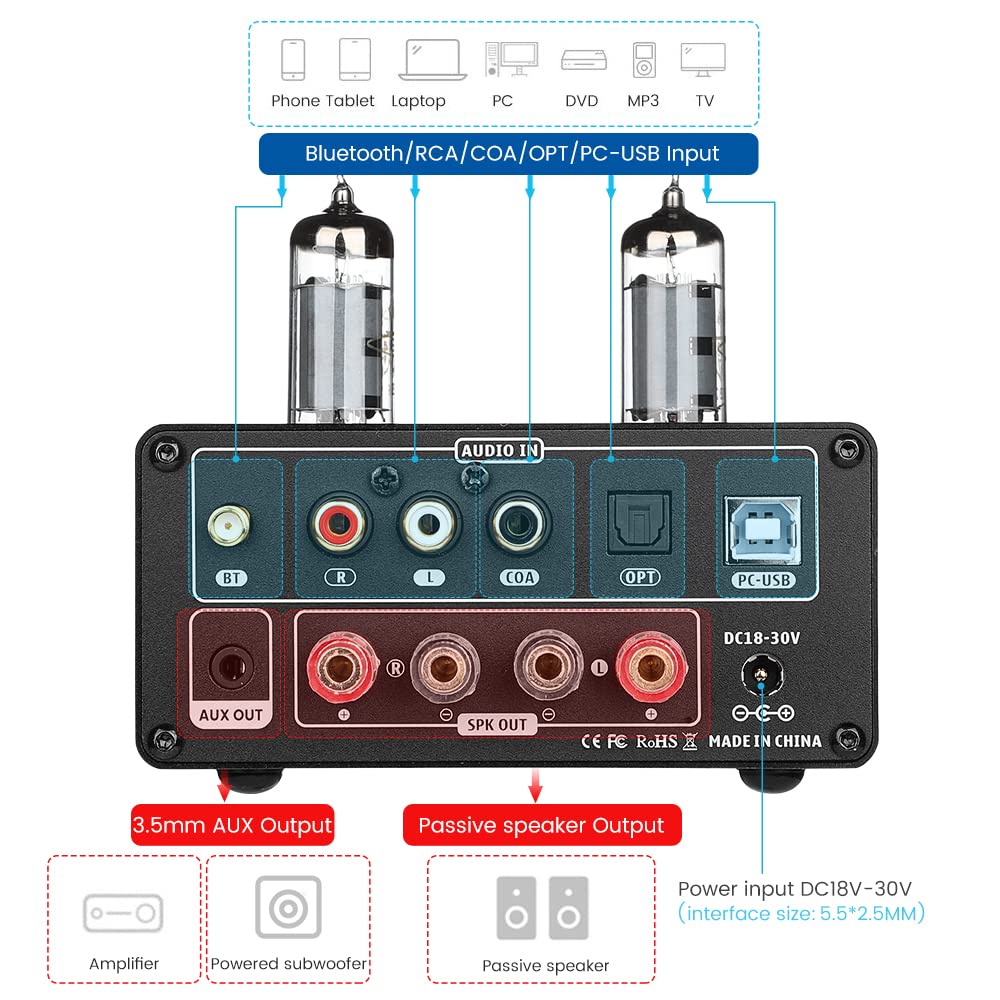
Afbeelding: Achterkant view of the AIYIMA TUBE T9 amplifier, highlighting the various input and output ports including Bluetooth, RCA, Coaxial, Optical, PC-USB, AUX Out, speaker terminals, and power input.
5. Instellen
5.1 Buisinstallatie
- Carefully unpack the two 6K4 vacuum tubes.
- Align the pins of each tube with the corresponding holes on the amplifier's tube sockets.
- Gently push the tubes straight down into the sockets until they are firmly seated. Do not force them.
5.2 Luidsprekers aansluiten
The TUBE T9 is designed for passive speakers with an impedance of 3-8Ω.
- Sluit uw passieve luidsprekers aan op de Speaker Output (SPK OUT) Aansluitingen op het achterpaneel. Zorg voor de juiste polariteit (+ op + en - op -).
- For a 2.1 channel system, connect an active subwoofer to the AUX Out (3.5mm) haven.
5.3 Audiobronnen aansluiten
Connect your desired audio sources to the corresponding input ports:
- Bluetooth: Screw the included Bluetooth antenna into the BT haven.
- PC-USB: Use the provided USB cable to connect your computer to the PC-USB haven.
- RCA: Connect analog audio devices (e.g., CD player, streamer) using RCA cables to the RCA (L/R) invoer.
- Coaxiaal/Optisch: Connect digital audio devices (e.g., TV, game console) using Coaxial or Optical cables to the respective inputs.
Belangrijke opmerking: Dit amplifier does not have a built-in phono preamplifier. Do not connect a vinyl record player directly to the RCA input without an external phono preamp, as this may result in very low volume or distorted sound.

Image: Diagrams illustrating various connection scenarios for the AIYIMA TUBE T9 amplifier, including connecting to passive speakers, an amplifier, and different audio sources like phones, tablets, laptops, PCs, DVDs, and TVs.

Image: A visual warning indicating that the AIYIMA TUBE T9 amplifier cannot be directly connected to a vinyl record player without an external phono preampverliezer.
5.4 Stroomaansluiting
- Zorg ervoor dat alle audioverbindingen goed vastzitten.
- Connect the DC24V power adapter to the DC18-30V input port on the rear panel.
- Sluit de stroomadapter aan op een stopcontact.
6. Gebruiksaanwijzing
6.1 In-/uitschakelen
Press and hold the main Volume/Input Knob on the front panel for approximately 1 second to power the amplifier on or off. The VU meter and tubes will illuminate upon power-on.
6.2 Ingangsselectie
Short press the main Volume/Input Knob to cycle through the available input sources: Bluetooth, PC-USB, RCA, Coaxial, Optical. The corresponding LED indicator on the front panel will light up.
6.3 Volumeregeling
Rotate the main Volume/Input Knob Met de klok mee draaien om het volume te vergroten en tegen de klok in draaien om het volume te verkleinen.
6.4 toonregeling
Gebruik de Bas En Drievoudige knobs on the front panel to adjust the low and high frequencies according to your preference. This allows for fine-tuning the sound profile.
6.5 Bluetooth-koppeling
- Select the Bluetooth input using the Volume/Input Knob. The Bluetooth indicator will flash.
- On your mobile device (phone, tablet, etc.), enable Bluetooth and search for available devices.
- Select "AIYIMA TUBE T9" from the list of devices to pair.
- Once paired, the Bluetooth indicator will stop flashing and remain solid. You can now play audio from your device.

Image: A smartphone connected via Bluetooth 5.0 to the AIYIMA TUBE T9 amplifier, demonstrating wireless audio streaming.
6.6 VU-meter
The integrated VU meter provides a visual representation of the audio output level. Its warm light and dynamic movement add a retro aesthetic to your listening experience. The meter is designed to respond to various volume levels.

Afbeelding: Een close-up view of the illuminated VU meter on the AIYIMA TUBE T9 amplifier, showing its needle indicating audio levels.
7. Onderhoud
7.1 Vervanging van de slang
The 6K4 vacuum tubes can be replaced to customize the sound or if they wear out. Compatible tube models include:
- 6J1
- 6J2
- GE5654
- 6J3
- 6J4
- 6J5
- 6Ж1п (6Zh1p)
- 6AK5
To replace tubes:
- Schakel de amplifier and disconnect it from the power outlet.
- Allow the tubes to cool completely (this may take several minutes).
- Gently pull the existing tubes straight up from their sockets.
- Insert the new compatible tubes, aligning the pins carefully, and push them straight down until seated firmly.
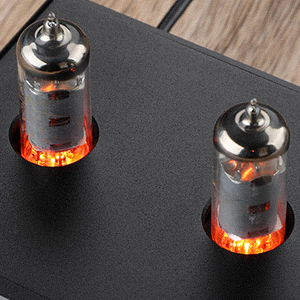
Afbeelding: Een close-up view of the two 6K4 vacuum tubes installed on the AIYIMA TUBE T9 amplifier, showing their glowing filaments during operation.
7.2 Reinigen
Veeg de ampReinig de buitenkant van de versterker met een zachte, droge doek. Gebruik geen schurende reinigingsmiddelen of oplosmiddelen.
7.3 Ventilatie
Zorg voor voldoende luchtstroom rondom de amplifier to prevent overheating. Do not place objects on top of the unit that could obstruct ventilation.
8. Probleemoplossing
| Probleem | Mogelijke oorzaak | Oplossing |
|---|---|---|
| Geen geluidsuitvoer |
|
|
| Vervormd geluid |
|
|
| Problemen met Bluetooth-verbinding |
|
|
| Clicking sound after silence | Automatic hibernation mode engaging | De amplifier may enter a hibernation state after a period of no audio signal, producing a soft click. This feature can be disabled using the remote control: press the M1 button on the remote to toggle the hibernation prompt on/off. |
| VU Meter not moving | Very low volume or specific audio characteristics | The VU meter is designed to respond to audio levels. Ensure the volume is sufficiently high for the meter to register movement. This issue has been addressed in updated models to work at various levels. |
9. Specificaties

Image: The AIYIMA TUBE T9 amplifier shown with its physical dimensions and a table summarizing its key specifications.
| Functie | Specificatie |
|---|---|
| Modelnummer | TUBE T9 |
| Merk | AIYIMA |
| Invoerinterfaces | Bluetooth 5.0, PC-USB, RCA, Coaxial, Optical |
| Uitvoerinterfaces | Passive Speaker Output, 3.5mm AUX Out (for active subwoofer/ampleraar) |
| Uitgangsvermogen | 100W x 2 (at 4Ω load) |
| Luidsprekerimpedantie | 3-8Ω |
| Frequentierespons | 20-20 kHz (±1dB) |
| Signaal-ruisverhouding (S/N) | ≥98dB |
| Werkvolumetage | DC18V-30V |
| Afmetingen (L x B x H) | 22 x 22 x 10 cm (ongeveer 8.66 x 8.66 x 3.94 inch) |
| Artikelgewicht | 1 kg (ongeveer 2.2 lbs) |
| Certificeringen | CE |
| Land van herkomst | China |
10. Garantie en ondersteuning
10.1 Garantie-informatie
According to the product specifications, there is no explicit warranty provided for this product. Please refer to your retailer's return policy for any issues within the initial purchase period.
10.2 Klantenservice
For technical assistance or inquiries, please contact the seller or AIYIMA customer support through their official channels. Keep your purchase receipt or order details handy for any support requests.