
1. Inleiding
The PETLIBRO Automatic Pet Feeder is designed to simplify pet feeding by providing automated and customizable meal schedules. With its smart features, you can manage your pet's diet remotely, ensuring they receive the right amount of food at the right time, promoting healthy eating habits and providing peace of mind.

This image displays the PETLIBRO Automatic Pet Feeder in white, showcasing its sleek design and the accompanying mobile application interface on a smartphone. The feeder has a food bowl filled with kibble.
2. Installatiehandleiding
2.1 Uitpakken en monteren
- Haal alle onderdelen voorzichtig uit de verpakking.
- Assemble the feeder by attaching the food tank to the base. Ensure it clicks securely into place.
- Plaats de roestvrijstalen kom in de daarvoor bestemde gleuf aan de voorkant van de voederautomaat.
2.2 Het apparaat van stroom voorzien
The feeder supports dual power modes for reliable operation:
- Stroomadapter: Connect the included power adapter to the feeder's power port and plug it into a wall outlet.
- Batterij backup: Voor ononderbroken stroomvoorziening tijdens stroomuitvaltages, insert 3 D batteries (not included) into the battery compartment at the bottom of the feeder. It is recommended to use both battery and adapter for optimal reliability.

This image demonstrates the dual power mode of the feeder, allowing it to be powered by either the included power adapter or 3 D batteries (not included) for uninterrupted feeding during power outagen.
2.3 Verbinding maken met wifi
Download the PETLIBRO app from your smartphone's app store (Android and iOS). Follow the in-app instructions to connect the feeder to your 2.4GHz Wi-Fi network. Note: Only supports 2.4GHz Wi-Fi networks.
3. Gebruiksaanwijzing
3.1 Customizing Feeding Schedules
Use the PETLIBRO app to set up a personalized feeding schedule for your pet. You can customize the number of meals per day (1-4 meals) and the portion size per meal (1-9 portions). The app also allows you to track feeding records for better management.

A cat is shown next to the PETLIBRO Automatic Pet Feeder, with text highlighting its ability to 'Feed Scientifically and Regularly'. Icons indicate features like 1-4 meals/day, 1-9 portions/meal, and 1 portion ≈ 18.8ml (6L).
3.2 Handmatig voeren
For additional feedings outside of the schedule, you can use the 'FEED' button on the feeder's LCD screen or the manual feeding option within the mobile app.
3.3 Gepersonaliseerde spraakopname
Record a personalized voice message (up to 10 seconds) that will play before each meal. This feature helps to call your pet to their food and makes mealtime more engaging.

A cat is shown near the feeder, with a speech bubble indicating the 'Personalized Voice Recording' feature, where your voice can be played before meals to call your pet.
4. Kenmerken
- 6L grote capaciteit: Reduces the frequency of kibble refills, ideal for busy pet owners or short trips.
- 8° Tilt Design: The proper angle of the food outlet prevents food accumulation and provides a comfortable feeding experience for pets, reducing neck strain.
- Deksel met veiligheidsslot: The lid features a secure locking mechanism to prevent pets from opening the feeder and accessing food, ensuring controlled portions and preventing overeating.
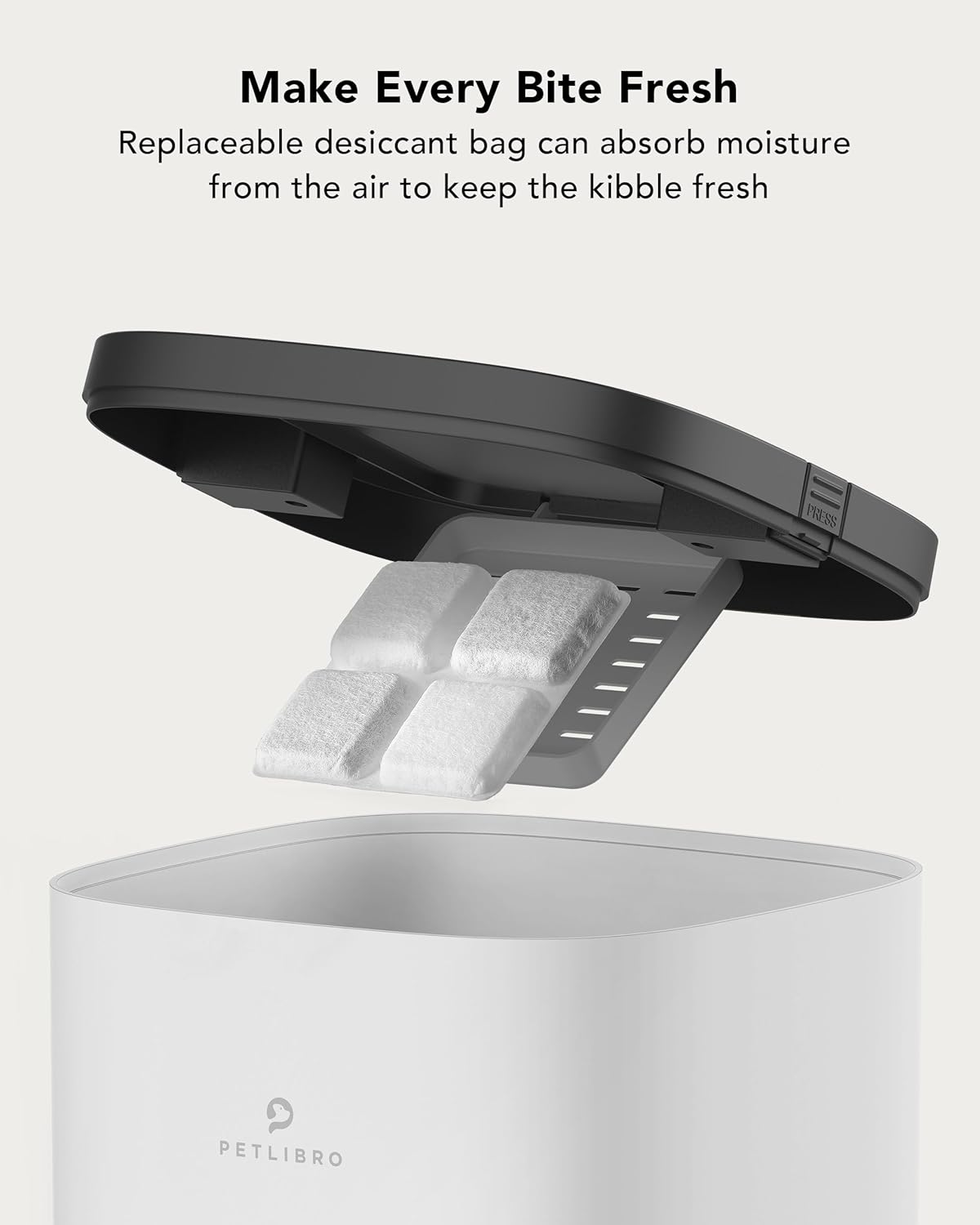
- Behoud van versheid: Includes a replaceable desiccant bag to absorb moisture and keep the kibble fresh and palatable.
- Detachable Stainless Steel Tray: The food-grade stainless steel tray is detachable for easy cleaning, promoting healthy and hygienic feeding and helping to prevent chin acne in pets.
A visual representation of the feeder's 6L capacity, indicating it can store approximately 4.4 lbs of kibble, sufficient for an adult cat for up to 24 days. Note: For dry kibble only.

This close-up shows a cat comfortably eating from the feeder's bowl, emphasizing the 8° tilt design which is beneficial for neck protection and prevents feline acne due to the 304 stainless steel material.

The image illustrates the feeder's secure locking lid design, intended to prevent pets from accessing extra food and overeating, thus helping to manage their weight.

This image highlights the replaceable desiccant bag feature located within the feeder's lid, designed to absorb moisture and keep the pet food fresh.
5. Onderhoud
5.1 De voederbak reinigen
Regular cleaning ensures optimal performance and hygiene. The food tank and tray are removable for cleaning. The base of the feeder is not washable.
- Ensure the food tank is empty before disassembly.
- Disassemble the food tank and tray from the base.
- Wash the food tank and stainless steel tray with mild soap and water. Rinse thoroughly.
- Wipe the base of the feeder with a damp Dompel de basis niet onder in water.
- Laat alle onderdelen volledig drogen voordat u ze weer in elkaar zet.
5.2 Vervanging van de droogmiddelzak
Replace the desiccant bag every half month to ensure continued food freshness. Additional desiccant bags can be purchased separately.
6. Probleemoplossing
If you encounter any issues with your PETLIBRO Automatic Pet Feeder, please refer to the following common troubleshooting tips:
- Voederbak geeft geen voer: Check if the food tank is empty or if kibble is jammed. Ensure the feeder is properly powered and connected to Wi-Fi.
- Problemen met app-connectiviteit: Verify your Wi-Fi network is 2.4GHz. Restart your router and the feeder. Ensure your phone is close to the feeder during setup.
- Food becoming stale: Ensure the desiccant bag is replaced regularly (every half month) and the lid is securely locked.
- Pet accessing food outside of schedule: Confirm the lid is properly locked and secured.
Voor meer gedetailleerde probleemoplossing of bij aanhoudende problemen kunt u de volledige gebruikershandleiding raadplegen of contact opnemen met de klantenservice.
7. Specificaties
| Attribuut | Waarde |
|---|---|
| Artikelgewicht | 4.73 pond (2.15 kilogram) |
| Fabrikant | PETLIBRO |
| ASIN | B097H1QDTY |
| Artikelmodelnummer | PLAF102 |
| Artikel Pakket Afmetingen L x B x H | 15.04 x 8.43 x 7.87 inch |
| Artikelafmetingen LxBxH | 8.46 x 7.64 x 14.96 inch |
| Datum eerste beschikbaarheid | 18 juni 2021 |
| Kleur | White Opaque |
| Maat | 6L with Wifi |
| Materiaal | Roestvrij staal, acrylonitril-butadieen-styreen |
| Doelgroep Trefwoord | house-cats, small-animal-pets, dogs |
| Leeftijdscategorie Beschrijving | Heel het leven Stages |
| Onderhoudsinstructies | Do not wash the base, Please use indoor, Use kibble with the diameter 2-10mm |
| Aantal artikelen | 1 |
| Stijl | Normaal |
| Ras aanbeveling | Large Animals, All American Shorthair, Maine Coon, Ragdoll, All British Shorthair, Persian, Scottish Fold, French bulldogs, corgi, Exotic, Sphynx, Persian,Sphynx, Small Animals |
| Meegeleverde componenten | Quick Guide, Stainless Steel Bowl, Automatic Pet Feeder, Charger, User Manual |
| Specifieke toepassingen voor het product | Suitable for Cats Dogs Small Animals, Help Pets on a Healthy Diet, Suitable for Pets, Feed Pets while Traveling, Pet Daily Feeding |
| Aanbevolen toepassingen voor het product | Replace Desiccant Bag Every Half Month, Keep dry before use, Dry Food, Kibble with diameter 2-10mm, Indoor |
| Speciale functie | Slide Food Outlet, App Control, Voice Recording, Double-Sided Lid, 6L Large Capacity |
8. Garantie en ondersteuning
De PETLIBRO automatische voerautomaat voor huisdieren wordt geleverd met een 24 maanden garantie Vanaf de aankoopdatum. Bewaar uw aankoopbewijs voor garantieclaims.
For further assistance, detailed instructions, or technical support, please refer to the official user manual: