
1. Inleiding
This manual provides detailed instructions for the setup, operation, and maintenance of your new Richmat Wireless Remote Control. This remote is designed to operate specific adjustable bed bases from Mlily, Bedtech, and Mattress Firm. Please read this manual thoroughly before use to ensure proper functionality.
Belangrijke compatibiliteitsopmerking:
- This remote is compatible only with Mlily, Bedtech, or Mattress Firm 3000 Richmat bases that originally featured a remote identical to the ones pictured (white or black versions).
- Minor button label variations may exist (e.g., M3 button as a flat button, flat button as under bed light, anti-snore as TV lounge on certain Classic Brands remotes). These are functional equivalents.
- This remote will NOT work if your original remote had a Bluetooth logo in the bottom right corner.
- This remote will NOT work if your original remote had a flashlight button on the top row or other button icons/words not listed here.
2. Veiligheidsinformatie
- Houd de afstandsbediening uit de buurt van water en overmatig vocht.
- Do not expose the remote to direct sunlight or extreme temperatures.
- Do not attempt to disassemble or repair the remote control yourself. Contact qualified service personnel.
- Houd batterijen buiten het bereik van kinderen. Bij inslikken onmiddellijk medische hulp inroepen.
- Gooi gebruikte batterijen weg volgens de plaatselijke voorschriften.
3. Inhoud van het pakket
Controleer bij het openen van uw pakket of u het volgende artikel heeft ontvangen:
- Richmat Wireless Remote Control (White or Black version)
4. Product voorbijview en bedieningselementen
The Richmat Wireless Remote Control provides a clear layout for operating your adjustable bed base. You may receive either a white or black version of the remote, both offering identical functionality.

Figure 1: White and Black Remote Control Versions. You will receive one of these two versions based on current inventory. Both versions function identically.
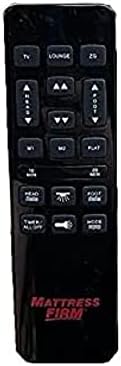
Figure 2: White Remote Control (Example with Mlily branding). This image displays the button layout and functions.

Figure 3: Black Remote Control (Example with Mattress Firm branding). This image displays the button layout and functions.
Knopfuncties:
- TV / LOUNGE / ZG (Zero Gravity): Preset positions for watching TV, lounging, or achieving a zero-gravity posture.
- Pijltjes omhoog/omlaag: Verstel het hoofdeinde van het bed omhoog of omlaag.
- Pijlen voor voet omhoog/omlaag: Verstel het voeteneinde van het bed omhoog of omlaag.
- M1 / M2: Memory preset buttons to save and recall your favorite bed positions.
- VLAK: Brengt het bed terug naar een volledig vlakke positie.
- 10 MIN / 20 MIN: Timer buttons for massage functions (if applicable to your base).
- HEAD / FOOT Massage: Activates or adjusts massage intensity for the head or foot sections.
- TIMER / ALLES UIT: Turns off all active functions, including massage and under-bed lighting.
- LIGHT (Under Bed Light): Toggles the under-bed lighting on or off.
- ROUTE: Cycles through different massage modes (if applicable).
Note: Button labels and specific functions may vary slightly depending on the adjustable base model. Refer to your adjustable base's manual for full details on its features.
5. Installatie- en koppelingsinstructies
To use your new Richmat Wireless Remote Control, it must first be paired with your adjustable bed base. The pairing process is typically straightforward.
5.1. Batterij installatie
- Zoek het batterijcompartiment aan de achterkant van de afstandsbediening.
- Schuif het batterijklepje open.
- Insert the required batteries (typically AAA, check markings inside the compartment) according to the polarity indicators (+ and -).
- Sluit het batterijklepje goed.
5.2. De afstandsbediening koppelen
The exact pairing procedure may vary slightly depending on your adjustable bed base model. Generally, the steps involve:
- Zorg voor stroom: Make sure your adjustable bed base is plugged into a working power outlet.
- Locate Pairing Button: Find the pairing button on the control box of your adjustable bed base. This box is usually located under the bed frame, near the head or foot end. It may be labeled "PAIR," "SYNC," or have a small button.
- Activate Pairing Mode on Base: Press and hold the pairing button on the control box for approximately 3-5 seconds until you hear a beep or see an indicator light flash. This indicates the base is in pairing mode.
- Activeer de koppelingsmodus op de afstandsbediening: While the base is in pairing mode (within 10-20 seconds), press and hold the "FLAT" button on your new remote control. Some remotes may require pressing and holding the "HEAD UP" and "FOOT DOWN" buttons simultaneously, or a dedicated "PAIR" button if present.
- Koppeling bevestigen: Release the button(s) on the remote when the indicator light on the control box stops flashing or you hear another beep, signifying successful pairing.
- Testfunctionaliteit: Test all remote functions (head/foot adjustment, flat, presets) to ensure proper operation.
If you encounter difficulties, refer to the original instruction manual for your specific adjustable bed base model for precise pairing instructions.
6. Gebruiksaanwijzing
Once paired, your Richmat Wireless Remote Control allows you to easily adjust your bed to your desired comfort position.
- Adjusting Head/Foot: Houd de HOOFD OMHOOG/OMLAAG or VOET OMHOOG/OMLAAG arrows to move the respective sections. Release the button when the desired position is reached.
- Vlakke positie: Druk op de VLAK knop om het bed weer volledig plat te leggen.
- Vooraf ingestelde posities: Pers TV, LOUNGE, of ZG (Zero Gravity) to move the bed to these pre-programmed comfort positions.
- Saving Memory Presets (M1/M2):
- Stel het bed in op de gewenste positie.
- Houd de M1 or M2 button for approximately 3 seconds until the bed slightly moves or the remote indicates the position is saved.
- To recall a saved position, simply press the M1 or M2 knop.
- Massage Functions (if applicable):
- Pers HEAD Massage or FOOT Massage to activate the massage for the respective section. Press again to cycle through intensity levels or modes.
- Gebruik de 10 MIN or 20 MIN buttons to set a timer for the massage function.
- Pers MODUS to change massage patterns.
- Under Bed Light: Druk op de LICHT button to turn the under-bed light on or off.
- Alles uit: Pers TIMER / ALL OFF to stop all active functions.
7. Onderhoud
7.1. Batterij vervangen
When the remote control's range decreases or buttons become unresponsive, it's time to replace the batteries.
- Schuif het klepje van het batterijvak aan de achterkant van de afstandsbediening open.
- Verwijder de oude batterijen.
- Insert new batteries (e.g., AAA) ensuring correct polarity (+ and -).
- Sluit het batterijklepje goed.
- Gooi oude batterijen op een verantwoorde manier weg, volgens de plaatselijke voorschriften.
7.2. Schoonmaken
Gebruik een zachte, droge doek om de afstandsbediening schoon te maken. Gebruik geen vloeibare reinigingsmiddelen, spuitbussen of schuurmiddelen, aangezien deze het oppervlak of de interne onderdelen van de afstandsbediening kunnen beschadigen.
8. Probleemoplossing
| Probleem | Mogelijke oorzaak | Oplossing |
|---|---|---|
| Afstandsbediening reageert niet. |
|
|
| Bed base only moves in one direction or partially. |
|
|
| Het bereik van de afstandsbediening is slecht. |
|
|
Als de stappen voor probleemoplossing het probleem niet verhelpen, raadpleeg dan de ondersteuningspagina voor verdere hulp.
9. Specificaties
- Modelnummer: 685650227221
- Fabrikant: Rijkmat
- Compatibele apparaten: Mlily, Bed Tech, or Mattress Firm 3000 Richmat adjustable bases (specific models HJH55, Classic Brands Innova NU203CB, and others featuring identical remote as pictured).
- Maximaal aantal ondersteunde apparaten: 1 (one remote per base)
- Kleuropties: White, Silver (Black)
- Speciale eigenschap: Ergonomisch ontwerp
10. Garantie-informatie
Specific warranty details for this Richmat Wireless Remote Control are not provided in the product information. Please refer to the documentation that came with your adjustable bed base or contact the original seller/manufacturer of the remote for warranty terms and conditions.
11. Klantenservice
If you require further assistance, have questions, or need to report an issue that cannot be resolved using the troubleshooting guide, please contact the seller or manufacturer of your adjustable bed base or the remote control.
For purchases made through Amazon, you may contact the seller, UTAH RUSTIC FURNITURE, via your Amazon order history for support.