
1. Inleiding
Bedankt voor uw aankoopasing the Technical Pro SPARK8GNEON Portable Bluetooth Speaker. This manual provides essential information for the safe and efficient operation of your device. Please read it thoroughly before use and retain it for future reference.
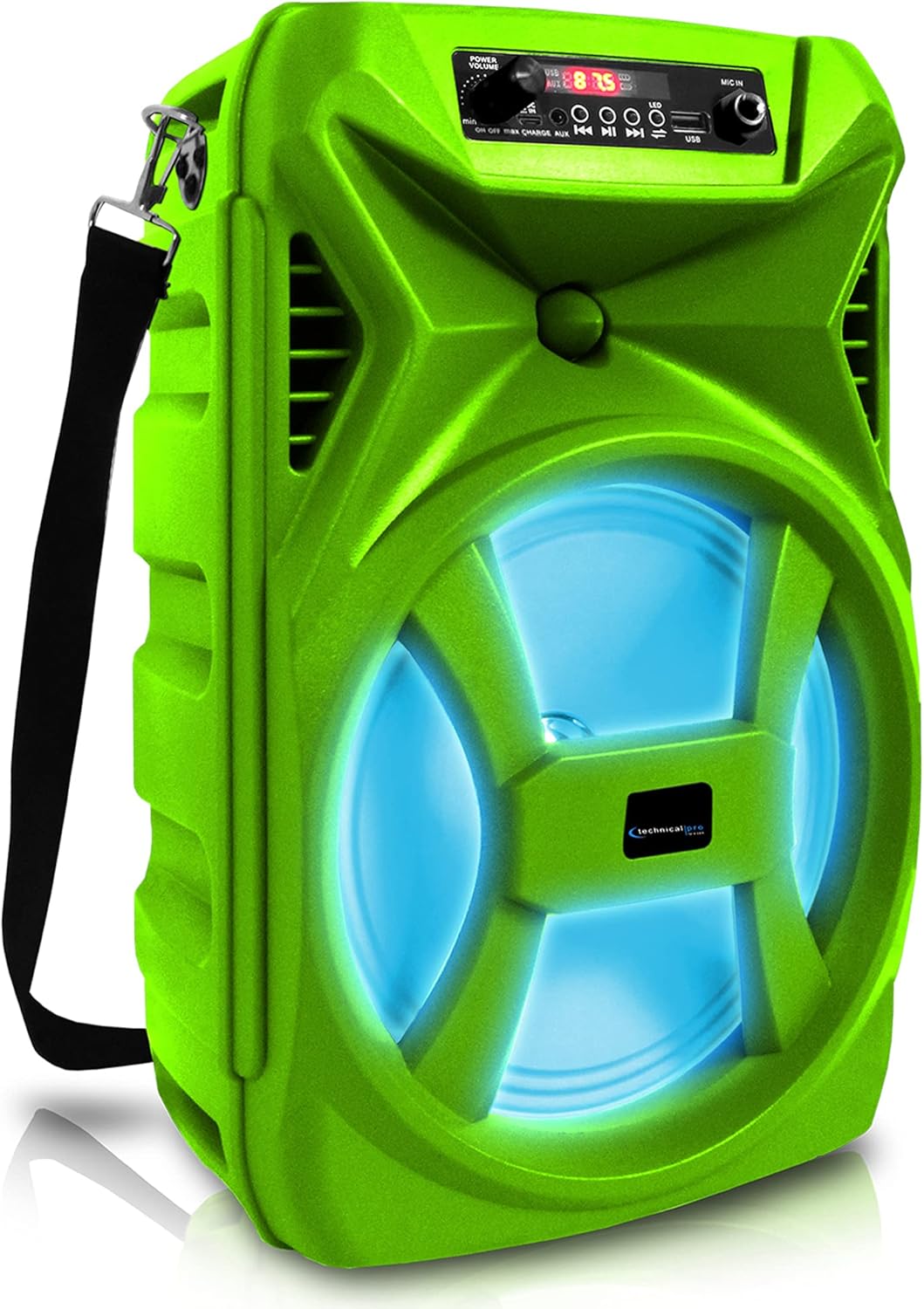
Voorkant view of the Technical Pro SPARK8GNEON portable Bluetooth speaker, showcasing its vibrant green casing, illuminated woofer, and the top-mounted control panel.
2. Veiligheidsinformatie
- Stel de luidspreker niet bloot aan extreme temperaturen, vochtigheid of direct zonlicht.
- Laat de luidspreker niet vallen en stel hem niet bloot aan harde stoten.
- Probeer de luidspreker niet te demonteren of te modificeren. Hierdoor vervalt de garantie.
- Houd de luidspreker uit de buurt van water en andere vloeistoffen.
- Gebruik uitsluitend de meegeleverde oplaadkabel of een gecertificeerd equivalent.
- Zorg voor voldoende ventilatie tijdens het gebruik van de luidspreker.
3. Inhoud van het pakket
Controleer of alle artikelen in het pakket aanwezig zijn:
- Technical Pro SPARK8GNEON Portable Bluetooth Speaker
- USB-oplaadkabel
- Schouderband
- Gebruikershandleiding (dit document)
4. Product voorbijview
Maak uzelf vertrouwd met de onderdelen en bedieningselementen van de luidspreker.

An infographic detailing the main features of the Technical Pro SPARK8GNEON speaker, such as its built-in rechargeable battery, True Wireless Stereo (TWS) capability, Bluetooth compatibility, USB and card inputs, durable ABS plastic construction, and support for A2DP & AVRCP stereo Bluetooth devices.
Bedieningspaneel (bovenkant) View)
- Aan/uit-knop: Houd de knop ingedrukt om de luidspreker AAN/UIT te schakelen.
- Modusknop: Short press to switch between Bluetooth, USB, TF Card, and AUX modes.
- Afspelen/Pauzeren-knop: Druk op om audio af te spelen of te pauzeren.
- Vorige/Volume omlaag-knop: Kort indrukken voor het vorige nummer, lang indrukken om het volume te verlagen.
- Volgende/Volume omhoog-knop: Kort indrukken voor het volgende nummer, lang indrukken om het volume te verhogen.
- LED-lichtknop: Druk om door de LED-lichtmodi te bladeren of ze uit te schakelen.
- USB-poort: Voor het afspelen van USB-sticks.
- TF-kaartsleuf: Voor weergave vanaf TF (MicroSD)-kaart.
- AUX-ingang: 3.5 mm-aansluiting voor externe audioapparaten.
- Oplaadpoort: Voor het aansluiten van de USB-oplaadkabel.
5. Instellen
5.1 Eerste keer opladen
- Laad de luidspreker vóór het eerste gebruik 8 tot 10 uur volledig op.
- Sluit de USB-oplaadkabel aan op de oplaadpoort van de luidspreker en het andere uiteinde op een USB-voedingsadapter (niet meegeleverd) of een USB-poort van een computer.
- Het oplaadindicatielampje brandt tijdens het opladen en gaat uit wanneer het apparaat volledig is opgeladen.
5.2 In-/uitschakelen
- To power ON, press and hold the Power Button until the display illuminates.
- To power OFF, press and hold the Power Button again until the display turns off.
6. Gebruiksaanwijzing
6.1 Bluetooth-koppeling
- Turn on the speaker. It will automatically enter Bluetooth pairing mode, indicated by a flashing Bluetooth icon on the display.
- Schakel Bluetooth in op uw mobiele apparaat (smartphone, tablet, enz.) en zoek naar beschikbare apparaten.
- Select "SPARK8GNEON" from the list of devices.
- Once paired, the speaker will emit a confirmation tone, and the Bluetooth icon will stop flashing.
- U kunt nu audio van uw apparaat via de luidspreker afspelen.
6.2 USB/TF-kaartweergave
- Plaats een USB-stick of TF-kaart (MicroSD) in de daarvoor bestemde poort.
- The speaker will automatically switch to USB or TF Card mode and begin playing audio files. If not, press the Mode Button to select the correct mode.
- Gebruik de knoppen Afspelen/Pauze, Vorige en Volgende om de weergave te bedienen.
6.3 AUX-ingang
- Sluit één uiteinde van een 3.5 mm audiokabel (niet meegeleverd) aan op de AUX-ingang van de luidspreker.
- Sluit het andere uiteinde aan op de audio-uitgang van uw externe apparaat (bijvoorbeeld een mp3-speler of laptop).
- Press the Mode Button to select AUX mode.
- Regel het afspelen en het volume vanaf uw externe apparaat.
6.4 True Wireless Stereo (TWS)-koppeling
The TWS function allows you to connect two SPARK8GNEON speakers wirelessly for a stereo sound experience.

Illustration demonstrating the True Wireless Stereo (TWS) feature, showing two Technical Pro SPARK8GNEON speakers wirelessly connected to a single smartphone for synchronized audio playback.
- Ensure both SPARK8GNEON speakers are powered on and in Bluetooth mode, but not yet paired with any device.
- On one of the speakers (this will be the primary speaker), press and hold the TWS button (if available, or a specific button designated for TWS pairing, otherwise assume it's initiated by a long press of the Mode button or a dedicated TWS button not explicitly listed but implied by feature).
- The speakers will attempt to connect to each other. A confirmation tone will sound once connected.
- Verbind nu uw mobiele apparaat via Bluetooth met de primaire luidspreker, zoals beschreven in paragraaf 6.1.
- Het geluid wordt nu in stereo via beide luidsprekers afgespeeld.
6.5 LED-verlichting
Press the LED Light Button on the control panel to cycle through various light modes or to turn the LED lights off.
7. Onderhoud
- Schoonmaak: Gebruik een zachte, droge doek om de buitenkant van de speaker schoon te maken. Gebruik geen schuurmiddelen of oplosmiddelen.
- Opslag: Bewaar de luidspreker, wanneer deze gedurende langere tijd niet wordt gebruikt, op een koele, droge plaats, uit de buurt van direct zonlicht.
- batterij zorg: Om de levensduur van de batterij te verlengen, laad de speaker volledig op voordat u hem voor langere tijd opbergt en laad hem elke 3-6 maanden opnieuw op.
8. Probleemoplossing
| Probleem | Mogelijke oorzaak | Oplossing |
|---|---|---|
| De luidspreker gaat niet aan. | Batterij is leeg. | Laad de luidspreker volledig op. |
| Geen geluid. | Het volume is te laag; er is een verkeerde modus geselecteerd; het apparaat is niet aangesloten. | Increase volume on speaker and connected device; press Mode button to select correct input; ensure Bluetooth/AUX connection is established. |
| Bluetooth-apparaat kan niet worden gekoppeld. | De luidspreker staat niet in de koppelingsmodus. Het apparaat is te ver weg. Er is interferentie. | Ensure speaker is in Bluetooth pairing mode (flashing icon); move device closer to speaker; turn off other Bluetooth devices nearby. |
| TWS-koppeling mislukt. | De luidsprekers staan te ver uit elkaar; één luidspreker is al gekoppeld aan een apparaat. | Ensure speakers are within close proximity; disconnect any Bluetooth devices from both speakers before initiating TWS pairing. |
9. Specificaties
- Model: SPARK8GNEON
- Vermogen: 500 Watt (piek)
- Luidsprekergrootte: 8 Inch Woofer & Tweeter
- Connectiviteit: Bluetooth, USB, TF Card, AUX (3.5mm)
- Bluetooth-versie: (Niet gespecificeerd, uitgaande van standaard)
- Batterij: 1 lithium-ionbatterij (meegeleverd)
- Levensduur batterij: (Not specified, varies with usage)
- Oplaadtijd: 8-10 hours (initial charge)
- Productafmetingen (L x B x H): 8.86 x 7.48 x 14.17 inch
- Artikelgewicht: 4 pond
- Impedantie: 3 Ohm
- UPC-nummer: 817802016296

Diagram illustrating the physical dimensions of the Technical Pro SPARK8GNEON speaker, measuring 14.17 inches in height, 8.86 inches in width, and 7.48 inches in depth.
10. Garantie en ondersteuning
For warranty information or technical support, please refer to the warranty card included with your product or visit the official Technical Pro website. You may also contact Technical Pro customer service directly for assistance.
Webwebsite: Technical Pro Store on Amazon