
1. Inleiding
Thank you for choosing the Orvibo Smart Door Lock C1. This smart lock is designed to provide enhanced security and convenience for your home or office. It integrates multiple unlocking methods, including fingerprint, password, RFID card, and traditional mechanical key, along with smart app control for remote management and monitoring. Please read this manual carefully before installation and operation to ensure proper use and optimal performance.
2. Veiligheidsinformatie
- Probeer het slot niet zelf te demonteren of te repareren. Schakel hiervoor een gekwalificeerde technicus in.
- Use only the specified battery type (4 x AA batteries). Do not mix old and new batteries or different types of batteries.
- Keep the mechanical keys in a safe place outside your home in case of emergency or battery depletion.
- Stel het slot niet bloot aan direct zonlicht, regen of extreme temperaturen.
- Ensure the door thickness is within the specified range (35mm ~ 120mm) for proper installation.
- Controleer regelmatig het batterijniveau en vervang de batterijen wanneer de waarschuwing voor een bijna lege batterij dit aangeeft.
3. Product voorbijview
The Orvibo Smart Door Lock C1 consists of an outer panel with a keypad, fingerprint sensor, and card reader, and an inner panel with the battery compartment and manual lock. The design is sleek and modern, suitable for various home aesthetics.

Figuur 3.1: Voor- en achterkant view of the Orvibo Smart Door Lock C1, showcasing het strakke zwarte ontwerp en de componenten.
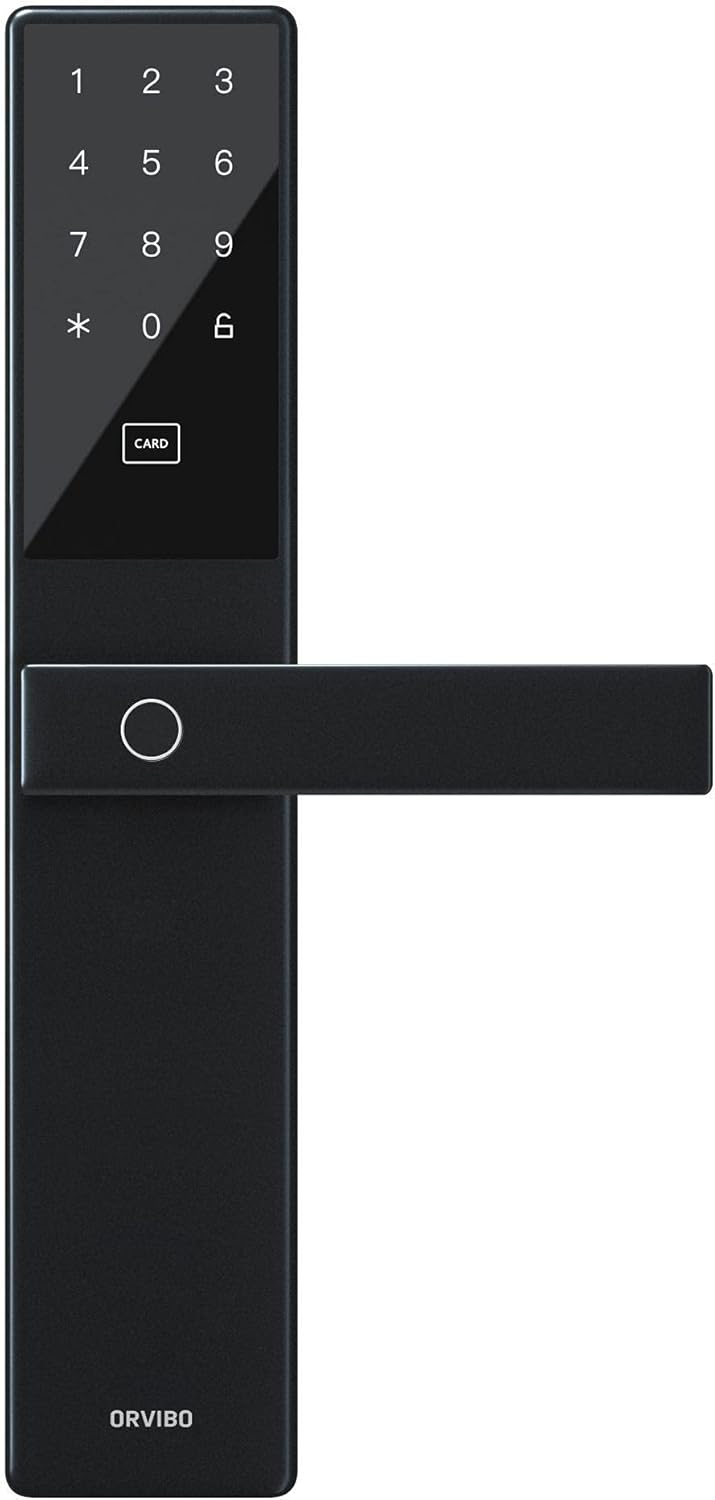
Figuur 3.2: Close-up view of the exterior panel, highlighting the numeric keypad, card reader area, and fingerprint sensor.
4. Installatie en installatie
Proper installation is crucial for the lock's functionality and security. It is recommended to have the lock installed by a professional if you are unsure about the process.
4.1 Controle vóór installatie
- Verify door thickness: 35mm to 120mm.
- Ensure the door frame is sturdy and aligned.
- Check package contents: Smart lock (front and back panels), mortise, strike plate, screws, keys, installation template, user manual.
4.2 Installatiestappen
- Bereid de deur voor: Use the provided template to mark and drill holes on the door.
- Installeer de insteekverbinding: Insert the mortise into the side of the door and secure it with screws.
- Install the Outer Panel: Pass the spindle and cables through the mortise. Align the outer panel and secure it.
- Install the Inner Panel: Connect the cables from the outer panel to the inner panel. Align the inner panel and secure it with screws.
- Sluitplaat installeren: Install the strike plate on the door frame, ensuring proper alignment with the mortise latch.
- Batterijen plaatsen: Open the battery cover on the inner panel and insert 4 AA batteries, observing polarity.
- Testfunctionaliteit: Test all unlocking methods (key, fingerprint, card, password) to ensure smooth operation.
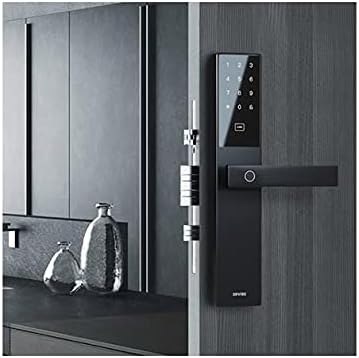
Figure 4.1: The Orvibo Smart Door Lock C1 installed on a wooden door, demonstrating its integrated appearance.
5. Gebruiksaanwijzing
The Orvibo Smart Door Lock C1 offers multiple convenient ways to unlock your door.
5.1 Ontgrendelingsmethoden
- Vingerafdruk: Plaats uw geregistreerde vinger op de vingerafdruksensor. Het slot wordt ontgrendeld als de vingerafdruk wordt herkend.
- Wachtwoord: Voer uw geregistreerde wachtwoord in op het toetsenbord, gevolgd door de '#' toets.
- RFID-kaart: Present your registered RFID card to the card reader area on the outer panel.
- Mechanische sleutel: Insert the backup mechanical key into the keyhole and turn to unlock.
- Temporary/One-Time Password: Generate a temporary or one-time password via the smartphone app and provide it to guests.
5.2 De deur op slot doen
The lock will automatically engage after the door is closed. You can also manually lock it from the inside using the thumb-turn or by pressing the lock button on the outer panel (if available).
6. App Integration and Smart Features
The Orvibo Smart Door Lock C1 connects to your smartphone via Wi-Fi, offering advanced control and monitoring features.
6.1 Verbinding maken met de app
- Download the Orvibo Smart Home App from your device's app store.
- Maak een account aan of log in.
- Follow the in-app instructions to add the Smart Door Lock C1 to your device list. This typically involves putting the lock in pairing mode and connecting it to your home Wi-Fi network.
6.2 App-functies
- Ontgrendeling op afstand: Unlock your door from anywhere using the app.
- Gebruikersbeheer: Add, modify, or delete fingerprints, passwords, and RFID cards for up to 25 users.
- Tijdelijke wachtwoorden: Genereer tijdelijke of eenmalige wachtwoorden voor bezoekers.
- Logboeken ontgrendelen: View a history of all lock and unlock events, including the method used and timestamp.
- Pushmeldingen: Receive real-time alerts on your phone for various events, such as low battery or unauthorized access attempts.
- Batterijstatus: Monitor the current battery level of the lock.
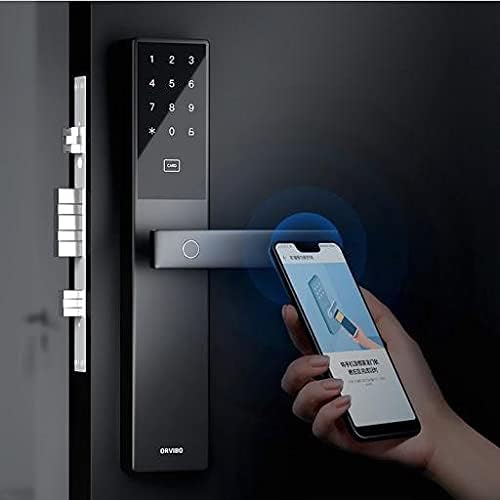
Figure 6.1: A user interacting with the Orvibo Smart Door Lock C1 and its corresponding smartphone application, demonstrating remote control capabilities.
7. Onderhoud
Regelmatig onderhoud zorgt voor een lange levensduur en optimale prestaties van uw slimme slot.
- Schoonmaak: Veeg het slotoppervlak af met een zachte, droge doek. Gebruik geen schurende reinigingsmiddelen of oplosmiddelen.
- Batterij vervangen: When the low battery indicator appears (or approximately every 400 days), replace all four AA batteries simultaneously. Ensure correct polarity.
- Mechanische controle: Periodically check that the door closes smoothly and the latch operates without obstruction.
8. Probleemoplossing
If you encounter issues with your Orvibo Smart Door Lock C1, refer to the following common problems and solutions:
| Probleem | Mogelijke oorzaak | Oplossing |
|---|---|---|
| Slot reageert niet | Lege batterijen | Vervang alle 4 AA-batterijen. |
| Vingerafdruk niet herkend | Finger wet/dirty, improper placement, unregistered fingerprint | Clean finger, ensure proper placement, register fingerprint if new. |
| Wachtwoord werkt niet | Incorrect password, unregistered password | Verify password, ensure it's registered. |
| Problemen met app-verbinding | Weak Wi-Fi signal, incorrect pairing | Check Wi-Fi signal, re-pair the lock with the app. |
| Het slot maakt ongewone geluiden. | Mechanical obstruction, loose parts | Check for obstructions, tighten screws. If issue persists, contact support. |
9. Specificaties
| Functie | Detail |
|---|---|
| Model | C1 Smart Way Wi-Fi |
| Gebruikerscapaciteit | Maximaal 25 gebruikers |
| Stroomvoorziening | 4 x AA-batterijen |
| Bedrijfsvolumetage | DC 3V |
| Bedrijfsstroom | <150mA (gemiddeld) |
| Levensduur van de batterij | Ong. 400 dagen |
| Draadloze connectiviteit | Wi-Fi |
| Paneelmateriaal | Aluminum Alloy, Zinc Alloy, Stainless Steel, ABS Plastic |
| Geschikte deurdikte | 35 mm tot 120 mm |
| Status Detection | Netwerkstatus, Batterijstatus |
| Ontgrendelingsmethoden | Fingerprint, Card, Password, Temporary/One-time Password, Mechanical Key |
10. Garantie en ondersteuning
Orvibo provides a standard warranty for this product. For detailed warranty terms and conditions, please refer to the warranty card included with your purchase or visit the official Orvibo website. If you require technical assistance, troubleshooting, or have any questions regarding your Smart Door Lock C1, please contact Orvibo customer support through their official channels. Please have your product model and purchase information ready when contacting support.