
1. Inleiding
Bedankt voor uw aankoopasing the Blackstar ID:Core Stereo 10 Sugar Skull V2 Limited Edition amplifier. This 10-watt (2x5W) stereo combo amplifier is designed to provide a versatile and high-quality sound experience for electric guitarists. It features Blackstar's patented ISF (Infinite Shape Feature) control, a range of voices, and built-in effects, making it ideal for practice, recording, and small performances. This manual provides essential information for safe and effective use of your ampverliezer.
2. Belangrijke veiligheidsinstructies
- Lees de instructies: Lees alle veiligheids- en bedieningsinstructies voordat u dit product gebruikt.
- Instructies bewaren: Bewaar deze instructies voor toekomstig gebruik.
- Let op waarschuwingen: Volg alle waarschuwingen op het product en in de gebruiksaanwijzing.
- Water en vocht: Gebruik dit apparaat niet in de buurt van water.
- Schoonmaak: Alleen schoonmaken met een droge doek.
- Ventilatie: Blokkeer geen ventilatieopeningen. Installeer volgens de instructies van de fabrikant.
- Warmte: Installeer het apparaat niet in de buurt van warmtebronnen zoals radiatoren, warmteroosters, kachels of andere apparaten (inclusief ampwarmtebronnen) die warmte produceren.
- Bescherming netsnoer: Zorg ervoor dat er niet op het netsnoer kan worden gelopen en dat het niet kan worden afgekneld, vooral bij stekkers, stopcontacten en het punt waar het snoer uit het apparaat komt.
- Ontkoppel tijdens stormen: Haal de stekker van dit apparaat uit het stopcontact tijdens onweer of wanneer u het apparaat gedurende langere tijd niet gebruikt.
- Onderhoud: Laat alle servicewerkzaamheden over aan gekwalificeerd servicepersoneel. Service is vereist wanneer het apparaat op enigerlei wijze is beschadigd, zoals wanneer het netsnoer of de stekker is beschadigd, er vloeistof is gemorst of er voorwerpen in het apparaat zijn gevallen, het apparaat is blootgesteld aan regen of vocht, niet normaal werkt of is gevallen.
3. Inhoud van het pakket
Vink het vakje aan voor de volgende items:
- Blackstar ID:Core Stereo 10 Sugar Skull V2 Limited Edition Ampverliezer
- Voedingseenheid
- USB-kabel
- Gebruikershandleiding (dit document)
4. Bedieningselementen en functies
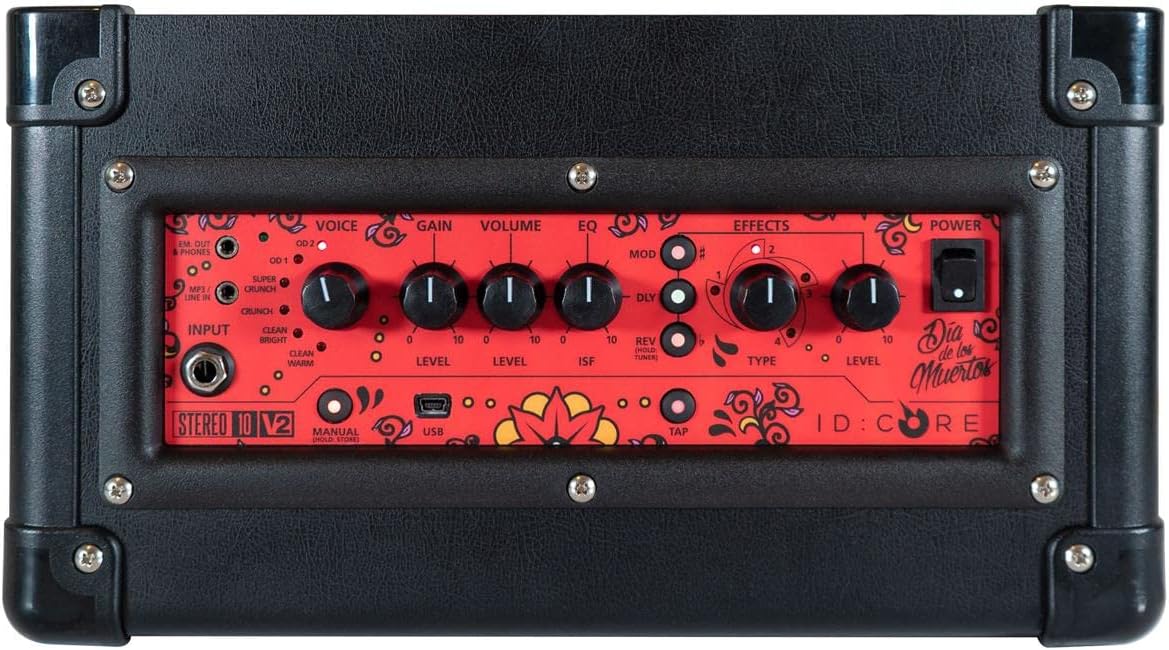
Afbeelding: Boven view van de amplifier's control panel, showing all knobs, buttons, and input/output jacks.
Bedieningselementen op het voorpaneel:
- Invoer: 6.35mm (1/4") jack for connecting your guitar.
- Stem: Rotary switch to select one of six Blackstar voices: Clean Warm, Clean Bright, Crunch, Super Crunch, OD 1, OD 2.
- Verdienen: Regelt de mate van overdrive of vervorming.
- Volume: Past het algehele uitvoerniveau van de aan ampverliezer.
- EQ: Toonregeling.
- ISF (Infinite Shape Feature): Patented control that shifts the tone stack response between a USA-style (counter-clockwise) and a UK-style (clockwise) ampverliezer.
- Mod (modulatie): Rotary switch to select and adjust the level of modulation effects (Chorus, Flanger, Phaser, Tremolo).
- Dly (Delay): Rotary switch to select and adjust the level of delay effects (Linear, Analogue, Tape, Multi).
- Rev (Reverb): Rotary switch to select and adjust the level of reverb effects (Room, Hall, Spring, Plate).
- Type: Selects the specific effect type within the Mod, Dly, or Rev categories.
- Niveau: Hiermee wordt het algehele niveau van het geselecteerde effect aangepast.
- Kraan: Button to set the tempo for time-based effects (Delay, Tremolo).
- Stroom: Aan/uit-schakelaar voor de ampverliezer.
- USB-poort: USB-B port for connecting to a computer for recording and using Blackstar's Architect software.
- Em. Out / Phones: 6.35mm (1/4") jack for headphones or direct recording output with speaker emulation.
- MP3 / Line In: 3.5mm (1/8") stereo jack for connecting external audio devices like MP3 players or phones.

Afbeelding: Voorzijde view of the Blackstar ID:Core Stereo 10 amplifier, showcasing the unique Sugar Skull V2 design on the speaker grille.
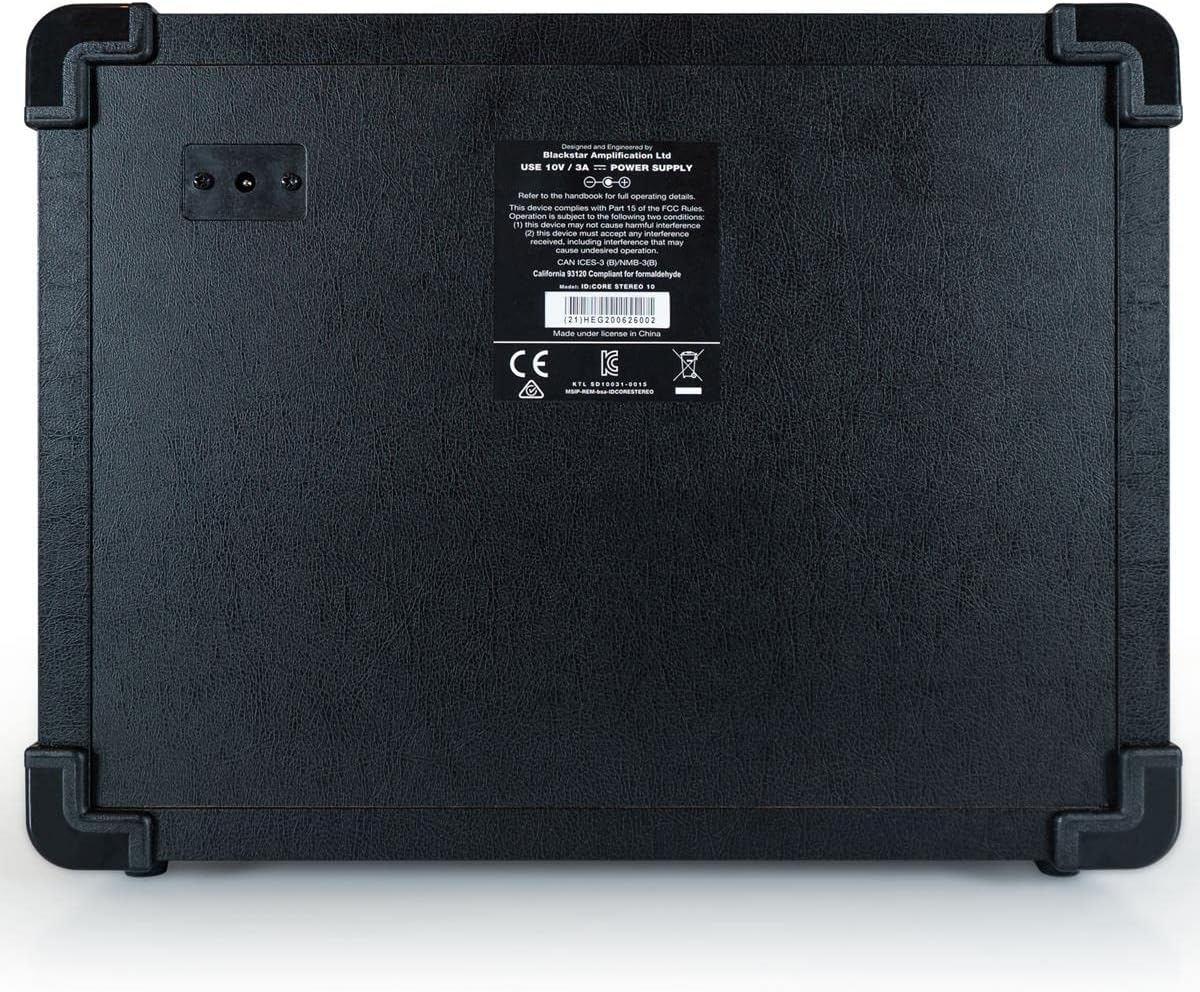
Afbeelding: Achterkant view of the Blackstar ID:Core Stereo 10 amplifier, displaying the product information label and power input.
5. Instellen
- Uitpakken: Verwijder voorzichtig het ampVersterker en alle accessoires uit de verpakking. Bewaar de verpakking voor toekomstig transport of opslag.
- Plaatsing: Plaats de amplifier on a stable, flat surface. Ensure adequate ventilation around the unit. Avoid placing it near heat sources or in direct sunlight.
- Stroomaansluiting: Connect the supplied power supply unit to the DC input jack on the rear of the amplifier. Plug the power supply into a suitable mains outlet. Ensure the ampDe aan/uit-schakelaar van de versterker moet in de UIT-stand staan voordat u de versterker aansluit.
- Gitaarverbinding: Sluit je elektrische gitaar aan op de Invoer jack on the front panel using a standard 6.35mm (1/4") instrument cable.
- Externe audio (optioneel): To play along with music, connect an MP3 player, phone, or other audio source to the MP3 / lijningang jack met behulp van een 3.5 mm stereokabel.
- USB-verbinding (optioneel): For recording or using the Blackstar Architect software, connect the amplifier to your computer using the supplied USB cable.
6. Gebruiksaanwijzing
- Inschakelen: Ensure all connections are secure, then switch the Stroom button to the ON position. The power indicator light will illuminate.
- Volume instellen: Begin met de Volume knob at a low setting to avoid sudden loud sounds.
- Selecteer stem: Draai de Stem switch to choose your desired amplifier type (e.g., Clean Warm, Crunch, OD 1).
- Aanwinst aanpassen: Gebruik de Verdienen knob to control the amount of drive. Lower settings provide cleaner tones, while higher settings introduce more distortion.
- Shape Tone with EQ and ISF: Pas de EQ knob for general tone shaping. Experiment with the ISF control to blend between American (tight low-end, aggressive mids) and British (woodier, less aggressive) ampversterkereigenschappen.
- Effecten toepassen:
- Select a modulation, delay, or reverb effect using the Mod, Dly, of Rev rotary switches.
- Gebruik de Type knob to select a specific effect within that category (e.g., Chorus, Flanger for Mod).
- Adjust the effect's intensity with the Niveau knop.
- For time-based effects (Delay, Tremolo), press the Kraan button repeatedly at your desired tempo to synchronize the effect.
- Headphone/Recording Output: Sluit een koptelefoon aan op de Em. Out / Phones jack for silent practice. This output also provides a speaker-emulated signal for direct recording.
- USB-audio: When connected to a computer via USB, the amplifier acts as an audio interface, allowing you to record your guitar directly into a DAW or use the Blackstar Architect software for deeper editing and patch management.
- Uitschakelen: Als je klaar bent, draai je de Volume down, then switch the Stroom knop naar de UIT-positie.
7. Onderhoud
- Schoonmaak: Maak de ampReinig de buitenkant van de versterker met een zachte, droge doek. Gebruik geen schurende reinigingsmiddelen, oplosmiddelen of was.
- Opslag: Wanneer u het apparaat gedurende langere tijd niet gebruikt, berg het dan op ampBewaar de versterker op een droge, koele plaats, uit de buurt van direct zonlicht en extreme temperaturen.
- Ventilatie: Ensure that the ventilation openings are always clear to prevent overheating.
- Kabelonderhoud: Always handle power and instrument cables carefully. Avoid bending or kinking them sharply.
8. Probleemoplossing
| Probleem | Mogelijke oorzaak | Oplossing |
|---|---|---|
| Geen geluid van ampverliezer |
|
|
| Poor sound quality / Buzzing noise |
|
|
| Effecten werken niet |
|
|
9. Specificaties
- Model: IDCORE10 V3
- Uitgang Wattage: 10 Watts (2 x 5W Stereo)
- Sprekers: 2 x 3" Blackstar Speakers
- Stemmen: 6 (Clean Warm, Clean Bright, Crunch, Super Crunch, OD 1, OD 2)
- Effecten: Modulation (Chorus, Flanger, Phaser, Tremolo), Delay (Linear, Analogue, Tape, Multi), Reverb (Room, Hall, Spring, Plate)
- Bediening: Voice, Gain, Volume, EQ, ISF, Mod, Dly, Rev, Type, Level, Tap, Power
- Ingangen: Guitar Input (6.35mm jack), MP3/Line In (3.5mm stereo jack), USB-B
- Uitgangen: Emulated Out/Headphones (6.35mm jack)
- Energiebron: Elektrische kabel
- Compatibele apparaten: Elektrische gitaar
- Artikelgewicht: 10 pond (4.54 kg)
- Productafmetingen: 16 x 18 x 14 cm (40.6 x 45.7 x 35.6 inch)
- ASIN: B08Z88WN8T
10. Garantie en ondersteuning
Zwarte ster Amplification products are designed and manufactured to the highest standards. For detailed warranty information specific to your region and product, please refer to the warranty card included with your purchase or visit the official Blackstar Amplificatie website. For technical support or service inquiries, please contact your authorized Blackstar dealer or Blackstar customer support directly.
Online bronnen:
- Zwarte ster Amplification Official Webwebsite: www.blackstaramps.com
- Blackstar Architect Software: www.blackstaramps.com/architect