
1. Inleiding
This manual provides comprehensive instructions for the Technical Pro Dual 21 Band Professional Stereo Equalizer, model EQ7153. This device is engineered to offer precise control over audio frequencies, allowing for detailed sound shaping and enhancement in various audio environments. Please read this manual thoroughly before operating the unit to ensure proper usage and to maximize its performance.
2. Belangrijke veiligheidsinstructies
- Energiebron: Sluit het apparaat alleen aan op het aangegeven stroomnet.tage as indicated on the rear panel. Ensure the power switch is set to the correct voltage (110V or 220V) for your region before connecting to power.
- Ventilatie: Ensure adequate ventilation around the unit. Do not block ventilation openings. Avoid placing the unit on carpets or in enclosed spaces that restrict airflow.
- Vocht: Stel het apparaat niet bloot aan regen, vocht, druppels of spetters. Plaats geen met vloeistof gevulde voorwerpen, zoals vazen, op het apparaat.
- Warmte: Houd het apparaat uit de buurt van warmtebronnen zoals radiatoren, warmteroosters, kachels of andere apparaten (inclusief ampwarmtebronnen) die warmte produceren.
- Schoonmaak: Disconnect the power cord from the outlet before cleaning. Use only a dry cloth for cleaning.
- Onderhoud: Probeer dit product niet zelf te repareren. Laat alle onderhoudswerkzaamheden uitvoeren door gekwalificeerd onderhoudspersoneel. Onderhoud is vereist wanneer het apparaat op enigerlei wijze beschadigd is, bijvoorbeeld wanneer het netsnoer of de stekker beschadigd is, er vloeistof in het apparaat is gemorst of er voorwerpen in zijn gevallen, het apparaat is blootgesteld aan regen of vocht, niet normaal functioneert of is gevallen.
- Object en vloeistofinvoer: Duw nooit voorwerpen van welke aard dan ook door de openingen in dit product, omdat ze gevaarlijke stoffen kunnen raken.tagDe contactpunten of onderdelen kunnen kortsluiting veroorzaken, wat brand of een elektrische schok tot gevolg kan hebben.
3. Inhoud van het pakket
Controleer bij het uitpakken of de volgende artikelen aanwezig zijn:
- Technical Pro EQ7153 Dual 21 Band Professional Stereo Equalizer
- Stroomkabel
- Removable Rack-Mount Brackets
- Gebruiksaanwijzing (dit document)
4. Product voorbijview
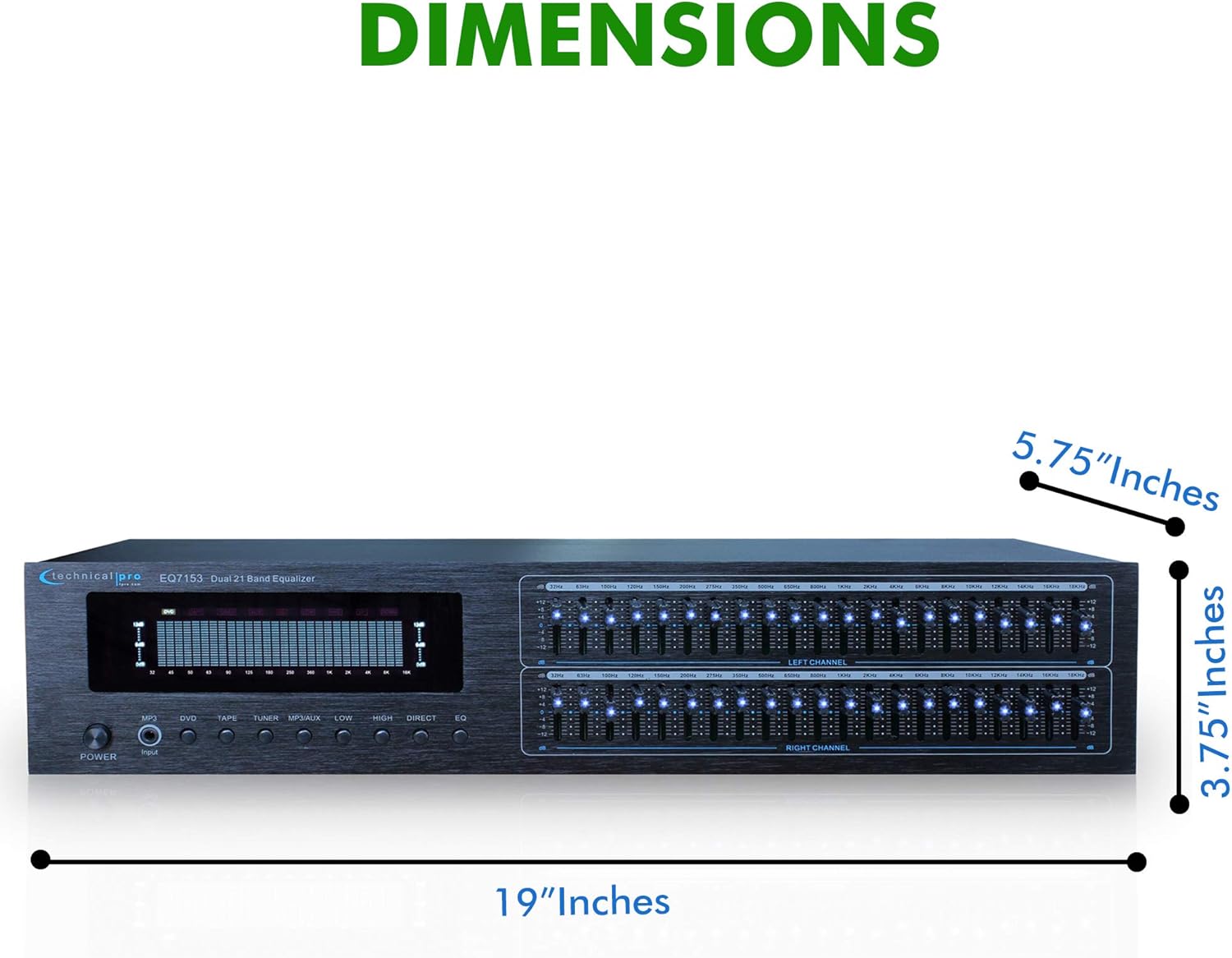
The EQ7153 is a dual 21-band graphic equalizer designed for precise audio frequency adjustment. It features individual LED indicators for each frequency band, a fluorescent spectrum display, and multiple input/output options.
4.1 Voorpaneel

- Aan/uit-knop: Hiermee schakelt u het apparaat in of uit.
- Ingangsselectoren: Buttons for MP3, DVD, TAPE, TUNER, MP3/AUX, LOW, HIGH, DIRECT, EQ to select the desired audio source or processing mode.
- Dual 21-Band Equalizer Sliders: Individual sliders for Left and Right channels, each with 21 frequency bands for precise audio adjustment. Each slider has an individual LED indicator.
- Fluorescent Spectrum Display: Visual representation of the audio frequency spectrum.
- Basversterker: Increases low-frequency levels.
- Loudness Booster: Increases both low and high-frequency levels.
- Direct / Equalizer Function: Allows for an unfiltered pass-through of the audio signal or engages the equalizer processing.
4.2 Achterpaneel
- RCA-audio-ingangen: Connect up to four audio sources (DVD, TAPE, TUNER, AUX) using RCA cables. An additional 1/8'' MP3 input is available on the front panel.
- RCA Audio Outputs: Maak verbinding met uw amplifier or recording device via the RECORD and MAIN RCA outputs.
- Stroomverbruik: Standard AC power connection with a voltage keuzeschakelaar (110V/220V).
4.3 Belangrijkste kenmerken

- Dual 21-Band Equalization: Offers precise control over 21 frequency bands per channel.
- Equalization Points: 32Hz, 63Hz, 100Hz, 120Hz, 150Hz, 200Hz, 275Hz, 350Hz, 500Hz, 1KHz, 1.5KHz, 2KHz, 2.5KHz, 3KHz, 4KHz, 5KHz, 6KHz, 8KHz, 10KHz, 12KHz, 14KHz.
- Aanpassingsbereik: ±12dB for each frequency band.
- Frequentiebereik: Frequentiebereik: 20 Hz - 20 kHz.
- Fluorescent Spectrum Display: Provides real-time visual feedback of audio levels across frequencies.
- Bass Booster & Loudness Booster: Dedicated functions to enhance low and high frequencies.
- Meerdere ingangen: RCA (4 audio sources) and 1/8'' MP3 input.
- RCA-uitgangen: For main audio and recording.
- Removable Rack-Mount Brackets: For easy integration into a standard audio rack.
5. Installatie-instructies
5.1 Uitpakken en plaatsen
- Carefully remove the EQ7153 from its packaging.
- Place the unit on a stable, flat surface or install it into a standard 19-inch audio rack using the provided brackets.
- Ensure there is adequate space around the unit for proper ventilation to prevent overheating.
5.2 Audioverbindingen
The EQ7153 typically connects between your audio source(s) and your ampzender/ontvanger.
- Audiobronnen aansluiten: Use RCA cables to connect your audio sources (e.g., DVD player, tape deck, tuner, auxiliary device) to the corresponding RCA INPUT jacks on the rear panel (DVD, TAPE, TUNER, AUX). For MP3 players or other portable devices, use a 1/8'' stereo cable to the front panel MP3 input.
- Verbinden met Ampversterker/ontvanger: Use RCA cables to connect the MAIN OUTPUT jacks on the rear panel of the EQ7153 to an available input on your amplifier or receiver (e.g., AUX IN, CD IN).
- Connect to Recording Device (Optional): If you wish to record the processed audio, connect the REC OUTPUT jacks on the EQ7153 to the input of your recording device.
5.3 Stroomaansluiting
- Before connecting the power cable, verify that the 110V/220V voltage selector switch on the rear panel is set to match your local power supply.
- Connect the provided power cable to the AC IN socket on the rear panel of the EQ7153.
- Steek het andere uiteinde van de voedingskabel in een geschikt stopcontact.
6. Gebruiksaanwijzing
6.1 In-/uitschakelen
Druk op de STROOM button on the front panel to turn the unit on or off. The fluorescent spectrum display and individual LED indicators will illuminate when the unit is powered on.
6.2 Ingangsselectie
Press the corresponding input button on the front panel (MP3, DVD, TAPE, TUNER, MP3/AUX) to select the audio source you wish to process. Ensure only one input is selected at a time.
6.3 Equalizer-aanpassing
- Engage Equalizer: Druk op de EQ button to activate the equalizer function. If you prefer an unprocessed signal, press the DIRECT knop.
- Adjust Frequency Bands: Use the individual sliders for the Left and Right channels to boost or cut specific frequency bands. Moving a slider up boosts the frequency, while moving it down cuts the frequency. The range of adjustment is ±12dB.
- Monitorweergave: Observe the fluorescent spectrum display to visually monitor the frequency distribution of your audio signal as you make adjustments.
6.4 Using Boost Functions
- Basversterker: Druk op de LAAG button to engage the Bass Booster, which will increase the overall low-frequency levels in your audio.
- Loudness Booster: Druk op de HOOG button to engage the Loudness Booster, which will simultaneously increase both low and high-frequency levels, providing a fuller sound at lower volumes.
7. Onderhoud
7.1 Reinigen
To maintain the appearance and longevity of your EQ7153:
- Koppel altijd de stroomkabel los voordat u gaat schoonmaken.
- Veeg de buitenkant af met een zachte, droge doek.
- Do not use liquid cleaners, aerosol cleaners, or strong chemicals, as they may damage the finish or internal components.
- For dust accumulation around sliders or buttons, use a soft brush or compressed air, being careful not to force dust into the unit.
7.2 Algemeen onderhoud
- Plaats geen zware voorwerpen op het apparaat.
- Protect the unit from extreme temperatures and direct sunlight.
- Ensure all cable connections are secure and free from strain.
8. Probleemoplossing
If you encounter issues with your EQ7153, refer to the following common problems and solutions:
| Probleem | Mogelijke oorzaak | Oplossing |
|---|---|---|
| Het apparaat wordt niet ingeschakeld. | Power cable not connected; Power outlet faulty; Voltage-selector onjuist. | Ensure power cable is securely connected. Test power outlet with another device. Verify 110V/220V switch matches local voltage. |
| Geen geluid. | Incorrect input selected; Cables not connected properly; AmpVersterkeringang niet geselecteerd. | Select the correct input source on the EQ7153. Check all RCA cable connections. Ensure your amplifier is set to the correct input connected to the EQ7153. |
| Vervormde of slechte geluidskwaliteit. | Input signal too high; Equalizer settings extreme; Faulty cables. | Reduce the input level from your source device. Adjust equalizer sliders to a more neutral position. Replace audio cables if suspected faulty. |
| LED indicators are too bright. | This is a characteristic of the product design. | While there is no built-in brightness adjustment, some users have applied light-dimming films or paint to the LEDs for personal preference. This is not officially supported and may void warranty. |
9. Specificaties

- Model: TPEQA7153
- Egalisatiebanden: Dual 21-band per channel
- Equalization Points: 32Hz, 63Hz, 100Hz, 120Hz, 150Hz, 200Hz, 275Hz, 350Hz, 500Hz, 1KHz, 1.5KHz, 2KHz, 2.5KHz, 3KHz, 4KHz, 5KHz, 6KHz, 8KHz, 10KHz, 12KHz, 14KHz
- Aanpassingsbereik: ±12dB
- Frequentiebereik: 20Hz-20kHz
- Ingangen: RCA (4 audio sources), 1/8'' MP3
- Uitgangen: RCA (Record, Main)
- Productafmetingen (B x D x H): 19 x 5.75 x 3.75 inch
- Artikelgewicht: 4 pond
- Fabrikant: Technisch Pro
10. Garantie en ondersteuning
For warranty information and technical support, please refer to the documentation provided with your purchase or visit the official Technical Pro webwebsite. Bewaar uw aankoopbewijs voor eventuele garantieclaims.