
Coredy R580
Gebruikershandleiding voor de Coredy R580 robotstofzuiger
Model: R580
1. Inleiding
This manual provides essential information for the safe operation, maintenance, and troubleshooting of your Coredy R580 Robot Vacuum Cleaner. Please read this manual thoroughly before using the product and retain it for future reference.
The Coredy R580 is a versatile robotic vacuum cleaner designed to simplify your cleaning routine. It features powerful 2000Pa suction, Wi-Fi connectivity for app control, and compatibility with voice assistants like Amazon Alexa and Google Assistant. It supports both sweeping and mopping functions (water tank and mop cloth sold separately) and can transition seamlessly from hard floors to carpets, automatically boosting suction when needed. Its slim design allows it to clean under furniture, and it supports virtual boundaries (strips sold separately) to define cleaning areas.
2. Veiligheidsinstructies
- Lees alle instructies voordat u het apparaat bedient.
- Laat kinderen niet met de robot spelen. Houd toezicht op kinderen en huisdieren wanneer de robot in werking is.
- Gebruik uitsluitend de originele voedingsadapter die door de fabrikant is meegeleverd.
- Gebruik de robot niet in een omgeving met open vuur of kwetsbare voorwerpen.
- Zorg ervoor dat de robot is uitgeschakeld en losgekoppeld voordat u hem reinigt of onderhoud uitvoert.
- Do not immerse the robot or its charging dock in water.
- Gebruik de robot niet op natte oppervlakken of in ruimtes met stilstaand water.
- Remove power cords, small objects, and loose rugs from the floor before operation to prevent entanglement.
3. Inhoud van het pakket
Upon opening the package, please verify that all items listed below are included and in good condition:
- Coredy R580 robotstofzuiger
- Oplaadstation
- Stroomadapter
- Zijborstels (4x)
- High Efficiency Filter (1x extra)
- Afstandsbediening
- Reinigingsborstel
Note: The 300ML water tank, cleaning mop cloth, and boundary strips are sold separately and are not included in the standard package.
4. Product voorbijview

Figuur 4.1: Boven view of the Coredy R580 Robot Vacuum Cleaner with an accompanying smartphone displaying the control application. The robot is black with bronze accents and features a central power button and home button.
Robotcomponenten
- Bovenpaneel: Power/Clean button, Home/Recharge button, Wi-Fi indicator.
- Voorbumper: Collision sensors.
- Zijborstels: Two rotating brushes for edge and corner cleaning.
- Vuilnisbak: Verzamelt puin.
- Hoofdborstel: Centrale borstel voor grondige reiniging.
- Aandrijfwielen: Voor beweging over diverse ondergronden.
- Oplaadcontacten: For automatic charging with the dock.
- Klifsensoren: Detecteert hoogteverschillen om te voorkomen dat iemand van de trap valt.
5. Instellen
5.1 De robot opladen
Before first use, fully charge the robot. Place the charging dock against a wall in an open, uncluttered area. Ensure there is at least 1 meter (3 feet) of clear space to the front and 0.5 meters (1.5 feet) to each side of the charging dock. Connect the power adapter to the charging dock and plug it into a wall outlet. Place the robot on the charging dock, ensuring the charging contacts align. The indicator light on the robot will show charging status.
5.2 Zijborstels installeren
Attach the side brushes by pressing them onto the square posts at the bottom of the robot until they click into place. Ensure the brushes are securely fastened.
5.3 Verbinding maken met wifi en de app instellen
To utilize smart features, download the Coredy app from your smartphone's app store. Follow the in-app instructions to connect your R580 to your home Wi-Fi network. Note that the robot supports 2.4 GHz Wi-Fi networks only.

Figure 5.1: The Coredy smartphone application allows users to control cleaning, monitor status, schedule cleaning, and access support.
6. De robotstofzuiger bedienen
6.1 Reiniging starten/stoppen
- Handmatige start: Press the Power/Clean button on the robot or the remote control.
- App starten: Use the Coredy app to initiate cleaning.
- Spraakopdracht: If connected to Alexa or Google Assistant, use voice commands like "Alexa, ask Coredy to start cleaning."
- To pause cleaning, press the Power/Clean button again. To send the robot back to the charging dock, press the Home/Recharge button.
6.2 Reinigingsmodi
- Automatische reiniging: De robot reinigt automatisch volgens een systematisch patroon.
- Vlekreiniging: De robot reinigt een specifiek gebied in een spiraalvormig patroon.
- Randreiniging: De robot reinigt langs muren en meubelranden.
6.3 Spraakbesturing gebruiken
The Coredy R580 is compatible with Amazon Alexa and Google Assistant. Once connected through the Coredy app, you can use simple voice commands to start or stop cleaning.

Figure 6.1: The Coredy R580 can be controlled via voice commands through Amazon Alexa or Google Assistant for hands-free operation.
6.4 Virtual Boundary (Sold Separately)
The R580 supports virtual boundary strips to restrict the robot from entering certain areas. Place the boundary strips on the floor to create invisible barriers. The robot's specialized sensors will detect these strips and avoid crossing them.

Figure 6.2: Virtual boundary strips (sold separately) allow you to define specific areas where the robot vacuum should not clean.
6.5 Sweep and Mop Function (Accessories Sold Separately)
The R580 can perform wet-dry mopping when equipped with the optional 300ML water tank and cleaning mop cloth. Attach the water tank with the mop cloth to the robot for comprehensive cleaning on hard surface floors.
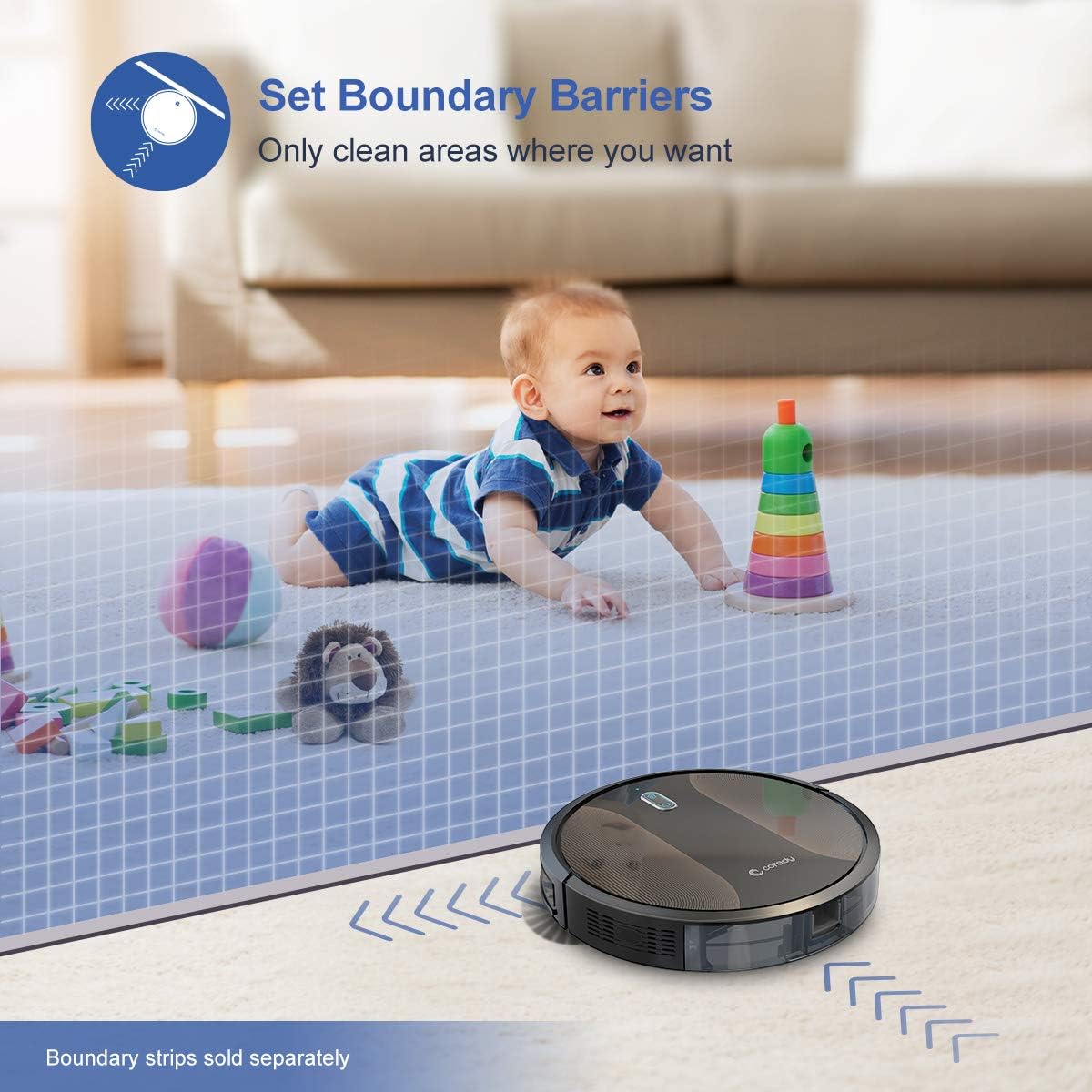
Figure 6.3: The Coredy R580 can be converted for mopping by attaching the optional water tank and mop cloth.
6.6 Boost-Intellect Technology
The robot is equipped with Boost-Intellect Technology, which automatically increases suction power when it detects carpeted surfaces, ensuring a deeper clean across different floor types.

Figure 6.4: Boost-Intellect Technology automatically adjusts suction power when the robot moves from hard floors to carpets.

Figure 6.5: The Coredy R580 provides strong suction power to effectively clean various types of debris from hard floors.
7. Onderhoud
Regular maintenance is crucial for optimal performance and longevity of your robot vacuum. Perform the following cleaning procedures regularly:
7.1 De prullenbak legen
Press the dustbin release button and pull out the dustbin. Open the dustbin cover and empty its contents into a trash can. It is recommended to empty the dustbin after each cleaning cycle.
7.2 De hoofdborstel reinigen
Remove the main brush cover and lift out the main brush. Use the provided cleaning tool or a pair of scissors to remove any hair or debris tangled around the brush. Reinstall the main brush and cover.
7.3 Zijborstels reinigen
Periodically check the side brushes for tangled hair or debris. Gently pull them off their posts to clean. If they are worn or damaged, replace them with new ones. Push them back onto the posts until they click.
7.4 Het filter reinigen
Remove the filter from the dustbin. Tap the filter against a trash can to remove dust. Do not wash the filter with water, as this can damage it. Replace the filter every 2-3 months, or more frequently depending on usage.
7.5 Sensoren en oplaadcontacten reinigen
Wipe the cliff sensors (located on the bottom of the robot) and the charging contacts (on the robot and charging dock) with a clean, dry cloth. Keeping these clean ensures proper navigation and charging.
8. Probleemoplossing
If your Coredy R580 encounters issues, refer to the following table for common problems and solutions:
| Probleem | Mogelijke oorzaak | Oplossing |
|---|---|---|
| Robot gaat niet aan | Batterij bijna leeg; stroomschakelaar uit | Laad de robot op; schakel de hoofdschakelaar in. |
| Robot laadt niet op | Laadcontacten vuil; Laadstation niet van stroom voorzien | Reinig de oplaadcontacten op de robot en het laadstation; zorg ervoor dat het laadstation is aangesloten. |
| Robot loopt vaak vast | Obstacles (cables, rugs); Cliff sensors dirty | Verwijder obstakels van het schoonmaakpad; reinig de klifsensoren. |
| Slechte reinigingsprestaties | Vuilnisbak vol; Borstels verstrengeld; Filter verstopt | Leeg de stofbak; reinig de hoofd- en zijborstels; reinig of vervang het filter. |
| Problemen met de wifi-verbinding | Onjuist wifi-wachtwoord; router te ver weg; 5GHz-netwerk | Re-enter password; Move robot closer to router; Ensure 2.4GHz network is used. |
If the problem persists after trying the above solutions, please contact Coredy customer support for further assistance.
9. Specificaties
| Functie | Detail |
|---|---|
| Merk | Coredy |
| Model | R580 |
| Speciale functie | HEPA Filtration, Pet Tools, Vacuums |
| Kleur | Zwart |
| Filtertype | Patroon |
| Capaciteit van de afvalbak | 0.3 liter |
| Energiebron | Werkt op batterijen (1 lithium-ionbatterij meegeleverd) |
| Controlemethode | Remote, Voice (Alexa, Google Home), App |
| Vormfactor | Robotisch |
| Afmetingen (L x B x H) | 16.89 x 13.66 x 4.57 inch |
| Artikelgewicht | 8.91 pond |
| Zuigkracht | Tot 2000Pa |
| Geluidsniveau | Onder 65dB |
10. Garantie en ondersteuning
10.1 Garantie-informatie
Coredy products are manufactured to the highest quality standards. For specific warranty details regarding your R580 Robot Vacuum Cleaner, please refer to the warranty card included in your product packaging or visit the official Coredy website. De garantie dekt doorgaans materiaal- en fabricagefouten bij normaal gebruik.
10.2 Klantenservice
If you have any questions, require technical assistance, or need to report an issue with your Coredy R580, please contact Coredy customer support. Contact information can usually be found on the official Coredy website or on the product packaging. Please have your model number (R580) and purchase information ready when contacting support.