
Belangrijke veiligheidsinstructies
Please read all instructions carefully before using the projector and retain this manual for future reference. Failure to follow these instructions may result in electric shock, fire, or other injuries or damage.
- Blokkeer geen ventilatieopeningen. Zorg voor voldoende ruimte rondom de projector voor een goede luchtcirculatie.
- Stel de projector niet bloot aan regen of vocht om het risico op brand of elektrische schokken te verminderen.
- Gebruik uitsluitend de door de fabrikant gespecificeerde toebehoren/accessoires.
- Haal de stekker van de projector uit het stopcontact tijdens onweer of wanneer deze gedurende langere tijd niet wordt gebruikt.
- Laat alle onderhoudswerkzaamheden over aan gekwalificeerd onderhoudspersoneel.
- Vermijd direct oogcontact met de projectorlens wanneer de projector in werking is.amp staat aan.
Inhoud van het pakket
Controleer of alle hieronder vermelde artikelen in uw pakket zitten:
- EKASN Creative E450 Mini Projector
- Afstandsbediening
- Stroomkabel
- HDMI-kabel
- AV-kabel
- Gebruiksaanwijzing
Product voorbijview
Familiarize yourself with the components and interfaces of your EKASN Creative E450 projector.

Image: The EKASN Creative E450 Mini Projector, showcasing its compact design, front lens, and included remote control and connection cables.
Interfaces en poorten
The projector features multiple ports for versatile connectivity with various devices.

Afbeelding: Zijkant view of the EKASN Creative E450 Mini Projector highlighting its various input and output ports, including VGA, Headset, Power, USB, AV, and HDMI.
- VGA-poort: For connecting to computers or laptops with a VGA output.
- Headset/Audio Out: 3.5mm audio jack for connecting external speakers or headphones.
- Stroomverbruik: Wordt aangesloten op de voedingsadapter.
- USB-poort: Supports USB flash drives for media playback. Note: Does not support cord connection or data transfer from devices.
- AV-poort: For connecting devices using an AV cable (e.g., DVD players).
- HDMI-poort: For high-definition video and audio input from devices like TV sticks, Apple TV, Roku, PCs, PS4, laptops, and MacBooks.
Installatiehandleiding
1. Initial Placement and Screen Size
Place the projector on a stable, flat surface. The projection size can be adjusted by changing the distance between the projector and the screen/wall. For optimal viewing, use the projector in a relatively dark environment.

Image: A diagram illustrating various projection screen sizes (38" to 160") achievable at different projection distances (3.9ft to 13.3ft) with the EKASN Creative E450 Mini Projector.
- Minimum Projection Size: Approximately 33 inches (at 3.7 feet distance).
- Maximum Projection Size: Up to 170 inches (at 19.7 feet distance).
- Aanbevolen afstand: Adjust to achieve desired screen size and clarity.
2. Inschakelen
- Sluit het netsnoer aan op de stroomaansluiting van de projector.
- Sluit het andere uiteinde van de stroomkabel aan op een stopcontact.
- Druk op de aan/uit-knop op de projector of de afstandsbediening om het apparaat in te schakelen.
3. Focus- en Keystone-correctie
To achieve a clear and rectangular image, adjust the focus and keystone correction.

Image: A visual representation of keystone correction, showing how the projected image can be adjusted by ±15 degrees to achieve a perfectly rectangular display.
- Keystone-correctie: Locate the keystone adjustment ring/knob near the lens. Rotate it to correct any trapezoidal distortion in the image, making it rectangular. The projector supports manual keystone correction of ±15 degrees.
- Scherpstelling: After correcting the keystone, rotate the focus ring/knob around the lens until the image appears sharp and clear.
4. Apparaten aansluiten
The EKASN Creative E450 supports various input sources.
- HDMI-aansluiting: Connect your TV Stick, Apple TV, Roku, PC, PS4, DVD player, laptop, or MacBook to the projector's HDMI port using an HDMI cable.
- Smartphone-verbinding:

Image: A visual guide demonstrating how to connect an iPhone (via Lightning to HDMI adapter) and an Android phone (via Micro USB/Type C to HDMI adapter) to the EKASN Creative E450 Mini Projector. Adapters are not included.
- For iPhone: An external Lightning to HDMI adapter is required (not included).
- For Android Phone: A Micro USB/Type C to HDMI adapter is required (not included).
- After connecting the adapter and HDMI cable, ensure you select HDMI as the input source on the projector.
- USB-verbinding: Insert a USB flash drive containing your media files into the USB port. Navigate to the USB input source and select the desired file for playback. Supported formats may vary.
- AV-aansluiting: Use the provided AV cable to connect devices with AV output.
- VGA-aansluiting: Connect to a computer or laptop using a VGA cable.
5. Meerdere installatiemethoden
The projector offers flexible installation options to suit your environment.
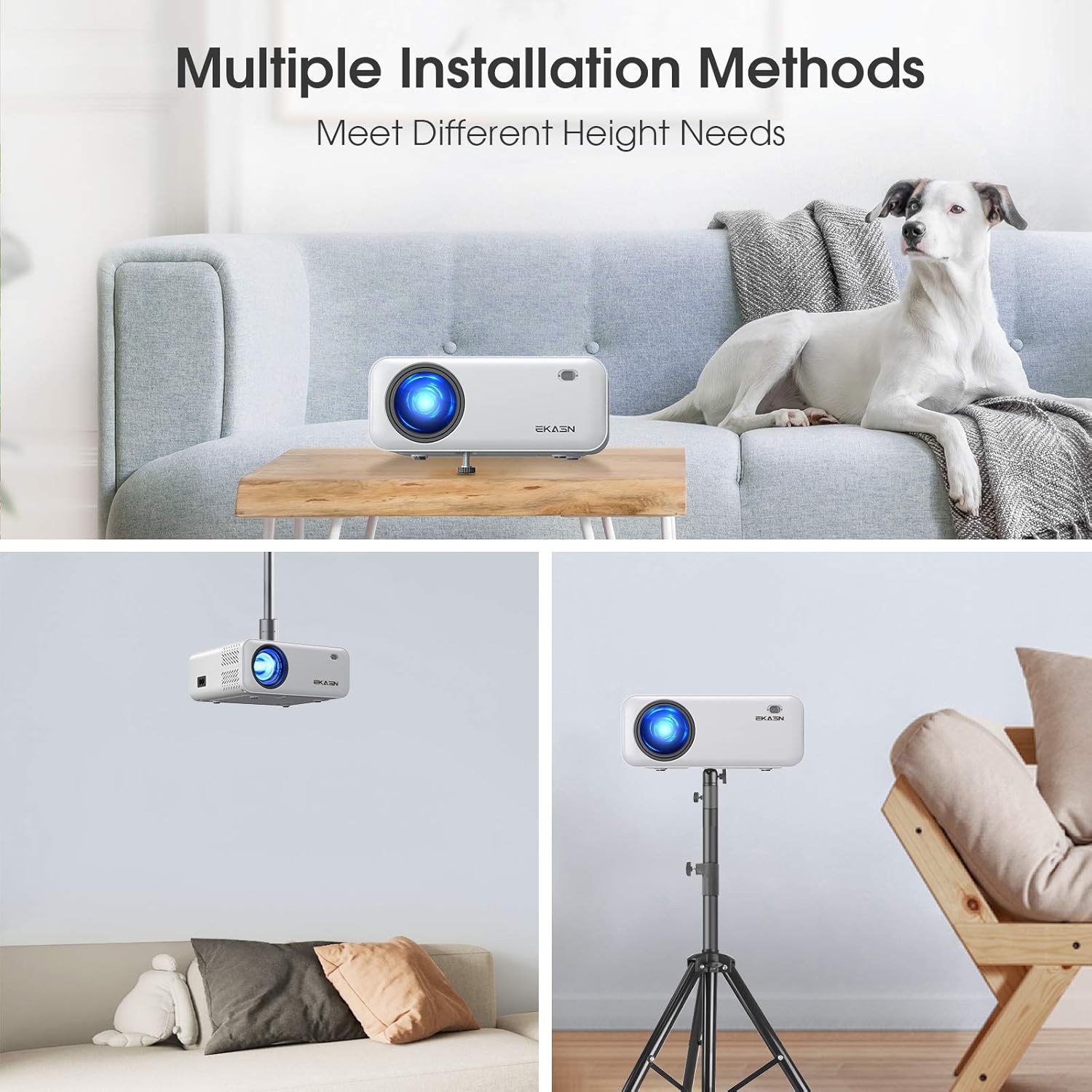
Afbeelding: Drie examples of installation methods for the EKASN Creative E450 Mini Projector: tabletop placement, ceiling mount, and tripod mount.
- Tafelbladmontage: Place the projector directly on a table or flat surface. You can adjust the height using the screw on the bottom.
- Plafondmontage: The projector has a screw hole on its bottom for universal tripod or ceiling mounting. Ensure proper mounting hardware is used (not included).
- Statiefbevestiging: Attach the projector to a compatible tripod using the screw hole on the bottom.
Gebruiksaanwijzing
1. Basic Operation and Menu Navigation
Use the included remote control or the buttons on the projector to navigate the menu and control playback.
- Aan/uit-knop: Schakelt de projector in/uit.
- Bronknop: Selects the input source (HDMI, AV, USB, VGA).
- Menuknop: Hiermee opent u het instellingenmenu van de projector.
- Navigatieknoppen (pijltoetsen): Navigeren door menuopties.
- OK-knop: Bevestigt selecties.
- Volumeknoppen: Pas het audiovolume aan.
2. Selectie ingangsbron
After connecting your device, press the "Source" button on the remote or projector to select the corresponding input (e.g., HDMI1, AV, USB, VGA).
3. Audio-instellingen
The projector has built-in stereo speakers. For enhanced audio, you can connect external speakers or headphones via the 3.5mm audio output jack.
Important Note on Dolby Sound: The projector does NIET support Dolby sound. If you experience no sound while playing videos from streaming services like Netflix or Amazon Prime Video, you must turn off Dolby sound in the settings of your connected device (e.g., TV Stick, media player). Typically, this setting can be found under: Settings > Display & Sounds > Audio > Dolby Digital Output > Turn Dolby Digital Plus OFF.
4. Media afspelen vanaf USB
Insert a USB flash drive containing your media files into the USB port. Navigate to the USB input source and select the desired file for playback. Supported formats may vary.
Onderhoud
Regelmatig onderhoud draagt bij aan de lange levensduur en optimale prestaties van uw projector.
- De lens reinigen: Gebruik een zachte, pluisvrije doek die speciaal is ontworpen voor optische lenzen. Gebruik geen schuurmiddelen of doeken die de lens kunnen krassen.
- De behuizing van de projector reinigen: Veeg de buitenkant af met een zachte, droge doek. Voor hardnekkige vlekken kunt u een licht vochtige doek gebruiken.amp U kunt hiervoor een doek gebruiken, gevolgd door een droge veeg.
- Ventilatie: Ensure the ventilation openings are clear of dust and debris. Do not block them during operation. Periodically clean the vents with a soft brush or compressed air.
- Opslag: Wanneer u de projector gedurende langere tijd niet gebruikt, bergt u deze op op een koele, droge plaats, uit de buurt van direct zonlicht en extreme temperaturen.
Probleemoplossing
Als u problemen ondervindt met uw projector, raadpleeg dan de volgende veelvoorkomende problemen en oplossingen:
| Probleem | Mogelijke oorzaak / oplossing |
|---|---|
| Onscherpe afbeelding |
|
| No Sound from Streaming Apps (e.g., Netflix, Amazon Prime Video) | The projector does not support Dolby sound. Turn off Dolby sound output in the audio settings of your connected streaming device (e.g., TV Stick, media player). |
| No Signal / No Picture |
|
| USB Port Not Working for Phone Connection/Data Transfer | The USB port only supports USB flash drives for media playback. It does NOT support cord connection for smartphones or data transfer. For smartphone mirroring, an external HDMI adapter is required. |
| De afbeelding is trapeziumvormig. | Adjust the keystone correction knob until the image is rectangular. |
Specificaties
Detailed technical specifications for the EKASN Creative E450 Mini Projector.
| Functie | Detail |
|---|---|
| Merk | EKASN |
| Model | Creatieve E450 |
| Weergavetechnologie | LCD |
| Oorspronkelijke resolutie | 1280 x 720 pixels |
| Ondersteunde resolutie | Up to 1920 x 1080 Pixels (1080P Full HD) |
| Helderheid | 5500 LUXE |
| Contrastverhouding | 2000:1 |
| Beeldverhouding | 16:9 |
| Projectiegrootte | 33" tot 170" |
| Projectieafstand | 3.7 tot 19.7 voet |
| Keystone Correctie | Manual ±15° |
| hardware Interface | 3.5mm Audio, HDMI, USB, VGA, AV |
| Compatibele apparaten | iPhone, Android Phones, TV Box, TV Stick, PCs, PS4, DVD, Laptops, Tablets, MacBook, USB Flash Drive, Media Players |
| Audio-uitgang | Built-in Stereo Speakers, 3.5mm Audio Out |
| Wattage | 60 watt |
| Vormfactor | Draagbaar |
| Montagetype | Tabletop Mount, Ceiling Mount, Tripod Mount |
| Productafmetingen | 19.28 x 16.48 x 7.62 cm; 1.51 kg |
Garantie en ondersteuning
EKASN provides comprehensive support for your projector.
- Garantie: The EKASN Creative E450 Mini Projector comes with a 2-year warranty.
- Technische ondersteuning: Levenslange professionele technische ondersteuning is beschikbaar.
- For any problems or inquiries, please contact EKASN customer service. Refer to your product packaging or the official EKASN website voor specifieke contactgegevens.