
Invoering
This manual provides essential information for the safe and effective use of your ProForm City L6 Folding Treadmill. Please read all instructions carefully before operating the equipment. Retain this manual for future reference.

Image: The ProForm City L6 Folding Treadmill, showcasing its compact design and console.
Belangrijke veiligheidsinformatie
To reduce the risk of serious injury, read all important precautions and instructions in this manual before using the treadmill. ProForm assumes no responsibility for personal injury or property damage sustained by or through the use of this product.
- Raadpleeg een arts voordat u met een trainingsprogramma begint.
- Houd kinderen en huisdieren uit de buurt van de loopband.
- Plaats de loopband op een vlakke ondergrond met minimaal 2 meter vrije ruimte erachter en 0.5 meter aan elke kant.
- Draag geschikte sportkleding en sportschoenen.
- Gebruik de loopband niet als het netsnoer of de stekker beschadigd is.
- Houd altijd de handrails vast bij het starten of stoppen van de loopband.
- Overschrijd het maximale gebruikersgewicht van 250 pond (113 kg) niet.
Instellen
Uitpakken en plaatsen
Carefully remove all components from the packaging. Place the treadmill on a flat, stable surface. Ensure adequate clearance around the unit for safe operation and maintenance.
Assembly (Folding Mechanism)
The ProForm City L6 features a SpaceSaver Design for compact storage. To prepare for use, carefully unfold the treadmill deck until it locks into place. To fold for storage, lift the deck until it secures in the upright position.
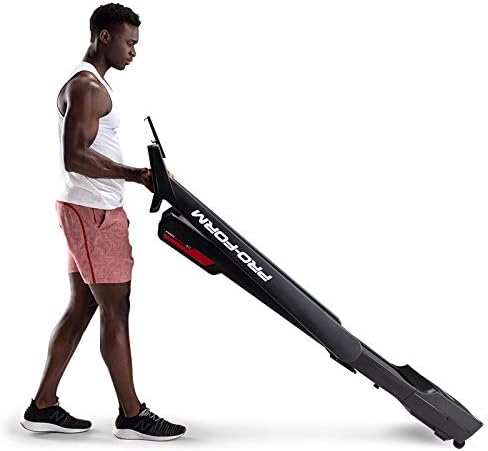
Image: A user demonstrating the folding mechanism of the ProForm City L6 Treadmill for compact storage.
Stroomaansluiting
Connect the power cord to a grounded outlet. Ensure the safety key is properly inserted into the console before attempting to power on the treadmill.
iFIT Activation
Your treadmill includes a 30-day iFIT membership. To activate, download the iFIT app on your tablet or smartphone. Connect your device to the treadmill via Bluetooth. Follow the on-screen instructions in the iFIT app to set up your account and access workouts.

Image: The treadmill console with a tablet mounted, showing the iFIT application interface.
Gebruiksaanwijzing
De loopband starten
- Ensure the safety key is in place.
- Stap op de loopband en plaats uw voeten op de zijrails.
- Druk op de BEGIN knop. De band begint met een lage snelheid te bewegen.
- Gradually increase speed using the SNELHEID + buttons or Digital QuickSpeed controls.

Image: A user engaged in a running workout on the ProForm City L6 Treadmill.
Snelheid aanpassen
Gebruik de SNELHEID + En SNELHEID - buttons on the console to adjust the treadmill's speed. The treadmill offers speeds from 0 to 8 MPH. For iFIT workouts, the trainer may automatically adjust your speed.
Stopping the Treadmill
Druk op de STOP button to gradually slow down and stop the treadmill belt. For an emergency stop, pull the safety key from the console.
Het display gebruiken
The 5-inch high-contrast display shows your workout metrics, including distance, speed, estimated calorie burn, and time. When connected to iFIT, enhanced metrics are available through the app.
Onderhoud
Schoonmaak
Maak de loopband regelmatig schoon met adamp cloth and mild soap. Avoid using abrasive cleaners or solvents. Wipe down the console and handrails after each use to remove sweat and debris.
Riem zorg
Inspect the walking belt periodically for wear and tear. Ensure the belt is properly centered and tensioned. Refer to the full product manual (if available from manufacturer) for detailed instructions on belt adjustment and lubrication, if required.
Algemene inspectie
Check all bolts and nuts for tightness regularly. Replace any worn components immediately. Unplug the treadmill before performing any maintenance or cleaning.
Probleemoplossing
| Probleem | Mogelijke oorzaak | Oplossing |
|---|---|---|
| De loopband gaat niet aan. | Power cord not plugged in; safety key not inserted; circuit breaker tripped. | Zorg ervoor dat het netsnoer goed is aangesloten. Steek de veiligheidssleutel er volledig in. Controleer de stroomonderbreker in de meterkast. |
| De loopband glijdt weg of hapert. | De riemspanning is te laag; de riem moet gesmeerd worden. | Adjust belt tension (refer to manufacturer's detailed guide). Lubricate belt if necessary (use approved silicone lubricant). |
| Het consolescherm is leeg of onregelmatig. | Loose cable connection; power issue. | Check all cable connections to the console. Unplug and re-plug the treadmill. |
If you encounter issues not listed here, or if solutions do not resolve the problem, contact customer support.
Specificaties
- Model: PFTL28820
- Merk: ProForm
- Productafmetingen: 30.48 x 81.28 x 187.96 cm (12 x 32 x 74 inch)
- Artikelgewicht: 65.77 kg (145 lbs)
- Maximaal gebruikersgewicht: 250 kg (113 lbs)
- Snelheidsbereik: 0-8 MPH Digital QuickSpeed Controls
- Loopvlakgordel: 18" x 47"
- Weergave: 5-inch High-Contrast LCD
- Motorvermogen: 2 PK
- Speciale kenmerken: SpaceSaver Design (Foldable), iFIT Bluetooth Connectivity
- Energiebron: Elektrische kabel

Image: The ProForm City L6 Treadmill with its physical dimensions indicated.
Garantie
The ProForm City L6 Folding Treadmill is protected by the following warranties:
- Kader: 10 jaar beperkte garantie
- Onderdelen en arbeid: 1 jaar beperkte garantie
This warranty applies to the original owner and is valid only in the country where the product was purchased. For full warranty terms and conditions, please refer to the warranty card included with your product or visit the official ProForm webplaats.
Steun
For technical assistance, parts inquiries, or warranty claims, please contact ProForm Customer Service. Have your model number (PFTL28820) and serial number ready when contacting support.
Visit the official ProForm webWebsite met aanvullende informatie, veelgestelde vragen en contactgegevens: www.proform.nl