
Invoering
This manual provides comprehensive instructions for the Elekpia Universal Remote Control, model CT-RC1US-18. This remote is designed for seamless compatibility with a wide range of Toshiba LED LCD HDTV models, including but not limited to CT-90325, CT-90326, CT-90329, CT-8037, CT-90302, CT-90275, CT-90, CT-90366, and CT-RC1US-18. Please read this manual carefully to ensure proper setup and operation of your new remote control.
Instellen
Batterij installatie
The Elekpia Universal Remote Control requires two (2) 1.5V AA batteries for operation. No programming is needed; simply install the batteries, and the remote will be ready to use with your compatible Toshiba TV.
- Zoek het deksel van het batterijcompartiment aan de achterkant van de afstandsbediening.
- Druk op het lipje en schuif het deksel naar beneden om het vak te openen.
- Plaats twee (2) AA-batterijen en zorg ervoor dat de positieve (+) en negatieve (-) polen correct zijn uitgelijnd met de markeringen in het compartiment.
- Schuif het batterijklepje terug totdat het goed vastklikt.

Figuur 1: Voor- en achterkant view of the Elekpia Universal Remote Control, highlighting the battery compartment on the rear.
Once batteries are installed, the remote is ready for immediate use with your Toshiba TV. No additional setup or code entry is required.
Gebruiksaanwijzing
This universal remote control is designed to replicate the functions of your original Toshiba TV remote. Point the remote directly at your television's infrared receiver for optimal performance.
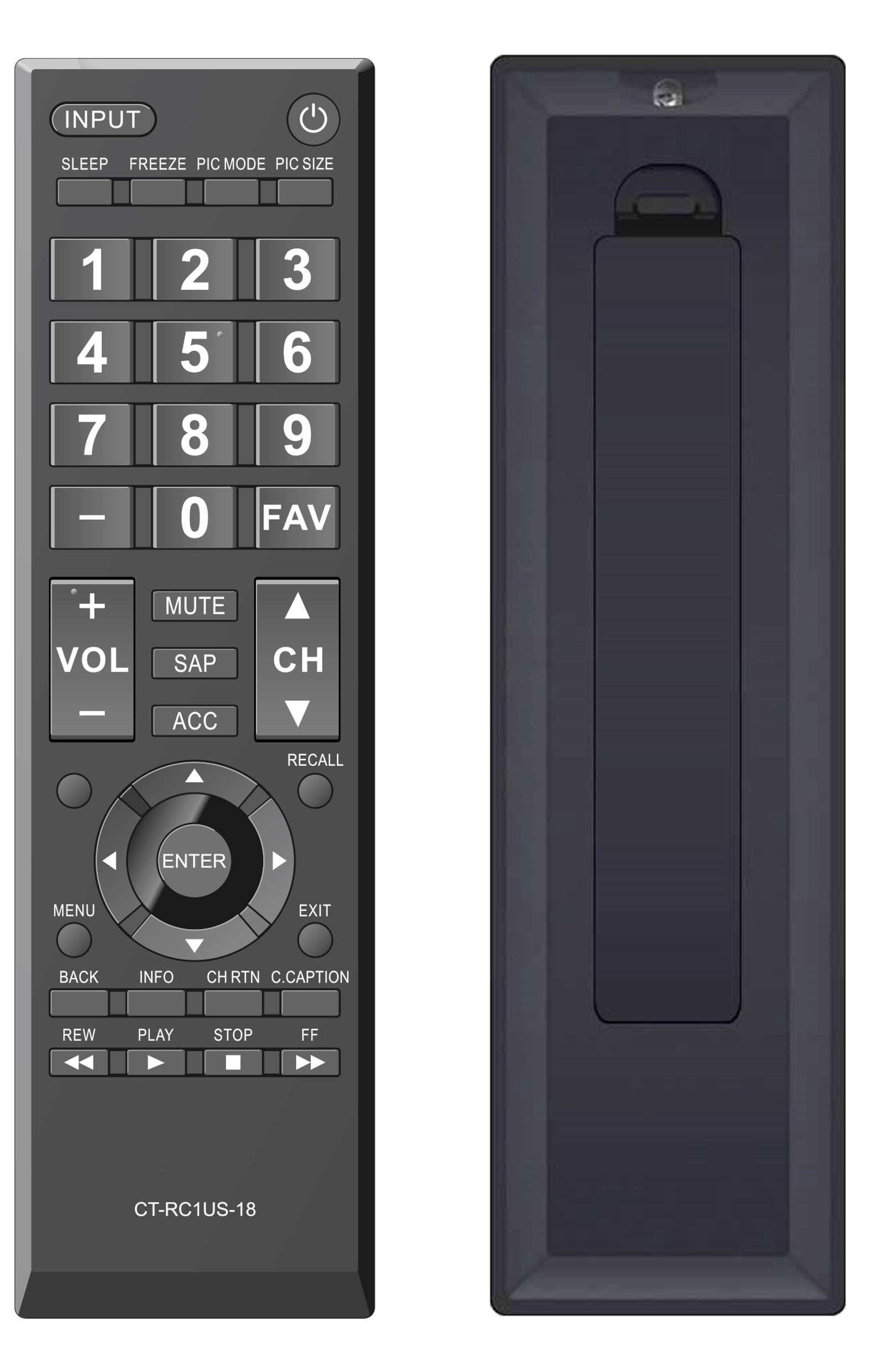
Figuur 2: Voorzijde view of the Elekpia Universal Remote Control, displaying the layout of all buttons.
Knopfuncties
- STROOM (⏻): Hiermee zet je de televisie aan of uit.
- INVOER: Schakelt tussen de beschikbare ingangsbronnen (HDMI 1, HDMI 2, AV, enz.).
- SLAAP: Activates or adjusts the TV's sleep timer function.
- BEVRIEZEN: Pauses the current image on the screen (functionality may vary by TV model).
- PIC-MODUS: Adjusts picture modes (e.g., Standard, Movie, Dynamic).
- FOTOFORMAAT: Changes the aspect ratio or picture size.
- Cijferblok (0-9): Voert direct kanaalnummers in.
- - (Streepje): Wordt gebruikt voor het invoeren van subkanalen (bijv. 7-1).
- Favoriet: Geeft toegang tot de lijst met favoriete kanalen.
- VOL (+/-): Verhoogt of verlaagt het volumeniveau.
- MUTE: Silences the television audio.
- SAP: Selects Secondary Audio Program (SAP) or alternate audio tracks.
- ACC: Accesses accessibility features or audio settings.
- CH (Omhoog/Omlaag)Hiermee kunt u het televisiekanaal hoger of lager zetten.
- HERINNEREN: Switches between the current and previously viewed kanaal.
- Navigation Pad (Up, Down, Left, Right, ENTER): Navigates through on-screen menus and confirms selections.
- MENUOpent het hoofdmenu van de televisie.
- EXIT: Closes the current menu or returns to the previous screen.
- RUG: Keert terug naar het vorige menu of scherm.
- INFORMATIEGeeft informatie weer over het huidige programma of de invoer.
- CH RTN (Channel Return): Similar to RECALL, returns to the previous channel.
- C.CAPTION (Closed Caption): Schakelt ondertiteling in of uit.
- REW (Rewind), PLAY, STOP, FF (Fast Forward): Controls for media playback (e.g., when using a connected USB device or smart TV apps, if supported by the TV).
Onderhoud
De afstandsbediening schoonmaken
Om het uiterlijk en de functionaliteit van de afstandsbediening te behouden, moet u deze regelmatig schoonmaken:
- Gebruik een zachte, droge doek om het oppervlak van de afstandsbediening af te vegen.
- Voor hardnekkig vuil, lichtjes dampReinig de doek met water of een milde, niet-schurende reiniger. Vermijd overmatige vochtigheid.
- Gebruik geen agressieve chemicaliën, oplosmiddelen of schurende reinigingspads, aangezien deze de afwerking of interne onderdelen van de afstandsbediening kunnen beschadigen.
Batterij vervangen
Replace batteries when the remote's response becomes sluggish or stops working. Always replace both AA batteries at the same time with new ones. Do not mix old and new batteries, or different types of batteries, as this can lead to leakage or damage.
Opslag
Als de afstandsbediening gedurende langere tijd niet wordt gebruikt, verwijder dan de batterijen om mogelijke lekkage en schade aan het apparaat te voorkomen.
Probleemoplossing
If you encounter issues with your Elekpia Universal Remote Control, please refer to the following common solutions:
- Afstandsbediening reageert niet:
- Ensure the batteries are correctly installed with the proper polarity (+/-).
- Vervang de batterijen door nieuwe AA-batterijen.
- Controleer of er zich obstakels bevinden tussen de afstandsbediening en de infraroodsensor van de tv.
- Zorg ervoor dat u de afstandsbediening rechtstreeks op de tv richt.
- Sommige knoppen werken niet:
- This remote is pre-programmed for Toshiba TVs. Verify your TV model is compatible.
- Clean the remote's surface, especially around the unresponsive buttons, to remove any dirt or debris that might be interfering with button presses.
- De tv gaat niet aan/uit:
- Confirm the TV is plugged into a working power outlet.
- Try using the power button directly on the TV to confirm it is operational.
If these steps do not resolve the issue, please refer to the customer support section.
Specificaties
| Modelnummer | CT-RC1US-18 |
| Merk | Elekpia |
| Productafmetingen | 7 x 2 x 0.6 inch |
| Artikelgewicht | 3 ons |
| Energiebron | 2 x 1.5V AA-batterijen (niet inbegrepen) |
| Compatibele apparaten | Toshiba LED LCD HDTVs |
| Max aantal ondersteunde apparaten | 1 |
| Kleur | Zwart |
Garantie-informatie
Specific warranty details for the Elekpia Universal Remote Control CT-RC1US-18 are not provided in this manual. Please refer to the product packaging, the retailer's return policy, or the manufacturer's official webVoor informatie over de garantievoorwaarden en -dekking kunt u terecht op deze website.
Klantenservice
For further assistance or inquiries regarding your Elekpia Universal Remote Control, please contact the retailer from whom you purchased the product. You may also visit the official Elekpia webDeze website biedt informatie over mogelijke ondersteuningsbronnen of contactgegevens.