
1. Inleiding
This manual provides detailed instructions for the installation, operation, and maintenance of the SINOTIMER TM919A-2 LCD Digital Programmable Timer Switch. This device is designed for automatic control of electrical appliances based on programmed time schedules, offering daily and weekly programming options.
2. Producteigenschappen
- Weekly 7-day programmable digital time switch.
- meerdere voltage options (5V, 12V, 24V, 110V, 220V, 85-265V). This specific model is 220V.
- Detachable battery design for backup power.
- Montage op een 35 mm DIN-rail voor eenvoudige installatie.
- LCD display for clear time and program viewind.
- 16 ON/OFF programs per day or week.
- Handmatige override-functie.
- High capacity 16A switching contact.
3. Veiligheidsinformatie
WARNING: Risk of electric shock. Installation should only be performed by a qualified electrician or competent person.
- Zorg ervoor dat de stroom is losgekoppeld voordat u met de installatie of het onderhoud begint.
- Do not exceed the maximum load capacity of 16A.
- Controleer de juiste voltage supply for the specific model (220V for TM919A-2).
- Houd het apparaat uit de buurt van vocht en extreme temperaturen.
4. Product voorbijview en componenten
The SINOTIMER TM919A-2 features an LCD display, control buttons, and wiring terminals for power input and load control.

Figuur 4.1: Voorkant view of the SINOTIMER TM919A-2 Digital Timer Switch, showing the LCD display, control buttons (P, D+, H+, M+, RESET, MANUAL), and wiring terminals.

Figuur 4.2: The timer switch with its transparent protective cover opened, revealing the control buttons for programming and manual operation.
Bedieningsknoppen:
- P (Programma): Opent de programma-instellingenmodus.
- D+ (Dag): Adjusts day of the week or program day.
- H+ (uur): Adjusts hour or program hour.
- M+ (Minuut): Adjusts minute or program minute.
- HERSTEL: Zet alle instellingen terug naar de fabrieksinstellingen.
- HANDMATIG: Toggles output ON/AUTO/OFF.
5. Installatie en installatie
5.1 Bedradingsschema
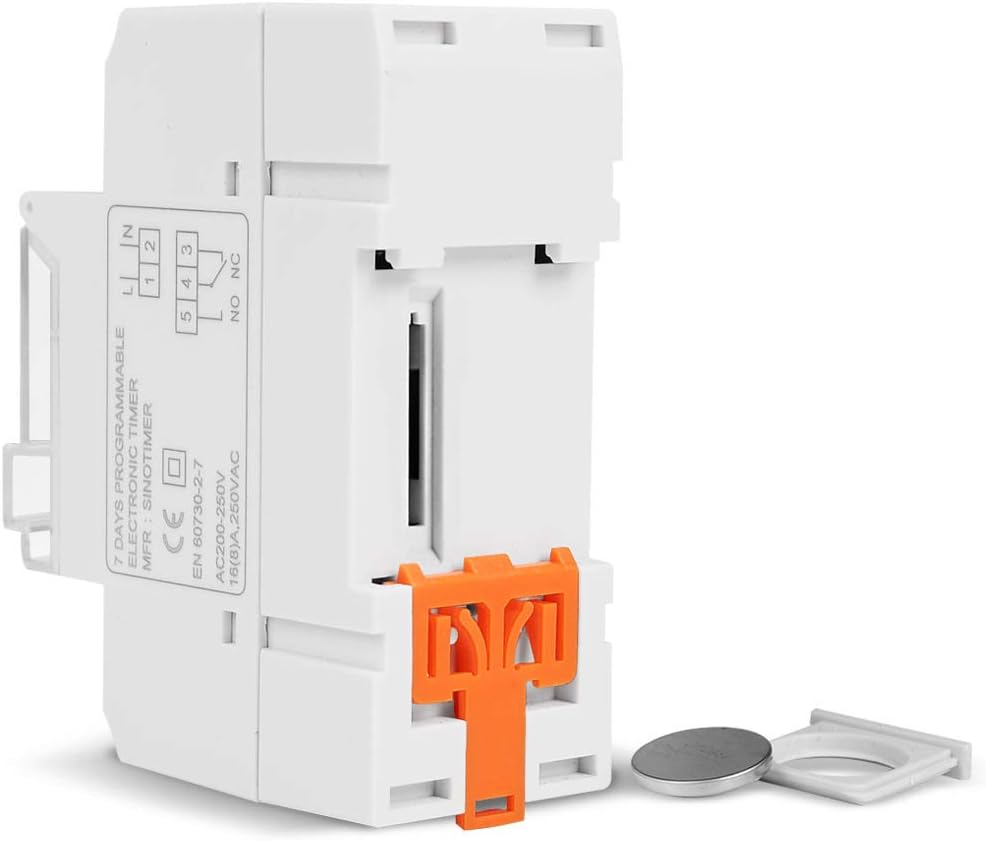
Refer to the wiring diagram on the side of the device and the illustration below for correct connection. Ensure all connections are secure.

Figuur 5.1: Kant view of the timer switch displaying the wiring diagram. Terminals 1 and 2 are for power input (L and N). Terminals 3, 4, and 5 are for the relay output (Common, Normally Open, Normally Closed).
- Terminals 1 & 2 (L, N): Connect to the main power supply (220V AC for this model).
- Terminal 3 (NO - Normally Open): Connects to the load when the timer is ON.
- Terminal 4 (COM - Common): Connects to one side of the load and the power supply.
- Terminal 5 (NC - Normally Closed): Connects to the load when the timer is OFF (less common for typical applications).
5.2 Initial Power-up and Reset
Upon first power-up or after a long period without power, the LCD display may be blank. The internal battery provides backup for settings. If the display is unresponsive or shows garbled characters, press the RESET button using a pointed object (e.g., a pen tip). This will clear all settings and restore the timer to its default state.
5.3 De huidige tijd en dag instellen
- Druk op de P Druk één keer op de knop. Op het display verschijnt de huidige tijdinstelling.
- Pers D+ om de huidige dag van de week in te stellen.
- Pers H+ om het huidige uur in te stellen.
- Pers M+ om de huidige minuut in te stellen.
- Druk op de P button again to exit time setting mode and return to normal operation.
6. Gebruiksaanwijzing
6.1 Programmeren van AAN/UIT-cycli
De timer ondersteunt tot 16 aan/uit-programma's. Elk programma bestaat uit een aan-tijd en een uit-tijd.
- Druk op de P button repeatedly until "1 ON" appears on the display. This is the first ON program.
- Pers D+ Om de dag(en) voor dit programma te selecteren. Opties zijn onder andere individuele dagen, weekdagen, weekenden of alle 7 dagen.
- Pers H+ to set the desired hour for the "ON" event.
- Pers M+ to set the desired minute for the "ON" event.
- Pers P again. "1 OFF" will appear. This is the first OFF program.
- Repeat steps 2-4 to set the day(s), hour, and minute for the "OFF" event.
- Blijf drukken op P to cycle through "2 ON", "2 OFF", up to "16 ON", "16 OFF". If you do not need all 16 programs, simply press P until the display returns to the current time.
- To save and exit programming mode, press the P button until the current time is displayed.
6.2 Handmatige opheffing
De HANDMATIG button allows you to override the programmed settings temporarily or permanently.
- Pers HANDMATIG once: Toggles between ON/AUTO/OFF modes.
- OP: De uitgang staat continu AAN en negeert programma's.
- OFF: De uitgang staat continu UIT en negeert programma's.
- AUTO: The timer operates according to the programmed ON/OFF cycles. This is the standard operating mode.
7. Onderhoud
7.1 Batterij vervangen
The timer includes a detachable CR2032 lithium battery to maintain time and program settings during power outages. If the display becomes dim or resets frequently, the battery may need replacement.

Figuur 7.1: The timer switch shown with its battery compartment open and a CR2032 lithium battery, indicating the detachable battery design.
- Disconnect power to the timer before attempting battery replacement.
- Zoek het batterijcompartiment, dat zich meestal aan de zijkant of achterkant van het apparaat bevindt.
- Verwijder voorzichtig de oude CR2032-batterij.
- Plaats een nieuwe CR2032-batterij en let daarbij op de juiste polariteit (pluszijde naar boven).
- Sluit het batterijvak.
- Reconnect power and reset the current time and day if necessary.
8. Probleemoplossing
- Display is leeg:
- Check power supply connections (Terminals 1 & 2).
- Ensure the internal battery is charged or replaced if old.
- Druk op de RESET knop.
- De programma's draaien niet:
- Zorg ervoor dat de timer is ingeschakeld AUTO mode (check the display for "AUTO"). Press HANDMATIG naar cyclusmodi.
- Controleer of de huidige tijd en dag correct zijn ingesteld.
- Check that the ON/OFF programs are correctly entered and enabled for the desired days.
- Confirm wiring to the load (Terminals 3, 4, 5) is correct.
- De timer wordt onverwacht gereset:
- The internal battery may be low or depleted. Replace the CR2032 battery.
- Ensure stable power supply to the unit.
9. Specificaties
| Functie | Specificatie |
|---|---|
| Model | TM919A-2 |
| Stroomvoorziening | 220V AC (as per model) |
| Stroomverbruik | 4.5 VA (MAX) |
| Temperatuurbereik | -20°C tot +50°C |
| Weergave | LCD |
| Schakelcontact | 1 omschakelaar |
| Programma's | 16 AAN/UIT per dag of week |
| Hysterese | 2 sec/dag (bij 25°C) |
| Capaciteit | 16A |
| Timerbereik | 1 minuut tot 168 uur |
| Minimaal interval | 1 minuut |
| Black-out geheugen | 60 days (with internal battery) |
| Artikelgewicht | 0.15 kg (5.3 ounces) |
| Montage | 35 mm DIN-rail |
| Schermgrootte | 1.2 inch |
Figuur 9.1: Dimensional drawing of the SINOTIMER TM919A-2, showing measurements in centimeters for height, width, and depth.
10. Garantie en ondersteuning
Specific warranty information for the SINOTIMER TM919A-2 is not provided in the product details. For warranty claims or technical support, please contact your retailer or the manufacturer directly. Keep your purchase receipt as proof of purchase.