
CHEREEKI 8808
CHEREEKI Digital Alarm Clock User Manual
Model: 8808
Invoering
Bedankt voor uw aankoopasing the CHEREEKI Digital Alarm Clock. This manual provides detailed instructions on how to set up, operate, and maintain your new alarm clock. Please read this manual carefully before use to ensure optimal performance and longevity of the product.

Afbeelding: Voorzijde view of the CHEREEKI Digital Alarm Clock displaying time and temperature.
Inhoud van het pakket
Controleer de inhoud van het pakket bij het uitpakken:
- 1 x LED Digital Alarm Clock
- 1 x USB Cable (adapter not included)
- 1 x Gebruikershandleiding
Note: The alarm clock contains a built-in Lithium-polymer battery.
Instellen
Het apparaat van stroom voorzien
The CHEREEKI Digital Alarm Clock offers two power modes:
- USB-voeding (aanbevolen voor continu gebruik):
Connect the alarm clock to a USB port or a 5V/1A or 5V/2A adapter using the provided USB cable. In this mode, the LED display will remain continuously on.

Image: Illustrations demonstrating connection to a USB port and a 5V/1A or 5V/2A adapter for continuous power.
- Built-in Battery Power:
When fully charged, the alarm clock can operate on its internal battery. In this mode, the LED display will automatically turn off after 6 seconds to conserve power. The display can be reactivated by sound (above 90 dB) or by pressing any button.

Image: Visual representation of the intelligent voice control function, where the display turns off after 6 seconds in battery mode and can be awakened by sound.
Eerste installatie
Upon first use or after a reset, you may need to set the time and other preferences.

Afbeelding: Gedetailleerd view of the alarm clock's top and bottom panels, highlighting buttons for time setting, alarm setting, volume, and switches for alarms.
Gebruiksaanwijzing
De tijd instellen
- Druk in de normale tijdweergavemodus op de "TIME SET" button located on the bottom of the clock.
- Gebruik de "OMHOOG" En "OMLAAG" knoppen om het uur aan te passen.
- Pers "TIME SET" again to move to minute adjustment, then use "OMHOOG" En "OMLAAG".
- Pers "TIME SET" Nog een keer bevestigen en afsluiten.
- The clock supports both 12-hour (with AM/PM indicator) and 24-hour formats. To switch, press the "OMHOOG" knop tijdens het instellen van de tijd.

Image: Illustration of the alarm clock displaying time in both 12-hour and 24-hour formats.
Alarmen instellen (Alarm 1 en Alarm 2)
De klok heeft twee onafhankelijke alarmen.
- To set Alarm 1: Press the "ALARM SET" button once. The Alarm 1 icon will flash.
- Gebruik "OMHOOG" En "OMLAAG" om het uur in te stellen en druk vervolgens op "ALARM SET" om naar minuten te gaan.
- Herhaal dit minutenlang en druk dan op "ALARM SET" bevestigen.
- To set Alarm 2: Press the "ALARM SET" button twice. The Alarm 2 icon will flash. Follow the same steps as Alarm 1.
- To activate/deactivate an alarm: In normal time display mode, press the "Alarm 1 Switch" or "Alarm 2 Switch" on the bottom of the clock. The corresponding alarm icon will appear/disappear on the display.

Image: A visual demonstrating the dual alarm functionality with different wake-up times and the snooze feature.
Snooze-functie
- Wanneer een alarm afgaat, drukt u op de grote "SNOOZE / LIGHT" button on top of the clock to activate the 5-minute snooze function.
- Het alarm gaat na 5 minuten opnieuw af.
- To turn off the alarm completely, press any other button on the clock.

Image: A user enjoying extra sleep thanks to the 5-minute snooze feature.
Helderheidsaanpassing
The clock offers both automatic and manual brightness control:
- Automatic Brightness (when USB powered): The display brightness adjusts automatically based on the time of day:
- 7:00 AM - 7:00 PM: High brightness
- 7:00 PM - 12:00 AM: Medium brightness
- 12:00 AM - 7:00 AM: Low brightness
- Handmatige helderheid: Druk in elke modus op de "SNOOZE / LIGHT" button on top of the clock to cycle through 4 levels of brightness (25%, 50%, 75%, 100%).
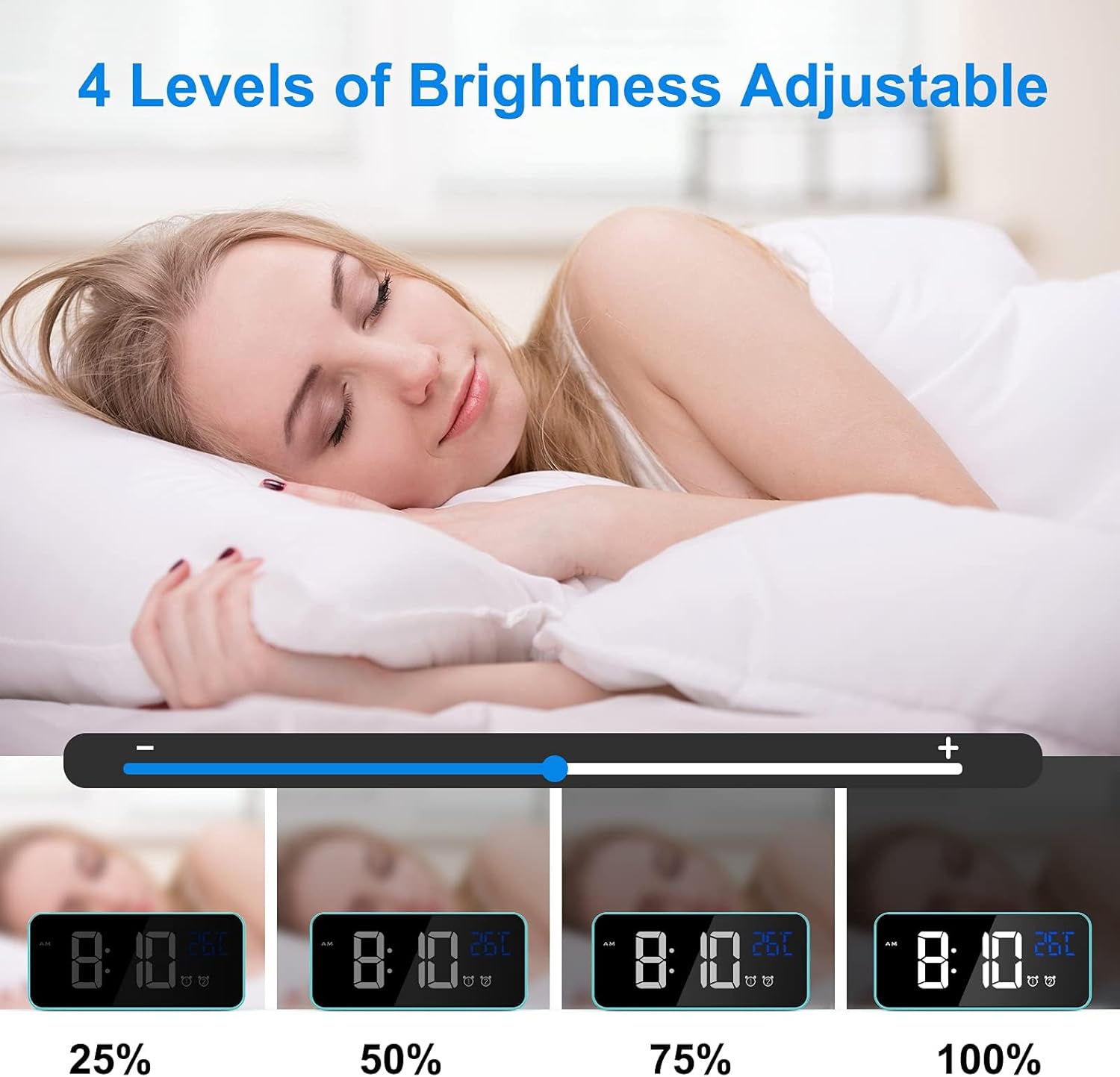
Image: Visual representation of the four adjustable brightness levels of the LED display.
Volume en beltonen
The alarm clock features 3 volume levels and 10 different ringtones.
- To adjust volume: During alarm setting, or when an alarm is sounding, press the "Volume" button on the bottom of the clock to cycle through the 3 volume levels.
- To change ringtone: During alarm setting, press the "OMHOOG" or "OMLAAG" buttons when the ringtone selection is active (after setting time and minutes for the alarm).

Image: A user waking up to one of the 10 natural sounds, with an illustration of the four selectable volume levels.
Temperatuurweergave
- The clock displays the ambient temperature in Celsius (°C) by default.
- Om te wisselen tussen Celsius (°C) en Fahrenheit (°F), drukt u op de "OMLAAG" button in normal time display mode.

Image: Illustration of the temperature display switching between Celsius and Fahrenheit.
Functies voorbijview
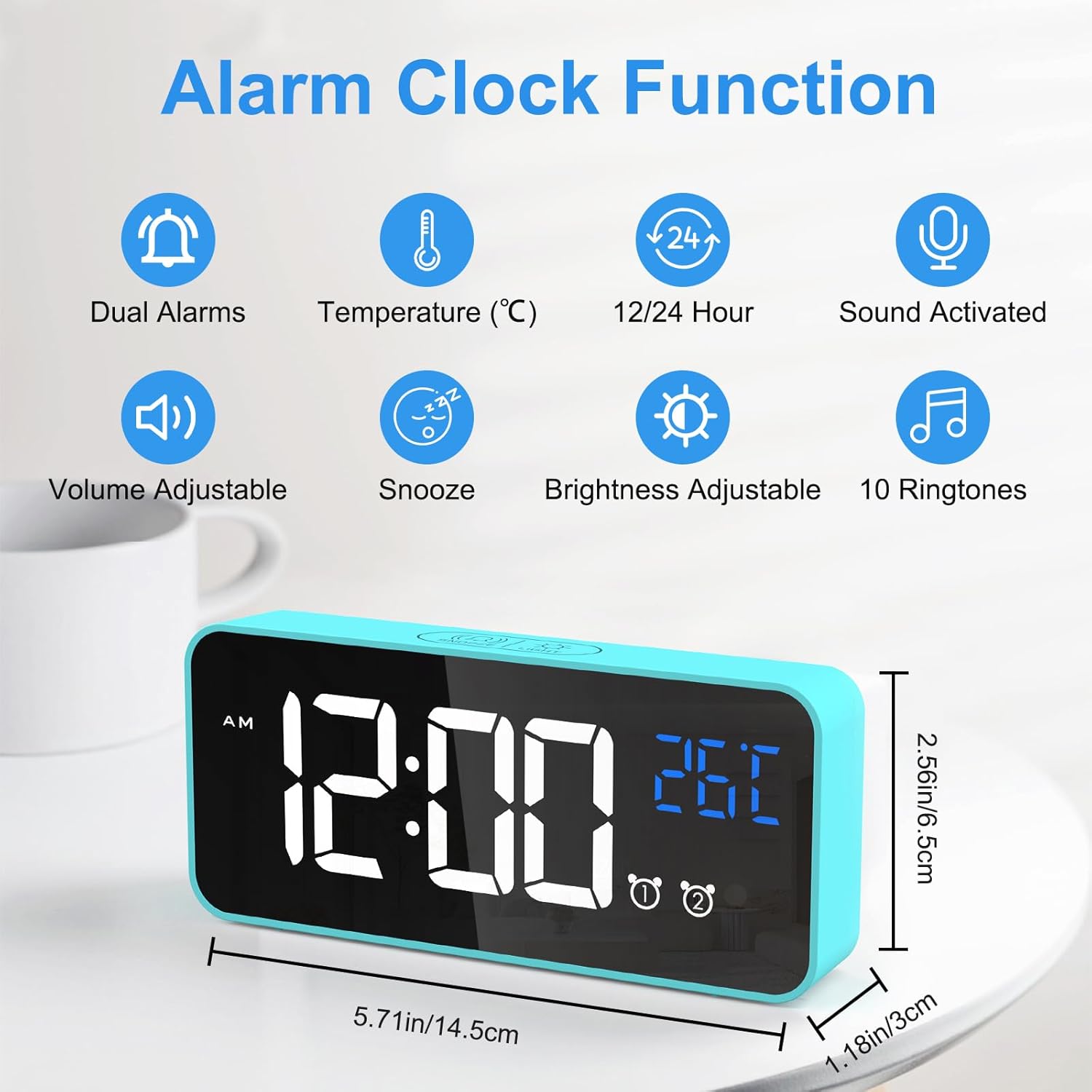
Image: An infographic highlighting the key functions of the alarm clock, including dual alarms, temperature display, 12/24 hour format, sound activation, volume adjustment, snooze, brightness adjustment, and 10 ringtones.
- Dubbele vermogensmodi: Operates via USB for continuous display or built-in battery for portable use with voice activation.
- Instelbare helderheid: 4 manual levels and automatic adjustment when USB powered.
- Dubbele alarmen met snoozefunctie: Set two independent alarms with a convenient 5-minute snooze function.
- Aanpasbaar geluid: Choose from 3 volume levels and 10 unique ringtones.
- Spraakactivering: In battery mode, the display activates for 6 seconds when sound exceeds 90 dB.
- Temperatuurweergave: Shows ambient temperature in Celsius or Fahrenheit.
- Geheugenfunctie: Settings are retained even if power is lost or the clock is turned off and on again.

Image: A visual explanation of the memory function, showing that settings are retained even after power loss or restart.
Onderhoud
- Schoonmaak: Reinig het oppervlak van de wekker met een zachte, droge doek. Gebruik geen schurende reinigingsmiddelen of oplosmiddelen.
- Omgeving: Keep the alarm clock away from heat sources, direct sunlight, and high humidity environments.
- Opslag: If the alarm clock will not be used for an extended period, turn off the power switch to preserve battery life.
Probleemoplossing
| Probleem | Mogelijke oorzaak | Oplossing |
|---|---|---|
| Display is blank or scrambled. | Low battery, power issue, or internal error. | Connect to USB power. If the issue persists, use a pin to press the "RESET" button on the bottom of the clock. |
| Display turns off after 6 seconds. | Clock is operating on battery power. | This is normal behavior to conserve battery. Connect to USB power for a continuously lit display. |
| Het alarm gaat niet af. | Het alarm is niet geactiveerd of het volume is te laag. | Ensure the alarm switch (Alarm 1 or Alarm 2) is in the "ON" position. Check and adjust the alarm volume. |
| Time/settings are lost after power off. | This should not happen due to memory function. | Ensure the internal battery is charged. If the issue persists, perform a reset. |
Specificaties
| Functie | Detail |
|---|---|
| Merk | CHEREEKI |
| Modelnummer | 8808 |
| Kleur | Blauw |
| Afmetingen (L x B x H) | 14.5 x 6.5 x 3 cm (5.71 x 2.56 x 1.18 inch) |
| Gewicht | 158 gram (0.35 lbs) |
| Materiaal | Plastic |
| Weergavetype | Digitale LED |
| Energiebron | USB Cable / Built-in Lithium-polymer Battery |
| Speciale kenmerken | Temperature Display, Snooze Function, Dual Alarms, Voice Activation, Adjustable Brightness, 10 Ringtones |
Garantie en ondersteuning
CHEREEKI is committed to providing high-quality products and excellent customer service. If you have any questions or encounter issues with your alarm clock, please do not hesitate to contact our customer support team. We are dedicated to providing attentive after-sales service.
For support, please refer to the contact information provided with your purchase or visit the official CHEREEKI webplaats.
Ask a question about this manual
Ask about setup, troubleshooting, compatibility, parts, safety, or missing instructions. Manuals+ will review the question and use this page’s manual context to help answer it.