
Technical Pro (2) BOOM8
Technical Pro BOOM8 Wireless TWS Portable 8" LED Party Speakers User Manual
Model: (2) BOOM8
Brand: Technical Pro
Invoering
Welcome to the user manual for your Technical Pro BOOM8 Wireless TWS Portable 8" LED Party Speakers. This manual provides essential information for the safe and efficient operation of your new speakers. Please read it thoroughly before use and retain it for future reference.
The BOOM8 speakers are designed to deliver powerful audio with dynamic LED lighting, offering versatile connectivity options including Bluetooth, USB, FM radio, and AUX input. With True Wireless Stereo (TWS) functionality, you can connect two BOOM8 speakers for an immersive stereo sound experience.
Veiligheidsinformatie
Om een veilige werking te garanderen en schade te voorkomen, dient u de volgende voorzorgsmaatregelen in acht te nemen:
- Stel de luidsprekers niet bloot aan water, vocht of extreme temperaturen.
- Plaats de luidsprekers niet in de buurt van warmtebronnen zoals radiatoren, verwarmingsroosters, kachels of andere apparaten (waaronder ampwarmtebronnen) die warmte produceren.
- Gebruik uitsluitend de door de fabrikant gespecificeerde toebehoren/accessoires.
- Alleen reinigen met een droge doek. Gebruik geen vloeibare reinigingsmiddelen of reinigingsmiddelen in spuitbussen.
- Zorg ervoor dat er niet op het netsnoer kan worden gelopen en dat het niet kan worden afgekneld, vooral bij stekkers, stopcontacten en het punt waar het snoer uit het apparaat komt.
- Haal de stekker uit het stopcontact tijdens onweer of wanneer u het apparaat gedurende langere tijd niet gebruikt.
- Laat alle servicewerkzaamheden over aan gekwalificeerd servicepersoneel. Service is vereist wanneer het apparaat op enigerlei wijze is beschadigd, zoals wanneer het netsnoer of de stekker is beschadigd, er vloeistof is gemorst of er voorwerpen in het apparaat zijn gevallen, het apparaat is blootgesteld aan regen of vocht, niet normaal werkt of is gevallen.
Inhoud van het pakket
Controleer of alle hieronder vermelde artikelen in uw pakket zitten:
- Technical Pro BOOM8 Portable Rechargeable 8" LED Speaker (x2)
- USB-oplaadkabel (x1)
- Gebruiksaanwijzing (x1)

Image: Technical Pro BOOM8 User Manual and USB Charging Cable
Product voorbijview
Familiarize yourself with the various components and controls of your BOOM8 speaker.

Afbeelding: Voorzijde View of BOOM8 Speaker with Blue LED

Afbeelding: Boven View of BOOM8 Speaker Control Panel

Image: Close-up of BOOM8 Control Panel
Functies van het Configuratiescherm:
- POWER/VOLUME-knop: Hiermee kunt u de luidspreker in- en uitschakelen en het hoofdvolume aanpassen.
- 5V gelijkstroom IN: Charging port for the built-in battery.
- AUX-ingang: 3.5 mm-aansluiting voor het aansluiten van externe audioapparaten.
- Afspeelbediening: Previous Track, Play/Pause, Next Track.
- LED-schakelaar: Schakelt de ledlampjes aan/uit.
- USB-poort: Voor het afspelen van MP3 filevanaf een USB-flashstation (tot 64 GB).
- MICROFOON INGANG: 1/4" input for a microphone.
- LCD-scherm: Displays current mode and track information.
Instellen
De batterij opladen
Before initial use, fully charge the speaker's built-in rechargeable battery for 8-10 hours. Connect the provided USB charging cable to the 5V DC IN port on the speaker and to a compatible USB power adapter (not included). The charging indicator light will illuminate during charging.
Aan/uitzetten
To power on the speaker, rotate the POWER/VOLUME knob clockwise until it clicks and the display illuminates. To power off, rotate the knob counter-clockwise until it clicks.
Initiële plaatsing
Place the speakers on a stable, flat surface. For optimal sound dispersion, ensure there are no obstructions directly in front of the speaker grille.
Gebruiksaanwijzing
Bluetooth Pairing (Single Speaker)
- Ensure the speaker is powered on and in Bluetooth mode (indicated on the LCD screen). If not, press the Mode button to cycle through modes until "Bluetooth" is displayed.
- Enable Bluetooth on your A2DP stereo Bluetooth device (e.g., smartphone, tablet).
- Zoeken naar available Bluetooth devices. The speaker will appear as "BOOM8".
- Select "BOOM8" from the list to pair. A confirmation tone will sound upon successful pairing.
- You can now play audio from your device through the speaker. The Bluetooth range is approximately 30 feet.
Echte draadloze stereo (TWS) -koppeling
TWS allows you to connect two BOOM8 speakers wirelessly to a single Bluetooth device for a true stereo sound experience.

Image: Two BOOM8 Speakers in TWS Configuration
- Ensure both BOOM8 speakers are powered on and in Bluetooth mode.
- On one of the speakers (this will be your primary speaker), press and hold the Play/Pause button for a few seconds until you hear a pairing tone. The two speakers will automatically connect to each other.
- Once the speakers are paired with each other, enable Bluetooth on your A2DP stereo Bluetooth device.
- Zoeken naar available Bluetooth devices and select "BOOM8".
- Both speakers will now play audio in stereo from your device.
USB-weergave
- Plaats een USB-stick (geformatteerd met MP3). files, maximum 64GB) into the USB port on the control panel.
- The speaker will automatically switch to USB mode and begin playing the first compatible MP3 file.
- Use the Previous Track, Play/Pause, and Next Track buttons to control playback.
- The speaker supports a repeat function for USB playback.
FM-radiobediening
- Druk op de Mode-knop om over te schakelen naar de FM-radiomodus.
- Press the Play/Pause button once to initiate an automatic station scan. The speaker will scan and save available FM stations.
- Gebruik de knoppen 'Vorig nummer' en 'Volgend nummer' om tussen opgeslagen stations te navigeren.
AUX-ingang
- Sluit een extern audioapparaat (bijvoorbeeld een smartphone of mp3-speler) aan op de AUX-ingang met een 3.5 mm audiokabel (niet meegeleverd).
- Press the Mode button to switch to AUX mode.
- Audio from your connected device will now play through the speaker. Control playback from your external device.
Microfooningang
- Connect a 1/4" microphone (not included) to the MIC IN port.
- Adjust the microphone volume using the dedicated microphone volume control (if available on your microphone or speaker model).
- The microphone input can be used simultaneously with other audio sources (Bluetooth, USB, AUX).
LED-lichtregeling
The BOOM8 speakers feature dynamic LED lights around the woofer. To toggle the LED lights on or off, press the dedicated LED switch on the control panel.
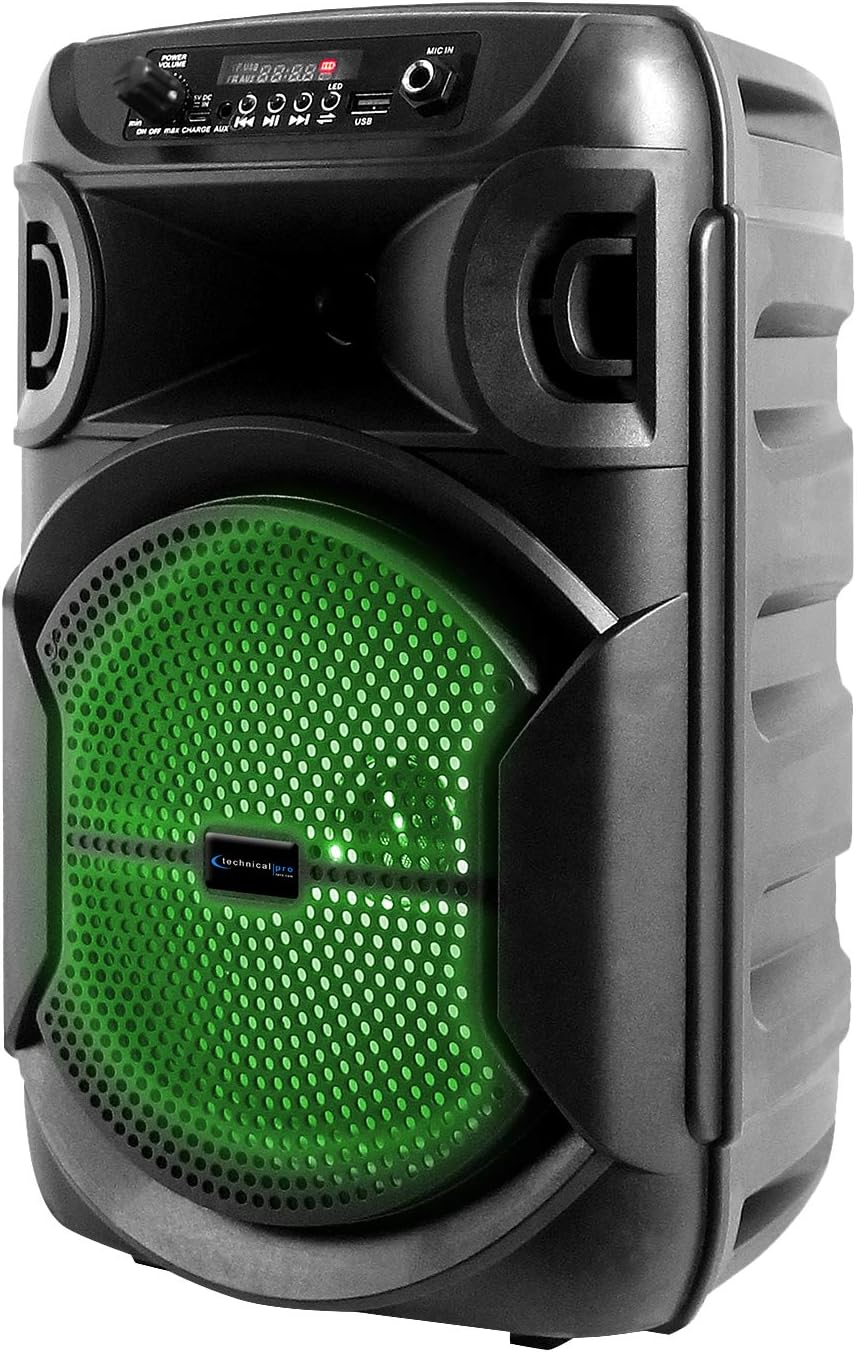
Image: BOOM8 Speaker with Green LED Illumination
Onderhoud
Schoonmaak
- Schakel de luidspreker altijd uit en haal de stekker uit het stopcontact voordat u hem schoonmaakt.
- Veeg de buitenkant van de luidspreker schoon met een zachte, droge doek.
- Gebruik geen schurende reinigingsmiddelen, was of oplosmiddelen, omdat deze de afwerking kunnen beschadigen.
Opslag
- Bewaar de luidspreker op een koele, droge plaats, uit de buurt van direct zonlicht en extreme temperaturen.
- Als u het apparaat voor langere tijd opbergt, zorg er dan voor dat de batterij gedeeltelijk is opgeladen (ongeveer 50%) om de levensduur te verlengen. Laad de batterij om de paar maanden volledig op als u het apparaat niet gebruikt.
Probleemoplossing
If you encounter issues with your BOOM8 speakers, refer to the following table for common problems and solutions.
| Probleem | Mogelijke oorzaak | Oplossing |
|---|---|---|
| De luidspreker gaat niet aan. | Batterij is leeg. | Sluit de luidspreker met behulp van de USB-oplaadkabel aan op een stroombron en laat hem opladen. |
| Er komt geen geluid uit de luidspreker. | Volume is too low or muted. Incorrect input mode. Bluetooth not paired. | Increase the volume. Ensure the correct input mode (Bluetooth, USB, AUX, FM) is selected. Re-pair Bluetooth device. |
| Het Bluetooth-apparaat kan de luidspreker niet vinden. | Speaker not in Bluetooth pairing mode. Device too far. Interference. | Ensure speaker is in Bluetooth mode. Move device closer to speaker. Avoid strong electromagnetic interference. |
| TWS-koppeling mislukt. | Speakers not reset. One speaker already paired to a device. | Ensure both speakers are in Bluetooth mode and not connected to any device. Try holding the Play/Pause button on one speaker again to initiate TWS pairing. |
| USB-weergave werkt niet. | USB drive not formatted correctly. Incompatible file type. Drive size too large. | Ensure USB drive is formatted correctly and contains MP3 files. Max USB size is 64GB. |
Specificaties
| Functie | Detail |
|---|---|
| Piekvermogen | 1000 Watt |
| Woofer-formaat | 8 inches (LED woofer) |
| Ingangen | USB flash drive, FM Radio, AUX, Bluetooth, 1/4'' microphone input |
| Bluetooth-versie | A2DP & AVRCP stereo Bluetooth device compatible |
| Bluetooth-bereik | 30 voet |
| USB Card Maximum Size | 64GB |
| Ondersteunde audio Files (USB) | .mp3 files |
| Impedantie | 3 ohm |
| Gevoeligheid | 80 ± 2dB (1W@1M) |
| Frequentierespons | 80Hz - 18KHz |
| Materiaal | ABS Plastic Face & Rugged perforated grill |
| Energiebron | Ingebouwde oplaadbare batterij |
| Battery Charge Time (Initial) | 8-10 uur |
| Artikelgewicht | 8 pond (per luidspreker) |
| Pakket afmetingen | 15 x 9 x 8 inch |
Garantie en ondersteuning
For warranty information and technical support, please refer to the documentation provided with your purchase or contact Technical Pro directly.
Contactgegevens:
Questions / Comments: Call 888-842-6277
E-mailadres: info@tpro.com