
1. Inleiding
Thank you for choosing the ALPHAMED UFR103 Infrared Forehead Digital LCD Thermometer. This device is designed for fast, accurate, and non-contact temperature measurement of the human body, objects, and ambient room temperature. It features a backlit digital LCD display for easy reading and is suitable for all ages.
Belangrijkste kenmerken zijn:
- Infrared thermometer with backlit digital LCD display.
- Fast 1-second reading with high-precision sensor and advanced infrared technology.
- Memory function stores up to 20 measurements to monitor body temperature changes and assist in fever diagnosis.
- Automatic shutdown after 60 seconds of inactivity to conserve energy.
- Measures ambient, body, and object temperatures.

Image 1: ALPHAMED Infrared Forehead Thermometer UFR103 and its packaging.
2. Veiligheidsinformatie
Please read all instructions carefully before using this device. Failure to follow these instructions may result in inaccurate readings or product damage.
- Alleen voor uitwendig gebruik.
- Vermijd contact met de ogen.
- Keep away from direct open flame or heat sources.
- Dompel het apparaat niet onder in water of andere vloeistoffen.
- Do not drop the thermometer or expose it to strong mechanical shock.
- Buiten het bereik van kinderen houden zonder toezicht van volwassenen.
- Raadpleeg een arts als u zich zorgen maakt over de temperatuurmetingen.
3. Product voorbijview
The ALPHAMED UFR103 thermometer is designed for user-friendly operation. Familiarize yourself with its components and features:

Image 2: Diagram illustrating key features of the thermometer.

Afbeelding 3: Voor- en zijkant view of the ALPHAMED UFR103 thermometer.
The device incorporates an integrated precision probe for accurate readings, supported by a smart chip and non-contact infrared technology.

Image 4: Integrated precision probe and technological features.
4. Instellen
Before first use, or when the low battery indicator appears, install or replace the batteries.
4.1 Batterij installatie
- Zoek het batterijklepje op het handvat van de thermometer.
- Slide the cover open according to the arrow indicator.
- Plaats twee (2) AAA-batterijen en let daarbij op de juiste polariteit (+ en -).
- Sluit het batterijklepje goed.
The thermometer requires 2 AAA batteries for operation.
5. Gebruiksaanwijzing
5.1 In-/uitschakelen
Press the measurement button (trigger) to turn on the thermometer. The device will perform a self-test and display the last measurement. The thermometer will automatically shut down after approximately 60 seconds of inactivity to conserve battery life.
5.2 De meetmodus selecteren
The thermometer can measure body temperature, object temperature, and ambient room temperature. Use the 'MODE' button (if available, refer to device buttons) to cycle through these modes. The selected mode will be indicated on the LCD display.
5.3 Een meting uitvoeren
- Ensure the correct measurement mode is selected (e.g., Body mode for human temperature).
- Point the thermometer at the center of the forehead from a distance of 3-5 cm (1.2-2 inches) for body temperature. For object temperature, point at the desired surface.
- Press and release the measurement button (trigger).
- The temperature reading will be displayed on the LCD screen within 1 second. A beep sound will indicate the completion of the measurement (if not muted).
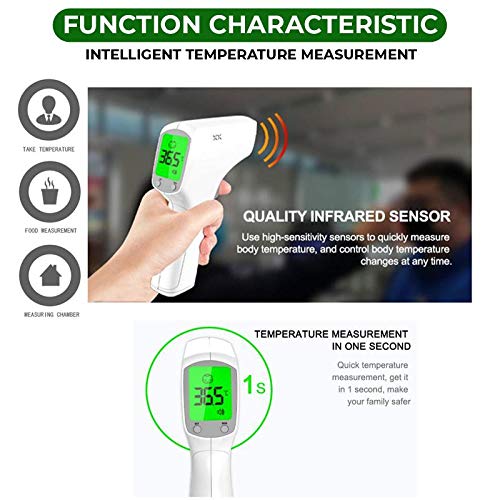
Image 5: Taking a non-contact forehead temperature measurement.

Image 6: Thermometer in use, highlighting 1-second fast reading.
5.4 Schakeltemperatuureenheden (°C/°F)
With the device powered on, press the 'SET' button (or similar button indicated on your device) to switch between Celsius (°C) and Fahrenheit (°F). The selected unit will be displayed on the screen.
5.5 Geheugenfunctie
The thermometer can store up to 20 previous temperature readings. To access the memory, press the 'MEM' button. Each press will cycle through the stored readings. This feature helps in tracking temperature changes over time.
5.6 Fever Alarm Function
The device is equipped with a fever alarm function. If a body temperature reading exceeds a predefined threshold (e.g., 99.5°F or 37.5°C), the thermometer may emit a specific alarm sound or change the backlight color to indicate a potential fever.

Image 7: Visual representation of the fever alarm function.
5.7 Mute-functie
Some models may include a mute function to silence the beep sounds. Refer to the device's buttons or settings for this option, often indicated by a speaker icon with a cross through it.

Image 8: Versatile design and ease of use features, including mute function.
6. Onderhoud
6.1 Reinigen
- Gebruik een zachte, droge doek om de behuizing van de thermometer schoon te maken.
- For the probe and lens, gently wipe with a cotton swab slightly moistened with alcohol. Allow to dry completely before use.
- Gebruik geen schurende reinigingsmiddelen en dompel het apparaat niet onder in water.
6.2 Opslag
- Bewaar de thermometer op een koele, droge plaats, uit de buurt van direct zonlicht en extreme temperaturen.
- Verwijder de batterijen als u het apparaat gedurende langere tijd niet gebruikt, om lekkage te voorkomen.
7. Probleemoplossing
If you encounter issues with your thermometer, refer to the following common solutions:
- Geen stroom: Controleer of de batterijen correct zijn geplaatst en niet leeg zijn. Vervang de batterijen indien nodig.
- Onjuiste metingen: Ensure the probe is clean. Make sure the measurement distance is correct (3-5 cm for forehead). Avoid taking measurements in environments with strong airflow or extreme temperature changes. Allow the thermometer to acclimatize to room temperature for 30 minutes if moved from a different environment.
- Foutmelding op het scherm: Refer to the specific error code in the full product manual (if available) or contact customer support. Common errors might indicate ambient temperature outside operating range or sensor issues.
- Geen pieptoon: Controleer of de dempfunctie is geactiveerd.
8. Specificaties
| Modelnummer | UFR103 |
| Merk | ALFAMED |
| Weergavetype | LCD |
| Connectiviteitstechnologie | Infrarood |
| Energiebron | Op batterijen |
| Batterijen vereist | 2 AAA (Type of battery needed) |
| Extern materiaal | Plastic |
| Kleur | Wit |
| Speciale functie | Hoge precisie |
| Eenheid Aantal | 1 eenheid |
| Afmetingen | 19.05 x 11.43 x 5.08 cm; 204.12 grams (Package Dimensions) |
9. Garantie en ondersteuning
For warranty information or technical support, please refer to the documentation included with your purchase or contact ALPHAMED customer service directly. Contact details can typically be found on the product packaging or the manufacturer's official webplaats.