
1. Inleiding
The INFURIDER YF-1500 is a professional-grade non-contact infrared thermometer designed for accurate temperature measurement in industrial settings. It features a wide temperature range, dual laser targeting, and adjustable emissivity, making it suitable for various high-temperature applications. This device is intended for industrial use only and is not suitable for measuring human or animal body temperature.
Belangrijkste kenmerken zijn:
- Wide Temperature Range: -58℉ to 2732℉ (-50℃ to 1500℃)
- High Accuracy: ±2%
- Distance to Spot Ratio (D:S): 30:1
- Dual Laser Pointers for precise targeting
- Instelbare emissiviteit (0.1-1.0)
- MAX/MIN/AVG/DIF Temperature Display Modes
- Alarm voor hoge/lage temperatuur
- Automatic Shut Down and Low Battery Indication
- Switchable ℃/℉ Units
- Data Hold and Data Record Functions
- Backlight LCD Screen and Flashlight
2. Product voorbijview
Familiarize yourself with the components of your INFURIDER YF-1500 infrared thermometer.
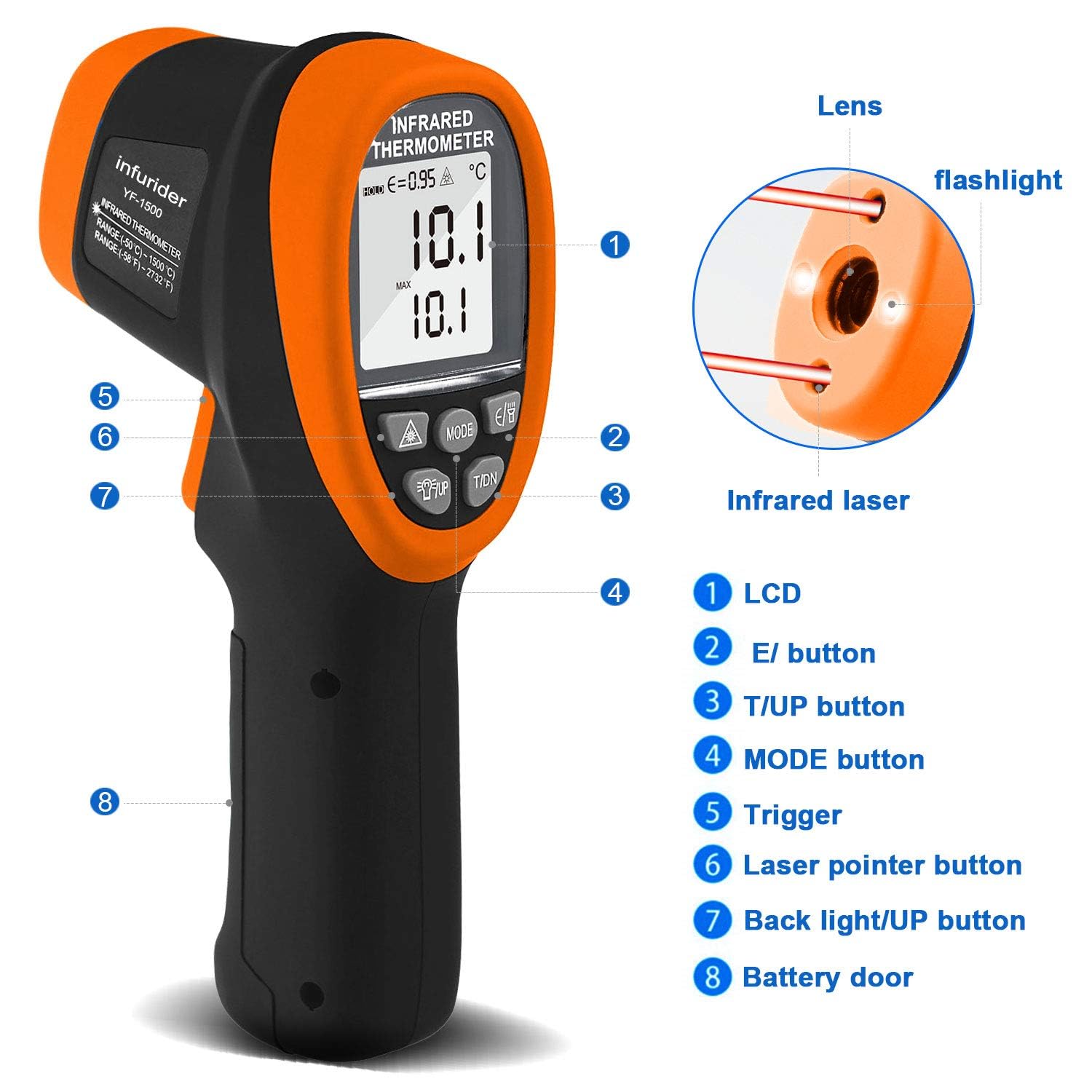
Figuur 1: INFURIDER YF-1500 Infrared Thermometer Components. This image shows the front and side view of the thermometer, highlighting key parts such as the LCD, E/ button, T/UP button, MODE button, Trigger, Laser pointer button, Back light/UP button, and Battery door. It also points out the lens, flashlight, and infrared laser.
Belangrijkste componenten:
- LCD-scherm: Shows temperature readings, mode indicators, emissivity, and battery status.
- E/ Button: Used for adjusting emissivity.
- T/UP Button: Used for temperature unit selection (℃/℉) and navigating menus.
- MODE-knop: Cycles through measurement modes (MAX, MIN, AVG, DIF).
- Trekker: Activates the infrared sensor and laser for measurement.
- Laserpointerknop: Toggles the dual laser pointers on/off.
- Backlight/UP Button: Activates the LCD backlight and serves as an 'up' button in menu navigation.
- Batterijklep: Biedt toegang tot het batterijcompartiment.
3. Instellen
3.1 Batterij installatie
The INFURIDER YF-1500 requires a 9V battery for operation. A screwdriver is typically included for opening the battery compartment.
- Locate the battery door at the bottom of the handle (refer to Figure 1, item 8).
- Gebruik een kleine schroevendraaier om het batterijcompartiment te openen.
- Plaats een nieuwe 9V-batterij en let op de juiste polariteit.
- Sluit het batterijvak goed af.
Note: If the low battery indicator appears on the LCD, replace the battery promptly to ensure accurate readings.
4. Gebruiksaanwijzing
4.1 Basistemperatuurmeting
- Richt de thermometer op het doelobject.
- Houd de Trekker (Figure 1, item 5) to begin measurement. The dual laser pointers will indicate the measurement area.
- The temperature reading will appear on the LCD within 0.25 seconds.
- Release the trigger to hold the reading on the display. The device will automatically shut down after a period of inactivity to conserve battery.
4.2 Afstand-spotverhouding (D:S)
The YF-1500 has a D:S ratio of 30:1. This means that at a distance of 30 units from the target, the measurement spot diameter will be 1 unit. For example, at 30 cm distance, the spot size is 1 cm. A higher D:S ratio allows for accurate measurement of smaller targets from a greater distance, ensuring safety from heat sources.

Figuur 2: Distance to Spot Ratio. This diagram visually explains how the measurement spot size increases with distance, demonstrating the 30:1 ratio for safe and accurate temperature readings.
4.3 Emissiviteitsaanpassing
Emissivity (ε) is a measure of an object's ability to emit infrared energy. Different materials have different emissivity values. For accurate readings, adjust the emissivity setting (0.1-1.0) to match the surface material being measured.
- Druk op de E/ button (Figure 1, item 2). The emissivity value will flash on the LCD.
- Gebruik de UP (Figure 1, item 7) and OMLAAG (Figure 1, item 3) buttons to adjust the emissivity value.
- Druk op de E/ button again or wait a few seconds for the setting to be saved.
Refer to a standard emissivity table for common materials if unsure.
4.4 Meetmodi (MAX/MIN/AVG/DIF)
The YF-1500 offers various measurement modes to suit different needs:

Figuur 3: Measurement Modes. This image displays the thermometer's LCD screen cycling through MAX, MIN, AVG, and DIF temperature readings, illustrating the different data display options.
- Druk op de MODUS button (Figure 1, item 4) repeatedly to cycle through the available modes:
- MAXIMAAL: Geeft de maximale temperatuur weer die tijdens een continue meting is geregistreerd.
- MIN: Geeft de laagste temperatuur weer die tijdens een continue meting is geregistreerd.
- AVG: Geeft de gemiddelde temperatuur weer die tijdens een continue meting is geregistreerd.
- Moeilijk: Displays the difference between the maximum and minimum temperatures recorded during a continuous scan.
- To exit a mode, press the MODUS button until the desired display returns.
4.5 Alarm hoge/lage temperatuur
You can set high and low temperature alarms to alert you when readings exceed or fall below a specified threshold.
- Druk op de MODUS button until 'HAL' (High Alarm) or 'LAL' (Low Alarm) appears on the display.
- Gebruik de UP En OMLAAG buttons to set the desired temperature threshold.
- Druk op de MODUS knop nogmaals om de instelling te bevestigen.
- When the measured temperature exceeds the high alarm or falls below the low alarm, an audible alert will sound.
4.6 ℃/℉ Unit Switching
Om te wisselen tussen Celsius (℃) en Fahrenheit (℉):
- Druk op de T/UP button (Figure 1, item 3) to toggle between the two units.
4.7 Laser- en achtergrondverlichtingsregeling
The device includes dual laser pointers for precise targeting and an LCD backlight for visibility in low-light conditions.
- Druk op de Laser Pointer Button (Figure 1, item 6) to turn the dual lasers on or off.
- Druk op de Backlight/UP Button (Figure 1, item 7) to turn the LCD backlight on or off.
5. Onderhoud
5.1 Reinigen
- Maak de lens schoon met een zachte, damp doek. Gebruik geen schurende reinigingsmiddelen of oplosmiddelen.
- Wipe the device body with a damp lap.
- Zorg ervoor dat het apparaat droog is voordat u het opbergt.
5.2 Opslag
- Bewaar de thermometer op een koele, droge plaats, uit de buurt van direct zonlicht en extreme temperaturen.
- Verwijder de batterij als u het apparaat gedurende langere tijd niet gebruikt, om lekkage te voorkomen.
6. Probleemoplossing
If you encounter issues with your INFURIDER YF-1500, consider the following:
- Geen stroom: Check battery installation and replace with a fresh 9V battery if necessary.
- Onjuiste metingen: Ensure the emissivity setting matches the target material. Verify the D:S ratio is appropriate for your measurement distance and target size. Clean the lens if it is dirty.
- Weergaveproblemen: If the LCD is dim, replace the battery. If the display is erratic, try removing and reinserting the battery.
- Laser werkt niet: Ensure the laser pointer button is pressed. Check battery level.
For further assistance, please contact INFURIDER customer support.
7. Specificaties
| Functie | Specificatie |
|---|---|
| Temperatuurbereik | -58℉~2732℉ (-50℃~1500℃) |
| Nauwkeurigheid | ±2% |
| Afstand tot puntverhouding (D:S) | 30:1 |
| Reactietijd | 0.25 seconden |
| Emissiviteit | Verstelbaar 0.1-1.0 |
| Lasertype | Class II, Optical power <0.5mW |
| Golflengte | 8-14um |
| Energiebron | 9V-batterij (meegeleverd) |
| Weergavetype | LCD met achtergrondverlichting |
| Automatische uitschakeling | Ja |
| Productafmetingen | 23.8x16.4x8.2cm |
| Gewicht | 500 gram |
8. Veiligheidsinformatie
IMPORTANT: This infrared thermometer is designed for industrial applications only. It is NOT intended for medical use or for measuring human or animal body temperature. Using it for such purposes may lead to inaccurate readings and potentially incorrect health assessments.
- Laser veiligheid: This device uses a Class II laser. Do not stare directly into the laser beam or point it at eyes. Avoid direct eye exposure.
- Bedrijfsomgeving: Gebruik het apparaat niet in omgevingen met explosieve gassen, dampen of stof.
- Onderhoud: Probeer het apparaat niet te demonteren of aan te passen. Reparaties mogen alleen worden uitgevoerd door gekwalificeerd personeel.
- Elektrische veiligheid: Houd het apparaat uit de buurt van water en andere vloeistoffen.

Figuur 4: Proper Use vs. Improper Use. This image clearly illustrates that the INFURIDER YF-1500 is not for human or animal temperature measurement, showing an incorrect use case on a child and a correct use case on an oven.
9. Garantie en ondersteuning
INFURIDER provides lifetime technical support for the YF-1500 Non-Contact Infrared Thermometer. For any technical inquiries, troubleshooting assistance, or warranty claims, please contact INFURIDER customer service through their official channels or the retailer where the product was purchased.