
1. Inleiding
Thank you for choosing the Master MA-8.1K Portable Amplified Bluetooth Speaker. This manual provides essential information for the safe and efficient operation of your device. Please read it thoroughly before use and retain it for future reference.
The Master MA-8.1K is designed to deliver powerful and clear audio, featuring versatile connectivity options including Bluetooth, USB, Micro SD, and auxiliary input. It also includes a microphone for karaoke or public address functions and TWS (True Wireless Stereo) technology for pairing with another compatible speaker.
2. Product voorbijview
2.1 Pakketinhoud
Controleer bij het uitpakken of alle artikelen aanwezig zijn:
- Master MA-8.1K draagbaar Ampgeïntegreerde Bluetooth-luidspreker
- Bedrade microfoon
- Afstandsbediening
- Oplaadadapter
- Hulpkabel

Figure 2.1: Master MA-8.1K speaker and included accessories.
2.2 Rear Panel Controls and Ports
Familiarize yourself with the controls and connection ports located on the rear panel of the speaker.

Afbeelding 2.2: Gedetailleerd view of the rear control panel.
- Micro SD-slot: Voor het afspelen van audio filevanaf een Micro SD-kaart.
- USB-poort: Voor het afspelen van audio files van een USB-flashstation.
- Volumeknop: Past het volume van de hoofdluidspreker aan.
- Treble knop: Past de hoge frequentie audio-uitvoer aan.
- Bas knop: Past de lage frequentie-audio-uitvoer aan.
- Hulpingang (AUX IN): 3.5 mm-aansluiting voor het aansluiten van externe audioapparaten.
- Microfooningang (MIC IN): 6.35 mm jack-aansluiting voor het aansluiten van de bedrade microfoon.
- Volumeknop microfoon: Past het microfoonvolume aan.
- Aan / uit schakelaar: Zet de luidspreker aan of uit.
- LED-lichtschakelaar: Controls the integrated LED lighting.
- Modusknop: Cycles through input modes (Bluetooth, USB, Micro SD, AUX).
- TWS Mode Button: Start de koppeling tot True Wireless Stereo.
- Record/Play Button: For recording microphone input or playing back recordings.
- Microfoonprioriteitsknop: Lowers music volume when microphone is in use.

Figure 2.3: Key features highlighted on the rear panel.
3. Instellen
3.1 De luidspreker opladen
The speaker is equipped with a rechargeable battery. Before first use, fully charge the speaker for optimal performance.
- Connect the charging adapter to the DC 5V input port on the rear panel.
- Sluit de adapter aan op een standaard stopcontact.
- Het oplaadlampje gaat branden. Zodra de batterij volledig is opgeladen, kan het lampje van kleur veranderen of uitgaan, afhankelijk van het model.
- Een volledige lading biedt ongeveer 5 uur ononderbroken muziekweergave.
3.2 In-/uitschakelen
Locate the Power Switch on the rear panel.
- To turn on: Flip the Power Switch to the 'ON' position. The display will light up.
- To turn off: Flip the Power Switch to the 'OFF' position.
4. Gebruiksaanwijzing
4.1 Bluetooth-verbinding
Connect your smartphone, tablet, or other Bluetooth-enabled device wirelessly.
- Turn on the speaker. It will automatically enter Bluetooth pairing mode, indicated by a flashing 'BLUE' on the display and an audible prompt.
- Schakel Bluetooth in op uw apparaat en zoek naar beschikbare apparaten.
- Select 'MA-8.1K' from the list of devices.
- Once connected, the speaker will emit an audible confirmation, and the 'BLUE' indicator will stop flashing.
- U kunt nu audio van uw apparaat via de luidspreker afspelen.
4.2 TWS (True Wireless Stereo) Koppelen
Pair two Master MA-8.1K speakers for a stereo sound experience.
- Ensure both MA-8.1K speakers are turned on and in Bluetooth mode, but not yet connected to any device.
- On one of the speakers (this will be the primary speaker), press and hold the 'TWS' button. The speaker will emit a pairing tone.
- The primary speaker will search for the secondary speaker. Once connected, both speakers will emit a confirmation tone.
- Now, connect your Bluetooth device to the primary speaker as described in Section 4.1. Audio will play in stereo through both speakers.
4.3 USB- en Micro SD-weergave
Audio afspelen files directly from a USB flash drive or Micro SD card.
- Insert a USB flash drive into the USB port or a Micro SD card into the Micro SD slot on the rear panel.
- The speaker will automatically switch to USB or Micro SD mode and begin playing audio files. If it does not, press the 'Mode' button until the correct mode is selected.
- Gebruik de afspeelknoppen (Afspelen/Pauze, Volgende/Vorige nummer) op de luidspreker of afstandsbediening om uw muziek te beheren.
4.4 Hulpingang (AUX IN)
Connect external audio devices using the 3.5mm auxiliary cable.
- Connect one end of the 3.5mm auxiliary cable to the AUX IN port on the speaker.
- Sluit het andere uiteinde van de kabel aan op de hoofdtelefoonaansluiting of de audio-uitgang van uw externe apparaat.
- Press the 'Mode' button on the speaker until 'AUX' mode is selected.
- Play audio from your external device. Adjust volume on both the speaker and your device.
4.5 Microfoongebruik
Use the included wired microphone for karaoke or public address.
- Plug the wired microphone into the MIC IN port on the rear panel.
- Adjust the 'Microphone Volume' knob to your desired level.
- To prioritize microphone audio over music, press the 'Mic Priority' button. This will temporarily lower the music volume when you speak into the microphone.

Figure 4.1: Wired microphone and remote control.
4.6 Functies afstandsbediening
The remote control provides convenient access to various speaker functions.
- Stroom: Schakelt de luidspreker in/uit.
- Modus: Switches between input sources (Bluetooth, USB, Micro SD, AUX).
- Inhoud +/-: Hiermee wordt het hoofdvolume aangepast.
- Afspelen/Pauzeren: Start of pauzeert het afspelen.
- Vorige volgende: Springt naar het vorige of volgende nummer.
- EQ: Doorloopt de equalizerpresets (indien beschikbaar).
- Stom: Dempt de audio-uitvoer.
- Cijferknoppen: For direct track selection in USB/Micro SD mode.
4.7 LED-verlichting
The speaker features integrated LED lights.
- Use the 'LED Light Switch' on the rear panel to turn the lights on or off.
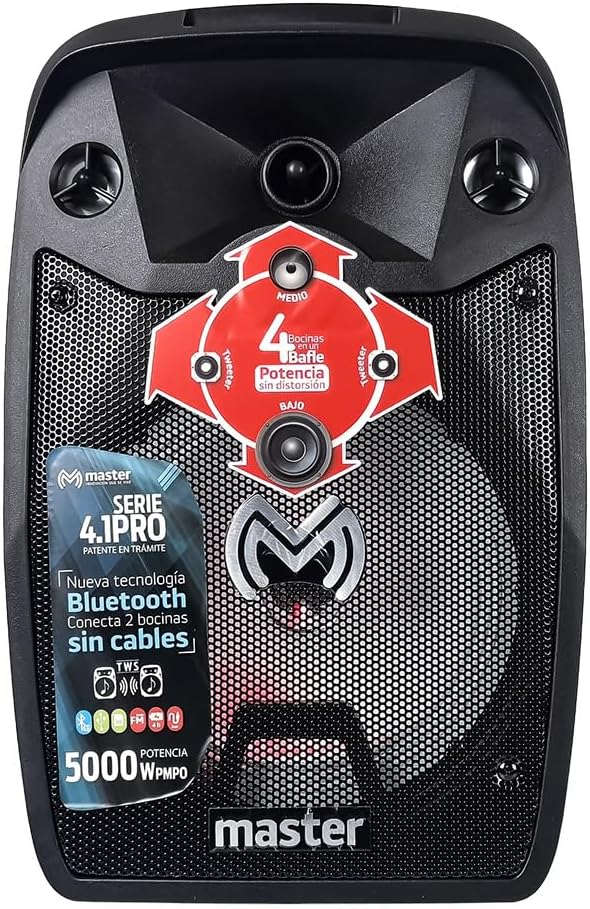
Figuur 4.2: Voorzijde view met LED-verlichting.
5. Onderhoud
Proper care ensures the longevity of your Master MA-8.1K speaker.
- Schoonmaak: Gebruik een zachte, droge doek om de buitenkant van de luidspreker schoon te maken. Gebruik geen schurende reinigingsmiddelen of oplosmiddelen.
- Opslag: Bewaar de luidspreker op een koele, droge plaats, uit de buurt van direct zonlicht en extreme temperaturen.
- batterij zorg: Als u het apparaat voor langere tijd opbergt, laad de batterij dan elke 3-6 maanden op om de levensduur te verlengen.
- Blootstelling aan water: Deze speaker is niet waterdicht. Vermijd blootstelling aan water of overmatige vochtigheid.
6. Probleemoplossing
Raadpleeg dit gedeelte voor veelvoorkomende problemen en hun oplossingen.
| Probleem | Mogelijke oorzaak | Oplossing |
|---|---|---|
| Geen stroom | De batterij is leeg; de aan/uit-schakelaar staat uit. | Charge the speaker; Ensure the Power switch is in the 'ON' position. |
| Geen geluid | Het volume is te laag; Onjuiste invoermodus; Apparaat niet correct aangesloten. | Increase speaker and device volume; Press 'Mode' button to select correct input; Reconnect device. |
| Bluetooth maakt geen verbinding | Luidspreker niet in koppelingsmodus; Bluetooth van apparaat uitgeschakeld; te ver van de luidspreker. | Ensure speaker is in Bluetooth mode (flashing 'BLUE'); Turn on device Bluetooth; Move device closer to speaker (within 10 meters). |
| Microfoon werkt niet | Microfoon niet aangesloten; microfoonvolume te laag. | Ensure microphone is securely plugged into MIC IN; Adjust 'Microphone Volume' knob. |
| TWS-koppeling mislukt | Speakers not in Bluetooth mode; Already connected to a device. | Ensure both speakers are in Bluetooth mode and not connected to any device before initiating TWS pairing. |
7. Specificaties
Detailed technical specifications for the Master MA-8.1K speaker.

Afbeelding 7.1: Afmetingen van de luidspreker.
| Functie | Specificatie |
|---|---|
| Modelnummer | MA-8.1K |
| Merk | Meester |
| Uitgang Wattage | 5000 Watt (PMPO) |
| Connectiviteitstechnologie | Bluetooth, USB, Micro SD, AUX (3.5 mm) |
| Energiebron | Batterij |
| Batterijduur (gemiddeld) | 5 uur |
| Speciale kenmerken | Bluetooth, TWS (True Wireless Stereo), Microphone Input, Remote Control, LED Lights |
| Aanbevolen gebruik | Muziekspelers |
| Productafmetingen (L x B x H) | 28.5x27x46.5cm |
| Productgewicht | 5.5 kg |
| Compatibele apparaten | MP3 Player, Smartphones, Tablets |
| Montagetype | Vloermontage |
8. Garantie en ondersteuning
Voor garantie-informatie en klantenservice kunt u de bijgeleverde documentatie raadplegen of contact opnemen met de winkel waar u het product heeft gekocht. Bewaar uw aankoopbewijs voor eventuele garantieclaims.