
1. Belangrijke veiligheidsinstructies
Lees alle veiligheids- en bedieningsinstructies zorgvuldig door voordat u deze televisie gebruikt. Bewaar deze instructies voor toekomstig gebruik.
- Energiebron: Sluit de tv alleen aan op de stroomvoorziening die op het label staat aangegeven.
- Ventilatie: Zorg voor goede ventilatie. Blokkeer de ventilatieopeningen niet.
- Schoonmaak: Haal de stekker van de tv uit het stopcontact voordat u hem schoonmaakt. Gebruik een zachte, droge doek. Gebruik geen vloeibare reinigingsmiddelen of spuitbussen.
- Water en vocht: Do not use this TV near water, such as a bathtub, washbowl, kitchen sink, laundry tub, swimming pool, or in a wet basement.
- Warmte: Position the TV away from heat sources such as radiators, heat registers, stoves, or other products (including ampwarmtebronnen) die warmte produceren.
- kabels: Bescherm het netsnoer tegen beschadiging door erop te lopen of het te beknellen, met name bij de stekkers, stopcontacten en het punt waar het snoer uit de tv komt.
- Bliksem: Koppel deze TV los tijdens onweer of wanneer deze langere tijd niet wordt gebruikt.
- Onderhoud: Do not attempt to service this TV yourself. Refer all servicing to qualified service personnel.
2. Product voorbijview
The CHIQ L40H7N is a 40-inch Full HD Smart TV designed to provide an immersive viewing experience with integrated smart features. It offers a resolution of 1080p and includes connectivity options such as Wi-Fi and Bluetooth.
Belangrijkste kenmerken:
- Full HD (1080p) Resolution: Levert heldere en gedetailleerde beelden.
- Smart TV-functionaliteit: Access popular streaming services like Netflix, YouTube, and Prime Video.
- Integrated Wi-Fi and Bluetooth: For wireless connectivity and device pairing.
- Meerdere aansluitpoorten: Includes 3 HDMI and 2 USB ports for various external devices.
- Drievoudige tuner: Supports DVB-T/T2/C/S/S2 for versatile broadcast reception.
- Dolby-audio: Verbeterde geluidsbeleving.
- HDR10-ondersteuning: Provides improved contrast and color reproduction.
- Quad Core CPU: Ensures smooth performance for smart features and applications.

Afbeelding: Voorzijde view of the CHIQ L40H7N Smart TV, showcasindoor de dunne rand en het dunne scherm.
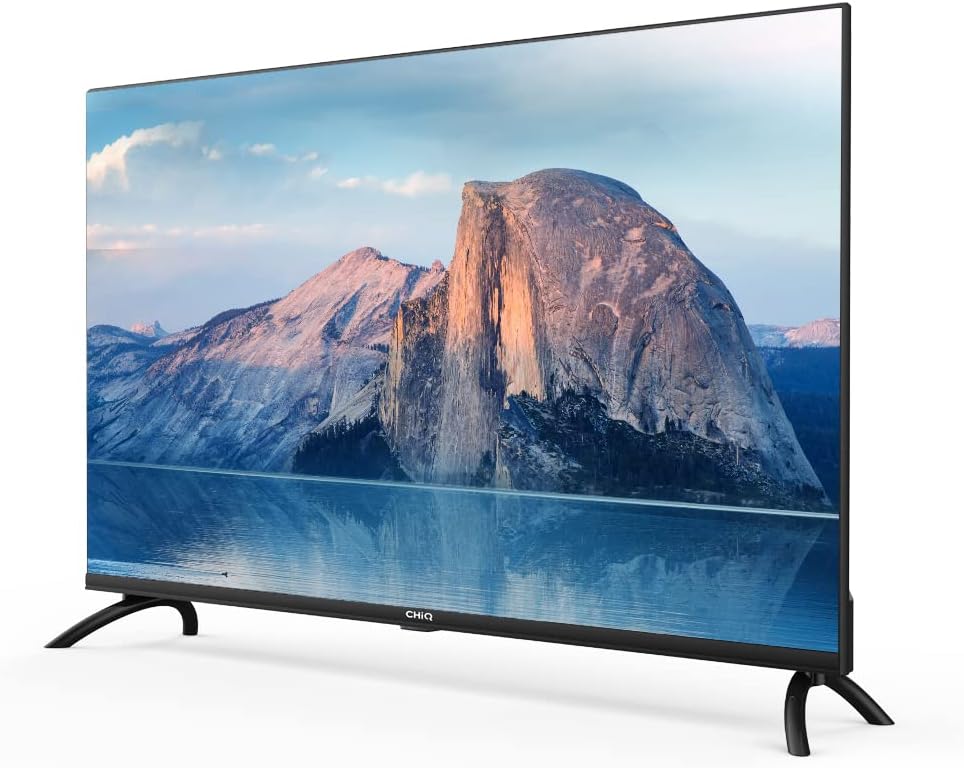
Afbeelding: Zijkant view of the CHIQ L40H7N Smart TV, highlighting its thin profile.
3. Instellen
3.1 Uitpakken
- Carefully open the packaging and remove the TV and all accessories.
- Ensure all components are present: TV unit, remote control, batteries, power cord, stand components, and user manual.
- Retain the packaging materials for future transport or servicing.
3.2 Standinstallatie
De tv-standaard installeren:
- Plaats de tv met het scherm naar beneden op een zachte, vlakke ondergrond (bijvoorbeeld een deken of schuimrubber) om beschadiging van het scherm te voorkomen.
- Lijn de poten van de standaard uit met de bijbehorende gleuven aan de onderkant van de tv.
- Bevestig de poten van de standaard met de meegeleverde schroeven. Zorg ervoor dat ze stevig vastgedraaid zijn.

Image: Diagram showing the dimensions of the CHIQ L40H7N TV, including height with stand (568.9mm), width (900.3mm), and depth with stand (178.9mm).
3.3 Wandmontage (optioneel)
If you choose to wall mount your TV, please consult a professional installer and refer to the specific instructions provided with your wall mount bracket. Ensure the wall mount is compatible with the TV's VESA mounting pattern.
3.4 Randapparatuur aansluiten
Sluit uw externe apparaten aan op de poorten van de tv:
- HDMI: Connect Blu-ray players, game consoles, or set-top boxes to the HDMI ports (HDMI1, HDMI2, HDMI3).
- USB-poort: Insert USB drives for media playback into the USB ports (USB1, USB2).
- Antenne/Kabel: Sluit uw antenne of kabel-tv-signaal aan op de juiste ingang.
- Ethernet: Voor een stabiele bekabelde internetverbinding sluit u een Ethernetkabel aan op de LAN-poort.
3.5 Stroomaansluiting
After connecting all necessary cables, plug the power cord into the TV's power input, then into a wall outlet.
3.6 Eerste inschakeling
Press the power button on the remote control or on the TV. Follow the on-screen instructions to complete the initial setup, including language selection, network connection, and channel scanning.
4. De tv bedienen
4.1 Functies afstandsbediening
Met de afstandsbediening kunt u de functies van de tv bedienen:
- Aan/uit-knop: Hiermee zet u de televisie aan of uit.
- Inhoud +/-: Past het volumeniveau aan.
- Kanaal +/-: Verandert van tv-kanaal.
- Invoerbron: Selecteert de invoerbron (HDMI, USB, TV).
- Navigatieknoppen (Omhoog/Omlaag/Links/Rechts/OK): Navigeert door menu's en bevestigt selecties.
- Home/Smart Hub: Geeft toegang tot de Smart TV-interface.
- App-knoppen: Dedicated buttons for Netflix, YouTube, Prime Video, etc.
4.2 Smart TV-functies
Your CHIQ L40H7N TV provides access to a range of smart features and applications:
- Toegang tot apps: Press the Home button or dedicated app buttons to launch applications like Netflix, YouTube, and Prime Video.
- App Store: Download en installeer extra applicaties vanuit de geïntegreerde app store.
- Schermspiegeling: Cast content vanaf compatibele smartphones of tablets naar uw tv.

Image: The CHIQ Smart TV displaying the Netflix application interface, along with other streaming apps like YouTube and Prime Video.

Image: A CHIQ Smart TV screen showing a variety of content from streaming services, indicating a rich media experience.
4.3 Netwerkverbinding
To use Smart TV features, connect your TV to the internet:
- Wifi: Ga naar Instellingen > Netwerk > Wi-Fi, selecteer je netwerk en voer het wachtwoord in.
- Ethernet: Connect an Ethernet cable from your router to the TV's LAN port. The TV will automatically detect the wired connection.
4.4 Bluetooth-connectiviteit
Pair Bluetooth devices like headphones or speakers:
- Enable Bluetooth on your external device and set it to pairing mode.
- On the TV, go to Settings > Remotes & Accessories > Bluetooth.
- Select your device from the list and follow the on-screen prompts to pair.
4.5 Ingangsselectie
Press the 'Input' or 'Source' button on your remote to switch between connected devices (HDMI1, HDMI2, HDMI3, USB, TV Tuner).
4.6 Beeld- en geluidsinstellingen
Adjust display and audio preferences via the Settings menu:
- Beeldmodus: Choose from standard, dynamic, movie, or custom settings.
- Helderheid/Contrast/Kleur: Optimaliseer de beeldkwaliteit.
- Geluidsmodus: Select audio presets like standard, music, movie, or custom.
- Dolby-audio: The TV supports Dolby Audio for enhanced sound.
- HDR10: Experience improved contrast and color with HDR10 content.

Image: The CHIQ L40H7N TV displaying a scene with the Dolby Audio logo, indicating support for enhanced sound.

Image: A split-screen comparison on the CHIQ L40H7N TV, demonstrating the visual improvement with HDR10 technology, showing richer colors and contrast.

Image: An illustration of a Quad Core CPU, representing the processing power within the CHIQ L40H7N TV for smooth operation.

Image: The CHIQ L40H7N TV positioned on a media console in a living room, showcasing its aesthetic integration into a home environment.
5. Onderhoud
5.1 De tv schoonmaken
To maintain the TV's appearance and performance:
- Scherm: Veeg het scherm voorzichtig af met een zachte, pluisvrije doek. Bij hardnekkige vlekken lichtjes afnemen.ampReinig de doek met water of een speciale schermreiniger (niet rechtstreeks op het scherm spuiten).
- Kabinet: Veeg de tv-kast af met een zachte, droge doek. Gebruik geen schurende reinigingsmiddelen of oplosmiddelen.
- Haal altijd de stekker van de tv uit het stopcontact voordat u hem schoonmaakt.
5.2 Software-updates
Regular software updates can improve performance and add new features:
- Automatische updates: Zorg ervoor dat uw tv is verbonden met internet voor automatische updates.
- Handmatige controle: You can manually check for updates in the Settings menu (e.g., Settings > About > System Update).
6. Probleemoplossing
Als u problemen ondervindt met uw tv, raadpleeg dan de volgende veelvoorkomende problemen en oplossingen:
- Geen stroom:
- Check if the power cord is securely plugged into the TV and the wall outlet.
- Ensure the wall outlet is functioning by testing it with another device.
- Try pressing the power button on the TV itself, not just the remote. - Geen beeld, maar wel geluid:
- Check the input source. Ensure it matches the device you are trying to view (e.g., HDMI1 for a Blu-ray player).
- Verify that the external device is powered on and functioning correctly.
- Try a different HDMI cable or port. - Geen geluid, maar wel beeld:
- Check the volume level and ensure the TV is not muted.
- Verify audio output settings in the TV menu (e.g., internal speakers, external audio system).
- If using an external device, check its volume and audio settings. - Afstandsbediening werkt niet:
- Vervang de batterijen in de afstandsbediening.
- Zorg ervoor dat er geen obstakels zijn tussen de afstandsbediening en de infraroodsensor van de tv.
- Point the remote directly at the TV. - Problemen met netwerkverbinding:
- Herstart je router en modem.
- Check Wi-Fi password if connecting wirelessly.
- If using a wired connection, ensure the Ethernet cable is properly connected.
If the problem persists, consult the CHiQ customer support or a qualified technician.
7. Specificaties
Below are the technical specifications for the CHIQ L40H7N Smart TV:
| Functie | Specificatie |
|---|---|
| Merk | CHIQ |
| Modelnaam | L40H7N |
| Schermgrootte | 40 inch |
| Weergavetechnologie | LCD |
| Oplossing | 1080p (Full HD) |
| Vernieuwingsfrequentie | 60Hz |
| Speciale functie | Full HD, Smart TV, HDR10, Dolby Audio |
| Connectiviteitstechnologie | Bluetooth, Ethernet, HDMI (3 poorten), USB (2 poorten), Wi-Fi |
| Ondersteunde internetdiensten | Amazon Instant Video, Netflix, YouTube |
| Compatibele apparaten | Laptop, Smart Speaker, Smart Watch, Tablet, Car Audio System, Cellphone |
| Stroomverbruik (SDR) | 47.0 W |
| Energie-efficiëntieklasse (SDR) | G |
| Screen Diagonal (cm) | 100.3cm |
| Screen Resolution (pixels) | 1920x1080 |
| Minimaal gegarandeerde software-updates tot | 20-01-2030 |
| Minimum Guaranteed Spare Parts Until | 20-01-2029 |
Voor gedetailleerde energie-informatie kunt u de EPREL-database raadplegen. https://eprel.ec.europa.eu/qr/454406

Image: The EU Energy Label for the CHIQ L40H7N TV, showing an energy efficiency class G and consumption of 47 kWh/1000h.
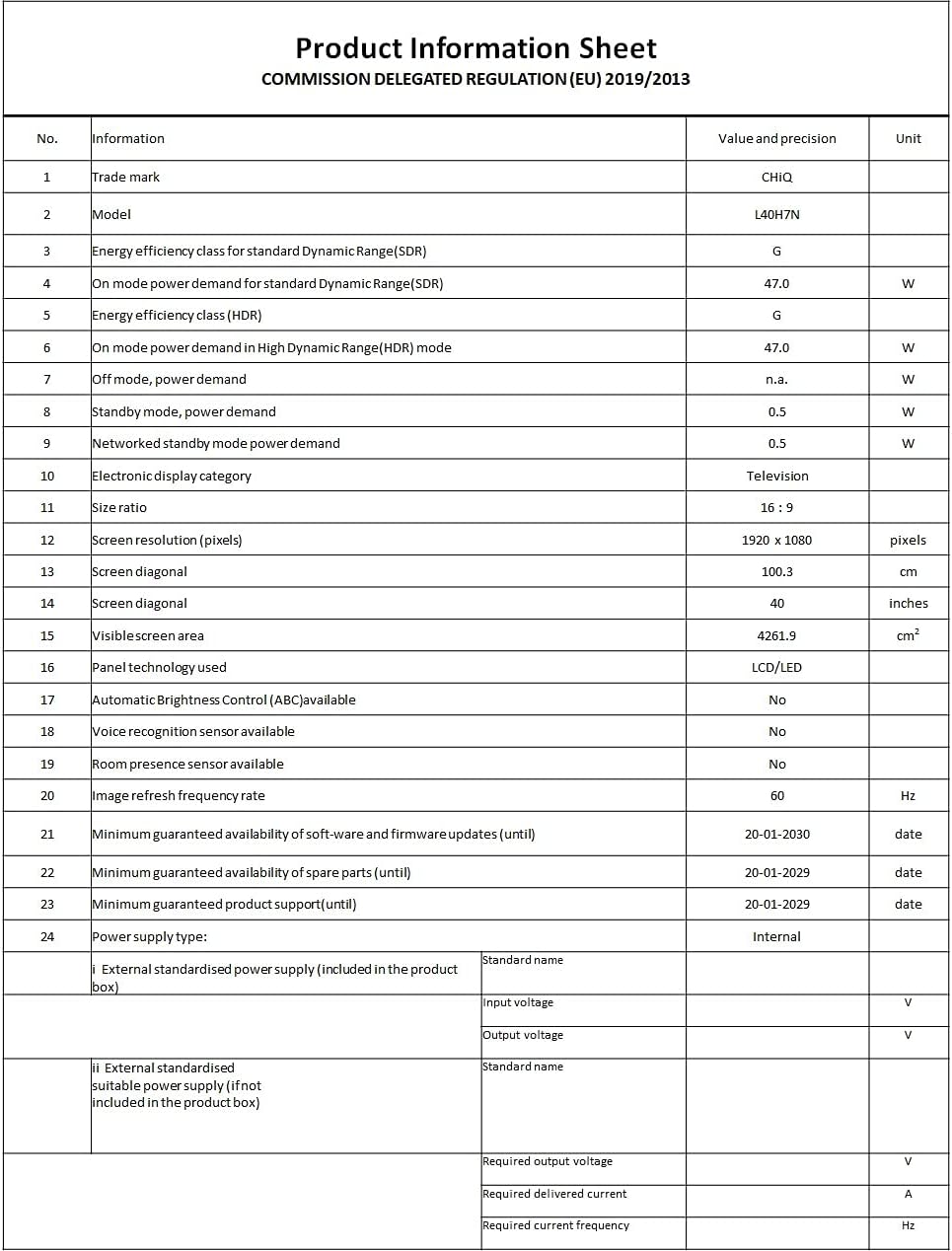
Image: A Product Information Sheet for the CHIQ L40H7N, detailing various specifications and compliance with COMMISSION DELEGATED REGULATION (EU) 2019/2013.
8. Garantie en ondersteuning
Your CHIQ L40H7N Smart TV comes with a manufacturer's warranty. Please refer to the warranty card included in your product packaging for specific terms and conditions, including warranty period and coverage details.
Klantenservice:
For technical assistance, troubleshooting, or warranty claims, please contact CHiQ customer support. Contact information can typically be found on the CHiQ official website of in uw productdocumentatie.