
1. Inleiding
Bedankt voor uw aankoopasing the MUSE M-10 Red Radio Alarm Clock. This manual provides essential information for the safe and efficient operation of your device. Please read these instructions carefully before use and retain them for future reference.

Figure 1: MUSE M-10 Red Radio Alarm Clock. This image shows the front view of the red alarm clock with its digital LED display showing '12:00' and various control buttons on the top panel.
2. Veiligheidsinstructies
- Lees alle instructies voordat u het apparaat bedient.
- Do not expose this appliance to rain or moisture to prevent fire or shock hazards.
- Ensure the power adapter is easily accessible.
- Gebruik uitsluitend de door de fabrikant gespecificeerde hulpstukken/accessoires.
- Do not place the product in direct sunlight or near heat sources.
- Avoid placing the product on surfaces that are unstable or subject to vibration.
- Open de c nietasing; laat alle onderhoudswerkzaamheden over aan gekwalificeerd personeel.
- Gooi gebruikte batterijen op verantwoorde wijze weg, volgens de plaatselijke voorschriften.
3. Product voorbijview
3.1 Frontpaneel en display
The front panel features a clear 0.6-inch white LED display for time and alarm indicators.
3.2 Bedieningselementen op het bovenpaneel
The top panel houses all control buttons for easy access:
- MEM: Memory button for saving and recalling radio presets.
- SET: Button for setting time and alarm parameters.
- AL1: Alarm 1 setting button.
- AL2: Alarm 2 setting button.
- << HR: Hour adjustment button (backward).
- MIN >>: Minute adjustment button (forward).
- SNOOZEN: Activates the snooze function during an alarm.
- SLAAP: Activeert de slaaptimerfunctie.
- DIMMER: Past de helderheid van het scherm aan.

Figuur 2: Overview of the MUSE M-10 Red Radio Alarm Clock's functions, including its 0.6-inch white LED display, PLL radio, 20 FM presets, dimmer, dual alarm, snooze, and sleep features.
4. Instellen
4.1 Stroomaansluiting
Connect the provided AC adapter to the DC IN jack on the rear of the unit and then plug it into a standard wall outlet. The unit will power on and the display will light up.
4.2 Installatie van batterijback-up
Voor het opslaan van tijd- en alarminstellingen tijdens een stroomstoringtage, install 2 x AAA batteries (not included) into the battery compartment located on the bottom of the unit. Ensure correct polarity (+/-) when inserting batteries.
5. Gebruiksaanwijzing
5.1 De tijd instellen
- Houd de SET knop totdat de uurcijfers knipperen.
- Gebruik de << HR or MIN >> knoppen om het uur aan te passen.
- Pers SET En dan knipperen de minuten.
- Gebruik de << HR or MIN >> knoppen om de minuten aan te passen.
- Pers SET nogmaals om te bevestigen en de tijdinstellingsmodus te verlaten.
5.2 Alarmen instellen (Alarm 1 en Alarm 2)
Het apparaat is voorzien van twee onafhankelijke alarmen.
- Houd de AL1 (of AL2) knop totdat de cijfers van het alarmuur knipperen.
- Gebruik de << HR or MIN >> knoppen om het gewenste alarmuur in te stellen.
- Pers AL1 (of AL2) nogmaals, en de alarmminuten zullen knipperen.
- Gebruik de << HR or MIN >> knoppen om de gewenste alarmminuten in te stellen.
- Pers AL1 (of AL2) om de alarmbron opnieuw te selecteren: Zoemer or Radio.
- Pers AL1 (of AL2) once more to confirm and activate the alarm. An alarm icon will appear on the display.
5.3 FM-radiobediening
The unit has a PLL FM radio with 20 preset stations.
- tuning: Druk op de << HR or MIN >> buttons to manually tune the radio frequency. Press and hold these buttons for automatic scanning to the next available station.
- Voorinstellingen opslaan: Stem af op de gewenste zender. Houd de knop ingedrukt. MEEM-lid button until 'P01' (or the next available preset number) flashes. Use << HR or MIN >> om een vooraf ingesteld nummer te selecteren en druk vervolgens op MEEM-lid opnieuw om op te slaan.
- Voorinstellingen oproepen: Druk kort op de MEEM-lid knop om door de opgeslagen voorkeurzenders te bladeren.
5.4 Snooze-functie
Wanneer een alarm afgaat, drukt u op de SNOOZEN Druk op de knop om het alarm tijdelijk gedurende ongeveer 9 minuten uit te zetten. Na deze periode gaat het alarm weer af.
5.5 Slaaptimerfunctie
Druk op de SLAAP button repeatedly to set a sleep timer (e.g., 90, 60, 30, 15 minutes, or OFF). The radio will play for the selected duration and then automatically turn off.
5.6 Weergavedimmer
Druk op de DIMMER button repeatedly to cycle through display brightness levels: High, Low, or Off.

Figure 3: Key features of the MUSE M-10 Red Radio Alarm Clock, including snooze, radio or buzzer alarm, dimmable display, and FM PLL radio with 20 presets.
6. Onderhoud
- Schoonmaak: Veeg het apparaat af met een zachte, droge doek. Gebruik geen schuurmiddelen of oplosmiddelen.
- Batterij vervangen: Replace backup batteries annually or when the display shows signs of dimming during power outagen.
- Opslag: Als u het apparaat voor langere tijd opbergt, verwijder dan de reservebatterijen om lekkage te voorkomen.
7. Probleemoplossing
| Probleem | Mogelijke oorzaak | Oplossing |
|---|---|---|
| Geen stroom/scherm uit | Stroomadapter niet aangesloten of defect. | Check power adapter connection. Try a different outlet. |
| Wekker klinkt niet | Alarm niet geactiveerd of verkeerd ingesteld. | Ensure alarm icon is visible on display. Re-check alarm time and source settings. |
| Slechte radio-ontvangst | De FM-antenne is niet uitgeschoven of er is sprake van een zwak signaal. | Fully extend the FM wire antenna. Adjust its position for better reception. |
| Tijd/instellingen verloren na stroomuitvaltage | Back-upbatterijen niet geïnstalleerd of leeg. | Install new AAA batteries for backup. |
8. Specificaties
- Model: M-10 ROOD
- Merk: MUZE
- Weergave: 0.6-inch White LED, Digital
- Radio: FM PLL Radio with 20 Presets
- Alarm: Dubbel alarm (zoemer of radio)
- Speciale kenmerken: Snooze, Sleep Timer, Display Dimmer (High/Low/Off)
- Energiebron: AC Adapter (included), 2 x AAA batteries for backup (not included)
- Afmetingen (L x B x H): 12 x 7 x 10.9 cm (ongeveer 4.7 x 2.8 x 4.3 inch)
- Gewicht: 200 gram (ongeveer 0.44 lbs)
- Materiaal: Plastic
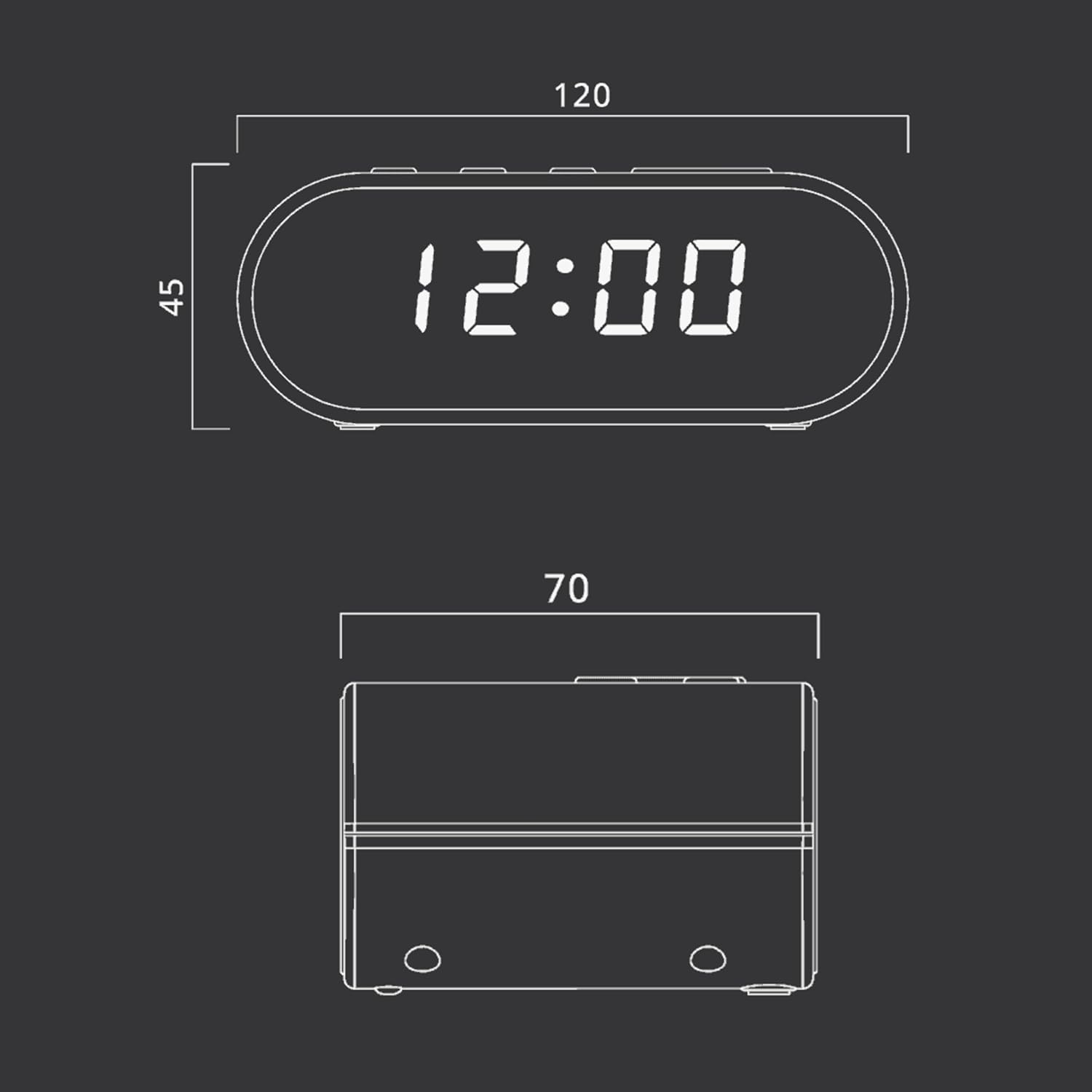
Figure 4: Dimensional drawing of the MUSE M-10 Red Radio Alarm Clock, showing its length (120mm), width (70mm), and height (45mm).
9. Garantie en ondersteuning
For warranty information or technical support, please refer to the warranty card included with your product or contact your local MUSE distributor. Keep your purchase receipt as proof of purchase.