
1. Product voorbijview
The OOYCYOO 100 Amp MPPT Solar Charge Controller, Model KP60 100, is designed for efficient management of solar power systems. It automatically identifies 12V or 24V battery systems and is compatible with various battery types, including AGM, Sealed, Gel, Flooded, and Lithium. This controller features advanced Maximum Power Point Tracking (MPPT) technology to maximize energy harvest from solar panels, ensuring optimal charging for your battery bank.
Key features include a backlit LCD display for real-time monitoring, enhanced safety protections, and a high DC/DC transfer efficiency of up to 98.7%.

Figuur 1: Voorzijde view of the OOYCYOO 100 Amp MPPT Solar Charge Controller, showing the LCD display and connection terminals.
2. Veiligheidsinstructies
Lees alle instructies en waarschuwingen zorgvuldig door vóór installatie en gebruik. Het niet opvolgen van deze instructies kan leiden tot een elektrische schok, brand of ernstig letsel.
- Ensure all wiring is correctly polarized and securely connected to prevent damage to the controller and connected devices.
- Always disconnect the solar panel array and battery before installing or adjusting the controller.
- Installeer de controller op een goed geventileerde plaats, uit de buurt van brandbare materialen en direct zonlicht.
- Demonteer of repareer de controller niet zelf. Schakel gekwalificeerd personeel in voor onderhoud.
- Use appropriate circuit breakers or fuses for all connections to protect against overcurrent.
- Wear appropriate personal protective equipment, including eye protection and insulated gloves, during installation.
3. Productonderdelen en aansluitingen
The controller features clearly labeled terminals for solar panel input, battery connection, and load output. It also includes a remote temperature sensor port and USB charging ports.

Afbeelding 2: Gedetailleerd view of the controller's LCD display, 5S Reset button, Solar Panel Terminal, Battery Terminal, Load Terminal, USB 5V2A ports, Remote Temp Sensor port, and RS485 Communication Port.
Inhoud van het pakket:
- 1 x OOYCYOO 100A MPPT Solar Charge Controller (Model K2500W)
- 1 x temperatuursensor
- 1 x Gebruikershandleiding (Engels)
4. Technische specificaties
The following table outlines the technical specifications for the OOYCYOO 100 Amp MPPT Solar Charge Controller (Model KP60 100).
| Parameter | Specificatie |
|---|---|
| Nominale laadstroom | 100A |
| Systeem Nominale Voltage | 12V/24VDC Auto Identifying |
| 12V System Max. PV Input Power | 1300W |
| 24V System Max. PV Input Power | 2600W |
| Maximaal PV Open Circuit Voltage (Voc) | 100V DC |
| Batterijvolumetage Bereik | 9V ~ 32V |
| Power Terminal Wire Gauge | 10 AWG |
| Afmetingen (L x B x H) | 12 x 7.8 x 3.2 cm (30.5 x 19.8 x 8.1 inch) |
| Gewicht | 8.84 pond (4 kg) |
| Weergavetype | LCD |
| Bedrijfstemperatuur | Tot 45 °C (113 °F) |
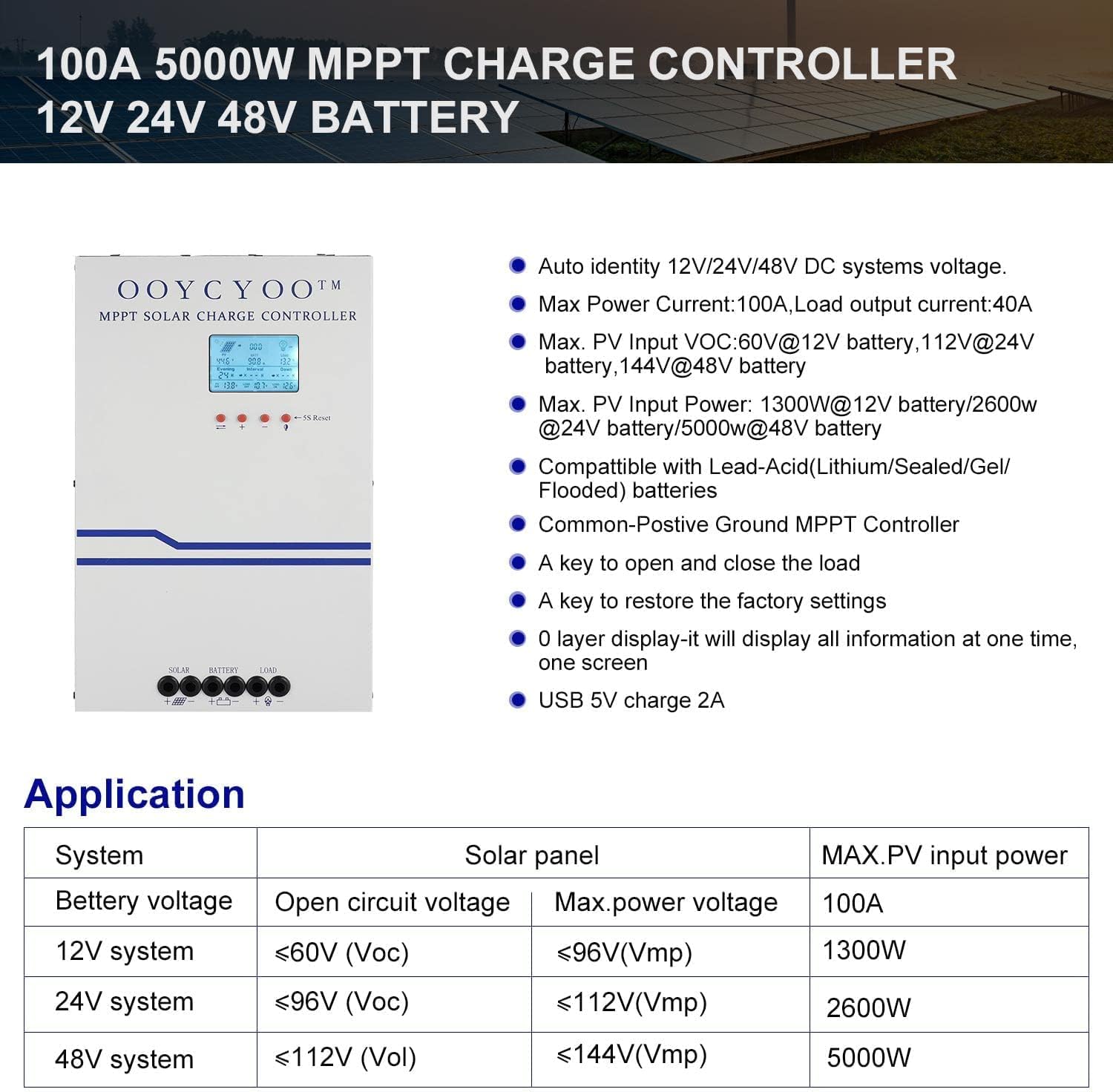
Figure 3: Application table detailing maximum PV input power and voltage for 12V, 24V, and 48V systems.
5. Installatiehandleiding
Een correcte installatie is cruciaal voor de veilige en efficiënte werking van uw zonne-laadregelaar. Volg deze stappen zorgvuldig:
5.1 De regelaar monteren
- Choose a dry, well-ventilated location, protected from direct sunlight, high temperatures, and moisture.
- Ensure sufficient clearance around the controller for proper airflow, especially around the cooling vents.
- Monteer de controller verticaal op een niet-brandbaar oppervlak met behulp van geschikte bevestigingsmiddelen.
5.2 bedradingsverbindingen
Connect the components in the following order: Battery > Solar Panel > Load. Always ensure correct polarity.
- Sluit de batterij aan: Connect the battery cables to the battery terminals on the controller. Ensure the positive (+) and negative (-) terminals are correctly matched. The controller will automatically detect the battery voltage (12V of 24V).
- Sluit het zonnepaneel aan: Connect the solar panel cables to the PV input terminals on the controller. Verify correct polarity. Ensure the open circuit voltage (Voc) of your solar array does not exceed 100VDC.
- De belasting aansluiten: Connect your DC load to the load output terminals. Ensure the load current does not exceed the controller's rated load current.
- Temperatuursensor aansluiten: Plug the remote temperature sensor into its designated port. This sensor helps the controller optimize charging based on battery temperature.
The controller is compatible with various battery types:

Figure 4: The controller supports AGM, Sealed, Gel, Flooded, and Lithium-Iron phosphate batteries for 12V/24V/48V systems.
6. Bedieningshandleiding:
Once installed, the controller will begin operation. The LCD display provides real-time system status and allows for configuration.
6.1 LCD-scherm
The backlit LCD display shows various parameters such as battery voltage, laadstroom, zonnepaneel voltage, load status, and accumulated energy (KWH). Use the buttons below the display to navigate through the different screens and access settings.
6.2 Basisinstellingen
The controller allows users to set parameters for different battery types (Lithium, LiFePO4, Li(NiCoMn)O2, Flooded, Sealed, Gel). Refer to the on-screen menu for specific adjustments to absorption voltage, vlotter voltage, en laag voltage disconnect settings. A load timer function is also available for controlling DC loads.
6.3 Werking van de koelventilator
The built-in cooling fan activates automatically when the internal temperature exceeds 45°C (113°F) and turns off when the temperature drops below 40°C (104°F). This mechanism ensures optimal performance and extends the lifespan of the controller.
7. Onderhoud
Regular maintenance helps ensure the longevity and optimal performance of your solar charge controller.
- Schoonmaak: Periodically clean the controller's exterior with a dry cloth. Ensure cooling vents are free from dust and debris.
- Verbindingen: Annually inspect all wiring connections for tightness and corrosion. Loose connections can cause overheating and damage.
- Omgeving: Verify that the installation environment remains dry and well-ventilated.
8. Probleemoplossing
The controller incorporates multiple protection functions to safeguard your system. If an issue arises, check the LCD display for error codes or indicators.
8.1 Beschermingsfuncties
- PV Over Current/Power Protection
- PV Short Circuit Protection
- PV-bescherming tegen omgekeerde polariteit
- Night Reverse Charging Protection
- Bescherming tegen omgekeerde polariteit van de batterij
- Batterij overvoltage Bescherming
- Batterij over ontladingsbescherming
- Battery Overheating, Controller Overheating Protection
- Lithium Battery Low Temperature Protection
- Kortsluitbeveiliging voor de belasting
- Bescherming tegen overbelasting:
- TVS hoog volumetage Transiëntenbescherming
8.2 Veelvoorkomende problemen
- Geen opladen: Controleer de aansluitingen van de zonnepanelen, zorg voor voldoende zonlicht en controleer het batterijvolume.tage valt binnen het werkingsbereik.
- Laden werkt niet: Check load connections, ensure battery voltage is boven het lage volumetage disconnect setting, and verify load timer settings.
- Oververhitting: Ensure adequate ventilation around the controller and that cooling vents are clear.
- Onjuist voltage-metingen: Verify all connections are secure and the temperature sensor is properly installed.
Als de problemen aanhouden nadat u deze punten hebt gecontroleerd, neem dan contact op met de klantenservice.
9. Garantie en ondersteuning
The OOYCYOO 100 Amp MPPT Solar Charge Controller is a professional product. For any questions or technical assistance, please contact us directly via email. We are committed to providing prompt support and ensuring your satisfaction.
Raadpleeg uw aankoopdocumentatie voor de specifieke garantievoorwaarden.