
1. Inleiding
This manual provides essential information for the safe and effective use of your WORKPRO Rotary Tool Set W124003. This versatile tool is designed for various applications including grinding, engraving, sanding, polishing, and cutting. Please read this manual thoroughly before operation and keep it for future reference.
2. Productinhoud
The WORKPRO Rotary Tool Set W124003 includes a comprehensive collection of accessories for various tasks. Please verify that all items listed below are present in your kit.
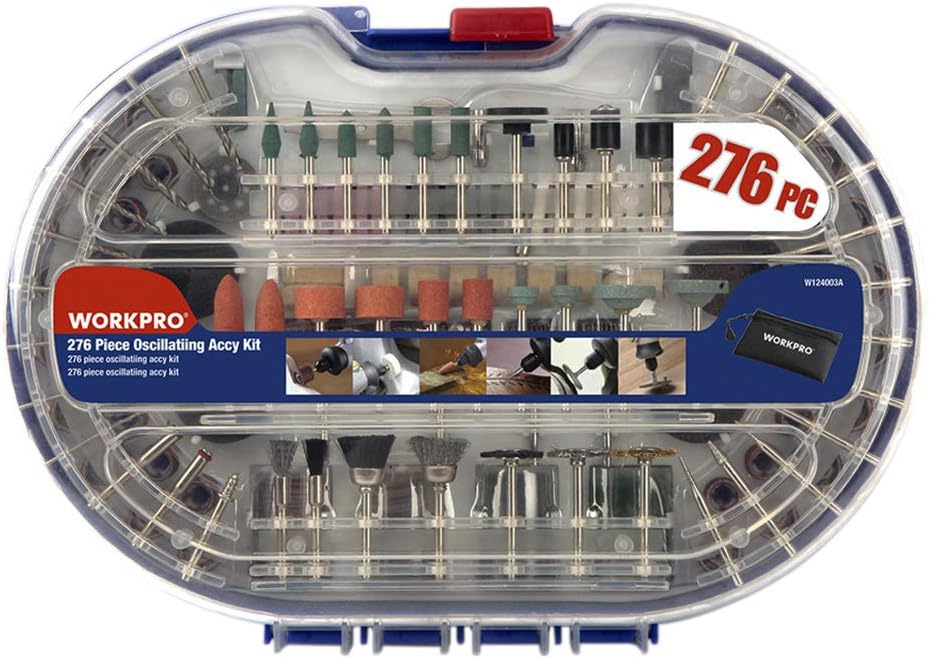
Figuur 2.1: Overview of the WORKPRO Rotary Tool Set W124003, showcasing the complete 276-piece kit within its transparent storage case.
- Sanding Bands: 52 pieces
- Sanding Discs: 40 pieces
- Emery Cut-off Wheels: 36 pieces
- Grinding Compound: 1 piece
- Fiberglass Cut-off Wheels: 16 pieces
- Flap Wheels: 4 pieces
- Felt Polishing Wheels: 8 pieces
- Felt Tip: 1 piece
- Silicon Carbide Grinding Stones: 6 pieces
- Aluminum Oxide Grinding Stones: 6 pieces
- White Aluminum Oxide Wheels: 6 pieces
- Diamond Wheels: 2 pieces
- Dressing Stone: 1 piece
- Collets: 3 pieces
- Sleutel: 1 stuk
- Rubber Emery Wheels: 2 pieces
- Diamond Cutters: 9 pieces
- HSS Twist Drill Bits: 9 pieces
- Mandrel Wheels: 3 pieces
- Sanding Shanks: 3 pieces
- Suction Cup: 1 piece
- Rubber Grinding Stones: 6 pieces
- Silicon Carbide Grinding Stones: 4 pieces

Figure 2.2: The rotary tool set opened, displaying the organized arrangement of various accessories in both the top and bottom compartments.

Figuur 2.3: Een gedetailleerde view of the grinding and sanding accessories, including various grit sizes and shapes for different applications.

Figure 2.4: The upper tray of the accessory kit, featuring an assortment of bits such as grinding stones, diamond cutters, and brushes.
3. Veiligheidsinstructies
Always follow basic safety precautions when using this rotary tool to reduce the risk of injury or damage. Failure to do so may result in serious injury.
- Oogbescherming: Always wear ANSI-approved safety goggles or safety glasses with side shields when operating the tool.
- Ademhalingsbescherming: Wear a dust mask or respirator, especially when working with materials that produce fine dust.
- Werkgebied: Houd uw werkplek schoon, goed verlicht en opgeruimd. Zorg voor voldoende ventilatie.
- Werkstuk beveiligen: Bevestig het werkstuk altijd met een klem.ampGebruik een bankschroef of een klemmenbank. Houd het werkstuk nooit met de hand vast.
- Juiste kleding: Draag geen losse kleding, sieraden of lang haar dat in bewegende onderdelen verstrikt kan raken.
- Energiebron: Ensure the power source matches the tool's requirements. Unplug the tool when not in use or when changing accessories.
- Vermijd overdrijving: Zorg te allen tijde voor een goede basis en evenwicht.
- Staat van het gereedschap: Inspect the tool and accessories for damage before each use. Do not use damaged tools or accessories.
- Kinderen en omstanders: Houd kinderen en omstanders uit de buurt van het werkgebied.
- Brandbare materialen: Do not operate the tool near flammable liquids, gases, or dust.
4. Instellen
Before operating your rotary tool, follow these steps for proper setup:
- Uitpakken: Haal alle onderdelen voorzichtig uit de verpakking. Bewaar de verpakking voor opslag of transport.
- Inspecteren: Check the tool and all accessories for any signs of damage from shipping. Do not use if damaged.
- Selecteer accessoire: Choose the appropriate accessory for your task (e.g., grinding stone, sanding band, cutting wheel).
- Accessoire invoegen:
- Press and hold the shaft lock button on the rotary tool.
- Draai de spantangmoer los.
- Steek de accessoire-schacht volledig in de spantang.
- Draai de spantangmoer stevig vast met de meegeleverde sleutel. Draai niet te vast aan.
- Laat de asvergrendelingsknop los.
- Stroomaansluiting: Ensure the tool's power switch is in the "OFF" position before plugging it into a suitable power outlet.
5. Gebruiksaanwijzing
Once set up, you can begin using your WORKPRO Rotary Tool. Always practice on scrap material first.
- Inschakelen: Plug the tool into the power outlet. Turn the power switch to the "ON" position.
- Snelheidsaanpassing: If your model has variable speed control, adjust the speed according to the material and accessory being used. Higher speeds are generally for harder materials and smaller accessories, while lower speeds are for softer materials and larger accessories.
- Sollicitatie:
- Grinding/Engraving: Apply light, consistent pressure. Let the tool do the work. Move the tool smoothly across the workpiece.
- Schuren: Use appropriate grit sanding bands/discs. Move the tool in a circular or back-and-forth motion to achieve an even finish.
- Snijden: Use cut-off wheels for cutting. Ensure the workpiece is stable. Apply gentle pressure and allow the wheel to cut through the material.
- Polijsten: Use felt wheels with polishing compound. Apply a small amount of compound to the wheel and polish the surface with light pressure.
- Uitschakelen: When finished, turn the power switch to the "OFF" position and unplug the tool from the power outlet.
6. Onderhoud
Regelmatig onderhoud zorgt ervoor dat uw rotatiegereedschap lang meegaat en optimaal presteert.
- Schoonmaak: After each use, unplug the tool and use a soft brush or compressed air to remove dust and debris from the ventilation openings and around the collet.
- Accessoire-opslag: Store accessories in their designated compartments within the case to prevent damage and loss.
- Gereedschapsopslag: Store the rotary tool in a dry, secure location, out of reach of children.
- Snoerinspectie: Regularly inspect the power cord for any cuts, fraying, or damage. Do not use the tool if the cord is damaged.
- Vervanging van borstels: (If applicable for this model) Refer to a qualified service technician for carbon brush inspection and replacement if the tool experiences reduced power or intermittent operation.
7. Probleemoplossing
If you encounter issues with your WORKPRO Rotary Tool, refer to the following common problems and solutions:
| Probleem | Mogelijke oorzaak | Oplossing |
|---|---|---|
| Gereedschap gaat niet aan. | No power supply; Faulty power switch; Damaged cord. | Check power outlet; Ensure switch is ON; Inspect cord for damage. |
| Het accessoire wiebelt of trilt overmatig. | Accessory not properly inserted; Collet nut loose; Bent accessory shank. | Re-insert accessory fully and tighten collet nut; Replace bent accessory. |
| Gereedschap oververhit. | Blocked ventilation; Excessive pressure during operation; Prolonged use. | Clean ventilation slots; Reduce pressure; Allow tool to cool down. |
| Poor performance (e.g., slow grinding). | Worn accessory; Incorrect speed setting; Inappropriate accessory for material. | Replace worn accessory; Adjust speed; Select correct accessory for task. |
8. Specificaties
Key technical specifications for the WORKPRO Rotary Tool Set W124003:
- Merk: WERKPRO
- Modelnummer: W124003
- Product Dimensions (Approx.): Lengte 240 mm x Breedte 290 mm x Dikte 57 mm
- Product Weight (Approx.): 838 gram
- Total Weight (Approx.): 860 g (inclusief verpakking)
- Energiebron: Elektrische kabel
- Hoeveelheid: 1 setje
9. Garantie en ondersteuning
According to the product information, there is no specific warranty provided for this item. For any product inquiries, technical assistance, or support, please contact the seller or WORKPRO customer service directly through their official channels.
You can visit the official WORKPRO store on Amazon for more information: WORKPRO Winkel