
1. Inleiding
The AIYIMA GE5654 (TUBE-A3 Pro) is a compact and versatile tube preamplifier designed to enhance your home audio system. It features Bluetooth 5.0 connectivity and AUX input, along with independent treble and bass adjustments, allowing for a personalized audio experience. This device functions as a preamplifier and requires connection to a power ampluidsprekers of actieve luidsprekers.
- Verbeterde geluidskwaliteit: Utilizes GE5654 vacuum tubes for a warm and sweet audio output, with adjustable bass and treble controls.
- Dubbele audio-ingangen: Supports both Bluetooth 5.0 and AUX (3.5mm) audio input modes, switchable via a dedicated button.
- Replaceable Tubes: Designed for easy tube replacement, compatible with 6J1/6J2/6K4/GE5654/6AK5/6Ж1n tubes.
- Geoptimaliseerde schakelingen: Features a power circuit separate from the audio circuit to minimize interference and ensure clear sound.
- Belangrijke opmerking: Dit is een preamplifier, geen kracht amplifier. It must be connected to powered speakers or a separate power amplifier. It is not suitable for direct connection to passive speakers without an amplifier, nor for use with record players or phonographs without an appropriate phono preamp.
2. Product voorbijview
2.1. Bedieningselementen op het voorpaneel

Afbeelding: Voorzijde view of the AIYIMA GE5654 (TUBE-A3 Pro) showing the power switch, working indicator, bass control, treble control, and volume control knobs.
- Aan / uit schakelaar: Schakelt het apparaat in/uit.
- Werkende indicator: Brandt wanneer het apparaat is ingeschakeld.
- Basregeling: Past de lage frequentie-audio-uitvoer aan.
- Treble-regeling: Past de hoge frequentie audio-uitvoer aan.
- Volumeregeling: Adjusts the overall audio output level.
2.2. Aansluitingen op het achterpaneel
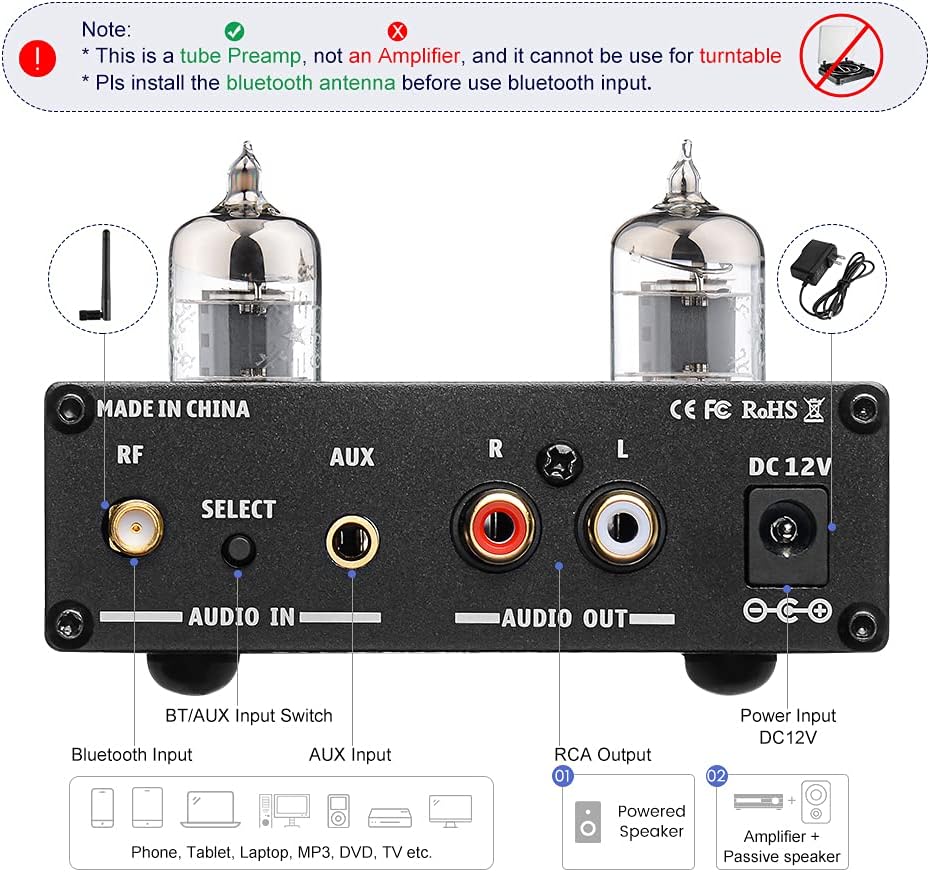
Afbeelding: Achterkant view of the AIYIMA GE5654 (TUBE-A3 Pro) showing the Bluetooth antenna connector, input selector, AUX input, RCA audio outputs, and DC 12V power input.
- RF (Bluetooth-antenne): Aansluiting voor de Bluetooth-antenne.
- Select (Audio Input Switch): Knop om te schakelen tussen Bluetooth- en AUX-ingangsmodi.
- AUX-ingang: 3.5mm stereo input for wired audio sources.
- Audio Out (RCA L/R): RCA stereo outputs to connect to a power ampluidsprekers of actieve luidsprekers.
- gelijkstroom 12V: Power input jack for the DC12V/1A power adapter.
2.3. Productafmetingen

Afbeelding: Van boven naar beneden view of the AIYIMA GE5654 (TUBE-A3 Pro) with dimensions: 118mm (4.65in) length, 95mm (3.74in) width, 30mm (1.18in) height.
3. Installatie-instructies
- Uitpakken en inspecteren: Verwijder voorzichtig de preamplifier and all accessories from the packaging. Ensure all components are present and undamaged.
- Installeer de Bluetooth-antenne: Screw the provided Bluetooth antenna into the 'RF' connector on the rear panel. Ensure it is securely tightened for optimal signal reception.
- Sluit audio-uitgang aan: Connect the RCA 'Audio Out' ports (L/R) on the rear panel of the preamplifier to the input ports of your power ampluidsprekers of actieve luidsprekers met behulp van geschikte RCA-kabels.
- Connect Audio Input (Choose One):
- Bluetooth-ingang: Zorg voor de preamplifier is in Bluetooth mode (indicated by a purple light, or red and blue flashing for search status). On your audio source device (e.g., smartphone, tablet), search for and connect to 'AIYIMA A3 Pro'.
- AUX-ingang: Connect your audio source (e.g., CD player, computer) to the 'AUX' 3.5mm input jack on the rear panel using a 3.5mm audio cable. Press the 'Select' button to switch to AUX input mode (indicated by a red light).
- Sluit stroom aan: Connect the DC12V/1A power adapter to the 'DC 12V' input jack on the rear panel, then plug the adapter into a wall outlet. Caution: Do not use a power supply exceeding 12V.
- Inschakelen: Flip the 'Power' switch on the front panel to the ON position. The working indicator will light up.
Installatie demonstratievideo
Video: This video demonstrates the connection of the AIYIMA GE5654 (TUBE-A3 Pro) preamplifier to an AIYIMA A07 power amplifier and speakers, showcasing both AUX and Bluetooth input modes and the treble/bass adjustment.
4. Gebruiksaanwijzing
- Aan/uit: Use the 'Power' switch on the front panel to turn the unit on or off.
- Selecteer invoer: Press the 'Select' button on the rear panel to toggle between AUX and Bluetooth input modes. The working indicator light color will change to reflect the active input (Red for AUX, Purple for Bluetooth).
- Volume aanpassen: Rotate the 'Volume' knob on the front panel to increase or decrease the audio output level.
- Toon aanpassen: Use the 'Bass' and 'Treble' control knobs on the front panel to fine-tune the low and high frequencies according to your preference.

Image: The AIYIMA GE5654 (TUBE-A3 Pro) connected to a smartphone via Bluetooth and outputting to a speaker, demonstrating a typical usage scenario.
5. Vervanging van de buis
The GE5654 (TUBE-A3 Pro) preamplifier allows for easy replacement of its vacuum tubes, offering flexibility for sound customization. Compatible tube models include 6J1, 6J2, 6K4, GE5654, 6AK5, and 6Ж1n.
- Uitschakelen en loskoppelen: Before attempting to replace tubes, ensure the preamplifier is powered off and disconnected from the main power supply. Allow the unit to cool down completely.
- Gently Remove Old Tubes: Carefully grasp the existing tube and pull it straight upwards from its socket. Avoid twisting or bending the tube pins.
- Insert New Tubes: Align the pins of the new tube with the holes in the socket. Gently push the tube straight down until it is firmly seated. Do not force it.
- Controleer de zitplaatsen: Ensure both tubes are properly seated in their sockets before reconnecting power.

Image: A hand demonstrating the process of replacing a vacuum tube on the AIYIMA GE5654 (TUBE-A3 Pro) preampverliezer.
6. Onderhoud
- Houd het apparaat schoon door het af te vegen met een zachte, droge doek.
- Gebruik geen agressieve chemicaliën of schurende schoonmaakmiddelen.
- Zorg voor goede ventilatie rondom het apparaat om oververhitting te voorkomen.
- Protect the unit from moisture, direct sunlight, and extreme temperatures.
7. Probleemoplossing
- Geen geluid:
- Check if the power adapter is correctly connected and the unit is powered on.
- Verify all audio cables are securely connected to the correct input and output ports.
- Ensure the correct input mode (Bluetooth or AUX) is selected.
- Confirm the volume knob is not set to minimum and the connected power amplifier/powered speakers are also powered on and at an audible volume.
- Check if the vacuum tubes are properly seated in their sockets.
- Vervormd geluid:
- Reduce the volume level on both the preamplifier en uw audiobron.
- Ensure your audio source is providing a clean signal. A noisy source will be ampbelichaamd door de preampverliezer.
- Adjust bass and treble controls to a neutral position or to your preference.
- Verify that the power supply is DC12V/1A and not exceeding 12V.
- Problemen met Bluetooth-verbinding:
- Ensure the Bluetooth antenna is securely installed.
- Bevestig de preamplifier is in Bluetooth input mode (purple indicator light).
- Make sure your audio source device's Bluetooth is enabled and within range.
- Probeer het apparaat te ontkoppelen en opnieuw te koppelen.
- Eenheid wordt niet ingeschakeld:
- Check the power adapter and wall outlet.
- Zorg ervoor dat de aan/uit-schakelaar volledig in de AAN-stand staat.
8. Specificaties
| Functie | Specificatie |
|---|---|
| Merknaam | AIYIMA |
| Model | AIYIMA GE5654 (TUBE-A3 Pro) |
| Artikelafmetingen (L x B x H) | 4.69 x 3.74 x 1.22 inch (118 x 95 x 30 mm) |
| Artikelgewicht | 520 gram |
| Deeltage | 12 Volt (DC) |
| Maximaal toevoervolumetage | 12 Volt (DC) |
| Minimale voorraad Voltage | 12 Volt (DC) |
| Aantal kanalen | 2 |
| Montagetype | Oppervlaktemontage |
| UPC | 749789527314 |
| Fabrikant | YIMA TECH |
9. Garantie en ondersteuning
For warranty information and technical support, please refer to the documentation included with your purchase or contact AIYIMA customer service directly. Keep your purchase receipt for warranty claims.