
1. Inleiding
Thank you for choosing the Hoco E30 Wireless Earphone. This manual provides essential information for setting up, operating, and maintaining your earphone. Please read it carefully before use to ensure optimal performance and longevity of your device.
2. Veiligheidsinformatie
To prevent damage to your device or injury to yourself and others, please observe the following safety precautions:
- Vermijd langdurige blootstelling aan hoge volumeniveaus om gehoorschade te voorkomen.
- Do not use the earphone while driving or in situations where you need to be aware of your surroundings.
- Houd het apparaat uit de buurt van water, vocht en extreme temperaturen.
- Do not attempt to disassemble, repair, or modify the earphone. This will void the warranty.
- Gebruik uitsluitend de meegeleverde of gecertificeerde oplaadkabels en adapters.
- Buiten bereik van kinderen en huisdieren houden.
3. Inhoud van het pakket
Vink het vakje aan voor de volgende items:
- Hoco E30 Wireless Earphone
- USB-oplaadkabel
- Gebruiksaanwijzing
4. Product voorbijview
Familiarize yourself with the components of your Hoco E30 Wireless Earphone:

Figuur 4.1: Kant view of the Hoco E30 Wireless Earphone, highlighting its sleek design and ear hook.

Figuur 4.2: The Hoco E30 Wireless Earphone positioned next to a smartphone, illustrating its compact size and wireless connectivity.
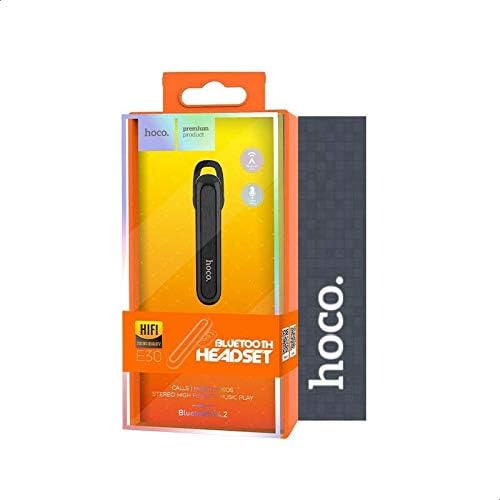
Figuur 4.3: The retail packaging for the Hoco E30 Wireless Earphone, displaying branding and key features.
5. Instellen
5.1 De oortelefoon opladen
Before first use, fully charge your Hoco E30 earphone.
- Connect the provided USB charging cable to the charging port on the earphone.
- Connect the other end of the USB cable to a DC 5V power source (e.g., a USB wall adapter or computer USB port).
- Het oplaadindicatielampje gaat branden.
- Charging typically takes approximately 2 hours. The indicator light will change or turn off once charging is complete.
5.2 Koppelen met een apparaat
To connect your Hoco E30 earphone to your smartphone or other Bluetooth-enabled device:
- Ensure the earphone is fully charged and turned off.
- Houd de multifunctionele knop op de oortelefoon ingedrukt totdat het indicatielampje afwisselend rood en blauw knippert. Dit geeft aan dat de oortelefoon in de koppelingsmodus staat.
- Schakel Bluetooth in op uw apparaat en zoek naar beschikbare apparaten.
- Selecteer "Hoco E30" uit de lijst met gevonden apparaten.
- Once paired, the indicator light on the earphone will flash blue slowly, and you will hear a confirmation tone.
- The earphone has a transmission range of up to 10 meters (33 feet).
6. Gebruiksaanwijzing
6.1 In-/uitschakelen
- Inschakelen: Press and hold the multi-function button for approximately 3 seconds until the blue indicator light flashes and you hear a power-on tone.
- Uitschakelen: Press and hold the multi-function button for approximately 5 seconds until the red indicator light flashes and you hear a power-off tone.
6.2 Oproepbeheer
- Beantwoord oproep: Briefly press the multi-function button when an incoming call rings.
- Einde gesprek: Briefly press the multi-function button during a call.
- Oproep afwijzen: Houd de multifunctionele knop 2 seconden ingedrukt wanneer u een inkomend gesprek ontvangt.
- Laatste nummer opnieuw kiezen: Druk twee keer op de multifunctionele knop wanneer u niet aan het bellen bent.
6.3 Muziek afspelen
- Afspelen/Pauzeren: Briefly press the multi-function button to play or pause music.
- Volgende nummer: Press and hold the multi-function button for 2 seconds to skip to the next track.
- Vorig nummer: Press and hold the multi-function button for 2 seconds (during playback) to go to the previous track.
Note: The Hoco E30 supports A2DP and AVRCP protocols for high-quality audio streaming and remote control. Volume control is typically managed via the connected device.
6.4 Battery Status Display
The Hoco E30 earphone supports battery level display on compatible Apple iOS devices and some Android smartphones. Check your device's notification bar or Bluetooth settings for this feature.
7. Onderhoud
- Schoonmaak: Reinig de oortelefoon met een zachte, droge doek. Gebruik geen agressieve chemicaliën of schurende materialen.
- Opslag: Bewaar de oortelefoon op een koele, droge plaats, uit de buurt van direct zonlicht en extreme temperaturen.
- batterij zorg: Om de levensduur van de batterij te verlengen, moet u voorkomen dat de oortjes vaak volledig leeglopen. Laad ze regelmatig op, ook als u ze langere tijd niet gebruikt.
8. Probleemoplossing
If you encounter issues with your Hoco E30 earphone, try the following solutions:
| Probleem | Oplossing |
|---|---|
| De oortelefoon gaat niet aan. | Ensure the earphone is fully charged. Connect it to a power source and try again. |
| Kan geen koppeling maken met het apparaat. |
|
| Geen geluid of slechte geluidskwaliteit. |
|
| Opladen werkt niet. |
|
9. Specificaties
| Functie | Detail |
|---|---|
| Model | E30 |
| Bluetooth-versie | V4.2 WT |
| Ondersteunde protocollen | Hoofdtelefoon, handsfree, A2DP, AVRCP |
| Transmission Range | 10 meter (33 voet) |
| Transmissiefrequentie | 2.4 GHz |
| Oplaadvolumetage | DC 5V |
| Oplaadtijd | Ongeveer 2 uur |
| Batterijcapaciteit | 60mAh |
| Praattijd | Ongeveer 3.5 uur |
| Muziek afspeeltijd | Ongeveer 3.5 uur |
| Standby-tijd | Ongeveer 110 uur |
| Netto productgewicht | 6 gram |
| Afmetingen (L x B x H) | 58mm x 14mm x 25mm |
| Materiaal | Plastic |
| Controlemethode | Aanraken |
| Kleur | Zwart en zilver |
10. Garantie en ondersteuning
Hoco products are designed and manufactured to the highest quality standards. This product is covered by a limited warranty from the date of purchase. Please refer to the warranty card included in your package for specific terms and conditions.
For technical support or warranty claims, please contact your local Hoco distributor or visit the official Hoco website voor meer informatie.