
1. Overview
The Apple iPad Mini (2019) is a compact and powerful tablet designed for portability and performance. It features a 7.9-inch Retina Display with True Tone technology, providing vibrant colors and comfortable viewing. Powered by the A12 Bionic chip, it offers fast and efficient performance for various tasks, from browsing to gaming.
Belangrijkste kenmerken zijn:
- 7.9-inch Retina Display with True Tone and wide Color
- A12 bionische chip met neurale motor
- Touch ID fingerprint sensor for secure authentication
- 8MP back camera and 7MP FaceTime HD front camera
- Stereo speakers for immersive audio
- 802.11ac Wi-Fi connectivity
- Tot 10 uur batterijduur
- Lightning connector for charging and accessories
- Support for Apple Pencil (1st Generation)
- iPadOS 14 for enhanced tablet experience

Image 1.1: The Apple iPad Mini (2019) in Space Gray, showcasing vanwege het compacte ontwerp en het scherm.
2. Wat zit er in de doos?
Upon opening your iPad Mini package, ensure all the following items are present:
- iPad mini (2019)
- Lightning naar USB-kabel
- USB-lichtnetadapter
3. Instellen
3.1. Initiële lading
Before first use, it is recommended to fully charge your iPad Mini. Connect the Lightning to USB Cable to the iPad's Lightning port and the USB Power Adapter, then plug the adapter into a power outlet.
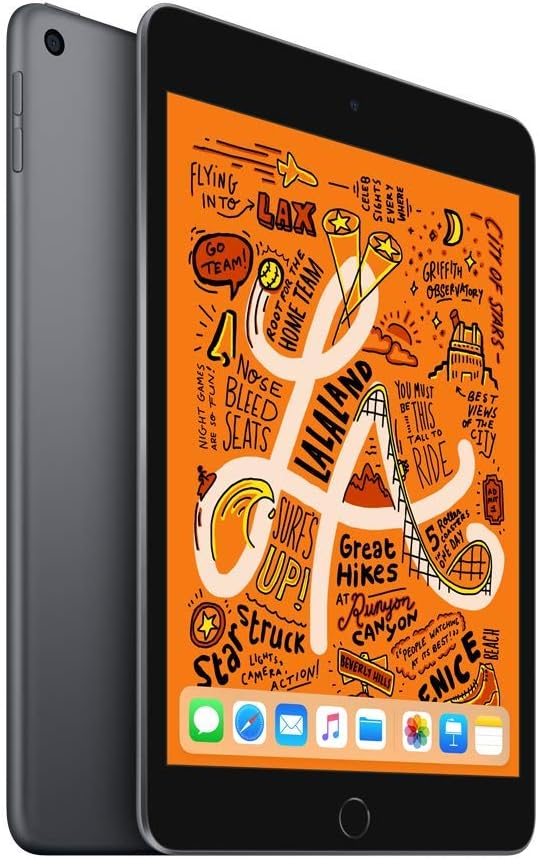
Afbeelding 3.1: Voorkant view of the iPad Mini, ready for initial setup.
3.2. Inschakelen en basisconfiguratie
- Houd de Bovenste knop totdat het Apple-logo verschijnt.
- Volg de instructies op het scherm om uw taal en regio te selecteren.
- Maak verbinding met een Wi-Fi-netwerk.
- Opzetten Aanraak-ID by following the prompts to register your fingerprint.
- Maak een toegangscode aan.
- Restore from an iCloud or computer backup, or set up as a new iPad.
- Meld u aan met uw Apple ID of maak een nieuwe aan.
- Enable or disable location services, Siri, and other features as desired.
4. Operating Your iPad Mini
4.1. Basisnavigatie
- Thuis knop: Press once to return to the Home screen. Double-press to open the App Switcher. Press and hold to activate Siri.
- Gebaren: Swipe down from the top-right corner for Control Center. Swipe down from the middle of the screen for Search. Swipe up from the bottom to go home (if using gestures instead of Home button).

Image 4.1: The iPad Mini display showing a vibrant interface.
4.2. Verbinding maken met wifi
- Ga naar Instellingen > Wi-Fi.
- Schakel wifi in.
- Selecteer het gewenste netwerk uit de lijst.
- Voer het wachtwoord in als daarom wordt gevraagd en tik vervolgens op Meedoen.
4.3. De camera gebruiken
Open de Camera app from the Home screen. Tap the shutter button to take a photo. Swipe left or right to switch between photo, video, panorama, and other modes. Tap the camera icon to switch between the front and back cameras.
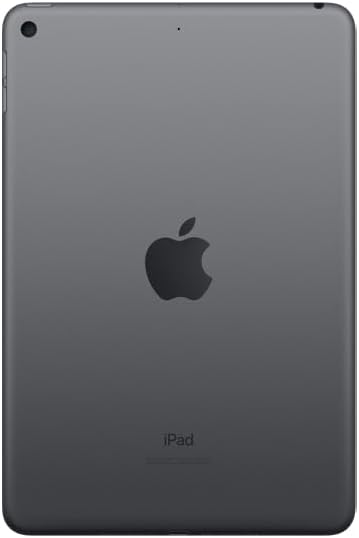
Afbeelding 4.2: Achterkant view of the iPad Mini, highlighting the back camera.
4.4. Apple Pencil (1st Generation)
The iPad Mini (2019) supports the first-generation Apple Pencil. To pair, remove the cap from your Apple Pencil and plug it into the Lightning connector on your iPad. Tap Paar when the Bluetooth Pairing Request appears. Once paired, you can use it for drawing, note-taking, and more.
5. Onderhoud
5.1. Cleaning Your iPad Mini
To clean your iPad Mini, use a soft, lint-free cloth. Avoid abrasive cloths, towels, paper towels, or similar items that could scratch the screen. Do not use aerosol sprays, solvents, or abrasives. Unplug all cables and power off the device before cleaning.
5.2. Software-updates
Keep your iPad Mini's software up to date to ensure optimal performance and security. Go to Instellingen > Algemeen > Software-updateAls er een update beschikbaar is, volg dan de instructies op het scherm om deze te downloaden en te installeren.
5.3. Batterijverzorging
To maximize battery lifespan, avoid exposing your iPad to extreme temperatures. For long-term storage, charge the device to about 50% and power it off. Recharge it to 50% every six months.
5.4. Opslagbeheer
To check and manage your storage, go to Instellingen > Algemeen > iPad-opslag. You can offload unused apps, delete large files, or move photos and videos to iCloud to free up space.
6. Probleemoplossing
6.1. Apparaat reageert niet
If your iPad Mini is unresponsive, try a force restart:
- Houd beide toetsen ingedrukt Bovenste knop en de Home-knop tegelijkertijd.
- Continue holding until you see the Apple logo.
- Release both buttons and allow the iPad to restart.
6.2. Problemen met de wifi-verbinding
If you are experiencing Wi-Fi connectivity problems:
- Zorg ervoor dat wifi is ingeschakeld in Instellingen > Wi-Fi.
- Start uw Wi-Fi-router opnieuw op.
- Vergeet het netwerk en maak opnieuw verbinding: Ga naar Instellingen > Wi-Fi, tik op de informatie-icoon next to your network, then tap Vergeet dit netwerk. Rejoin the network.
- Reset Network Settings: Go to Instellingen > Algemeen > Transfer or Reset iPad > Opnieuw instellen > Netwerkinstellingen resetten. This will reset all network settings, including Wi-Fi passwords.
6.3. De app crasht of loopt vast
If an app is not working correctly:
- Force quit the app: Double-press the Home button to open the App Switcher, then swipe up on the app's preview to close it. Reopen the app.
- Update the app: Check the App Store for updates to the problematic app.
- Reinstall the app: Delete the app from your iPad and then download it again from the App Store.
7. Specificaties
| Modelnaam | iPad mini |
| Artikelmodelnummer | MUQW2LL/A |
| Weergave | 7.9-inch Retina display with True Tone |
| Weergaveresolutie | 2048 x 1536 pixels |
| Spaander | A12 bionische chip met neurale motor |
| Opslagcapaciteit | 64GB |
| Achtercamera | 8MP with HDR and 1080p HD video |
| Voorcamera | 7MP FaceTime HD with Auto HDR |
| Levensduur van de batterij | Up to 10 hours (Wi-Fi browsing) |
| Verbindingsstuk | Bliksem |
| Afmetingen (H x B x D) | 8 x 5.3 x 0.24 inch (203.2 x 134.8 x 6.1 mm) |
| Gewicht | 0.66 pond (300.5 gram) Wi-Fi-model |
| Releasedatum | 18 maart 2019 |
8. Garantie en ondersteuning
8.1. Garantie-informatie
Your Apple iPad Mini (2019) is covered by Apple's standard limited warranty, which typically covers manufacturing defects for one year from the original purchase date. For detailed warranty terms and conditions, please refer to the official Apple warranty documentation included with your product or visit the Apple webplaats.
8.2. Klantenservice
Voor verdere hulp, technische ondersteuning of service kunt u terecht op de officiële Apple Support-pagina. webwebsite:
You can find articles, troubleshooting guides, and contact options for Apple support specialists on their webplaats.