
Invoering
Thank you for choosing the EZQuest USB C Hub Docking Station 8-in-1. This manual provides detailed instructions for setting up, operating, and maintaining your device. Please read this manual thoroughly before use to ensure optimal performance and longevity of your product.
Product voorbijview
The EZQuest USB C Hub Docking Station 8-in-1 is designed to expand the connectivity of your USB-C enabled devices, offering a comprehensive solution for various peripherals and display needs. It features multiple ports for data transfer, video output, network connection, and power delivery.
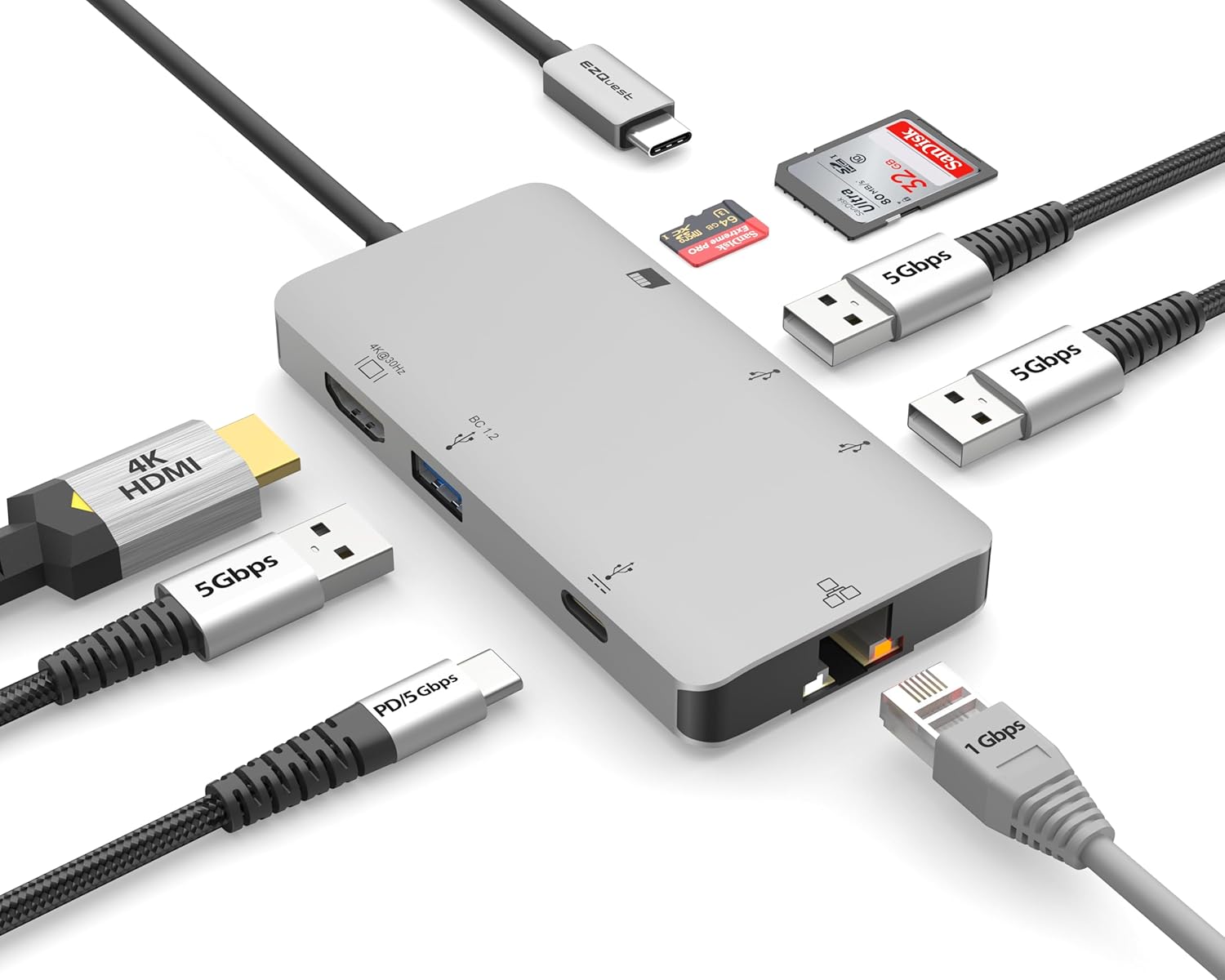
Image: The EZQuest USB C Hub Docking Station 8-in-1, showcasing dankzij het compacte ontwerp en de geïntegreerde USB-C-kabel.

Image: A diagram illustrating the 8-in-1 expansion capabilities of the hub, including HDMI, USB-C PD, USB 3.0, Ethernet, and card readers.
Installatie-instructies
- Verbinding maken met hostapparaat: Plug the integrated USB-C cable of the EZQuest hub into an available USB-C/Thunderbolt 3/4 port on your laptop, tablet, or smartphone.
- Stroomvoorziening (optioneel): For charging your host device, connect your USB-C power adapter to the USB-C Power Delivery port on the hub. The hub supports up to 100W input with 85W pass-through charging.
- HDMI-scherm: Connect an HDMI cable from your monitor to the HDMI port on the hub for 4K 30Hz video output.
- Ethernet-verbinding: For a stable wired network, connect an Ethernet cable to the Gigabit Ethernet port on the hub.
- USB-randapparatuur: Connect your USB-A devices (e.g., mouse, keyboard, external hard drive) to the three USB-A 3.0 ports.
- SD/Micro SD Cards: Insert your SD or Micro SD cards into the respective slots for data transfer.

Image: A user connecting the EZQuest USB C Hub to a laptop's USB-C port.

Image: Illustrates connecting a power adapter to the hub for pass-through charging of a laptop.
Gebruiksaanwijzing
Weergave-uitgang (HDMI)
The HDMI port supports 4K resolution at 30Hz. Connect an HDMI-enabled display to extend or mirror your desktop for enhanced productivity or multimedia viewing. Ensure your display and device support 4K 30Hz for optimal performance. Note that the USB-C ports on the hub are for data and power delivery, not for connecting a monitor.
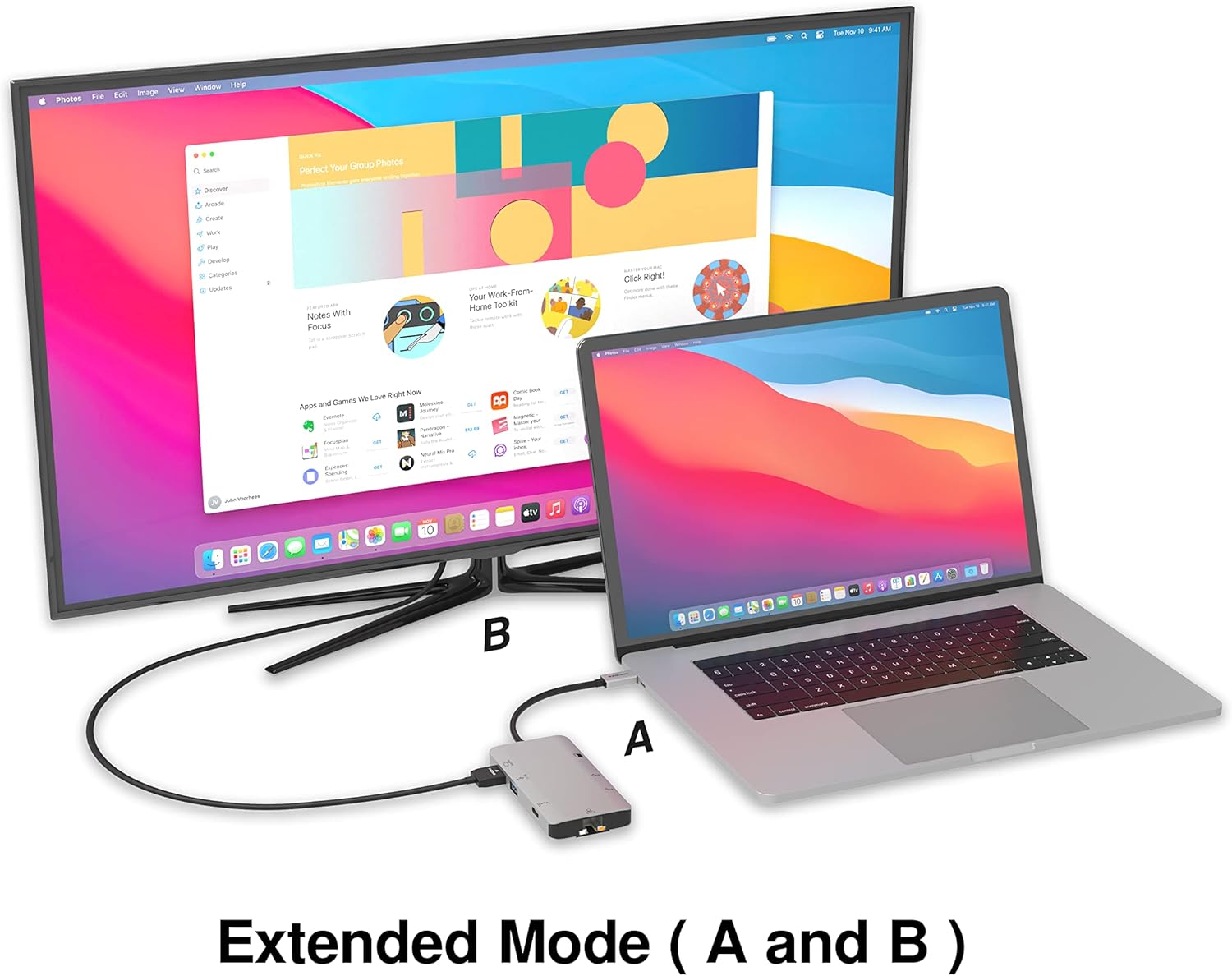
Image: A laptop connected to an external monitor via the hub, demonstrating extended display mode.
Data Transfer (USB-A & SD/Micro SD)
The three USB-A 3.0 ports offer data transfer speeds up to 5Gbps. The SD and Micro SD card slots allow for simultaneous read and write operations, facilitating quick file transfers from memory cards.

Image: Various devices like USB drives, SD cards, and an Ethernet cable connected to the EZQuest hub.
Network Connection (Gigabit Ethernet)
The Gigabit Ethernet port provides a stable and high-speed wired internet connection, ideal for large downloads, uploads, or streaming where Wi-Fi might be unreliable. An LED indicator confirms network activity.
Stroomverdeling
The USB-A ports distribute power efficiently. One USB-A port with BC1.2 outputs 5V/1.5A (7.5W), while the other two USB-A ports deliver 5V/0.9A (4.5W) each. The total shared power when all ports are in use is 10 watts.

Image: A diagram detailing the power output and data transfer speeds of the USB-A ports on the hub.
Functies en poorten
| Poorttype | Hoeveelheid | Functionaliteit |
|---|---|---|
| HDMI | 1 | 4K @ 30Hz Video Output (Extended/Mirror Mode) |
| USB-C Power Delivery/Data | 1 | Up to 100W Power Input (85W Pass-Through), 5Gbps Data Transfer |
| USB-A 3.0 | 3 | 5Gbps Data Transfer (One port BC1.2 5V/1.5A, two ports 5V/0.9A) |
| Gigabit-Ethernet | 1 | 10/100/1000 Mbps Wired Network Connection with LED Indicator |
| SD-kaartlezer | 1 | SDHC/SDXC Read/Write |
| Micro SD-kaartlezer | 1 | Micro SDHC/SDXC Read/Write |
Verenigbaarheid
This USB C Hub is compatible with a wide range of devices:
- Computers featuring USB-C, USB 4, Thunderbolt 4, or Thunderbolt 3 ports.
- USB-C smartphones and tablets equipped with OTG (On-The-Go) support.
Unsupported Device:
- The USB-A ports on this docking station do not support Apple SuperDrive. For connecting an Apple SuperDrive, an alternative adapter (e.g., EZQuest X40100 USB-C to USB-A Female Mini Adapter) directly to your Mac is recommended.
Probleemoplossing
- Geen weergave-uitvoer:
- Controleer of de USB-C-poort van uw hostapparaat video-uitvoer ondersteunt (DisplayPort Alternate Mode).
- Check all cable connections (USB-C from hub to device, HDMI from hub to monitor).
- Verify your monitor input source is set correctly to HDMI.
- Probeer een andere HDMI-kabel of monitor, indien beschikbaar.
- Problemen met opladen:
- Zorg ervoor dat uw USB-C-voedingsadapter is aangesloten op de USB-C PD-poort van de hub.
- Controleer of uw voedingsadapter voldoende vermogen levert.tage (up to 100W recommended for laptops).
- Check if the host device's USB-C port supports Power Delivery.
- Langzame gegevensoverdracht:
- Zorg ervoor dat u USB 3.0-compatibele apparaten en kabels gebruikt voor optimale snelheden.
- The total shared power for USB-A ports is 10W; excessive power draw from multiple devices may affect performance.
- Ethernet werkt niet:
- Controleer de ethernetkabelverbinding met zowel de hub als uw router/modem.
- Controleer de netwerkinstellingen op uw hostapparaat.
- Ensure the LED indicator on the Ethernet port is active.
- SD/Micro SD Card Not Recognized:
- Zorg ervoor dat de kaart volledig in de juiste sleuf is geplaatst.
- Probeer de kaart opnieuw in te voeren of een andere kaart te gebruiken.
- Controleer of de kaart beschadigd of corrupt is.
Specificaties
| Functie | Detail |
|---|---|
| Modelnummer | X40030 |
| Productafmetingen | 0.81 x 1.63 x 0.2 inch |
| Artikelgewicht | 1.6 ons |
| hardware Interface | USB-type C |
| HDMI-uitgang | 4K bij 30 Hz |
| USB-C PD-ingang | Tot 100W |
| USB-C PD-uitgang | Tot 85W |
| USB-A 3.0 Data Speed | 5 Gbps |
| Ethernet-snelheid | 1 Gigabit (10/100/1000 Mbps) |
| Ondersteuning voor kaartlezers | SDHC, SDXC, Micro SDHC, Micro SDXC |
| Materiaal | Anodized Aluminum Housing |
Onderhoud
- Schoonmaak: Gebruik een zachte, droge doek om de naaf schoon te maken. Vermijd vloeibare reinigingsmiddelen of spuitbussen.
- Opslag: Bewaar de hub op een koele, droge plaats, uit de buurt van direct zonlicht en extreme temperaturen.
- Behandeling: Laat het apparaat niet vallen en stel het niet bloot aan sterke schokken. Probeer de hub niet te demonteren.
Garantie en ondersteuning
The EZQuest USB C Hub Docking Station 8-in-1 comes with a 1 jaar zorgeloze garantieDeze garantie dekt productiefouten en zorgt ervoor dat u met een gerust hart kunt investeren.
For technical support, warranty claims, or any product-related inquiries, please visit the official EZQuest website or contact their customer service team through the contact information provided with your product packaging.