
1. Inleiding
This manual provides instructions for the Zerone Universal Remote Control, designed as a replacement for various Haier TV models. It is compatible with Haier HTR-A18M, 55D3550, 40D3500M, and 48D3500 series televisions. This remote control offers direct access to digital TV functions without complex programming.

Image 1.1: The Zerone Universal Remote Control in use, demonstrating its compatibility with Haier HTR-A18M, 55D3550, 40D3500M, and 48D3500 TV models.
2. Instellen
2.1 Batterij installatie
De afstandsbediening heeft twee (2) AAA-batterijen (niet meegeleverd) nodig om te kunnen werken. Volg deze stappen om de batterijen te plaatsen:
- Zoek het batterijcompartiment aan de achterkant van de afstandsbediening.
- Druk de vergrendeling naar beneden en schuif het batterijklepje eraf.
- Plaats twee AAA-batterijen en zorg ervoor dat de positieve (+) en negatieve (-) polen correct zijn uitgelijnd met de markeringen in het batterijvak.
- Schuif het batterijklepje terug op zijn plaats totdat het stevig vastklikt.
The remote is ready for use immediately after battery installation; no additional programming is required for compatible Haier TV models.

Afbeelding 2.1: Gedetailleerd view of the remote control, highlighting the battery compartment for AAA battery installation.
3. Gebruiksaanwijzing
3.1 Basisfuncties
This remote control provides standard functions for your Haier TV. Point the remote directly at your television's infrared receiver for optimal performance.
- Aanknop (U): Hiermee schakelt u de televisie in of uit.
- Invoer: Selects video input sources (HDMI, AV, etc.).
- Cijfertoetsen (0-9)Directe kanaalselectie.
- VOL +/-: Hiermee verhoogt of verlaagt u het volume.
- CH +/-: Verandert van kanaal omhoog of omlaag.
- MUTE: Schakelt het tv-geluid in of uit.
- MENU: Hiermee opent u het hoofdmenu van de tv.
- Navigatieknoppen (omhoog, omlaag, links, rechts, OK): Navigeert door menu's en bevestigt selecties.
- BACK / EXIT: Keert terug naar het vorige scherm of verlaat het huidige menu.
- WEERGAVEToont de actuele kanaalinformatie.
- SAP / AUDIO: Selects audio language or mode.
- SLAAP: Hiermee stelt u de slaaptimer in.
- PICTURE / WIDE: Adjusts picture mode or aspect ratio.
- CH.LIST / FAVORITE: Accesses channel list or favorite channels.
- Media Control Buttons (Play, Pause, Fast Forward, Rewind): Regelt het afspelen van media.
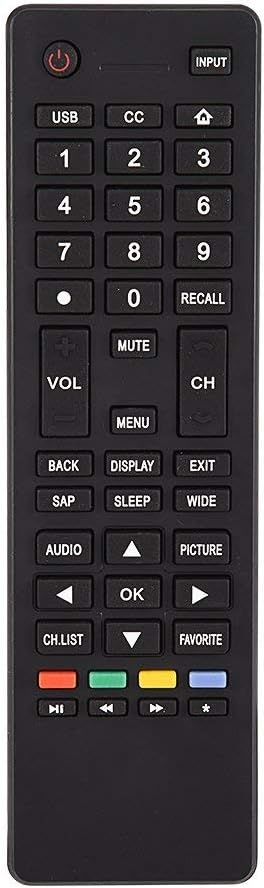
Afbeelding 3.1: voorbijview of the remote control's button layout for easy identification of functions.
3.2 werkbereik:
The remote control has a stable signal transmission distance of up to 10 meters (33 feet). Actual remote distance may vary depending on environmental factors and the specific model of your TV.
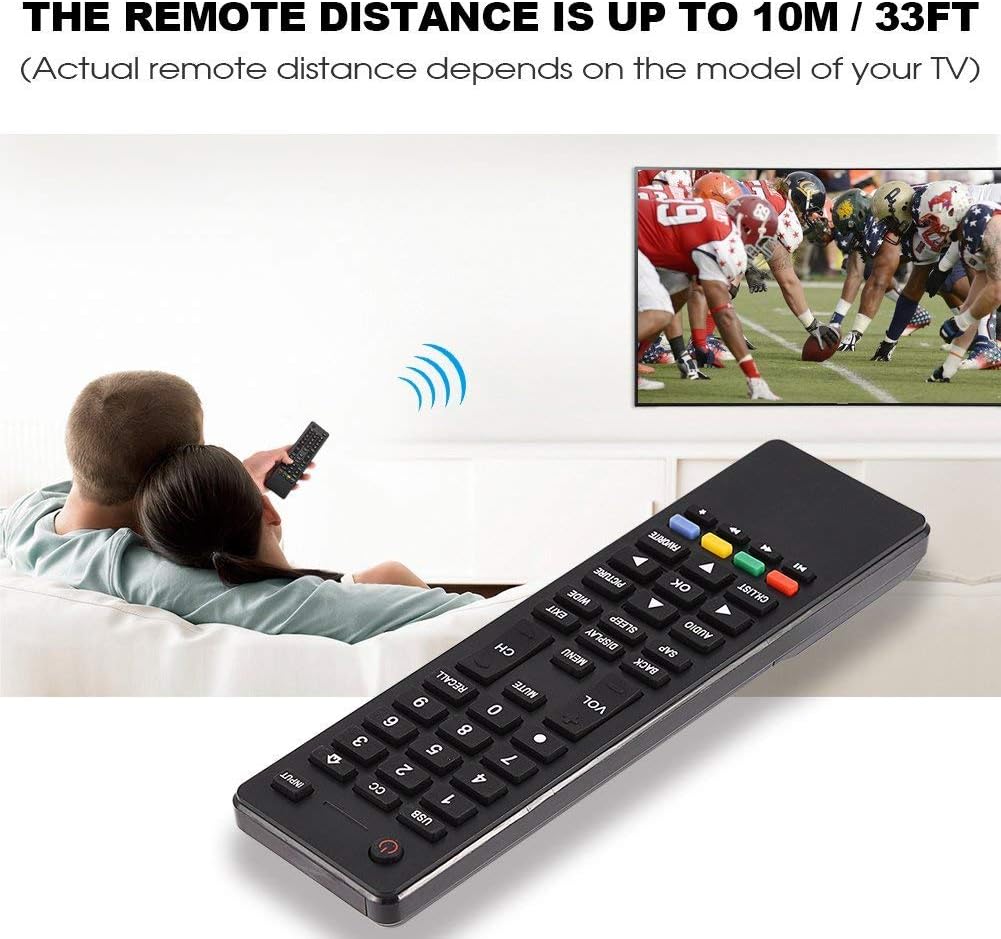
Image 3.2: Visual representation of the remote control's effective operating distance to the television.
4. Onderhoud
4.1 Reinigen
Gebruik een zachte, droge doek om de afstandsbediening schoon te maken. Bij hardnekkig vuil lichtjes afnemen.ampen the cloth with water or a mild cleaning solution. Avoid using harsh chemicals or abrasive cleaners, as these can damage the remote's surface or internal components.
4.2 Batterijonderhoud
- Vervang de batterijen wanneer de afstandsbediening traag reageert of helemaal niet meer werkt.
- Gebruik geen oude en nieuwe batterijen of verschillende soorten batterijen door elkaar.
- Verwijder de batterijen als u de afstandsbediening gedurende langere tijd niet gebruikt, om lekkage te voorkomen.
- Gooi gebruikte batterijen op een verantwoorde manier weg volgens de plaatselijke regelgeving.
5. Probleemoplossing
5.1 Afstandsbediening reageert niet
- Controleer batterijen: Ensure batteries are inserted correctly with the correct polarity (+/-) and are not depleted. Replace with fresh AAA batteries if necessary.
- Zichtlijn: Make sure there are no obstructions between the remote control and the TV's infrared sensor.
- Afstand: Confirm you are within the effective operating range (up to 10 meters / 33 feet).
- TV-compatibiliteit: Verify that your TV model is listed as compatible (Haier HTR-A18M, 55D3550, 40D3500M, 48D3500).
5.2 Buttons Not Working Correctly
- Schoon afstandsbediening: Dust or debris under buttons can cause malfunction. Refer to the Maintenance section for cleaning instructions.
- Batterijcontrole: Weak batteries can lead to inconsistent button responses. Replace batteries.
6. Specificaties
| Functie | Detail |
|---|---|
| Merk | Nul |
| Compatibele apparaten | Haier HTR-A18M, 55D3550, 40D3500M, 48D3500 TVs |
| Connectiviteitstechnologie | Infrarood |
| Maximaal bereik | 10 meter (33 voet) |
| Batterijtype | 2 x AAA (niet inbegrepen) |
| Controller-type | Knopbediening |
| Materiaal | ABS |
| Modelnummer | Zerone9rnag3b5y4-cr |
| UPC | 647213811490 |

Image 6.1: Physical dimensions of the Zerone Universal Remote Control.
7. Garantie-informatie
This product is offered as an Amazon Renewed item. Amazon Renewed products are professionally inspected and tested to work and look like new. If you are not satisfied with your purchase, renewed products are eligible for replacement or refund under the Amazon Renewed Guarantee.
Additionally, the manufacturer provides a 90 dagen beperkte garantie. For specific details regarding the terms and conditions of this warranty, please refer to the documentation provided at the time of purchase or contact customer support.
8. Klantenservice
If you encounter any issues or have questions regarding your Zerone Universal Remote Control that are not addressed in this manual, please contact the seller or Amazon Renewed customer service for assistance.
For Amazon Renewed Guarantee claims, please visit the Amazon Renewed program page or contact Amazon customer support directly.