
Invoering
Thank you for choosing the NEC NP-MC372X Portable Projector. This manual provides essential information for the safe and efficient use of your projector. Please read these instructions thoroughly before operating the device and retain them for future reference. The NEC NP-MC372X is an XGA LCD projector designed for clear and bright presentations, offering 3700 lumens of brightness and a native resolution of 1024x768.
Veiligheidsinformatie
Neem altijd de volgende veiligheidsmaatregelen in acht om brand, elektrische schokken of letsel te voorkomen:
- Blokkeer de ventilatieopeningen niet. Zorg voor voldoende ruimte rondom de projector voor een goede luchtcirculatie.
- Kijk niet rechtstreeks in de projectorlens als de lamp is aan, omdat het felle licht oogbeschadiging kan veroorzaken.
- Plaats de projector niet op een onstabiel karretje, standaard of tafel.
- Unplug the projector from the power outlet before cleaning. Use a dry cloth for cleaning.
- Laat alle onderhoudswerkzaamheden over aan gekwalificeerd onderhoudspersoneel.
Inhoud van het pakket
Controleer of alle hieronder vermelde artikelen in uw pakket zitten:
- NEC NP-MC372X Portable Projector
- Stroomkabel
- HDMI-kabel
- Afstandsbediening
Product voorbijview
The NEC NP-MC372X is a versatile projector featuring an LCD display, 1024x768 native resolution, and 3700 lumens brightness. It includes a 1.2x zoom lens and offers a lamp life of up to 10,000 hours. Connectivity options include Dual HDMI, VGA, and USB.
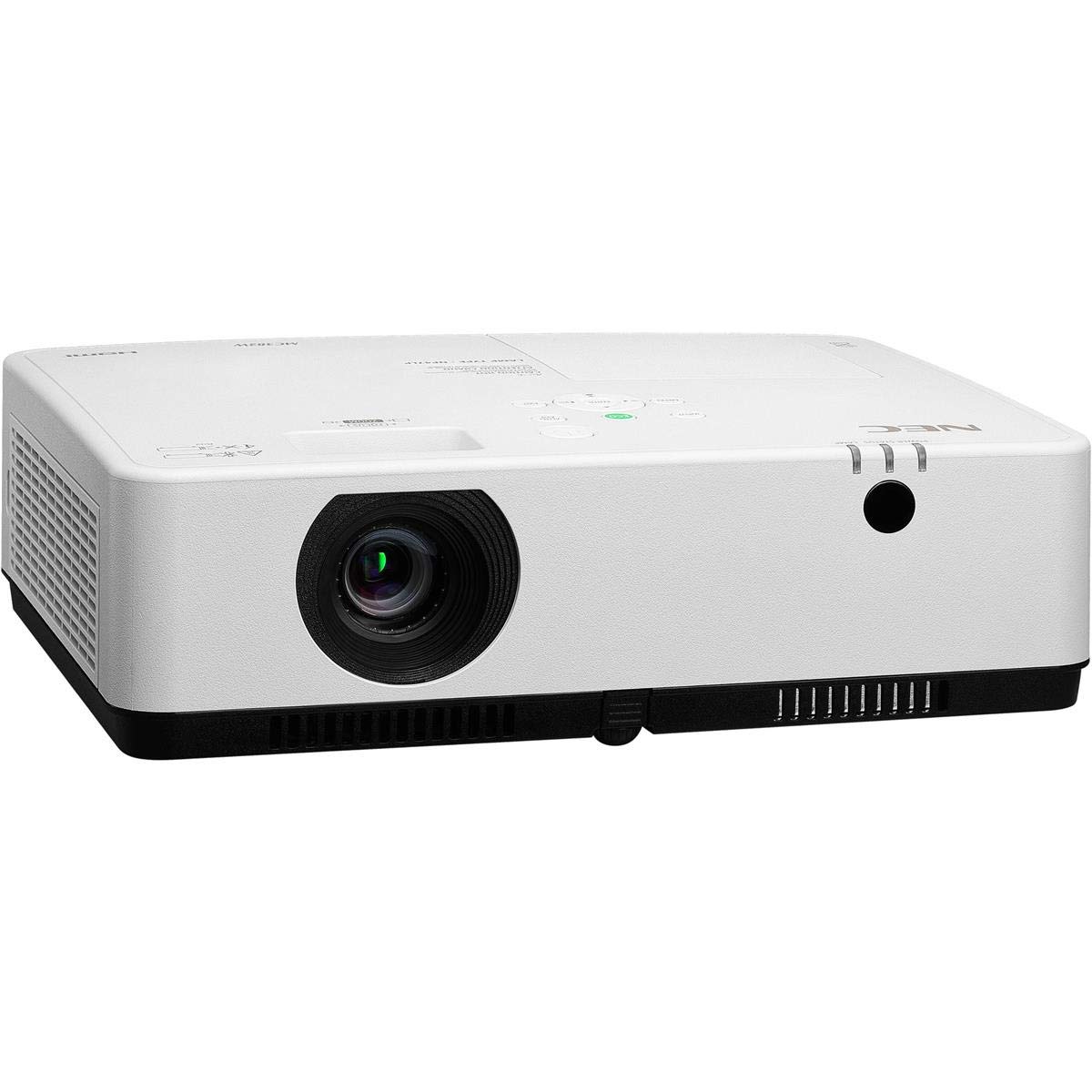
Afbeelding 1: Voorkant en bovenkant view of the NEC NP-MC372X Portable Projector, showing the lens and control panel.

Figuur 2: Voorzijde view of the projector, highlighting the projection lens.

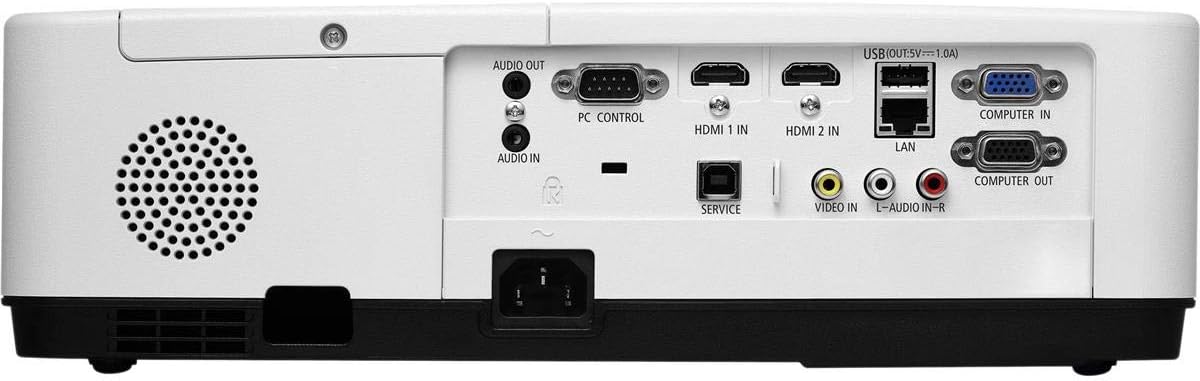
Afbeelding 3: Achter view of the projector, displaying the various input and output ports including HDMI, VGA, USB, LAN, and audio connections.
Figuur 4: Zijkant view of the projector, showing the ventilation grille for heat dissipation.
Instellen
Fysieke plaatsing
Place the projector on a stable, flat surface or mount it securely. Ensure the projector is positioned at an appropriate distance from the screen to achieve the desired image size. Maintain clear space around the projector for ventilation.
Apparaten verbinden
Refer to Figure 3 for port locations. Connect your source device (e.g., laptop, gaming console) to the projector using one of the following methods:
- HDMI: Use an HDMI cable to connect to either HDMI 1 IN or HDMI 2 IN.
- VGA: Use a VGA cable to connect to COMPUTER IN. For audio, connect a 3.5mm audio cable to AUDIO IN.
- USB-poort: Connect a USB device to the USB port for direct media playback.
- LAN: Sluit een Ethernetkabel aan op de LAN-poort voor netwerkverbinding.
Aan/uitzetten
1. Connect the power cable to the projector and a power outlet.
2. Press the power button on the projector or the remote control to turn on the projector.
3. To turn off, press the power button again. Confirm shutdown when prompted.
Gebruiksaanwijzing
Basic Operation with Remote Control
Use the included remote control to navigate menus, select input sources, and adjust settings. Point the remote control towards the projector's remote sensor.
Selectie van invoerbron
Press the 'Input' button on the remote control or projector control panel to cycle through available input sources (HDMI 1, HDMI 2, Computer In, USB).
Beeldaanpassing
- Focus: Rotate the focus ring on the lens until the image is sharp.
- Zoom: Use the zoom ring on the lens to adjust the image size without moving the projector. The projector features a 1.2x optical zoom.
- Keystone-correctie: If the image appears trapezoidal, use the keystone correction function in the projector menu to square the image.
Speciale kenmerken
- Multi Presenter: This feature allows multiple users to connect and display content wirelessly from their devices. Refer to the on-screen menu for setup instructions.
- USB Viewer Capability: Insert a USB drive into the USB port to directly view photos, videos, and documents without a connected computer.
- Ondertiteling: Enable closed captioning for compatible video sources through the projector's menu settings.
Onderhoud
Lamp Vervanging
De projector lamp has an operating life of up to 10,000 hours. When the lamp reaches the end of its life, a warning message will appear. Consult a qualified service technician for lamp vervangen om een correcte installatie en veiligheid te garanderen.
Schoonmaak
- Buitenkant: Veeg de projector schoon.asinmet een zachte, droge, pluisvrije doek. Voor hardnekkige vlekken, lichtjes dampen de doek met water.
- Lens: Use a professional lens cleaning kit or a soft, dry cloth specifically designed for optical lenses. Avoid harsh chemicals.
- Luchtfilter: Controleer en reinig het luchtfilter regelmatig om stofophoping te voorkomen, wat de prestaties kan beïnvloeden.amp life. Refer to the projector's on-screen menu for filter usage time.
Probleemoplossing
Als u problemen ondervindt, probeer dan de volgende oplossingen voordat u contact opneemt met de ondersteuning:
- Geen afbeelding: Ensure all cables are securely connected. Verify the correct input source is selected. Check if the lens cap is removed.
- Geen geluid: Confirm audio cables are connected (if applicable). Adjust volume on both the projector and the source device.
- Afstandsbediening werkt niet: Check the batteries in the remote. Ensure there are no obstructions between the remote and the projector's sensor.
- De afbeelding is wazig: Stel de scherpstelring op de lens in. Zorg ervoor dat het projectieoppervlak vlak is.
- Oververhittingswaarschuwing: Ensure ventilation openings are not blocked. Clean the air filter if necessary.
Specificaties
| Functie | Specificatie |
|---|---|
| Merk | NEC |
| Modelnaam | MC372X |
| Modelnummer | NP-MC372X |
| Weergavetype | LCD |
| Oorspronkelijke resolutie | 1024x768 (XGA) |
| Helderheid | 3700 Lumen |
| Connectiviteitstechnologie | HDMI, USB, VGA, LAN |
| Zoom | 1.2x Optisch |
| Levensduur van de lichtbron | 10,000 uur |
| Wattage | 267 watts (typical 120V) |
| Controller-type | Afstandsbediening |
| Artikelgewicht | 7.1 pond |
| Deeltage | 120 Volt |
| UPC | 805736070248 |
Garantie en ondersteuning
The NEC NP-MC372X Portable Projector comes with a 3 jaar beperkte garantie. For warranty claims or technical support, please contact NEC customer service. You can find contact information on the official NEC webwebsite of via uw productverkoper.