
1. Inleiding
This manual provides essential information for the safe and efficient operation of your Zerone 10.8V-12V Lithium Battery Charger. This charger is designed for use with 10.8V to 12V Lithium-Ion batteries, offering quick and reliable charging. Please read this manual thoroughly before first use and retain it for future reference.

Image 1: The Zerone 10.8V-12V Lithium Battery Charger, showing its compact design and universal compatibility label.
2. Veiligheidsinstructies
Always observe the following safety precautions to reduce the risk of electric shock, fire, or serious injury:
- Lees alle instructies: Lees voordat u de oplader gebruikt alle instructies en waarschuwingsmarkeringen op de oplader, de batterij en het product dat de batterij gebruikt.
- Uitsluitend voor gebruik binnenshuis: Stel de oplader niet bloot aan regen of natte omstandigheden.
- juiste voltage: Zorg ervoor dat de voeding voltage komt overeen met het volumetagzoals aangegeven op het typeplaatje van de lader.
- Schade voorkomen: Gebruik de oplader niet als deze een harde klap heeft gekregen, is gevallen of anderszins beschadigd is. Breng hem naar een gekwalificeerde reparateur.
- Ventilatie: Do not block any ventilation openings. Ensure adequate airflow around the charger during operation.
- Haal de stekker uit het stopcontact wanneer u deze niet gebruikt: Always unplug the charger from the power outlet before attempting any maintenance or cleaning, and when not in use.
- Use specified batteries: Only charge batteries specifically designed for this charger. Charging other battery types may cause them to burst, leading to personal injury and damage.
- Niet kortsluiten: Sluit de accupolen nooit kort.
- Buiten het bereik van kinderen houden: Dit apparaat is niet bedoeld voor gebruik door personen (inclusief kinderen) met beperkte fysieke, sensorische of mentale vermogens, of met een gebrek aan ervaring en kennis, tenzij zij onder toezicht staan of instructies hebben gekregen over het gebruik van het apparaat door een persoon die verantwoordelijk is voor hun veiligheid.
3. Inhoud van het pakket
Controleer of alle items aanwezig zijn en in goede staat zijn:
- 1 x Zerone 10.8V-12V Lithium Battery Charger
- 1 x Gebruikershandleiding
4. Producteigenschappen
The Zerone 10.8V-12V Lithium Battery Charger offers the following key features:
- Universele compatibiliteit: Specifically designed for 10.8V to 12V Lithium-Ion batteries.
- LED-indicator: Built-in LED display provides intuitive monitoring of battery status.
- Slim laadbeheer: Utilizes a 'first in, first charged' system and protects against overload.
- Snel opladen: Capable of charging a 12V Lithium-Ion 1.5Ah battery in approximately 50 minutes.
- Wide Model Compatibility: Compatible with models such as DC10WD, DC10SB, DC10WC, BL1015, BL1016, BL1021B, and BL1041B.

Image 2: The charger displaying its compatibility with various battery models, including DC10WD, DC10SB, DC10WC, BL1015, BL1016, BL1021B, and BL1041B.
5. Instellen
Volg deze stappen om uw batterijlader in te stellen:
- Pak de oplader uit: Carefully remove the charger and all components from the packaging.
- Aansluiten op stroom: Plug the charger's power cord into a standard 100V-260V AC electrical outlet. The charger's LED indicator will flash green once to confirm power connection.
- Batterij voorbereiden: Ensure the battery to be charged is clean and free from debris.
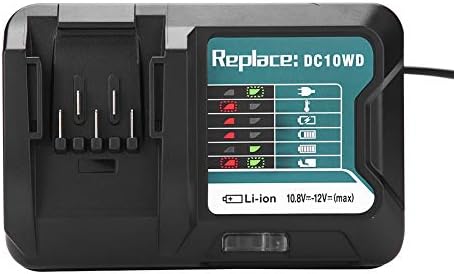
Image 3: The Zerone charger with its integrated power cord, ready for connection to an electrical outlet.
6. Gebruiksaanwijzing
Een batterij opladen:
- Batterij plaatsen: Align the battery with the charger's slot and slide it in until it clicks securely into place.
- Monitor opladen: The LED indicator will show the charging status. Refer to the "LED Indicator Guide" section for detailed explanations of the light patterns.
- Opladen voltooid: Once the battery is fully charged, the LED indicator will show a solid green light.
- Batterij verwijderen: Press the release button on the battery (if applicable) and slide it out of the charger.
- Oplader loskoppelen: Haal de oplader uit het stopcontact wanneer deze niet in gebruik is.

Image 4: The Zerone charger with a compatible lithium-ion battery inserted, ready for charging.
7. LED-indicatorgids
The charger features an LED display to communicate the battery's status:
| Indicatielampje | Staat |
|---|---|
| Groen knipperend | De oplader is aangesloten en klaar voor gebruik. |
| Rood knipperend | Battery is in cooling mode. Charging will begin once the battery temperature is within the optimal range. |
| Red Sustained Light | Battery is currently charging (0-100%). |
| Green Sustained Light | Charging is completed. The battery is fully charged. |
| Red and Green Flashing | Indicates a defective battery pack or charger. |

Afbeelding 5: Een close-up view of the charger's LED indicator panel, detailing the meaning of each light pattern for battery status.
8. Onderhoud
Proper maintenance ensures the longevity and performance of your charger:
- Schoonmaak: Koppel de oplader los van het stopcontact voordat u hem schoonmaakt. Gebruik een droge, zachte doek om de buitenkant van de oplader af te vegen. Gebruik geen water of chemische reinigingsmiddelen.
- Opslag: Store the charger in a dry, cool place, away from direct sunlight and moisture.
- Regelmatig inspecteren: Periodically inspect the charger and its cord for any signs of damage. If damage is found, discontinue use and seek professional repair.
9. Probleemoplossing
Als u problemen ondervindt met uw oplader, raadpleeg dan de volgende veelvoorkomende problemen en oplossingen:
- Oplader gaat niet aan:
- Zorg ervoor dat het netsnoer stevig is aangesloten op zowel de oplader als een werkend stopcontact.
- Controleer het stopcontact met een ander apparaat om te bevestigen dat het werkt.
- Battery not charging (Red Flashing LED):
- The battery may be too hot or too cold. Allow the battery to reach room temperature before attempting to charge again. Charging will automatically resume once the temperature is optimal.
- Battery not charging (Red and Green Flashing LED):
- This indicates a defective battery or charger. Try charging a different, known-good battery. If the issue persists, the charger may be faulty. If only the original battery causes this, the battery is likely defective.
- Langzaam opladen:
- Zorg ervoor dat de batterij volledig in de oplader is geplaatst.
- Verify that the battery is compatible with this charger.
Als het probleem met deze stappen niet is opgelost, neem dan contact op met de klantenservice.
10. Specificaties
| Specificatie | Detail |
|---|---|
| Modelnummer | Zeronegfvetp6dn8-01 |
| Ingangsvolumetage | 100V-260V wisselstroom, 50-60Hz |
| Uitgangsvolumetage | 10.8 V-12 V (gelijkstroom) |
| Productafmetingen | 4.72 x 1.97 x 5.91 inch |
| Artikelgewicht | 11.6 ons (0.33 kilogram) |
| Fabrikant | Nul |
| Compatibele batterijtypen | 10.8V-12V Lithium-Ion (e.g., BL1015, BL1016, BL1021B, BL1041B) |
| Compatible Charger Models | DC10WD, DC10SB, DC10WC |

Image 6: The bottom view of the Zerone charger, showing its input/output specifications and model number.
11. Garantie en ondersteuning
For warranty information or technical support, please refer to the documentation provided with your purchase or contact Zerone customer service through the retailer where the product was purchased. Keep your purchase receipt as proof of purchase.