
1. Inleiding
Thank you for choosing the KAIDI KD-904 Bluetooth Earphones. These wireless in-ear headphones are designed for comfort and stability, making them ideal for sports and daily use. Featuring Bluetooth connectivity and a built-in microphone, they allow for hands-free calls and high-quality audio playback. This manual provides essential information for the proper setup, operation, and maintenance of your earphones.
2. Inhoud van het pakket
- KAIDI KD-904 Bluetooth Earphones
- USB-oplaadkabel
- Gebruiksaanwijzing
3. Product voorbijview
The KAIDI KD-904 earphones feature an ergonomic design with ear hooks for a secure fit, especially during physical activity. The earbuds are magnetic, allowing them to clip together for convenient storage around your neck when not in use. An inline control module provides easy access to power, volume, and call functions.

Afbeelding: Close-up view of a single KAIDI KD-904 earphone, highlighting the in-ear bud and the flexible ear hook designed for stability.

Afbeelding: Gedetailleerd view of the earbud housing with the 'KAIDI' brand logo, showing the design and finish of the earphone unit.
4. Instellen
4.1 De oordopjes opladen
- Connect the micro USB end of the charging cable to the charging port on the inline control module of the earphones.
- Sluit het USB-A-uiteinde van de oplaadkabel aan op een USB-voedingsbron (bijvoorbeeld een USB-poort van een computer of een wandadapter).
- The LED indicator on the control module will illuminate, typically red, during charging.
- Once fully charged (approximately 1-2 hours), the LED indicator will change color (e.g., blue) or turn off.
Let op: Zorg ervoor dat de oortjes volledig zijn opgeladen voor het eerste gebruik, voor een optimale batterijduur.
4.2 Bluetooth-koppeling
- Inschakelen: Press and hold the multi-function button (usually the center button on the inline control) for approximately 3-5 seconds until the LED indicator flashes blue and red alternately. This indicates the earphones are in pairing mode.
- Activeer Bluetooth: Ga op je smartphone of ander apparaat met Bluetooth naar de Bluetooth-instellingen en zorg ervoor dat Bluetooth is ingeschakeld.
- Zoeken naar Apparaten: Your device will scan for available Bluetooth devices. Look for "KD-904" or a similar name in the list.
- Verbinden: Select "KD-904" from the list to initiate the connection. Once successfully paired, the LED indicator on the earphones will typically flash blue slowly or turn solid blue, and you may hear an audible confirmation.
- Maak opnieuw verbinding: After initial pairing, the earphones will automatically attempt to connect to the last paired device when powered on, provided the device's Bluetooth is active and within range.
5. Gebruiksaanwijzing
5.1 Basisfuncties
- Inschakelen: Houd de multifunctionele knop 3 seconden ingedrukt.
- Uitschakelen: Houd de multifunctionele knop 5 seconden ingedrukt.
- Afspelen/Pauzeren: Druk kort op de multifunctionele knop.
- Volume omhoog: Druk kort op de '+' knop.
- Volume verminderen: Druk kort op de '-' knop.
- Volgende nummer: Houd de '+' knop lang ingedrukt.
- Vorig nummer: Houd de '-' knop lang ingedrukt.
5.2 Oproepbeheer
- Beantwoord oproep: Druk kort op de multifunctionele knop wanneer er een inkomend gesprek overgaat.
- Einde gesprek: Druk tijdens een gesprek kort op de multifunctionele knop.
- Oproep afwijzen: Houd de multifunctionele knop lang ingedrukt wanneer er een inkomend gesprek overgaat.
- Laatste nummer opnieuw kiezen: Druk tweemaal op de multifunctionele knop.
6. Onderhoud
- Schoonmaak: Use a soft, dry cloth to clean the earphones. Do not use abrasive cleaners or immerse in water.
- Opslag: Store the earphones in a cool, dry place away from direct sunlight and extreme temperatures. The magnetic earbuds help prevent tangling during storage.
- batterij zorg: To prolong battery life, avoid completely discharging the earphones frequently. Charge them regularly, even if not in use for extended periods.
- Voorkom schade: Do not drop, disassemble, or modify the earphones. Keep away from sharp objects.
7. Probleemoplossing
| Probleem | Mogelijke oorzaak | Oplossing |
|---|---|---|
| De oordopjes gaan niet aan. | Batterij bijna leeg. | Laad de oordopjes volledig op. |
| Kan geen koppeling maken met het apparaat. | Earphones not in pairing mode; Bluetooth off on device; device out of range. | Ensure earphones are in pairing mode (flashing red/blue). Turn on Bluetooth on your device. Move device closer to earphones (within 10 meters). Try re-pairing. |
| Geen geluid of zacht volume. | Volume te laag; niet aangesloten; verkeerde audio-uitgang geselecteerd. | Increase volume on both earphones and connected device. Ensure earphones are successfully connected. Check audio output settings on your device. |
| Opladen werkt niet. | Defecte kabel of stroombron. | Try a different USB charging cable and/or a different USB power source. |
8. Specificaties
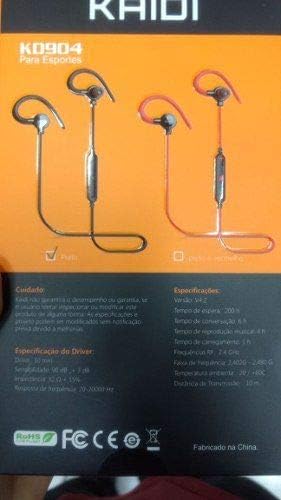
Image: Back of the KAIDI KD-904 product box, displaying detailed technical specifications and features in text.
- Model: KD-904
- Bluetooth-versie: V4.2
- Werkingsbereik: Tot 10 meter (33 voet)
- Muziek afspeeltijd: Ongeveer 4 uur
- Standby-tijd: Ongeveer 200 uur
- Oplaadtijd: Ongeveer 1-2 uur
- Stuurprogrammagrootte: 10mm
- Bestuurdersgevoeligheid: 98dB
- Frequentiebereik: 20Hz - 20kHz
- Connectiviteit: Draadloos Bluetooth
- Oor plaatsing: In-ear (Intra-auricular)
- Specifieke toepassingen: Sports, Running
- Compatibele apparaten: Android, Samsung, iPhone
9. Garantie en ondersteuning
For warranty information or technical support, please refer to the purchase documentation or contact your retailer. Keep your proof of purchase for any warranty claims. KAIDI is committed to providing quality products and support.