
1. Inleiding
This manual provides detailed instructions for the proper installation, operation, and maintenance of your Roadstar RD8410N and RD8200N TV Tuner and TV Antenna. Please read this manual thoroughly before using the product to ensure safe and efficient operation. Keep this manual for future reference.
2. Veiligheidsinformatie
- Zorg ervoor dat de voeding voltage komt overeen met de vereisten die op het apparaat zijn gespecificeerd.
- Stel het apparaat niet bloot aan regen, vocht of extreme temperaturen.
- Plaats het apparaat niet in de buurt van warmtebronnen of in direct zonlicht.
- Open de c nietasing of the TV tuner; refer all servicing to qualified personnel.
- Keep the antenna away from high-voltage power lines and other electrical hazards.
- Koppel de voedingsadapter los tijdens onweer of wanneer het apparaat gedurende langere tijd niet wordt gebruikt.
3. Inhoud van het pakket
Controleer de inhoud van de verpakking bij het openen. Neem contact op met uw verkoper als er onderdelen ontbreken of beschadigd zijn.
- Roadstar TV Tuner (RD8410N or RD8200N)
- TV-antenne
- Stroomadapter
- Afstandsbediening (indien meegeleverd met uw model)
- Gebruikershandleiding (dit document)
4. Product voorbijview
Familiarize yourself with the components of your Roadstar TV Tuner and Antenna.
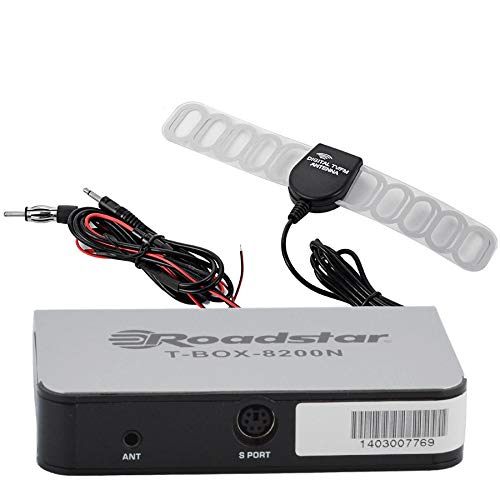
Figure 1: Roadstar T-BOX-8200N TV Tuner
This image displays the Roadstar T-BOX-8200N TV Tuner. It is a compact, silver-grey rectangular device with black side panels. The front face prominently features the "Roadstar" logo and the model name "T-BOX-8200N". On the right side, two ports are visible: one labeled "12V" for power input and another labeled "ANT" for antenna connection. This device is designed to receive and process television signals.
4.1. TV Tuner Ports and Indicators
- ANT-invoer: Connects to the TV antenna for receiving broadcast signals.
- 12V DC-ingang: Wordt aangesloten op de meegeleverde stroomadapter.
- (Other ports like HDMI Out, USB, AV Out may be present depending on specific model variant. Refer to your device for exact port configuration.)
4.2. TV Antenna
The included TV antenna is designed to capture terrestrial broadcast signals. Its performance may vary based on location, signal strength, and obstacles.
5. Instellen
5.1. Connecting the TV Tuner
- Sluit de antenne aan: Plug the antenna cable into the "ANT" input port on the Roadstar TV Tuner.
- Aansluiten op tv: Use an appropriate cable (e.g., HDMI, AV) to connect the TV tuner's output port to an available input port on your television. Note the input port you use (e.g., HDMI 1, AV 2).
- Sluit stroom aan: Insert the small end of the power adapter into the "12V DC" input port on the TV tuner. Plug the other end of the power adapter into a standard electrical outlet.
5.2. Positioning the TV Antenna
- Place the antenna in a location with minimal obstructions, ideally near a window or high up.
- Experiment with different antenna positions to find the best signal reception.
- Avoid placing the antenna near large metal objects or other electronic devices that may cause interference.
6. Gebruiksaanwijzing
6.1. Eerste keer inschakelen en kanaalscan
- Turn on your television and select the correct input source (e.g., HDMI 1, AV 2) that the TV tuner is connected to.
- The TV tuner should power on automatically or can be turned on using its power button or remote control.
- Follow the on-screen prompts for initial setup. This typically includes selecting your language and country.
- Initiate an "Auto Scan" or "Channel Search" from the TV tuner's menu. This process will scan for available digital television channels. This may take several minutes.
- Once the scan is complete, the tuner will save the found channels, and you should be able to view hen.
6.2. Basis-tv Viewingaan
- Use the remote control's channel up/down buttons to navigate through channels.
- Use the volume buttons on your TV's remote control to adjust audio levels.
- Access the menu to adjust settings, view program guides (EPG), or manage channels.
7. Onderhoud
7.1. Schoonmaken
- Zorg ervoor dat het apparaat is losgekoppeld voordat u het schoonmaakt.
- Wipe the exterior of the TV tuner and antenna with a soft, dry cloth.
- Do not use liquid cleaners, aerosols, or abrasive chemicals.
7.2. Opslag
- Als u het apparaat voor een langere periode opbergt, koppelt u het los van de stroomvoorziening en bewaart u het op een koele, droge plaats.
- Houd het uit de buurt van direct zonlicht en extreme temperaturen.
8. Probleemoplossing
| Probleem | Mogelijke oorzaak | Oplossing |
|---|---|---|
| Geen stroom | Stroomadapter niet aangesloten of stopcontact defect. | Ensure power adapter is securely connected to the tuner and a working electrical outlet. |
| No signal / "No Channel" message | Antenna not connected, poor antenna position, or no channels scanned. |
|
| Poor picture quality / pixelation | Zwak signaal, storing of antennepositie. |
|
| Geen geluid | TV volume muted or too low, incorrect audio settings. |
|
9. Specificaties
Opmerking: Specificaties kunnen zonder voorafgaande kennisgeving worden gewijzigd.
- Model: Roadstar RD8410N, Roadstar RD8200N
- Producttype: TV Tuner and Antenna Package
- Tunertype: Digital Terrestrial Television (DTT)
- Ingangsvolumetage: 12V DC (via included power adapter)
- Antennetype: Passive or Active (depending on specific antenna model)
- Connectiviteit: ANT In, 12V DC In, (e.g., HDMI Out, USB, AV Out - specific to model)
- ASIN: B07GXJPR3R
- Merk: Wegster
10. Garantie en ondersteuning
Voor garantie-informatie en technische ondersteuning kunt u de bijgeleverde documentatie raadplegen of contact opnemen met uw winkelier. Bewaar uw aankoopbewijs voor garantieclaims.