
1. Inleiding
Thank you for choosing the Logic Life30 Smartwatch. This device is designed to integrate seamlessly into your active lifestyle, offering features such as Bluetooth calling, fitness tracking, sleep monitoring, and real-time notifications. This manual provides detailed instructions for setup, operation, and maintenance to ensure optimal performance and longevity of your smartwatch.

Image 1.1: Logic Life30 Smartwatches in multiple colors, showcasing different display options including a dialer, messages, contacts, time, date, and heart rate monitor.
2. Veiligheidsinformatie
- Probeer het apparaat niet te demonteren, repareren of wijzigen. Dit kan de garantie ongeldig maken en schade veroorzaken.
- Houd het apparaat uit de buurt van extreme temperaturen, direct zonlicht en hoge luchtvochtigheid.
- Zorg ervoor dat het apparaat niet wordt blootgesteld aan harde stoten of vallen.
- Use only the provided charging cable and adapter. Using unauthorized accessories may cause damage or fire.
- Consult a medical professional before starting any new exercise regimen, especially if you have pre-existing health conditions. The heart rate monitor is for reference only and should not be used for medical diagnosis.
- Houd het apparaat buiten bereik van kinderen en huisdieren.
- Reinig het apparaat met een zachte, droge doek. Gebruik geen agressieve chemicaliën of schurende materialen.
3. Inhoud van het pakket
Controleer de inhoud van de verpakking bij het uitpakken. Neem contact op met de klantenservice als er onderdelen ontbreken of beschadigd zijn.
- Logic Life30 Smartwatch
- USB-oplaadkabel
- Gebruikershandleiding (dit document)
4. Apparaat voorbijview
Familiarize yourself with the physical components of your Logic Life30 Smartwatch.
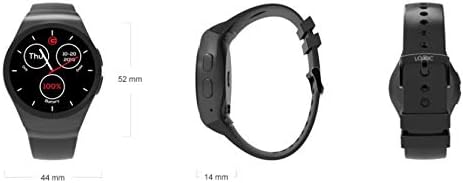
Afbeelding 4.1: Voor-, zij- en achterkant views of the Logic Life30 Smartwatch with dimensions (44mm width, 52mm height, 14mm thickness).
4.1 voorzijde View
- IPS LCD Touch Display: The main interface for interacting with the smartwatch.
4.2 Zijde View
- Aan/uit-knop: Wordt gebruikt om het apparaat aan/uit te zetten en het scherm te activeren/deactiveren.
- Microfoon: Voor spraakopdrachten en oproepen.
4.3 Terug View

Afbeelding 4.2: Achterkant view of the Logic Life30 Smartwatch, highlighting the optical heart rate sensor and magnetic charging contacts.
- Hartslagsensor: Controleert uw hartslag.
- Oplaadcontacten: For connecting the magnetic USB charging cable.
- Spreker: For audio output during calls or media playback.
5. Instellen
5.1 De smartwatch opladen
- Connect the USB charging cable to a power adapter (not included) or a computer's USB port.
- Align the magnetic end of the charging cable with the charging contacts on the back of the smartwatch. It will snap into place.
- The watch display will show a charging indicator. Allow the device to fully charge before first use (approximately 2 hours).
5.2 In-/uitschakelen
- Inschakelen: Press and hold the Power Button on the side of the watch until the Logic logo appears.
- Uitschakelen: Press and hold the Power Button, then select "Power Off" on the screen.
5.3 Pairing with Your Smartphone (Bluetooth)
To access all features, including calls, notifications, and data synchronization, pair your Life30 Smartwatch with your smartphone via Bluetooth.
- Ensure your smartwatch is powered on and Bluetooth is enabled on your smartphone.
- Ga op je smartwatch naar de Bluetooth-instellingen.
- On your smartphone, open Bluetooth settings and search for available devices.
- Select "Logic Life30" (or similar name) from the list of found devices on your smartphone.
- Bevestig het koppelingsverzoek op zowel je smartphone als je smartwatch.
5.4 Companion App Installation
For full functionality, including fitness data tracking and advanced settings, download the recommended companion app from your smartphone's app store. Refer to the smartwatch's display or packaging for the specific app name or QR code.
- Scan the QR code displayed on the smartwatch or in the quick start guide, or search for the app name in your phone's app store.
- Install the app and follow the on-screen instructions to create an account and connect your Life30 Smartwatch.
6. Gebruiksaanwijzing
6.1 Navigeren door de interface
- Veeg omhoog/omlaag: Blader door menu's of meldingen.
- Veeg naar links/rechts: Access different screens, widgets, or app lists.
- Kraan: Selecteer een item of open een applicatie.
- Druk op de aan / uit-knop: Ga terug naar het startscherm of schakel het scherm in/uit.
6.2 Communicatiefuncties
- Bellen/gebeld worden: Once paired via Bluetooth, you can dial numbers directly from the watch or answer incoming calls.
- Berichten: View incoming text messages and social media notifications directly on your watch.
- Contacten: Access your phone's contact list from the smartwatch.
6.3 Gezondheids- en fitnesstracking

Image 6.1: The Logic Life30 Smartwatch supports fitness tracking, monitoring activities like running.
- Hartslagmeter: Access the heart rate app to measure your current heart rate. The watch can also log your heart rate over time.
- Pedometer: Tracks your steps, distance, and estimated calories burned throughout the day.
- Slaapmonitor: Houdt uw slaappatronen bij, waaronder diepe slaap, lichte slaap en wakkere tijden.
- Herinnering aan sedentair gedrag: Notifies you when you have been inactive for too long, encouraging you to move.
6.4 Multimedia and Other Features
- Camera/Remote Camera: Use the built-in camera (if available) or control your smartphone's camera remotely from the smartwatch.
- MP3/MP4-speler: Play music or videos stored on the device or control media playback on your connected smartphone.
- Geluidsrecorder: Record audio directly from the smartwatch.
- Calculator, Calendar, Alarm, Stopwatch: Standaard toepassingen voor nutsvoorzieningen.
- Diefstalbeveiliging: Helps locate your phone if it's out of range or alerts you if the connection is lost.
- Spraakassistent: Access your phone's voice assistant through the smartwatch.
NOOIT maatwerk
- Kijk gezichten: Personalize your smartwatch by choosing from various pre-installed watch faces or downloading new ones via the companion app.
- Thema's: Adjust the overall visual theme of the smartwatch interface.
7. Onderhoud
7.1 Uw smartwatch schoonmaken
- Veeg het scherm en de behuizing van het horloge af met een zachte, pluisvrije doek.
- Voor hardnekkige vlekken, licht dampen the cloth with water. Avoid using harsh cleaning agents, solvents, or abrasive materials.
- Zorg ervoor dat de laadcontacten schoon en droog zijn voordat u gaat opladen om corrosie te voorkomen.
7.2 Opslag
- Bewaar de smartwatch op een koele, droge plaats wanneer u deze gedurende langere tijd niet gebruikt.
- Charge the device periodically (e.g., every 3 months) to prevent deep discharge of the battery.
8. Probleemoplossing
| Probleem | Mogelijke oplossing |
|---|---|
| Smartwatch gaat niet aan. | Zorg ervoor dat het apparaat volledig is opgeladen. Sluit het minstens 30 minuten aan op de oplader. |
| Kan geen koppeling maken met smartphone. |
|
| Meldingen worden niet ontvangen. |
|
| Hartslagmetingen zijn onnauwkeurig. | Zorg ervoor dat het horloge goed om je pols zit, niet te strak of te los. Maak de sensor aan de achterkant van het horloge schoon. |
| Het scherm reageert niet. | Restart the smartwatch by pressing and holding the power button. If the issue persists, ensure the screen is clean and dry. |
9. Specificaties
| Functie | Detail |
|---|---|
| Modelnaam | Leven30 |
| Merk | Logica |
| Weergave | 1.3 Inch IPS LCD Touch Screen |
| Connectiviteit | Bluetooth |
| Draadloze communicatie | Bluetooth |
| Speciale kenmerken | Email, Sleep Monitor, Notifications, Heart Rate Monitor, Pedometer, Remote Camera, MP3/MP4 Player |
| Menselijke interface-invoer | Aanraakscherm |
| Productafmetingen | 3.81 x 1.3 x 4.5 cm (1.5 x 0.51 x 1.77 inch) |
| Artikelgewicht | 426 g (0.94 pond) |
| Kleuropties | Silver/White (other colors may be available) |
| Vorm | Ronde |
10. Garantie en ondersteuning
10.1 Garantie-informatie
The Logic Life30 Smartwatch comes with a standard manufacturer's warranty. Please refer to the warranty card included in your package or visit the official Logic webRaadpleeg de website voor gedetailleerde algemene voorwaarden met betrekking tot de garantie, de duur ervan en de claimprocedure.
10.2 Klantenservice
For technical assistance, troubleshooting, or any questions regarding your Logic Life30 Smartwatch, please contact Logic customer support. Contact information can typically be found on the official Logic webwebsite of op de productverpakking.
- Online hulp: Visit the official Logic website voor veelgestelde vragen, ondersteuningsartikelen en contactformulieren.
- E-mailondersteuning: Raadpleeg de productdocumentatie voor het e-mailadres van de klantenservice.
- Telefonische ondersteuning: Refer to your product documentation for customer service phone numbers.