
360S6
Gebruikershandleiding voor de 360 Robotstofzuiger en dweilrobot
Model: S6
Invoering
Thank you for choosing the 360 Robot Vacuum and Mop Cleaner. This intelligent cleaning device is designed to provide efficient and thorough cleaning for your home, featuring advanced laser navigation, powerful suction, and smart app control. This manual will guide you through the setup, operation, and maintenance of your new robot vacuum to ensure optimal performance and longevity.

The 360 Robot Vacuum and Mop Cleaner, Model S6, shown with its companion mobile application interface.
Veiligheidsinformatie
- Lees alle instructies zorgvuldig door voordat u het apparaat gebruikt.
- Laat kinderen de robotstofzuiger niet bedienen. Houd toezicht op kinderen en huisdieren wanneer de robot in werking is.
- Ensure the charging dock is placed on a flat surface against a wall, with clear space around it.
- Gebruik de robotstofzuiger niet in natte omgevingen of in de buurt van vloeistoffen.
- Verwijder losse kabels, kleine voorwerpen of breekbare items van de vloer voordat u gaat schoonmaken, om te voorkomen dat ze verstrikt raken of beschadigd raken.
- Gebruik de robotstofzuiger niet om grote stukken vuil, scherpe voorwerpen of brandende/rokende materialen op te zuigen.
- Gebruik uitsluitend de originele oplader en batterij die door de fabrikant zijn meegeleverd.
- Voer regelmatig onderhoud uit zoals beschreven in deze handleiding om een veilige en efficiënte werking te garanderen.
Inhoud van het pakket
Controleer of alle componenten in het pakket aanwezig zijn:
- 360 Robot Vacuum and Mop Cleaner (S6)
- Oplaadstation
- Stroomadapter
- Waterreservoir
- Dweildoek
- Zijborstels (2 paar)
- Reinigingsgereedschap
- Gebruiksaanwijzing
- Batterij (voorgeïnstalleerd)
- Filter (vooraf geïnstalleerd)
Product voorbijview
Familiarize yourself with the main components of your 360 Robot Vacuum and Mop Cleaner.

Overview of the robot vacuum's intelligent features including anti-collision, anti-drop sensors, long-lasting battery, LDS laser navigation, and SLAM algorithm for mapping.
Bovenkant View:
- LDS-lasernavigatiesensor: Voor nauwkeurige kaartweergave en navigatie.
- Power/Clean-knop: Press to start/pause cleaning, long press to turn on/off.
- Oplaadknop: Druk op deze knop om de robot terug te sturen naar het laadstation.
- Dustbin Compartment: Bevindt zich onder de bovenklep.
Onderkant View:
- Hoofdborstel: Voor het grondig reinigen van tapijten en harde vloeren.
- Zijborstels: Om vuil en puin van randen en hoeken te verwijderen.
- Aandrijfwielen: Voor beweging over diverse ondergronden.
- Omni-directional Wheel: For steering.
- Oplaadcontacten: To connect with the charging dock.
- Klifsensoren: To prevent falling down stairs.
- Wandsensor: To sweep along walls and corners effectively.
Instellen
1. De robotstofzuiger opladen
- Place the charging dock on a hard, level surface against a wall. Ensure there is at least 0.5 meters (1.6 feet) of clear space on both sides and 1.5 meters (4.9 feet) in front of the dock.
- Connect the power adapter to the charging dock and plug the other end into a power outlet.
- Place the robot vacuum onto the charging dock, ensuring the charging contacts align. The robot will announce that it is charging. For first use, fully charge the robot before operation.
2. Connecting to the 360 Robot App
- Download the "360 Robot" app from the App Store (iOS) or Google Play Store (Android).
- Open de app en maak een account aan of log in.
- Follow the in-app instructions to add your device. This typically involves selecting your robot model, connecting to its Wi-Fi hotspot, and then connecting the robot to your home Wi-Fi network (2.4GHz only).
- Zodra u verbinding heeft, kunt u de robot besturen, view cleaning maps, set schedules, and access advanced features through the app.
Bediening
Een reinigingscyclus starten
- Via robotknop: Press the Power/Clean button on the robot once to start a cleaning cycle. Press again to pause.
- Via app: Open the 360 Robot app and tap the "Clean" button. You can also select specific cleaning modes (e.g., Spot cleaning, Proximity cleaning) or set schedules.
- Via Voice Command (Alexa): If integrated with Alexa, you can use voice commands like "Alexa, ask 360 Robot to start cleaning."
Reinigingsmodi

The robot vacuum is capable of both sweeping (vacuuming) and mopping, utilizing its main brush, side brushes, and mop cloth.
- Automatisch reinigen: The robot intelligently maps your home and cleans systematically. It identifies carpet and automatically switches to Max Mode with 1800Pa suction power for deep cleaning.
- Vlekreiniging: Geeft de robot de opdracht om een specifiek, klein gebied intensief te reinigen.
- Proximity Cleaning: Cleans a designated area around the robot.
- Dweilmodus: Bevestig de watertank met adamp mop cloth. The robot will mop hard floors. Note: The mopping function is designed for light mopping and not for heavy stains.
Geavanceerde app-functies
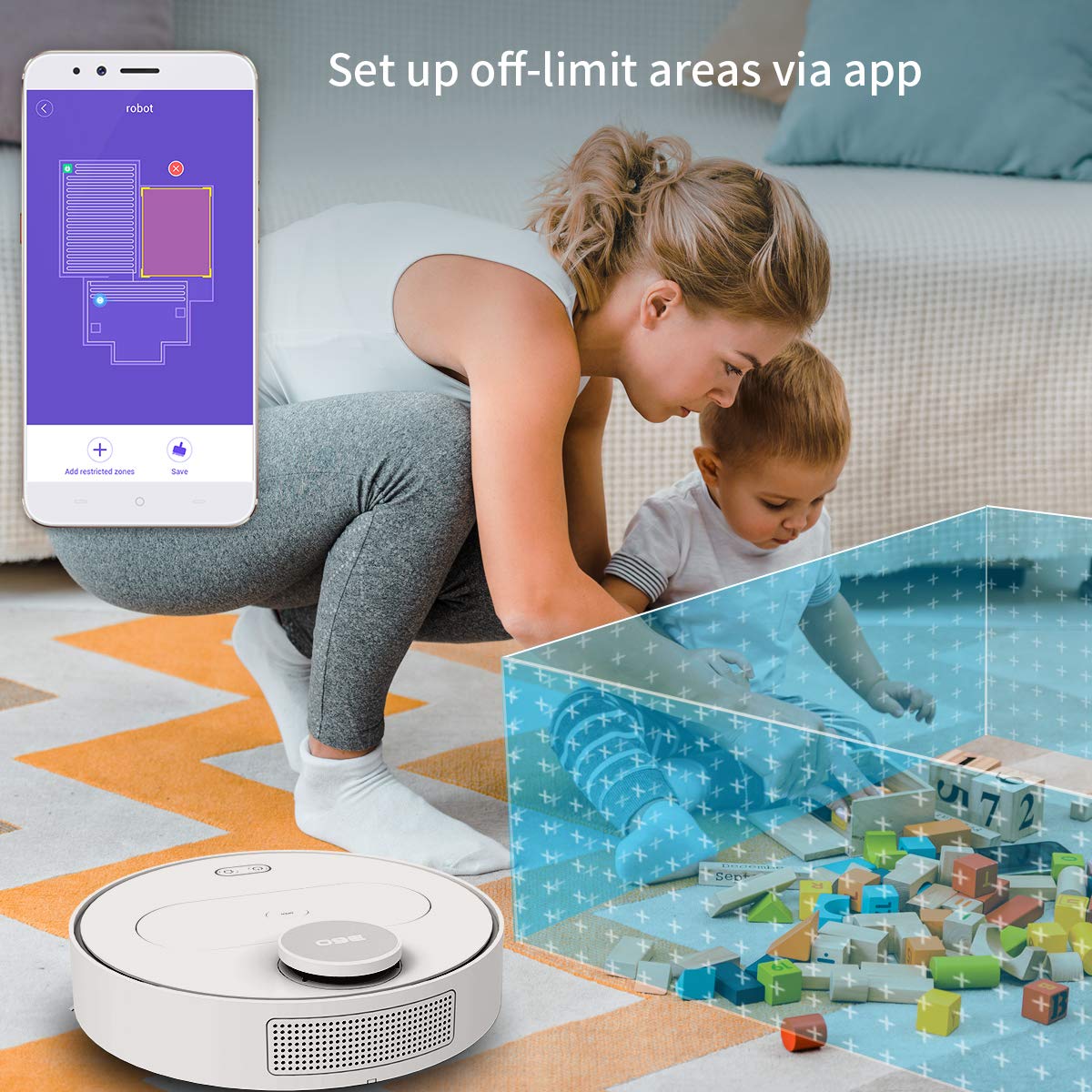
The 360 Robot app allows users to define and set up off-limit areas on the cleaning map, preventing the robot from entering specific zones.
- Multi-map Management: Save and manage multiple floor plans for different levels of your home.
- Off-limit Area: Draw virtual boundaries or no-go zones on the map to prevent the robot from entering specific areas.
- Planning: Stel specifieke tijden in waarop de robot automatisch met schoonmaken moet beginnen.
- Afstandsbediening: Manually control the robot's movement using the app.
- Spoorreiniging: Monitor the robot's real-time cleaning path and progress on the map.
- Zuigniveaus: Adjust suction power (Quiet, Normal, Powerful, Max) according to your cleaning needs.
Automatic Recharge and Breakpoint Resume
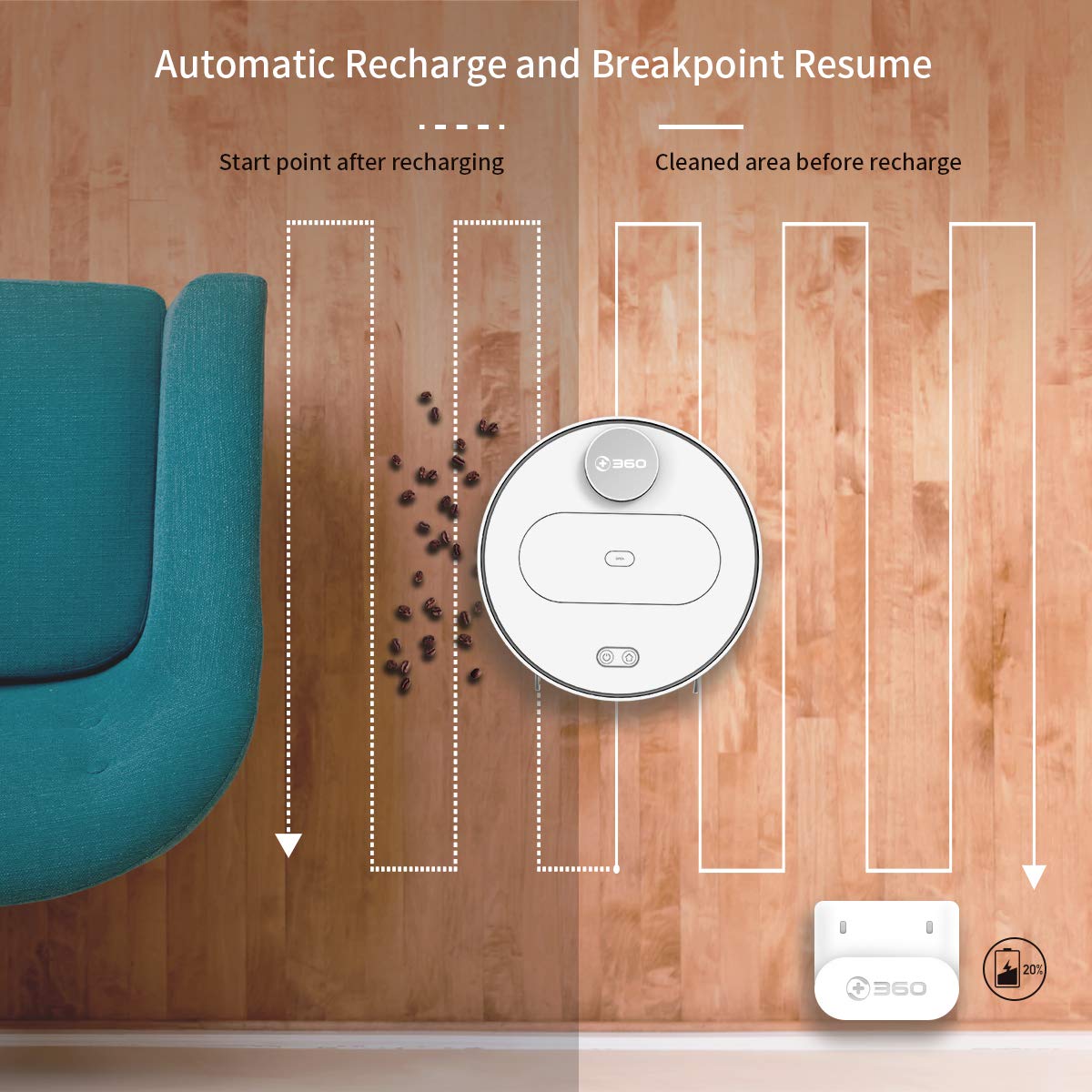
The robot automatically returns to its charging dock when the battery is low and resumes cleaning from the last uncleaned spot after recharging.
When the battery level is low during a cleaning cycle, the robot will automatically return to its charging dock. Once fully recharged, it will resume cleaning from where it left off, ensuring complete coverage of your home.
Onderhoud
Regular maintenance is crucial for optimal performance and longevity of your robot vacuum.
1. De prullenbak legen
- Open de bovenklep van de robot en verwijder de vuilnisbak.
- Open het deksel van de vuilnisbak en leeg de inhoud in een afvalbak.
- It is recommended to empty the dustbin after each cleaning cycle.
2. Het filter reinigen

The 360 Robot Vacuum features a washable HEPA filter, which helps maintain high filtration efficiency and contributes to cleaner indoor air.
- Haal het filter uit de vuilnisbak.
- Tap the filter gently to remove loose dirt.
- Rinse the filter under running water. Ensure it is completely dry before reinserting it into the dustbin. Do not use a brush or other tools to clean the filter, as this may damage it.
- It is recommended to clean the filter weekly and replace it every 3-6 months, depending on usage.
3. Reinigingsborstels
- Hoofdborstel: Remove the main brush cover and then the main brush. Use the provided cleaning tool to remove hair and debris tangled around the brush. Reinstall the brush and cover. Clean weekly.
- Zijborstels: Check side brushes for tangled hair or debris. If necessary, remove them (they can be pulled off) and clean. Reinstall, ensuring they click into place. Replace if worn or damaged. Clean monthly.
4. Sensoren en oplaadcontacten reinigen
- Wipe the cliff sensors (on the bottom of the robot), wall sensor (on the side), and charging contacts (on the robot and charging dock) with a clean, dry cloth. This ensures proper navigation and charging. Clean monthly.
5. Water Tank and Mop Cloth Maintenance
- After mopping, remove the water tank and empty any remaining water.
- Remove the mop cloth and wash it thoroughly. Allow it to air dry completely before reattaching or storing.
- Do not leave water in the tank when the robot is not in use for extended periods.
Probleemoplossing
| Probleem | Mogelijke oorzaak | Oplossing |
|---|---|---|
| Robot gaat niet aan. | Batterij is leeg. | Plaats de robot op het laadstation en zorg ervoor dat deze wordt opgeladen. |
| Robot kan geen verbinding maken met wifi. | Onjuist wifi-wachtwoord; 5GHz-netwerk; robot te ver van de router. | Ensure correct 2.4GHz Wi-Fi password. Move robot closer to router. Restart robot and router. |
| Robot loopt vaak vast. | Obstacles on the floor; narrow spaces. | Clear obstacles. Use the app to set off-limit areas for problematic zones. |
| Slechte reinigingsprestaties. | Vuilnisbak vol; filter verstopt; borstels in de knoop. | Leeg de stofbak. Reinig of vervang het filter. Reinig de hoofd- en zijborstels. |
| Robot keert niet terug naar het laadstation. | Charging dock obstructed; charging contacts dirty. | Ensure clear space around the dock. Clean charging contacts on both robot and dock. |
Specificaties
| Functie | Detail |
|---|---|
| Merk | 360 |
| Modelnaam | S6 |
| Speciale kenmerken | Anti-Collision, Anti-Fall, Washable Filter |
| Kleur | Veelkleurig |
| Filtertype | Lap |
| Levensduur van de batterij | 110 minuten |
| Energiebron | Op batterijen |
| Controlemethode | Toepassing |
| Compatibele apparaten | Alexa |
| Artikelgewicht | 3 kg 490 gram |
| Artikelafmetingen (LxBxH) | 35 x 35 x 10 centimeter |
Garantie en ondersteuning
For warranty information and technical support, please refer to the warranty card included in your product packaging or visit the official 360 SmartAI website. You can also contact customer service through the 360 Robot app for assistance.
Voor aanvullende informatie en veelgestelde vragen kunt u terecht op de volgende website: 360 Store on Amazon.