
1. Inleiding
This user manual provides comprehensive instructions for the installation, operation, and maintenance of the Secukey SK4-W Standalone Access Control System. Please read this manual carefully before installation and use to ensure proper functionality and safety.
The Secukey SK4-W is a robust, IP66-rated access control device designed for outdoor use, featuring RFID card and PIN code access. It is an ideal solution for securing doors, gates, and other entry points.
2. Product voorbijview
2.1 Belangrijkste kenmerken
- IP66 Waterproof and Anti-Vandal Design: Suitable for harsh outdoor environments.
- Meerdere toegangsmodi: Supports RFID card only, PIN code only, or Card + PIN for enhanced security.
- Hoge gebruikerscapaciteit: Manages up to 1000 users.
- Integrated Relay: Built-in NO, NC, Com relay for direct door lock control.
- Adjustable Output Times: Programmable lock output time (1-99 seconds) and alarm output time (1-3 minutes).
- Wiegand 26-bit Interface: Supports external Wiegand readers, exit buttons, and alarms.
- Vergrendelingsmodus: Allows the door or gate to remain open.
- Breed volumetage Bereik: Operates on 12~28V AC/DC.
- Verlicht toetsenbord: Zorgt voor zichtbaarheid bij weinig licht.
- Duurzame constructie: Zinc alloy casing with powder coating.
2.2 Meegeleverde componenten
- 1 x Secukey SK4-W Standalone Access Control Device (RFID/PIN)
- 1 x Master Add Card
- 1 x Master Delete Card
- 1 x Gebruikershandleiding
2.3 Producten Views

Figuur 1: Voorzijde view of the SK4-W unit, highlighting the keypad and Secukey branding.

Figuur 2: Schuin view of the SK4-W, providing a perspective of its slim profile.

Figuur 3: Zijkant view of the SK4-W unit.
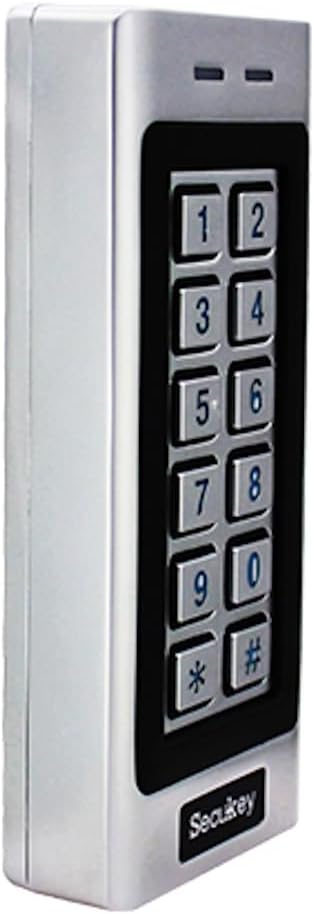
Figuur 4: Een andere kant view of the SK4-W unit.

Afbeelding 5: Terug view of the SK4-W unit, displaying the integrated wiring for installation.
3. Installatie en installatie
3.1 Het apparaat monteren
The SK4-W is designed for surface mounting. Choose a secure location near the door or gate, ensuring it is within reach for users and protected from direct impact. Use appropriate screws and wall plugs for the mounting surface.
3.2 Bedradingsschema
The device requires a 12~28V AC/DC power supply (not included). Connect the wires according to the diagram provided in the full manual. Ensure all connections are secure and insulated to prevent short circuits.
- Stroomverbruik: Connect to 12~28V AC/DC power source.
- Lock Output (NO/NC/COM): Connect to your electric lock.
- Alarm uitgang: Connect to an external alarm system (if applicable).
- Wiegand In/Out: For connecting external Wiegand readers or other Wiegand devices.
- Afsluitknop: Connect a push-to-exit button for convenient egress.
For detailed wiring schematics, please refer to the comprehensive wiring diagram included in the product packaging.
4. Gebruiksaanwijzing
4.1 Initial Setup and Master Cards
Upon first power-up, the device will be in factory default mode. Use the included Master Add Card and Master Delete Card to manage user access.
- Gebruikers toevoegen: Present the Master Add Card, then present the new user's RFID card or enter their PIN.
- Gebruikers verwijderen: Present the Master Delete Card, then present the user's RFID card or enter their PIN to be deleted.
4.2 Access Modes
The SK4-W supports three primary access modes:
- Card Only Mode: Users gain access by presenting a valid RFID card.
- PIN Only Mode: Users gain access by entering a valid 4-6 digit PIN code.
- Card + PIN Mode: Users must present a valid RFID card and then enter their corresponding PIN code for access. This mode offers the highest security.
Refer to the full programming guide for instructions on how to switch between access modes and manage user PINs.
4.3 Visitor PINs
The SK4-W supports up to 10 visitor PINs, which can be set to be valid for 1 to 10 uses. This feature is useful for temporary access for guests or service personnel.

Figure 6: The SK4-W supports visitor PINs and is IP66 waterproof, suitable for outdoor installation.
4.4 Latch Mode
The latch mode allows the door or gate to remain unlocked for an extended period, which can be useful during peak hours or for maintenance. Consult the programming manual for activation and deactivation procedures.
5. Onderhoud
The Secukey SK4-W is designed for minimal maintenance due to its robust construction and IP66 rating. However, regular checks can prolong its lifespan and ensure optimal performance.
- Schoonmaak: Wipe the keypad and casing met een zachte, damp doek. Vermijd schurende reinigingsmiddelen of oplosmiddelen.
- Verbindingscontrole: Periodically inspect wiring connections for any signs of wear, corrosion, or loosening.
- Firmware-updates: Controleer die van de fabrikant webDe website bevat informatie over beschikbare firmware-updates.

Figure 7: The SK4-W is designed to withstand extreme operating temperatures, from -40°C to 60°C.
6. Probleemoplossing
| Probleem | Mogelijke oorzaak | Oplossing |
|---|---|---|
| Apparaat gaat niet aan. | Geen voeding; onjuist volumetage; loose wiring. | Check power connections and ensure correct 12~28V AC/DC supply. Verify wiring. |
| RFID-kaart niet herkend. | Card not enrolled; incorrect card type (not 125 KHz EM); damaged card. | Ensure the card is properly enrolled. Verify it is a 125 KHz EM card. Try another card. |
| De pincode werkt niet. | Incorrect PIN; PIN not enrolled; device in card-only mode. | Double-check the PIN. Ensure the PIN is enrolled. Verify the access mode setting. |
| Het deurslot werkt niet. | Incorrect lock wiring (NO/NC); lock power issue; relay output time too short. | Check lock wiring and power. Adjust the lock output time in settings. |
| Wiegand output issues. | Incorrect Wiegand wiring; incompatible Wiegand device. | Verify Wiegand 26-bit wiring. Ensure external device compatibility. |
If the problem persists, please contact Secukey technical support for assistance.

Figure 8: Wiegand 26-bit input and output signal timing diagram.
7. Specificaties
| Attribuut | Waarde |
|---|---|
| Modelnummer | SK4-W |
| Merk | Secukey |
| Afmetingen (L x B x H) | 13.0x5.6x2.3cm |
| Gewicht | 500 gram |
| Kleur | Zilver |
| Stroomvoorziening | 12 ~ 28 V AC / DC |
| Ingress Protection (IP)-classificatie | IP66 (Waterproof, Anti-Vandal) |
| Gebruikerscapaciteit | Maximaal 1000 gebruikers |
| Lengte pincode | 4 tot 6 cijfers |
| Kaarttype | 125 KHz EM Card |
| Wiegand-interface | Wiegand 26-bit Input & Output |
| Vergrendel de uitgangsbelasting | 3A maximaal |
| Alarmuitgangsbelasting | 3A maximaal |
| Bedrijfstemperatuur | -40 °C tot 60 °C (-40 F tot 140 F) |
| Bedrijfsvochtigheid | 10% tot 90% (niet-condenserend) |
| Casing Materiaal | Zinc Alloy with Powder Coating |
8. Garantie en ondersteuning
Secukey products are manufactured to high quality standards. For warranty information and technical support, please refer to the warranty card included with your product or visit the official Secukey webplaats.
Contactgegevens:
- Fabrikant: Secukey
- Webwebsite: www.secukey.com (Examp(de link, de daadwerkelijke link kan variëren)
- Klantenservice: Raadpleeg de productverpakking of webWebsite voor regionale contactpersonen voor ondersteuning.
Bewaar uw aankoopbewijs voor garantieclaims.