
Invoering
Bedankt voor uw aankoopasing the Max Power MPD125L Karaoke DJ Speaker System. This portable 12-inch speaker system is designed to deliver powerful sound and vibrant LED lighting for your entertainment needs. It features a built-in rechargeable battery, multiple connectivity options including USB, SD, AM/FM radio, and Bluetooth, along with a strong amplifier voor een meeslepende audio-ervaring.
Please read this manual thoroughly before operating the device to ensure proper use, optimal performance, and to prevent damage.
Veiligheidsinformatie
- Stel het apparaat niet bloot aan regen of vocht om brand of elektrische schokken te voorkomen.
- Open de c nietasing. Er bevinden zich geen onderdelen in het apparaat die door de gebruiker zelf onderhouden kunnen worden. Laat al het onderhoud uitvoeren door gekwalificeerd personeel.
- Plaats het apparaat op een stabiele, vlakke ondergrond om te voorkomen dat het valt.
- Houd het apparaat uit de buurt van direct zonlicht, warmtebronnen en overmatig stof.
- Zorg voor goede ventilatie. Blokkeer de ventilatieopeningen niet.
- Gebruik alleen de voedingsadapter die bij het apparaat is geleverd.
- Koppel het apparaat los tijdens onweer of wanneer het langere tijd niet wordt gebruikt.
- Plaats geen zware voorwerpen op het netsnoer.
- Steek geen voorwerpen in de openingen van het apparaat.
Inhoud van het pakket
Controleer of alle items aanwezig zijn en in goede staat zijn:
- Max Power MPD125L Karaoke DJ Speaker System
- Draadloze microfoon
- Draadloze afstandsbediening
- Stroomadapter/oplaadkabel
- Gebruikershandleiding (dit document)
Producteigenschappen
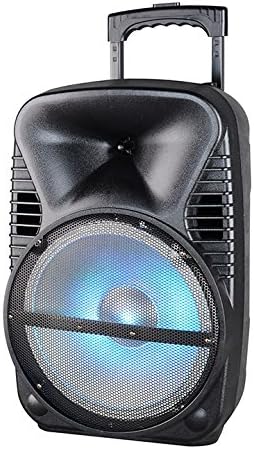
Afbeelding: Voorzijde view of the Max Power MPD125L Karaoke DJ Speaker System. It is a black, portable speaker with a retractable handle on top and wheels at the bottom. The front features a large speaker grille with blue LED lights illuminating the woofer, indicating its active state.
- Draagbaar ontwerp: 12-inch speaker with built-in retractable handle and wheels for easy transport.
- Krachtige audio: 4000W peak power output for loud and clear sound with good bass.
- Ingebouwde oplaadbare batterij: Provides up to 4 hours of continuous playback. (Battery size: 12V/2.6A)
- LED Dance Lights: Integrated LED lights that flash, transforming any room into a disco club.
- Meerdere connectiviteitsopties:
- Bluetooth: Wireless streaming from compatible devices (laptops, smartphones).
- USB-sleuf: Voor het afspelen van audio files vanaf USB-drives.
- SD-slot: Voor het afspelen van audio filevan SD-kaarten.
- AM/FM-radio: Built-in tuner for radio broadcasts.
- Karaoke-functionaliteit: Includes a wireless microphone for karaoke sessions.
- Full-Function Wireless Remote Control: Voor comfortabele bediening op afstand.
- Impedantie: 4 Ohm.
- Frequentiebereik: 40 Hz - 20 kHz.
Instellen
1. Opladen van de luidspreker
- Locate the DC input port on the speaker (usually on the rear panel).
- Connect the supplied power adapter to the DC input port.
- Sluit de voedingsadapter aan op een standaard stopcontact.
- The charging indicator light (if present) will illuminate, typically red, during charging and turn green when fully charged.
- Allow approximately 4-6 hours for a full charge before first use. The speaker can be used while charging.
2. Draadloze microfooninstallatie
- Insert appropriate batteries (not included, usually AA) into the wireless microphone.
- Schakel de microfoon in. Deze zou automatisch verbinding moeten maken met de luidspreker.
- Stel het microfoonvolume in op het bedieningspaneel van de luidspreker en stel het volume in op het gewenste niveau.
3. Instelling afstandsbediening
- Insert appropriate batteries (not included, usually AAA) into the wireless remote control.
- Point the remote control towards the speaker's IR receiver (usually on the front panel or near the controls) to operate.
Gebruiksaanwijzing
1. Aan/uit
Locate the Power switch (usually a rocker switch) on the speaker's control panel. Flip it to the "ON" position to power on the speaker. Flip it to "OFF" to power off.
2. Modusselectie
Press the "MODE" button on the control panel or remote control to cycle through available input modes: Bluetooth, USB, SD, FM Radio, AM Radio, AUX (if available).
3. Bluetooth-koppeling
- Turn on the speaker and select Bluetooth mode. The speaker will typically announce "Bluetooth Mode" or display "BT" and enter pairing mode (indicated by a flashing Bluetooth indicator).
- On your smartphone, tablet, or laptop, enable Bluetooth and search for new devices.
- Select "MPD125L" (or similar name) from the list of available devices.
- Once paired, the speaker will confirm with an audible tone or a solid Bluetooth indicator light. You can now play audio wirelessly.
4. USB/SD-weergave
- Insert a USB flash drive or SD card (pre-loaded with MP3 or compatible audio files) in het betreffende vakje.
- The speaker should automatically switch to USB/SD mode and begin playing the first track. If not, press the "MODE" button to select USB or SD mode.
- Use the Play/Pause, Next Track, and Previous Track buttons on the control panel or remote to navigate.
5. AM/FM-radiobediening
- Select FM or AM radio mode using the "MODE" button.
- Press and hold the Play/Pause button (often labeled "SCAN") to automatically scan and save available radio stations.
- Use the Next Track and Previous Track buttons to switch between saved stations.
- Extend the telescopic antenna (if present) for better reception.
6. Karaokefunctie
Ensure the wireless microphone is powered on and paired. Play your desired music through any input mode (Bluetooth, USB, etc.). Speak or sing into the microphone. Adjust the microphone volume and echo effects (if available) using the dedicated knobs on the control panel.
7. LED Dance Lights
The LED lights typically activate automatically when the speaker is powered on. There may be a dedicated button (e.g., "LIGHT" or "LED") on the control panel or remote to toggle them on/off or change patterns.
8. Volumeregeling
Adjust the master volume using the main volume knob on the speaker's control panel or the volume buttons on the remote control.
Onderhoud
- Schoonmaak: Use a soft, dry cloth to wipe the exterior of the speaker. Do not use liquid cleaners or abrasive chemicals.
- Opslag: Wanneer u de luidspreker gedurende langere tijd niet gebruikt, bergt u deze op op een koele, droge plaats, uit de buurt van direct zonlicht en extreme temperaturen.
- batterij zorg: To prolong battery life, avoid fully discharging the battery frequently. Recharge the battery at least once every 3 months if not in regular use.
- Ventilatie: Ensure the speaker's ventilation openings are clear of dust and debris to prevent overheating.
Probleemoplossing
| Probleem | Mogelijke oorzaak | Oplossing |
|---|---|---|
| De luidspreker gaat niet aan. | Batterij is leeg. Stroomkabel niet goed aangesloten. | Connect the speaker to a power outlet and allow it to charge. Ensure the power cable is securely plugged into both the speaker and the outlet. |
| Er komt geen geluid uit de luidspreker. | Het volume is te laag. Verkeerde invoermodus geselecteerd. Device not properly connected (Bluetooth/USB/SD). | Verhoog het hoofdvolume. Press the "MODE" button to select the correct input. Re-pair Bluetooth device, re-insert USB/SD, or check AUX cable connection. |
| Het Bluetooth-apparaat kan niet worden gekoppeld. | De luidspreker bevindt zich niet in de koppelingsmodus. Het apparaat staat te ver van de luidspreker. Bluetooth op het apparaat is uitgeschakeld. | Ensure speaker is in Bluetooth mode and indicator is flashing. Plaats het apparaat dichter bij de luidspreker (binnen 10 meter). Schakel Bluetooth in op uw apparaat. |
| Microfoon werkt niet. | Microphone is off or batteries are dead. Het microfoonvolume is te laag. | Turn on the microphone and replace batteries if necessary. Increase the microphone volume knob on the speaker. |
| Radio-ontvangst is slecht. | Zwak signaal. Antenne niet uitgeschoven. | Relocate the speaker to an area with better signal. Trek de telescopische antenne volledig uit. |
Specificaties
| Modelnummer | MPD125L |
| Merk | MAXIMALE KRACHT |
| Piekvermogen | 4000 Watt |
| Impedantie | 4 Ohm |
| Frequentierespons | 40 Hz - 20 kHz |
| Batterijgrootte | 12V / 2.6A |
| Levensduur van de batterij | Tot 4 uur |
| Productafmetingen (L x B x H) | 33.02 x 38.1 x 58.42 cm (13 x 15 x 23 inch) |
| Productgewicht | 15.88 kg (35 lbs) |
| Compatibele apparaten | Laptops, Smartphones |
| Aansluitingstype | USB |
| UPC | 703510623201 |
Garantie en ondersteuning
Voor garantie-informatie en technische ondersteuning kunt u de documentatie raadplegen die u bij aankoop heeft ontvangen of contact opnemen met uw verkoper. Bewaar uw aankoopbewijs voor eventuele garantieclaims.
For further assistance or inquiries, please visit the official MAX POWER website of neem contact op met de klantenservice.