
1. Product voorbijview
The EVACH Active Stylus Digital Pen is designed for precise writing, drawing, and navigation on various touchscreen devices. It features a 1.5mm fine tip for accuracy and a durable anodized aluminum body. The pen is lightweight and offers comfortable control, making it suitable for artists, journalists, teachers, and students.

Figure 1.1: EVACH Active Stylus Digital Pen
Belangrijkste kenmerken:
- Fine Tip Accuracy: 1.5mm tip for pinpoint precision in writing and drawing.
- Duurzaam ontwerp: Anodized aluminum body for durability and a stylish appearance.
- Magnetische dop: Protects the charging port and provides an alternative normal tip when the active stylus is out of power.
- Brede compatibiliteit: Works with most touchscreen devices, including iPads, iPhones, Samsung tablets, and other capacitive devices. No Bluetooth connection required.
- Lange batterijduur: Provides up to 8 hours of active use on a full charge (approx. 60 minutes charging time).
- Smart Saver: Automatische uitschakeling na 30 minuten inactiviteit om de batterij te sparen.
- 2-in-1 ontwerp: Features both a 1.5mm fine tip and a 7.0mm fabric tip for versatile use.

Figure 1.2: 2-in-1 Design of the Stylus
2. Instellen en opladen
2.1 Eerste keer opladen
Before first use, it is recommended to fully charge the stylus. The stylus has a built-in 140mAh polymer battery.
- Access the micro USB charging port by removing the magnetic cap from the top of the stylus.
- Plug the micro USB end of the provided charging cable into the stylus.
- Connect the other end of the USB cable to a 5V/0.2A USB power source (e.g., computer USB port, wall adapter).
- The LED indicator light will turn ROOD tijdens het opladen.
- Once fully charged (approximately 60-80 minutes), the LED indicator light will turn GROENTE.
Important: Do not use a fast charger adapter, as high current may damage the internal chip.
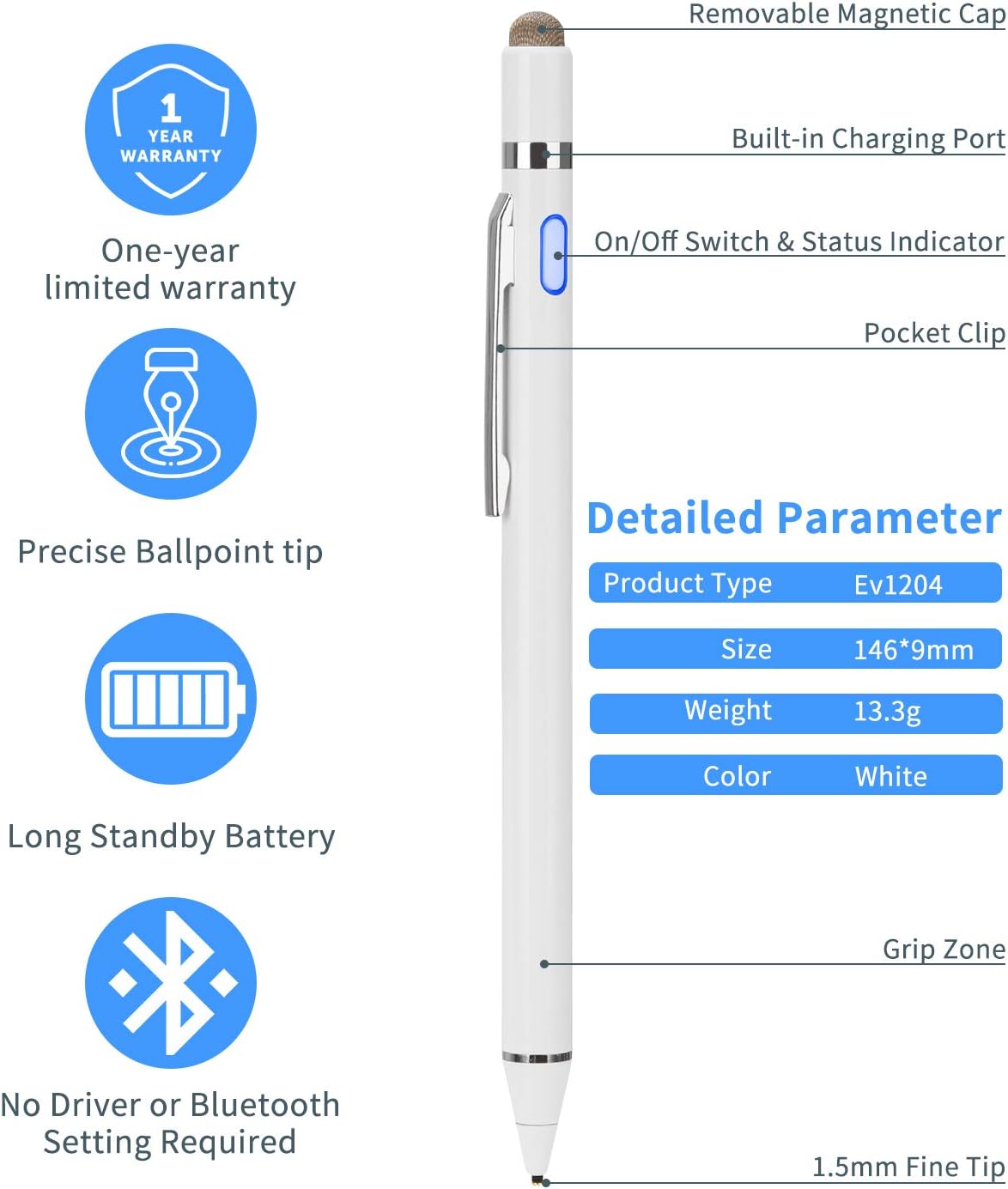
Figure 2.1: Stylus Components and Charging Port Location
3. Gebruiksaanwijzing
3.1 Basisbediening
- To power on the stylus, press the power button located on the side of the pen. The LED indicator will illuminate BLAUW.
- To power off the stylus, press the power button again until the blue LED light turns off.
- The stylus does not require Bluetooth pairing or cable connection with your device. Simply turn it on and begin using it.
- When using the stylus, write and draw softly. Excessive pressure may cause damage to the tip or screen.
- For the best writing experience, hold the stylus in the grip zone with a slight inclination angle to the screen.

Figure 3.1: Stylus Compatibility Across Devices
3.2 Compatibility and Usage Tips
The EVACH Active Stylus is compatible with most capacitive touchscreen devices. This includes a wide range of iPads, iPhones, Samsung tablets, and other Android/Windows devices.
- Recommended Applications (iOS): GoodNotes, UPAD3, Noteshelf, Notes Plus, Notability (for writing); ArtRage, Procreate, Sketches, Paper, SketchBook, ArtStudio, Zen Brush (for drawing).
- Recommended Applications (Android): Meta Moji Note, Notepad+, Bamboo Paper (for writing); Autodesk SketchBook, ArtFlow, Painter, Design, Zen Brush (for drawing).
- Schermbeschermers: Using a screen protector will not affect the performance of the stylus.
Special Instructions for iPad/iPad Pro (Newer iOS Systems):
If you are using an iPad or iPad Pro with a newer iOS system, you may need to adjust a setting to ensure proper functionality:
- Go to your device's Instellingen.
- Select the specific application you intend to use for drawing or writing (e.g., Notes).
- Locate the option related to Apple Pencil (e.g., "Only Draw with Apple Pencil") and turn this function OFF.
- You can now use the EVACH stylus as intended.

Figure 3.2: Stylus Dimensions and Elastic Fine Tip
4. Verzorging en onderhoud
- To ensure optimal performance and longevity, handle your stylus with care. Avoid dropping it, exposing it to fire, or submerging it in water.
- Always use the stylus on capacitive devices' screens only. Do not use it for other purposes.
- The stylus will automatically shut down after 30 minutes of inactivity to save battery life.
- If the battery power is low, the LED light will turn off automatically, indicating it's time to recharge.
- When disposing of the stylus, please follow local laws and regulations for electronic waste due to the built-in polymer battery. Do not litter.
5. Probleemoplossing
If you encounter any issues with your EVACH Active Stylus, please refer to the following common solutions:
- Stylus reageert niet:
- Ensure the stylus is powered on (blue LED indicator).
- Controleer het batterijniveau en laad deze indien nodig op.
- Verify that the stylus tip is clean and free from debris.
- Onnauwkeurig of inconsistent schrift/tekening:
- Ensure you are holding the stylus with a slight inclination angle to the screen.
- For iPad/iPad Pro users, ensure the "Only Draw with Apple Pencil" setting is turned OFF in your device's application settings.
- Als je een schermbeschermer gebruikt, zorg er dan voor dat deze goed is aangebracht en de aanraakgevoeligheid niet beïnvloedt.
- Stylus not connecting (no Bluetooth):
- The EVACH Active Stylus does not require Bluetooth or any other wireless connection. It operates by simply being powered on and touching the screen. If you are attempting to pair it, this is not necessary and will not work.
- Stylus not working with specific Android devices (e.g., Xiaomi Redmi Pad, Android Tab A9 Plus):
- While compatible with most capacitive touchscreens, some specific device models or their software configurations may have limitations. Ensure your device's touchscreen is fully functional.
- Test the stylus on another compatible device to determine if the issue is with the stylus or the specific device.
Als het probleem aanhoudt na het volgen van deze stappen, raadpleeg dan het gedeelte 'Garantie en ondersteuning' voor verdere hulp.
6. Specificaties
| Functie | Detail |
|---|---|
| Modelnummer van het product | K825 |
| Productafmetingen (L x B x H) | 7.09 x 1.57 x 0.79 inch (180 x 40 x 20 mm) |
| Artikelgewicht | 0.494 ounce (14 gram) |
| Materiaal | Geanodiseerd aluminium |
| Kleur | Wit |
| Tipgrootte | 1.5mm Fine Tip, 7.0mm Fabric Tip |
| Batterijtype | 1 lithium-metaalbatterij (meegeleverd) |
| Batterijcapaciteit | 140mAh |
| Laadingang | 5V/0.2A (Micro USB) |
| Oplaadtijd | Ong. 60-80 minuten |
| Actieve gebruikstijd | Tot 8 uur |
| Standby-tijd | Up to 30 days (or 365 days as per some specs) |
| Automatisch uitschakelen | Na 30 minuten inactiviteit |
| Compatibele apparaten | Most capacitive touchscreen devices (Tablets, Smartphones) |
7. Garantie en ondersteuning
7.1 Beperkte garantie
The EVACH Active Stylus Digital Pen comes with a Eén jaar beperkte garantie Deze garantie geldt vanaf de aankoopdatum. De garantie dekt fabricagefouten en problemen die ontstaan bij normaal gebruik. Schade veroorzaakt door verkeerd gebruik, ongelukken, ongeautoriseerde aanpassingen of onjuist onderhoud valt niet onder de garantie.
Afbeelding 7.1: Garantie-informatie
7.2 Klantenservice
For any questions, concerns, or issues regarding your product or service, please contact EVACH customer support. Our team is dedicated to providing excellent customer service and will assist you with troubleshooting and resolving any problems you may encounter.
Please refer to the contact information provided with your product packaging or visit the official EVACH webwebsite voor ondersteuningsdetails.