
1. Inleiding
This manual provides comprehensive instructions for the safe and effective use of your Lobster Sports Elite Two Tennis Ball Machine. Please read this manual thoroughly before operating the machine and retain it for future reference. The Elite Two is designed to enhance your tennis practice with advanced features and reliable performance.
2. Product voorbijview en functies
The Lobster Sports Elite Two is a portable, battery-operated tennis ball machine offering a range of features to simulate various match play scenarios. Its design focuses on durability, ease of transport, and versatile training options.
- Adjustable Ball Speed & Spin Control: Fine-tune your practice sessions with adjustable ball speeds ranging from 10 to 80 MPH. Simulate gentle volleys to high-speed ground strokes while adding heavy topspin or backspin for competitive game situations.
- Triple Oscillation: Simulate match play by combining both vertical and horizontal oscillation functions to throw tennis balls throughout the entire court - left, right, short, and deep. Perfect the winning forehand, volley, line-drive backhands, drop shots, and more!
- Electronic Elevation Control: Deliver low, medium, or high soaring lobs up to 60-degrees. Perfect your overhead smash high-arc baseline returns, or pin-point net play with a flip of a switch.
- Lightweight, Portable & Easy to Transport: Weighing only 42 LBS, the Lobster Sports Elite Two inverting hopper and folding handle allows for easy transport in any small car or SUV. The 8-inch all-terrain wheels can easily glide with ease over any surface and onto the court.
- Extended Long Battery Life: The battery-operated Elite Two tennis machine has a rechargeable battery that offers 4 to 6 hours of gameplay and includes a Lobster Sports standard battery charger.

Figure 1: The Lobster Sports Elite Two Tennis Ball Machine, shown fully assembled with its hopper extended and handle raised. Dimensions are indicated: 43 inches height, 29 inches length, and 15.5 inches width. The machine is red and white, with tennis balls visible in the hopper.
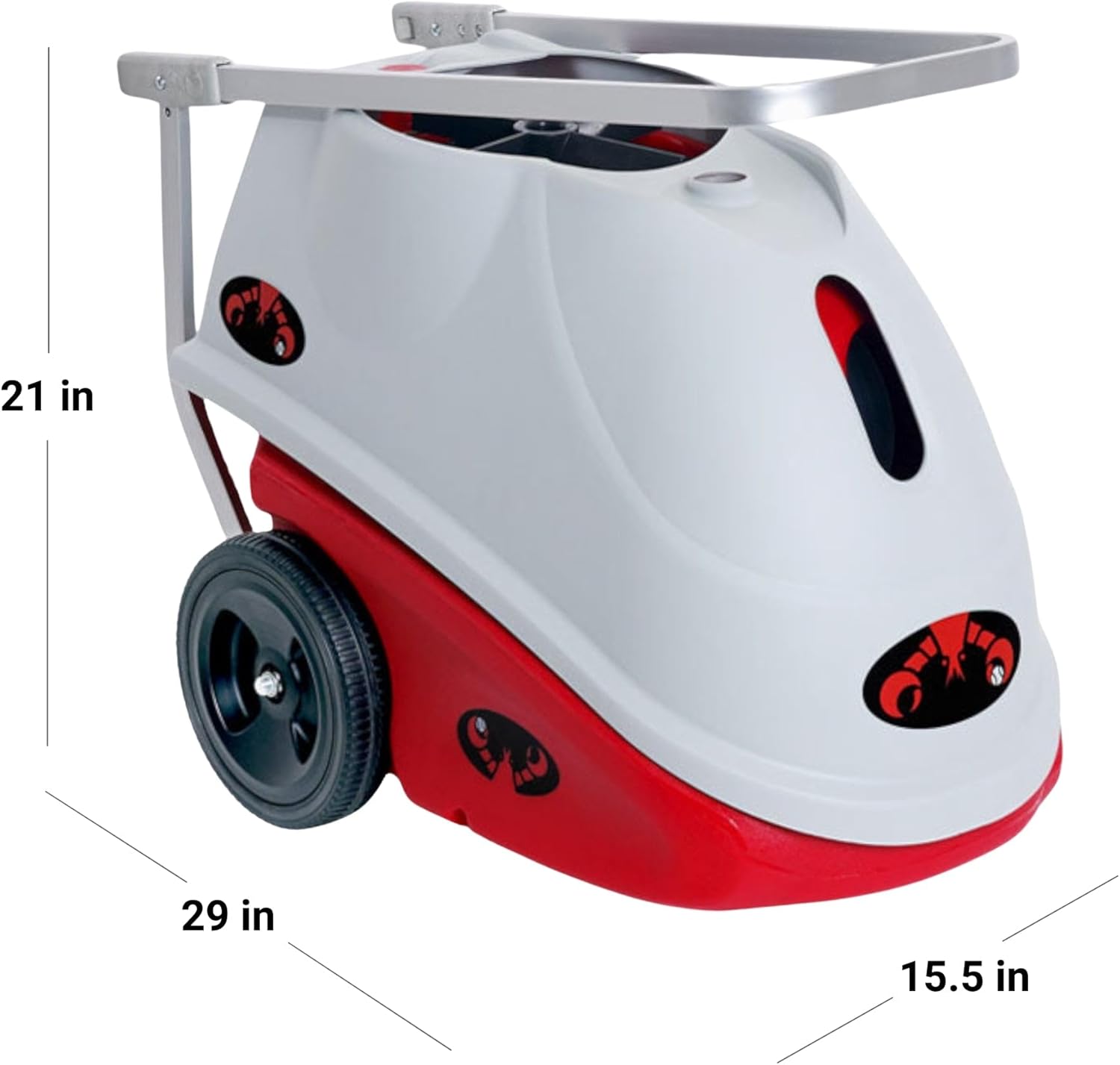
Figure 2: The Lobster Sports Elite Two Tennis Ball Machine in its folded configuration, ready for transport. The hopper is inverted, and the handle is retracted, reducing its height to 21 inches for easy storage and portability.
3. Opstelling en montage
Your Elite Two machine comes mostly pre-assembled. Follow these steps for initial setup:
- Uitpakken: Haal het apparaat voorzichtig uit de verpakking.
- Hoppermontage: Invert the ball hopper from its storage position to its upright operating position.
- Handgreepverlenging: Extend the handle to a comfortable height for transport.
- Opladen: Before first use, fully charge the external battery using the provided Lobster Sports standard battery charger. Refer to the 'Battery and Charging' section for details.
- Ball Loading: Load standard tennis balls into the hopper. The machine has a large capacity for extended play.

Figuur 3: Een close-up view of the control panel for the Lobster Sports Elite Two. It features dials for Feed (2-12 seconds), Speed (10-80 MPH), and Spin (under spin to top spin). Toggle switches control Power, Elevation (up/down), Vertical Oscillation, Horizontal Oscillation, and Remote control. Status lights indicate low/depleted or on/full battery.
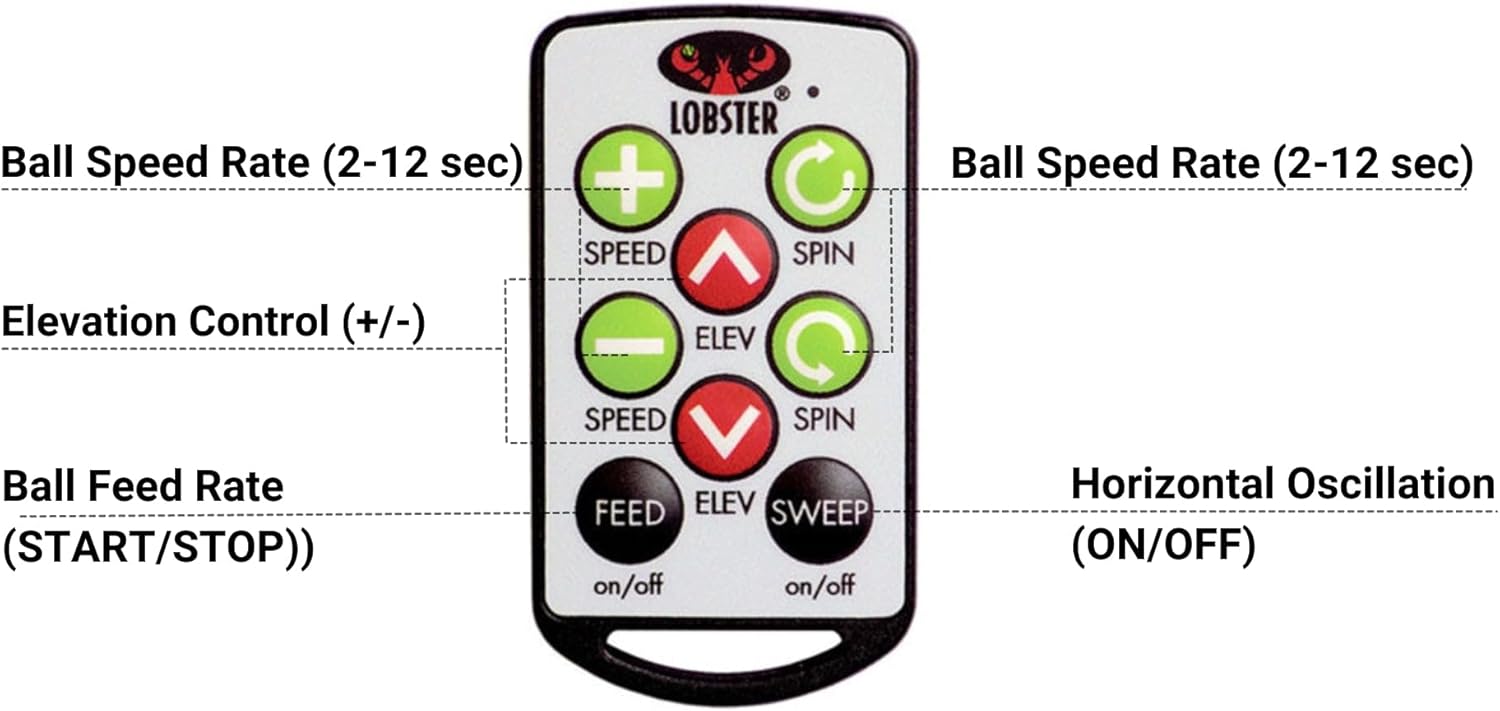
Figure 4: The 10-function remote control for the Lobster Sports Elite Two. It includes buttons for adjusting ball speed rate, elevation control, ball feed rate (start/stop), and horizontal oscillation (on/off). The remote allows for convenient adjustments during practice.
4. Gebruiksaanwijzing
The Elite Two offers both manual control via the panel and remote control for convenience.
4.1. Bediening via het bedieningspaneel
- Stroom: Use the 'POWER' toggle switch to turn the machine on or off.
- Voedingssnelheid: Adjust the 'FEED' dial to set the interval between balls (approximately 2 to 12 seconds).
- Balsnelheid: Rotate the 'SPEED' dial to select ball velocity (approximately 10 to 80 MPH).
- Spin Control: Use the 'SPIN' dial to apply underspin or topspin to the balls.
- Hoogte: The 'ELEVATION' toggle switch controls the vertical angle of the ball launch, allowing for lobs up to 60 degrees.
- Oscillatie: Use the 'VERTICAL' and 'HORIZONTAL' toggle switches to activate vertical and horizontal ball delivery patterns, respectively.
- Op afstand: The 'REMOTE' toggle switch enables or disables remote control functionality.
4.2. Bediening op afstand
Ensure the 'REMOTE' switch on the control panel is set to 'on'. The remote allows for quick adjustments to:
- Ball Speed Rate
- Elevation Control (+/-)
- Ball Feed Rate (START/STOP)
- Horizontal Oscillation (ON/OFF)
Video 1: Deze video geeft een overzichtview of the Lobster Sports Elite Series Tennis Ball Machines, demonstrating their key features such as adjustable ball speed, spin control, lob elevation, and oscillation functions. It highlights the machines' ease of use and portability for tennis players looking to improve their game.
5. Batterij en opladen
The Elite Two is powered by an external rechargeable battery, providing 4 to 6 hours of continuous gameplay. To charge:
- Connect the Lobster Sports standard battery charger to the machine's charging port.
- Steek de oplader in een standaard stopcontact.
- Allow the battery to charge fully before use. The 'STATUS' indicator lights on the control panel will show the charging status (low/depleted or on/full).
6. Onderhoud
Regular maintenance ensures the longevity and optimal performance of your Elite Two machine:
- Schoonmaak: Veeg de buitenkant van de machine af met advertentieamp doek na elk gebruik om vuil en puin te verwijderen.
- Ball Quality: Use clean, dry tennis balls. Dirty or wet balls can affect performance and potentially damage internal components.
- Opslag: Store the machine in a dry, protected area when not in use. Fold the hopper and retract the handle for compact storage.
- batterij zorg: Fully charge the battery after each use and before long-term storage to maintain battery health.
7. Probleemoplossing
If you encounter issues with your Elite Two, consider the following common solutions:
- Apparaat gaat niet aan: Check the battery charge level. Ensure the power switch is in the 'on' position.
- Balls Not Feeding: Verify that the hopper is not empty and that balls are not jammed. Check the feed rate dial setting.
- Inconsistente balsnelheid/spin: Ensure the speed and spin dials are set correctly. Check that the balls are clean and dry.
- Oscillatie werkt niet: Confirm that the vertical and/or horizontal oscillation switches are engaged.
- Afstandsbediening reageert niet: Check if the remote control switch on the main panel is 'on'. Ensure the remote's battery is functional.
For persistent issues, please contact Lobster Sports customer support.
8. Specificaties
| Functie | Detail |
|---|---|
| Artikelafmetingen LxBxH | 30 x 23 x 18.5 inch |
| Artikelgewicht | 42 pond |
| Merknaam | KREEFT |
| Land van herkomst | Verenigde Staten |
| Modelnaam | Elite Two |
| Kleur | Rood |
| Materiaal | Plastic |
| Voorgestelde gebruikers | unisex-volwassen |
| Fabrikant | Kreeft Sport |
| Onderdeelnummer | EL02.EB |
| Stijl | Elite Two |
| Meegeleverde componenten | Elite, battery charger, remote |
| Sporttype | Tennis |
9. Garantie en ondersteuning
Garantie: The Lobster Sports Elite Two Tennis Ball Machine comes with a 2-Year Warranty. Please refer to the warranty documentation included with your product for full terms and conditions.
Steun: For further assistance, technical support, or to inquire about replacement parts, please visit the official Lobster Sports webwebsite of neem contact op met hun klantenservice. U kunt ook de website bezoeken LOBSTER Store on Amazon.