
1. Inleiding
Thank you for choosing the BBC Jadel K100 Gaming Keyboard. This manual provides essential information for setting up, operating, maintaining, and troubleshooting your new keyboard. The Jadel K100 is designed for gaming, office, and daily home use, featuring multimedia keys and a mechanical suspension design for a responsive typing experience.
Lees deze handleiding aandachtig door voordat u het product gebruikt, om een goede werking en een lange levensduur te garanderen.
2. Inhoud van het pakket
Controleer bij het uitpakken of alle artikelen aanwezig zijn:
- BBC Jadel K100 Gaming Keyboard
- Gebruikershandleiding (dit document)
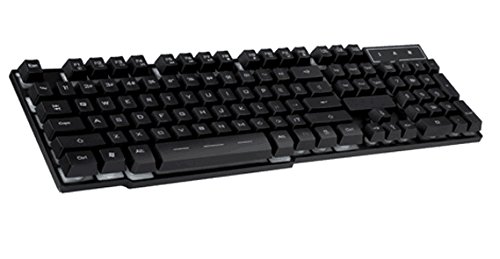
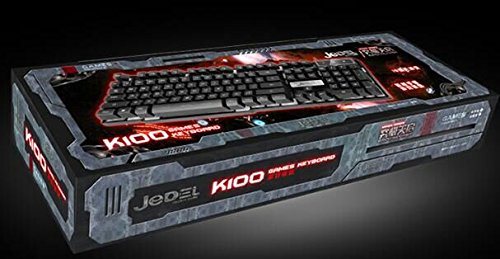
Image 1: The BBC Jadel K100 Gaming Keyboard, showcasing het ontwerp en de verpakking.
3. Instellen
Follow these steps to connect your BBC Jadel K100 Gaming Keyboard to your computer:
- Pak het toetsenbord uit: Haal het toetsenbord voorzichtig uit de verpakking.
- Verbinden met computer: Locate an available USB port on your laptop or desktop computer. Insert the USB connector of the keyboard firmly into the USB port.
- Stuurprogramma-installatie: The keyboard is plug-and-play. Your operating system (Windows, macOS, Linux) should automatically detect and install the necessary drivers. This process may take a few moments.
- Controleer de verbinding: Once drivers are installed, the keyboard should be ready for use. Test by typing in a text editor or browser.
Opmerking: This keyboard is compatible with laptops and desktop computers running standard operating systems.
4. Gebruiksaanwijzing
The Jadel K100 keyboard features a standard 104-key layout, including a numeric keypad and function keys. It also incorporates multimedia functions accessible via the FN sleutel.
Afbeelding 2: Close-up view of the BBC Jadel K100 keyboard's main keys, including Esc, Tab, Caps Lock, Shift, Ctrl, and Alt.
4.1. Standard Key Functions
All standard alphanumeric, symbol, and navigation keys operate as expected on a typical keyboard.
4.2. Multimedia Functions (FN Key)
The Jadel K100 includes an FN (Function) key, similar to those found on laptops, to access multimedia controls. To use these functions, press and hold the FN key, then press the corresponding function key (F1-F12) or other designated keys.
Common multimedia functions typically include:
- FN + F1-F12: Control media playback (play/pause, stop, previous/next track), volume (mute, volume up/down), and other system functions (e.g., open default browser, email client, calculator). Refer to the keycap legends for specific functions.
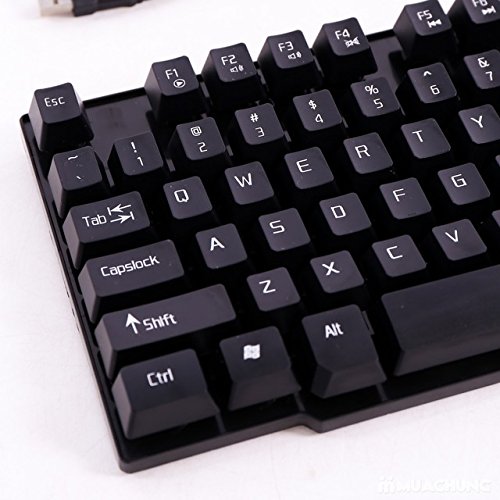
Afbeelding 3: Gedetailleerd view of the BBC Jadel K100 keyboard's F-keys, which often include multimedia shortcuts when combined with the FN key.
4.3. Game-ervaring
The mechanical suspension design provides a tactile and responsive feel, enhancing the gaming experience. The keyboard is designed for durability and comfort during extended gaming sessions.
5. Onderhoud
Goed onderhoud zorgt ervoor dat uw toetsenbord lang meegaat en optimaal presteert.
- Schoonmaak:
- Koppel het toetsenbord los van de computer voordat u het schoonmaakt.
- Gebruik een zachte, pluisvrije doek die lichtjes is schoongemaakt.ampSpoel de toetsen en het oppervlak af met water of een mild reinigingsmiddel.
- Gebruik perslucht om stof en vuil tussen de toetsen te verwijderen.
- Vermijd het gebruik van agressieve chemicaliën, schurende reinigingsmiddelen of het rechtstreeks spuiten van vloeistoffen op het toetsenbord.
- Opslag: Bewaar het toetsenbord op een koele, droge plaats, uit de buurt van direct zonlicht en extreme temperaturen, wanneer u het toetsenbord gedurende langere tijd niet gebruikt.
- Behandeling: Avoid dropping the keyboard or exposing it to excessive force, which can damage internal components or key mechanisms.
6. Probleemoplossing
If you encounter issues with your BBC Jadel K100 keyboard, refer to the following common problems and solutions:
| Probleem | Mogelijke oorzaak | Oplossing |
|---|---|---|
| Toetsenbord reageert niet | Losse USB-verbinding, defecte USB-poort, driverprobleem. |
|
| Bepaalde toetsen werken niet | Debris under keycap, physical damage, software conflict. |
|
| Multimediatoetsen werken niet | Incorrect usage of FN key, software conflict. |
|
7. Specificaties
| Functie | Detail |
|---|---|
| Merk | BBC |
| Modelnummer | Jadel K100 |
| Toetsenbordbeschrijving | Gamen |
| Aantal sleutels | 104 |
| Sleuteltype | Mechanische vering |
| Kleur | ZWART |
| Compatibele apparaten | Laptop, desktop-pc |
| Connectiviteit | USB |
| Stijl | Modern |
| Handoriëntatie | Ambidexter |
| Fabrikant | bbc |
8. Garantie en ondersteuning
Specific warranty details for the BBC Jadel K100 Gaming Keyboard are not provided in this manual. For warranty information, please refer to the product packaging or contact your retailer at the point of purchase.
For technical support or further assistance, please contact the manufacturer or your retailer. Keep your purchase receipt as proof of purchase for any warranty claims.