
1. Inleiding
The Amkette Trubeats S50 is a versatile smart wireless Bluetooth speaker designed to enhance your audio experience. It features multiple connectivity options including Bluetooth, USB, Micro SD card, and AUX input, along with an integrated FM radio. The speaker also includes a digital clock with alarm functions and can be controlled via a dedicated smartphone application. Additionally, it can function as a power bank to charge your mobile devices.
2. Inhoud van het pakket
Vink het vakje aan voor de volgende items:
- Amkette Trubeats S50 Smart Wireless Bluetooth Speaker
- USB-oplaadkabel
- AUX-kabel
- Gebruikershandleiding (dit document)
3. Product voorbijview
Familiarize yourself with the various parts and controls of your Amkette Trubeats S50 speaker.
3.1 voorzijde View

Figuur 1: Voorzijde view of the Amkette Trubeats S50 speaker, showing the speaker grille and LED display.
3.2 Bovenste bedieningspaneel

Figure 2: Labeled diagram of the Amkette Trubeats S50 speaker's top control buttons: Mode, Volume Down/Previous, Play/Pause/Answer Call, Volume Up/Next, Clock, and Microphone.
- MODE-knop: Press to switch between Bluetooth, FM, AUX, USB, and Micro SD modes.
- K-/ Button: Press to decrease volume; long press for previous track/station.
- Play/Pause/Answer Call Button: Press to play/pause audio; press to answer/end calls.
- +/N Button: Press to increase volume; long press for next track/station.
- KLOK-knop: Press to set time and alarms.
- Microfoon: Voor handsfree bellen.
3.3 Rear Ports and Switch

Figure 3: Labeled diagram of the Amkette Trubeats S50 speaker's rear ports: AUX, Micro SD, USB Host, USB DC, and On/Off switch.
- AUX-ingang: Sluit externe audioapparaten aan met de 3.5 mm AUX-kabel.
- Micro SD-kaartsleuf: Plaats een Micro SD-kaart voor het afspelen van audio.
- USB-hostpoort: Insert a USB drive for audio playback or use as a power bank.
- USB DC Input: Connect the USB charging cable to power the speaker.
- Aan / uit knop: Power the speaker on or off.
4. Instellen
4.1 De luidspreker opladen
- Connect the small end of the USB charging cable to the USB DC Input aansluiting aan de achterkant van de luidspreker.
- Sluit het grote uiteinde van de USB-oplaadkabel aan op een USB-voedingsadapter (niet meegeleverd) of een USB-poort van een computer.
- De led-indicator geeft de laadstatus weer. Een volledige lading duurt doorgaans ongeveer 4 uur.
Opmerking: The speaker does not have a visible battery level indicator. It is recommended to charge fully before first use and when the battery is low.
4.2 In-/uitschakelen
- Om het apparaat in te schakelen, schuift u de AAN/UIT-schakelaar on the rear of the speaker to the 'ON' position.
- Om het apparaat uit te schakelen, schuif je de AAN/UIT-schakelaar naar de 'UIT'-stand.
5. Gebruiksaanwijzing
5.1 Bluetooth-koppeling

Figure 4: Speaker in Bluetooth pairing mode, indicated by 'BT' on the display.
- Power on the speaker. It will automatically enter Bluetooth pairing mode, indicated by 'BT' flashing on the LED display.
- Schakel Bluetooth in op uw smartphone of ander apparaat.
- Zoeken naar available devices and select "Amkette S50" from the list.
- Once paired, the speaker will emit a confirmation tone, and 'BT' will stop flashing.
- U kunt nu audio van uw apparaat via de luidspreker afspelen.
5.2 Gebruik van de AUX-ingang

Figure 5: Speaker connected to a smartphone via AUX cable for wired audio playback.
- Sluit één uiteinde van de 3.5 mm AUX-kabel aan op de AUX-ingang aansluiting aan de achterkant van de luidspreker.
- Connect the other end of the AUX cable to the audio output jack of your external device (e.g., smartphone, MP3 player, laptop).
- Druk op de MODE-knop repeatedly until the speaker enters AUX mode.
- Speel audio af vanaf uw verbonden apparaat.
5.3 Using USB/Micro SD Card
- Plaats een USB-stick in de USB-hostpoort of een Micro SD-kaart in de Micro SD-kaartsleuf aan de achterkant van de luidspreker.
- Zorg voor uw audio files (MP3 format recommended) are stored on the drive/card.
- Druk op de MODE-knop repeatedly until the speaker enters USB or Micro SD mode. Playback will begin automatically.
- Gebruik de K-/ En +/N knoppen voor nummernavigatie en volumeregeling.
5.4 FM-radiobediening

Figure 6: Speaker displaying FM frequency, with app control for station selection.
- Druk op de MODE-knop repeatedly until the speaker enters FM radio mode.
- Auto Scan: In FM mode, long press the Afspelen/Pauzeren button to initiate an automatic scan for available FM stations. The speaker will save detected stations.
- Handmatig afstemmen: Gebruik de K-/ En +/N knoppen om door opgeslagen zenders te navigeren.
- For precise tuning and station management, use the Amkette Trubeats Smart Speaker App (see section 5.7).
5.5 Digital Clock and Alarm Setup

Figure 7: Speaker displaying the current time on its LED screen.
- Insteltijd: Houd de KLOK-knop. The hour display will flash. Use the K-/ En +/N knoppen om het uur aan te passen. Druk op de KLOK-knop again to set minutes, and adjust with K-/ En +/N. Druk op KLOK-knop Nogmaals ter bevestiging.
- Alarmen instellen: Druk kort op de KLOK-knop to cycle through Alarm 1 and Alarm 2 settings. When an alarm time is displayed, long press the KLOK-knop to enter alarm setting mode. Adjust hour and minute using K-/ En +/N, confirming each with a short press of the KLOK-knop. You can also set the alarm source (FM/SD Card/USB) via the app.
5.6 Gebruik als powerbank
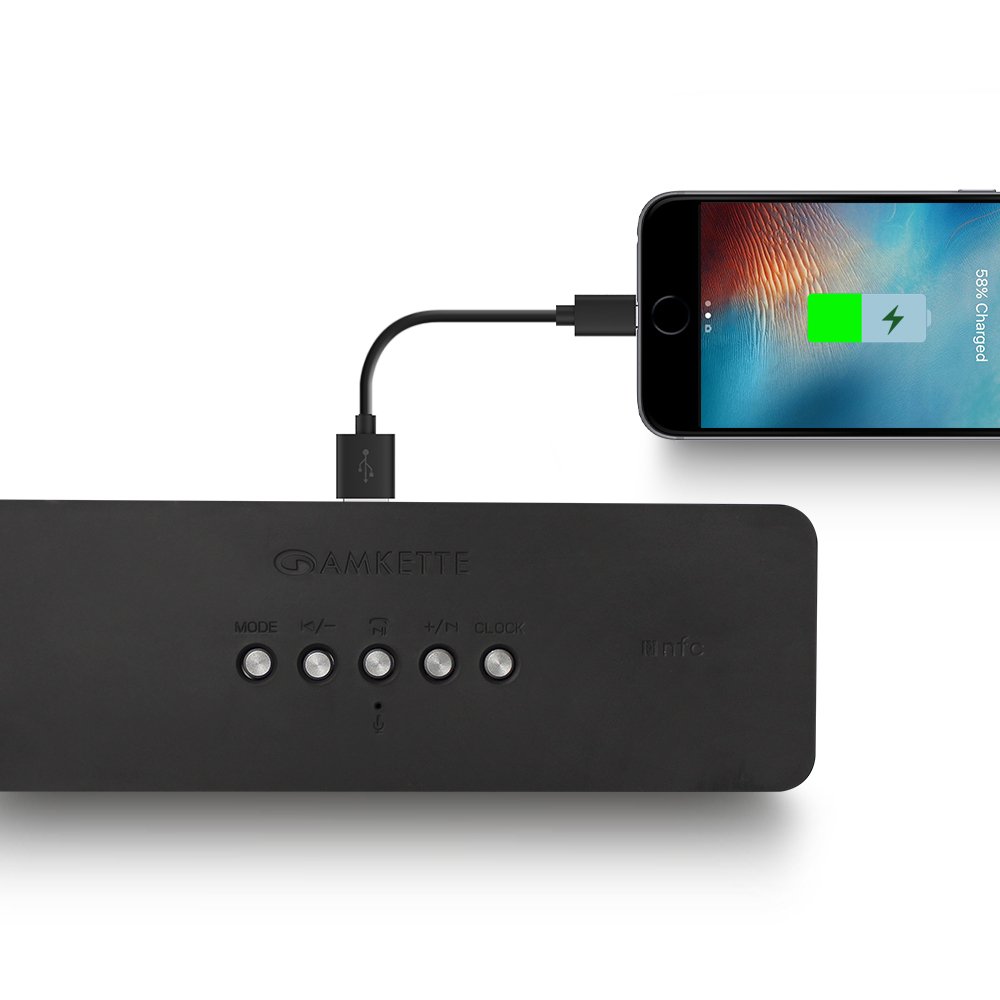
Figure 8: Speaker providing power to a smartphone through its USB Host port.
The Amkette Trubeats S50 can charge your smartphone or other USB-powered devices. Connect your device's charging cable to the USB-hostpoort on the rear of the speaker. The speaker's internal battery will then supply power to your device.
5.7 App Control (Android Only)

Figure 9: Smartphone displaying the Amkette Trubeats Smart Speaker App interface.
For enhanced control, download the Amkette Trubeats Smart Speaker App from the Google Play Store (for Android phones). The app allows you to:
- Schakel tussen verschillende audiomodi.
- Control volume and track playback.
- Manage FM radio stations and perform precise tuning.
- Set and customize alarms, including alarm source.
Ensure your speaker is connected via Bluetooth to your smartphone for app functionality.
5.8 Gesprekken afhandelen
When connected via Bluetooth to a smartphone, the speaker can be used for hands-free calling:
- Beantwoord oproep: Druk op de Play/Pause/Answer Call Button eenmaal.
- Einde gesprek: Druk op de Play/Pause/Answer Call Button eenmaal tijdens een gesprek.
- Oproep afwijzen: Houd de Play/Pause/Answer Call Button.
6. Onderhoud
- Houd de luidspreker uit de buurt van extreme temperaturen, direct zonlicht en vocht.
- Reinig de speaker met een zachte, droge doek. Gebruik geen schuurmiddelen of oplosmiddelen.
- Laat de luidspreker niet vallen en stel hem niet bloot aan harde stoten.
- Bewaar de luidspreker op een koele, droge plaats wanneer u hem langere tijd niet gebruikt en laad hem regelmatig op om de levensduur van de batterij te verlengen.
7. Probleemoplossing
| Probleem | Mogelijke oorzaak | Oplossing |
|---|---|---|
| De luidspreker gaat niet aan. | Batterij is leeg. | Laad de luidspreker volledig op. |
| Er komt geen geluid uit de luidspreker. | Het volume is te laag, de verkeerde modus is geselecteerd, het apparaat is niet goed aangesloten. | Increase speaker and source device volume. Ensure correct mode (Bluetooth, AUX, etc.) is selected. Reconnect the device. |
| Bluetooth-koppeling mislukt. | Luidspreker niet in koppelingsmodus; apparaat te ver weg; storing. | Ensure speaker is in pairing mode ('BT' flashing). Move device closer to speaker. Turn off other Bluetooth devices. |
| Slechte FM-radio-ontvangst. | Zwak signaal; omgevingsinterferentie. | Relocate the speaker to an area with better reception. Perform an auto-scan again. |
| De app maakt geen verbinding met de luidspreker. | Bluetooth not connected; app issue. | Ensure speaker is paired via Bluetooth to your phone. Restart the app and try again. |
8. Specificaties
- Model: S50
- Merk: Amket
- Luidsprekertype: Portable Bluetooth Speaker (Outdoor)
- Connectiviteit: Bluetooth, USB, Micro SD, AUX, FM-radio
- Draadloze communicatietechnologie: Bluetooth
- Controlemethode: Buttons, App (Android)
- Audio-uitgangsmodus: Stereo
- Audio Wattage: 10 Watt
- Energiebron: Op batterijen
- Levensduur batterij: Tot wel 12 uur (gemiddeld)
- Oplaadtijd: Ongeveer 4 uur
- Compatibele apparaten: Laptop, Mobile, Tablet
- Afmetingen (LxBxH): 26.7x10.9x7.9cm
- Artikelgewicht: 703 gram
- Waterdicht: Ja
- Montagetype: Tafelmontage
9. Garantie en ondersteuning
The Amkette Trubeats S50 Smart Wireless Bluetooth Speaker comes with a 1 jaar garantie vanaf de aankoopdatum. Deze garantie dekt fabricagefouten bij normaal gebruik.
For warranty claims, technical assistance, or any other support inquiries, please contact Amkette customer support through their official webwebsite of de contactgegevens die u bij uw aankoopdocumentatie hebt gekregen.
Bewaar uw aankoopbewijs als aankoopbewijs voor garantiedoeleinden.