
Invoering
This manual provides detailed instructions for the installation, operation, and maintenance of your Venstar T1900 Residential Slimline Platinum Thermostat. Please read this manual thoroughly before attempting to install or operate the thermostat to ensure proper function and to avoid potential damage.
Belangrijke veiligheidsinformatie
- Always turn off power to the heating/cooling system at the main circuit breaker or fuse box before installing or servicing the thermostat.
- This thermostat operates on 24 Volts AC. Do not connect to line voltage (120V of 240V).
- Als u niet bekend bent met elektrische bedrading, dient u de installatie over te laten aan een gekwalificeerde technicus.
- Do not short circuit the terminals on the gas valve or at the system control to test the thermostat. This will damage the thermostat and void the warranty.
- Zorg ervoor dat alle bedradingsverbindingen goed vastzitten en geïsoleerd zijn om kortsluiting te voorkomen.
Inhoud van het pakket
Controleer of uw pakket de volgende items bevat:
- Venstar T1900 thermostaatunit
- Montagemateriaal (schroeven en muurankers)
- Gebruikershandleiding (dit document)
Product voorbijview
The Venstar T1900 is a 7-day programmable digital thermostat designed for residential use. It offers precise temperature control and energy-saving scheduling capabilities. This thermostat is compatible with heat/cool, heat pump, and dual-fuel systems, controlling up to three heat stages en twee coole stagen.
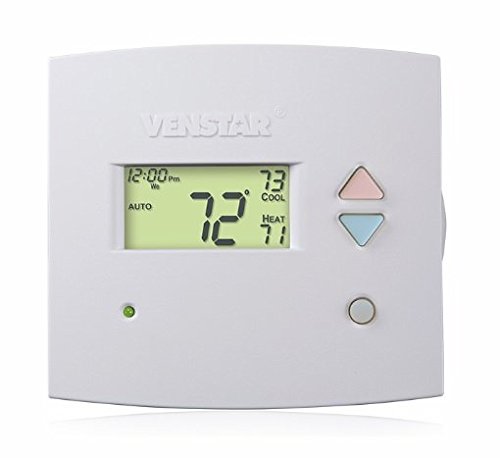
Figuur 1: Voorkant view of the Venstar T1900 Thermostat. This image displays the thermostat's LCD screen and control buttons, indicating its slimline design.
Belangrijkste kenmerken:
- 7-daagse programmeerbaarheid: Allows for customized heating and cooling schedules for each day of the week.
- Systeemcompatibiliteit: Works with heat/cool, dual-fuel, and heat pump systems.
- Multi-Stage Controle: Manages up to three heat stages en twee coole stagen.
- Mogelijkheid tot afstandsbediening: Controllable by phone using an optional add-on (sold separately).
- Automatic or Manual Operation: Provides flexibility for scheduled or on-demand temperature adjustments.
Installatiehandleiding
Benodigde gereedschappen:
- Schroevendraaier (kruiskop en/of platkop)
- Gebruik een geschikte boor (bij het installeren van nieuwe muurankers).
- Wire strippers
- Potlood
- Niveau (optioneel)
1. Schakel de stroom uit
Locate the circuit breaker or fuse box that controls your heating and cooling system. Turn off the power completely before proceeding with any wiring.
2. Remove Old Thermostat (if applicable)
- Verwijder voorzichtig de kap van uw oude thermostaat.
- Maak een foto van de bestaande bedrading ter referentie.
- Label each wire with the terminal designation it was connected to (e.g., R, G, Y, W).
- Koppel de draden los en verwijder de montageplaat van de oude thermostaat van de muur.
3. Mount the New Thermostat Base
- Separate the front cover of the T1900 thermostat from its base plate.
- Position the base plate on the wall where you want to install the thermostat. Ensure it is level.
- Markeer de montagegaten met een potlood.
- Boor indien nodig gaten voor en plaats muurpluggen.
- Bevestig de basisplaat van de thermostaat aan de muur met behulp van de meegeleverde schroeven.
4. Bedrading
Connect the wires from your HVAC system to the corresponding terminals on the T1900 thermostat base. Refer to the wiring diagram provided with your specific HVAC system for precise connections. Ensure wires are stripped approximately 3/8 inch and securely fastened under the terminal screws.
Common Terminal Designations:
- R/Rc/Rh: 24V-voeding (verwarming/koeling)
- C: Common (24V return)
- G: Fan
- Y/Y1: Compressor Stage1 (Koeling)
- Y2: Compressor Stage2 (Koeling)
- W/W1: Verwarm Stage 1 (Verwarming)
- W2: Verwarm Stage 2 (Verwarming)
- O / B: Omkeerklep (warmtepompen)
Note: The T1900 supports various system types. Consult the detailed wiring diagrams in the full installation manual for specific configurations (e.g., heat pump with auxiliary heat, conventional multi-stage systems).
5. Attach Thermostat to Base
Once wiring is complete and verified, carefully align the thermostat front cover with the mounted base plate and snap it into place.
6. Herstel stroom
Return to your circuit breaker or fuse box and restore power to your heating and cooling system.
Eerste installatie
Upon initial power-up, the thermostat may prompt you to configure basic settings. Follow the on-screen instructions to set the current date, time, and system type (e.g., Conventional, Heat Pump).
System Type Configuration:
It is crucial to correctly configure the thermostat for your specific HVAC system. Incorrect settings can lead to improper operation or damage. Access the installer settings menu (refer to the full installation guide for specific button sequences) to select:
- Systeemtype: Heat/Cool, Heat Pump, Dual Fuel
- Aantal warmte Stages
- Aantal Cool Stages
- Reversing Valve Operation: O (Koelen) of B (Verwarmen)
Gebruiksaanwijzing
Het scherm begrijpen:
The LCD screen displays the current temperature, set temperature, system mode, fan mode, time, and programming status. Refer to the icons and indicators on the screen for current operational status.
Setting System Mode:
Druk op de MODUS knop om door de beschikbare systeemmodi te schakelen:
- WARMTE: The system will operate to maintain the heating setpoint.
- STOER: The system will operate to maintain the cooling setpoint.
- AUTO: The thermostat automatically switches between heating and cooling as needed to maintain the set temperature range.
- OFF: Het verwarmings- en koelsysteem is uitgeschakeld.
Setting Fan Mode:
Druk op de FAN button to cycle through fan modes:
- AUTO: De ventilator draait alleen als het verwarmings- of koelsysteem actief is.
- OP: De ventilator draait continu, ongeacht of er om verwarming of koeling wordt gevraagd.
Temperatuur aanpassen:
Gebruik de UP En OMLAAG arrow buttons to adjust the desired temperature setpoint. In programmable modes, this will temporarily override the schedule until the next scheduled change.
Programmaschema's (7 dagen):
The T1900 allows for 7-day programming, enabling different schedules for each day of the week. This feature helps save energy by adjusting temperatures when you are away or asleep.
- Druk op de PROGRAMMA knop om de programmeermodus te openen.
- Gebruik de DAG button to select the day or group of days you wish to program (e.g., Mon-Fri, Sat-Sun, or individual days).
- Gebruik de TIJD button to cycle through the four available periods: Wake, Leave, Return, Sleep.
- Gebruik de UP En OMLAAG arrow buttons to set the desired temperature for each period.
- Gebruik de UITSTEL button to exit programming mode or save changes.
Refer to the detailed programming section in the full user guide for advanced options and specific button sequences.
Remote Control (Optional Add-on):
The Venstar T1900 thermostat can be controlled remotely via a phone using an optional add-on module (sold separately). This module connects to the thermostat and allows for remote access and control through a dedicated application. Installation and setup instructions for the remote control module are provided with the module itself.
Onderhoud
De thermostaat reinigen:
To maintain the appearance and functionality of your thermostat, periodically wipe the exterior with a soft, damp Gebruik een doek. Gebruik geen schurende reinigingsmiddelen, oplosmiddelen of chemische sprays, aangezien deze het plastic en de elektronische componenten kunnen beschadigen.
Batterij vervangen:
The Venstar T1900 thermostat does not require batteries for operation as it is powered by the 24V AC system.
Probleemoplossing
If you experience issues with your Venstar T1900 thermostat, consult the following common problems and solutions:
| Probleem | Mogelijke oorzaak | Oplossing |
|---|---|---|
| Thermostaatdisplay is leeg | Er gaat geen stroom naar de thermostaat. | Controleer de stroomonderbreker van uw HVAC-systeem. Zorg ervoor dat alle bedradingsaansluitingen goed vastzitten. |
| Heating/Cooling system does not respond | Onjuiste systeemmodus geselecteerd; bedradingsprobleem; systeemvergrendeling. | Verify the system mode (HEAT/COOL/AUTO). Check wiring connections. Wait 5 minutes for system lockout to reset. |
| Temperatuurmeting lijkt onnauwkeurig | Locatie van de thermostaat; sensor geblokkeerd. | Ensure the thermostat is not exposed to direct sunlight, drafts, or heat sources. Clean any dust from the thermostat vents. |
| Programming schedule is not working | Program not saved; temporary override active; incorrect time/day setting. | Ensure programs are saved. Check if a temporary override is active and cancel it. Verify current time and day settings. |
| De ventilator draait continu in de AUTO-modus. | Fan mode set to ON; wiring issue. | Press the FAN button to ensure it is set to AUTO. Check fan wiring. |
If these solutions do not resolve the issue, please contact customer support or a qualified HVAC technician.
Specificaties
| Functie | Specificatie |
|---|---|
| Merk | Venstar |
| Modelnaam | Venstar T1900 |
| Controller-type | Drukknop |
| Speciale functie | Programmeerbaar |
| Kleur | Wit |
| Specifieke toepassingen voor het product | Heat Pump, Heater |
| Type temperatuurregeling: | Programmable, Smart/Remote (with add-on) |
| Deeltage | 24 volt wisselstroom |
| Weergavetype | LCD of LED |
| Controlemethode | Remote (with add-on) |
| Achtergrondverlichting | Ja |
| Productafmetingen | 5.3 x 2 x 2 inch |
| Artikelgewicht | 0.01 ons |
| Zijn batterijen nodig? | Nee |
Garantie-informatie
Venstar products are manufactured to high-quality standards. This product is covered by a limited warranty against defects in materials and workmanship. The specific terms and duration of the warranty may vary. Please refer to the warranty card included with your product or visit the official Venstar website voor gedetailleerde garantie-informatie en registratieprocedures.
Klantenservice
For technical assistance, troubleshooting, or warranty inquiries, please contact Venstar customer support. You can typically find contact information, including phone numbers and email addresses, on the official Venstar website (www.venstar.com) or on the product packaging.
When contacting support, please have your thermostat model number (T1900) and any relevant purchase information ready.