
1. Inleiding
This manual provides essential instructions for the installation, operation, maintenance, and troubleshooting of the APC Smart-UPS SRT3000RMXLT 3kVA 208V Rackmount Uninterruptible Power Supply (UPS). Please read this manual thoroughly before installing or operating the equipment to ensure proper usage and safety.
2. Veiligheidsinformatie
Neem alle waarschuwingen en bedieningsinstructies in deze handleiding in acht. Het niet opvolgen hiervan kan leiden tot letsel of schade aan de apparatuur.
- Elektrische veiligheid: Dit apparaat bevat gevaarlijke voltages. Do not attempt to disassemble the UPS. Servicing should only be performed by qualified personnel.
- Batterijveiligheid: Batteries can present a risk of electrical shock and high short-circuit current. Remove watches, rings, or other metal objects before handling batteries. Use tools with insulated handles.
- Gewicht: The UPS is heavy. Use proper lifting techniques and ensure adequate support during installation.
- Omgeving: Install the UPS indoors in a controlled environment, free from excessive dust, moisture, and extreme temperatures.
3. Inhoud van het pakket
Carefully unpack the UPS and inspect for shipping damage. The package should contain the following items:
- APC Smart-UPS SRT3000RMXLT Unit
- Power Supply (Built-In)
- Hardware voor rekmontage
- Documentatie CD
- USB-kabel
- Seriële kabel
4. Instellen
4.1 fysieke installatie
The SRT3000RMXLT is designed for rack installation. Ensure the rack is stable and capable of supporting the UPS weight (approximately 69 pounds).
- Mount the UPS into a standard 19-inch rack using the provided rack-mounting hardware.
- Zorg voor voldoende luchtcirculatie rondom het apparaat. Blokkeer de ventilatieopeningen niet.

Figuur 4.1: Voorzijde view of the APC Smart-UPS SRT3000RMXLT. This image shows the front panel with the display and ventilation grille.
4.2 De UPS aansluiten
Connect the UPS to the utility power and your equipment.
- Connect the UPS input power cord to a dedicated 208V AC outlet. The UPS uses a Type B - 3 pin (North American) power plug.
- Connect your equipment to the output receptacles on the rear of the UPS. The unit provides 12 IEC 320 C13/C14 outlets.
- For communication, connect the USB cable or serial cable from the UPS to your computer or network management card.
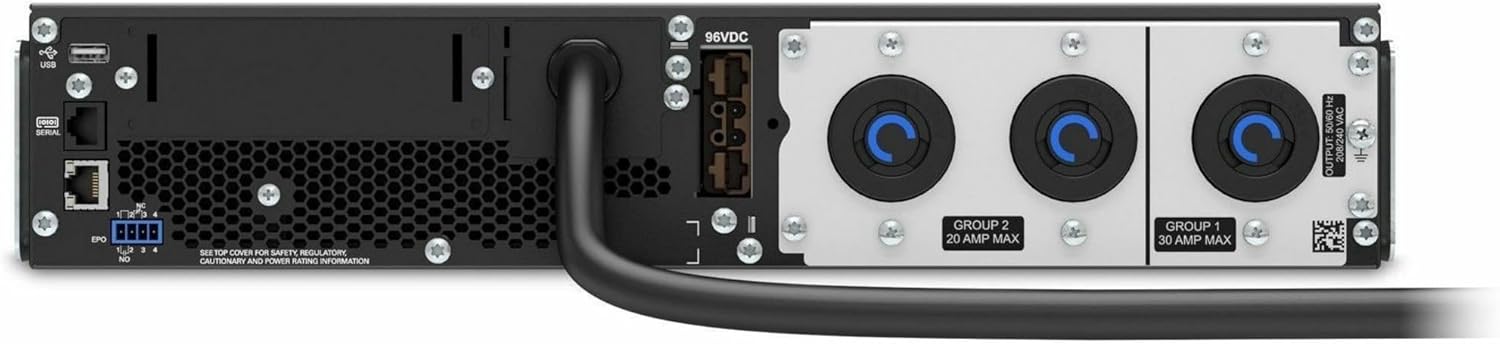
Afbeelding 4.2: Achter view of the APC Smart-UPS SRT3000RMXLT. This image displays the various input and output ports, including USB, serial, EPO, and the 12 output receptacles, along with the main power input.
4.3 Eerste inschakeling
After all connections are secure:
- Druk op de aan/uit-knop op het voorpaneel om de UPS in te schakelen.
- The UPS will perform a self-test and the display will show the current status.
- Allow the batteries to charge for at least 6 hours before relying on them for extended backup time.
5. De UPS bedienen
5.1 Display en bedieningselementen op het voorpaneel
The front panel features an LCD display and control buttons for monitoring and configuring the UPS.
- LCD-scherm: Shows real-time status, load, battery charge, input/output voltage, and event logs.
- ESC-knop: Exits the current menu or cancels an operation.
- OK-knop: Bevestigt een selectie of opent een menu.
- Omhoog/omlaag pijlen: Navigeer door menuopties of pas instellingen aan.
5.2 Basisbediening
- Inschakelen: Houd de aan/uit-knop ingedrukt totdat het display oplicht.
- Uitschakelen: Press and hold the power button until the UPS powers down. Ensure all connected equipment is safely shut down first.
- Batterijmodus: In het geval van een stroomstoringtage, the UPS will automatically switch to battery power. The display will indicate 'On Battery'.
- Zelftest: Initiate a manual self-test through the front panel menu to verify battery and UPS functionality.
6. Onderhoud
6.1 Batterij vervangen
The UPS uses sealed lead-acid batteries. Battery life is typically 3-5 years, depending on environmental conditions and usage. Replace batteries when the UPS indicates a 'Battery Fault' or 'Replace Battery' warning.
- Contact APC support or a certified service technician for battery replacement.
- Always use genuine APC replacement battery cartridges (RBCs) to ensure compatibility and optimal performance.
- Recycle old batteries responsibly.
6.2 Reinigen
Keep the UPS free from dust and debris to ensure proper ventilation.
- Use a soft, dry cloth to clean the exterior of the UPS.
- Gebruik geen vloeibare reinigingsmiddelen of oplosmiddelen.
- Zorg ervoor dat de ventilatieopeningen vrij zijn van obstakels.
7. Probleemoplossing
Deze sectie biedt oplossingen voor veelvoorkomende problemen. Neem voor complexere problemen contact op met de technische ondersteuning.
| Probleem | Mogelijke oorzaak | Oplossing |
|---|---|---|
| UPS gaat niet aan | No input power; Battery disconnected or discharged | Check power cord connection; Ensure utility power is present; Allow batteries to charge. |
| UPS piept continu | Werkt op batterijvoeding; overbelastingstoestand | Check utility power; Reduce connected load. |
| 'Batterij vervangen'-indicator | Batterij nadert einde levensduur | Order and replace the battery cartridge. |
| UPS not providing power to outlets | Output circuit breaker tripped; UPS in fault mode | Reset circuit breaker; Check display for fault codes and consult manual. |
8. Specificaties
Key technical specifications for the APC Smart-UPS SRT3000RMXLT.
| Functie | Specificatie |
|---|---|
| Modelnummer | SRT3000RMXLT |
| Merk | APC |
| Uitgangsvermogen | 3000 VA / 2700 Watt |
| Nominaal uitgangsvolumetage | 208V wisselstroom |
| Nominaal ingangsvolumetage | 208V wisselstroom / 230V wisselstroom |
| Ingangsfrequentie | 60Hz |
| Uitgangsverbindingen | 12 x IEC 320 C13/C14 |
| Batterijtype | Loodzuur |
| Typische oplaadtijd | 6 uur |
| Gebruikelijke back-uptijd (volledige belasting) | 4 minuten |
| Vormfactor | Rek |
| Afmetingen (H x B x D) | 9 x 23 x 34 inch |
| Gewicht | 69 pond |
| Bedrijfstemperatuur | 0 - 40 °C (32 - 104 °F) |
9. Garantie en ondersteuning
9.1 Garantie-informatie
APC provides a standard warranty for this product. Please refer to the warranty card included with your product or visit the official APC website voor gedetailleerde garantievoorwaarden die specifiek zijn voor uw regio.
9.2 Technische ondersteuning
For technical assistance, product information, or troubleshooting beyond the scope of this manual, please contact APC customer support. Have your model number (SRT3000RMXLT) and serial number ready when contacting support.
- Bezoek de officiële APC-website. website voor ondersteuningsbronnen, veelgestelde vragen en contactinformatie.
- Online resources often include updated manuals, firmware, and diagnostic tools.