
Invoering
This manual provides detailed instructions for the Inateck Bluetooth 4.1 Sport Headset, Model P20 (BH1001). Please read this guide thoroughly before using the product to ensure proper operation and to maximize your listening experience. This headset is designed for active lifestyles, offering wireless audio with a secure fit and integrated microphone.
1. Instellen
1.1 Pakketinhoud
Controleer of alle artikelen in het pakket aanwezig zijn:
- Inateck Bluetooth Sport Headset (P20 / BH1001)
- USB-oplaadkabel
- Meerdere paar siliconen oordopjes (verschillende maten)
- Draagtas
- Gebruikershandleiding (dit document)
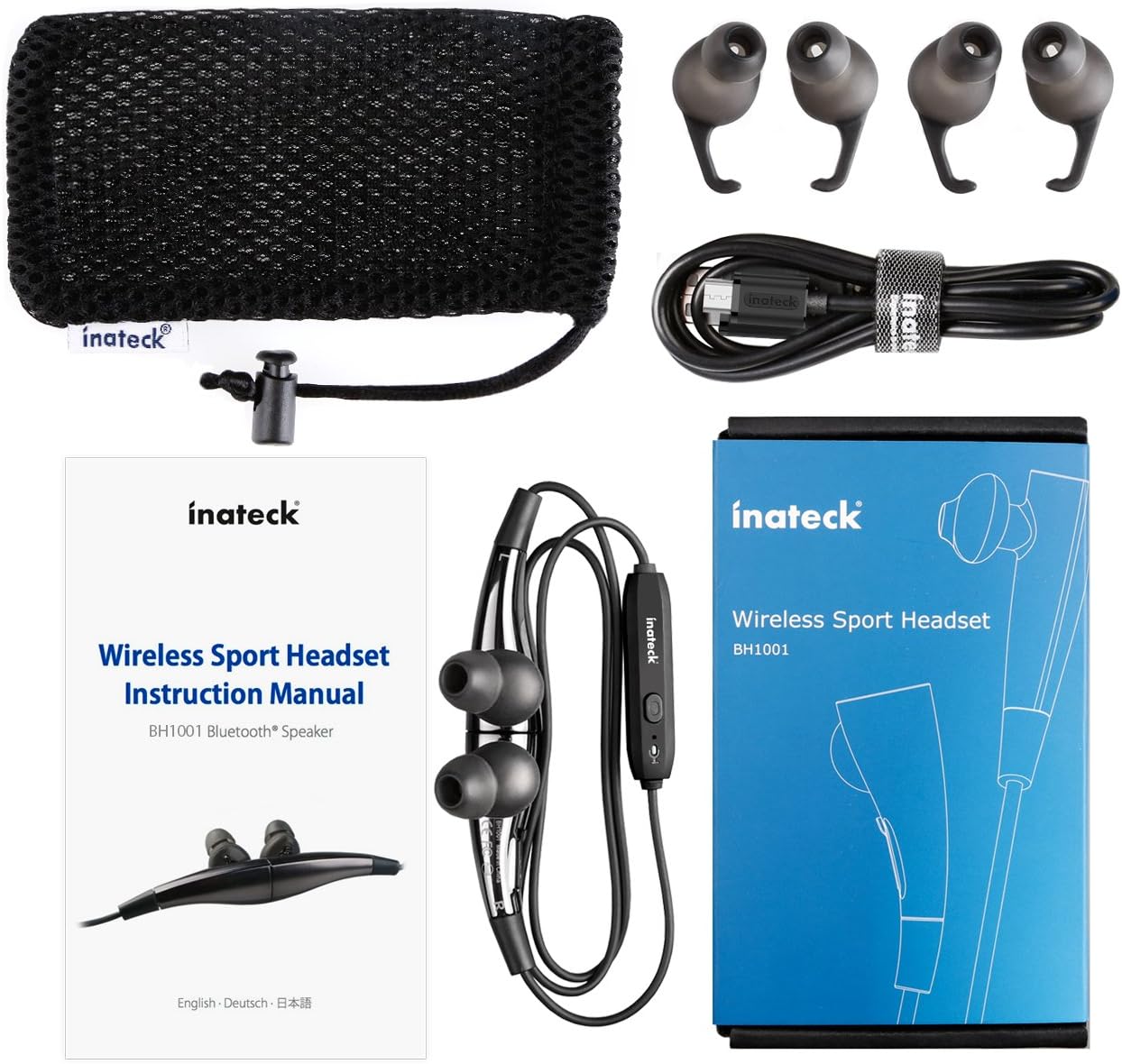
Figuur 1.1: Contents of the Inateck Bluetooth Sport Headset package.
1.2 De headset opladen
Before first use, fully charge the headset. A full charge takes approximately 3 hours and provides at least 8 hours of music playback.
- Locate the Micro USB charging port on the headset.
- Connect the small end of the provided USB charging cable to the headset's Micro USB port.
- Sluit het grotere uiteinde van de USB-kabel aan op een USB-voedingsbron (bijvoorbeeld een USB-poort van een computer of een USB-wandadapter).
- The status indicator light will illuminate during charging. It will change color or turn off once charging is complete.

Figuur 1.2: Charging the Inateck Bluetooth Sport Headset via Micro USB.
1.3 Koppelen met een Bluetooth-apparaat
To connect your headset to a smartphone or other Bluetooth-enabled device:
- Zorg ervoor dat de headset is uitgeschakeld.
- Press and hold the Multifunction Key (MFB) on the inline control unit for approximately 5-7 seconds until the status indicator light flashes red and blue alternately. This indicates pairing mode.
- Schakel Bluetooth in op uw Bluetooth-apparaat en zoek naar nieuwe apparaten.
- Select "Inateck BH1001" or "Inateck P20" from the list of available devices.
- Once paired, the status indicator light on the headset will flash blue slowly, and you may hear an audible confirmation.
- The headset will automatically attempt to reconnect to the last paired device when turned on.

Figuur 1.3: Inateck Headset paired with a mobile device for music playback.
2. Gebruiksaanwijzing
2.1 Bedieningselementen van de headset
The inline control unit provides easy access to various functions:

Figuur 2.1: Overview of the Inateck Headset control unit.
- Multifunction Key (MFB):
- Press and hold (5-7s): Power On/Off, Enter Pairing Mode
- Kort indrukken: Muziek afspelen/pauzeren, gesprek beantwoorden/beëindigen
- Long press (during incoming call): Reject call
- Volume omhoog (+) / Volgende nummer:
- Kort indrukken: volume verhogen
- Lang indrukken: Ga naar het volgende nummer
- Volume omlaag (-) / Vorige nummer:
- Kort indrukken: Volume verlagen
- Long press: Go to previous track
- Micro-USB-poort: Voor het opladen van de hoofdtelefoon.
- Statusindicator: Geeft de stroom-, koppelings- en oplaadstatus weer.
- Microfoon: Voor handsfree bellen.
2.2 De headset dragen
Select the ear tips that provide the most comfortable and secure fit for your ears. The headset is designed to be worn with the cable behind your neck, ensuring stability during physical activity.

Figuur 2.2: Proper wearing of the Inateck Sport Headset for active use.
2.3 Magnetic Earbuds Feature
The earbuds feature integrated magnets. When not in use, you can connect the two earbuds together, forming a necklace around your neck. This action automatically pauses music playback and prevents the headset from falling off.

Figuur 2.3: Magnetic earbuds feature for secure wearing around the neck.

Figuur 2.4: Headset worn as a necklace using the magnetic feature.
3. Onderhoud
- Schoonmaak: Wipe the headset with a soft, dry cloth. Do not use abrasive cleaners or solvents.
- Oortips: Verwijder de siliconen oordopjes regelmatig en reinig ze met milde zeep en water. Zorg ervoor dat ze volledig droog zijn voordat u ze weer bevestigt.
- Opslag: When not in use, store the headset in the provided carrying pouch to protect it from dust and damage. Avoid extreme temperatures.
- Waterbestendigheid: The headset is designed to be water-resistant for sports and exercise (e.g., sweat, light rain). Do not submerge it in water or expose it to heavy rain.
4. Probleemoplossing
4.1 Kan niet inschakelen
Ensure the headset is fully charged. Connect it to a power source using the USB cable and allow it to charge for at least 30 minutes before attempting to power on again.
4.2 Kan niet koppelen met het apparaat
- Ensure the headset is in pairing mode (status indicator flashing red and blue alternately).
- Make sure Bluetooth is enabled on your device and it is within range (typically 10 meters or 33 feet).
- Turn off and on the Bluetooth function on your device.
- If previously paired, try "forgetting" or "unpairing" the headset from your device's Bluetooth settings and then re-pair.
- Zorg ervoor dat er geen andere Bluetooth-apparaten de verbinding verstoren.
4.3 Geen geluid of slechte geluidskwaliteit
- Controleer het volumeniveau op zowel de headset als het aangesloten apparaat.
- Ensure the headset is properly paired and connected to your device.
- Move closer to your device to reduce potential interference or range issues.
- Ensure the ear tips are correctly seated in your ears for optimal sound delivery.
- Reboot both the headset and your connected device.
4.4 Intermitterende verbinding
- Ensure there are no physical obstructions between the headset and your device.
- Avoid placing your device in areas where the signal might be blocked (e.g., deep pockets, behind thick walls).
- Minimaliseer interferentie van andere draadloze apparaten (Wi-Fi-routers, andere Bluetooth-apparaten).
- Keep the headset and your device within the recommended Bluetooth range.
5. Specificaties
| Merk | Inateck |
| Modelnaam | P20 |
| Modelnummer | BH1001 |
| Connectiviteitstechnologie | Bluetooth 4.1 |
| Vormfactor | In-oor |
| Plaatsing van de oren | Intra-aural |
| Koptelefoonaansluiting | USB (voor opladen) |
| Waterbestendigheidsniveau | Waterproof (suitable for sweat/light rain) |
| Speciale kenmerken | Sports and exercise, integrated microphone, magnetic earbuds |
| Artikelgewicht | 78 gram |
| Controletype | Volumeregeling, multifunctionele knop |
| Materiaal | Plastic |
6. Garantie-informatie
Inateck products typically come with a limited warranty. For specific warranty terms and conditions applicable to your Inateck Bluetooth Sport Headset, please refer to the warranty card included in your product packaging or visit the official Inateck webwebsite. Bewaar uw aankoopbewijs voor garantieclaims.
7. Klantenservice
If you encounter any issues not covered in this manual or require further assistance, please contact Inateck customer support. You can usually find contact information, FAQs, and additional resources on the official Inateck webwebsite:
Webwebsite: www.inateck.com
Please have your product model (P20 / BH1001) and purchase details ready when contacting support.