
Invoering
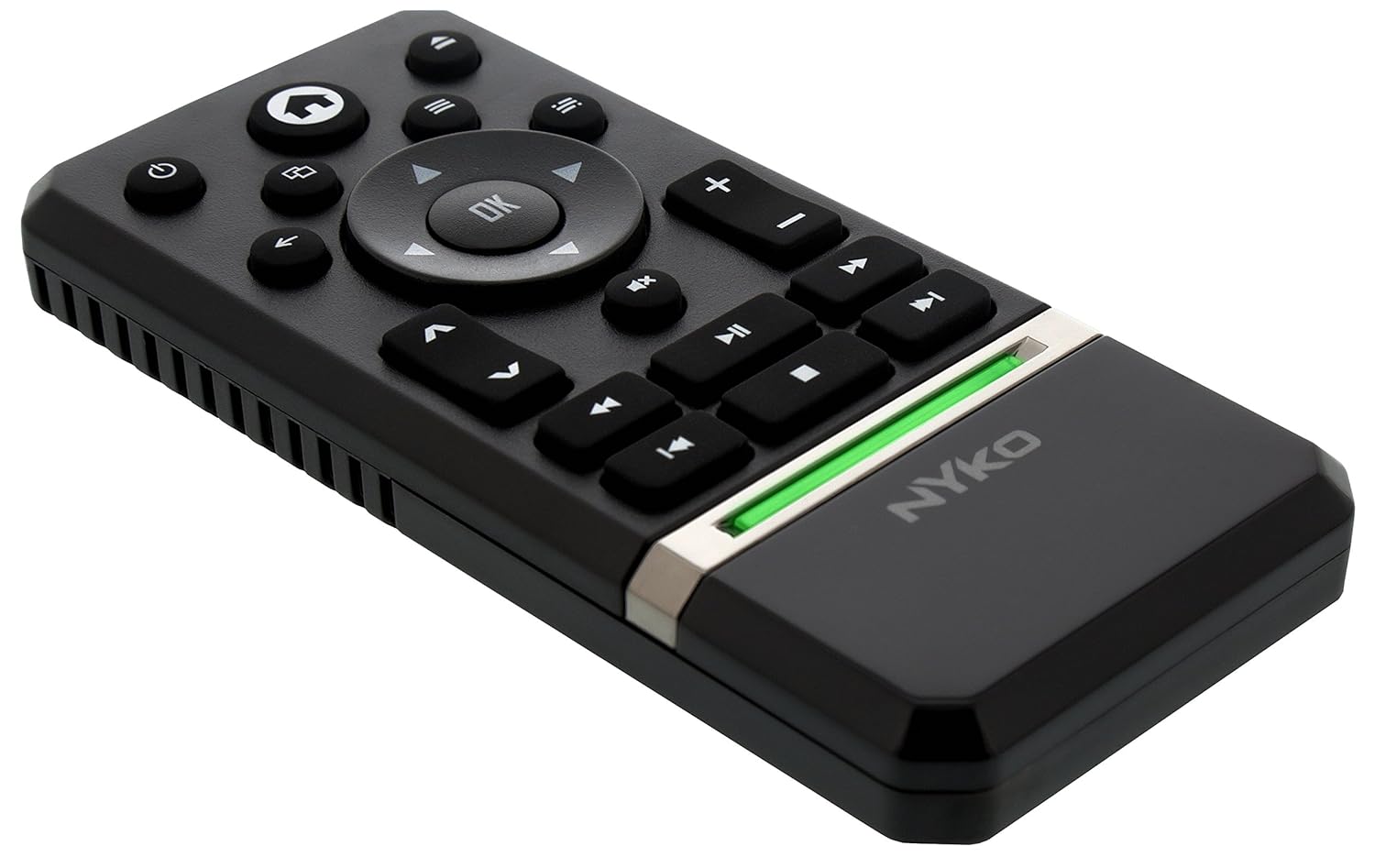
The Nyko Media Remote for Xbox One provides convenient control over your Xbox One console and various media applications. This remote simplifies navigation and playback of streaming content and physical media, offering dedicated buttons for common functions. It also features the ability to power your Xbox One on and off, and control basic functions of your television.

Image: Nyko Media Remote for Xbox One, front view.
Inhoud van het pakket
- Nyko Media Remote for Xbox One (Model: 86116)
- Let op: AAA-batterijen zijn niet inbegrepen en moeten apart worden aangeschaft.

Image: Nyko Media Remote for Xbox One in its retail packaging.
Instellen
1. Batterij installatie
- Zoek het batterijvak aan de achterkant van de afstandsbediening.
- Schuif het batterijklepje naar beneden om het te openen.
- Plaats twee (2) AAA-batterijen en let daarbij op de juiste polariteit (+/-) zoals aangegeven in het compartiment.
- Plaats het batterijklepje terug door het omhoog te schuiven totdat het vastklikt.
Afbeelding: Achterkant view of the remote with the battery cover removed, illustrating the AAA battery placement.
2. Eerste verbinding
The Nyko Media Remote uses infrared (IR) technology. No manual pairing is required for the Xbox One. Simply ensure a clear line of sight between the remote's IR emitter and the Xbox One's IR receiver.
For TV control functions (volume, channels, power), your TV must be configured to respond to the Xbox One's IR signals, typically through the Xbox One's OneGuide settings. The remote sends commands to the Xbox One, which then relays them to your TV via its IR blaster (if configured) or Kinect sensor.
Gebruiksaanwijzing
The Nyko Media Remote provides comprehensive control for your Xbox One and various media applications. Refer to the diagram below for button identification and their primary functions.

Afbeelding: Voorzijde view of the Nyko Media Remote, displaying all control buttons.
Knopfuncties:
| Knop | Functie |
|---|---|
| Aan/uit-knop (⏻) | Powers the Xbox One console on or off. |
| Home-knop (⌂) | Returns to the Xbox One Home screen. |
| View Knop (🗀) | Accesses additional information or options within an app or game. |
| Menuknop (☰) | Opens context-sensitive menus or options. |
| Richtingspad (D-pad) | Navigeer door menu's en inhoud. |
| OK-knop | Confirms selections. Can also function as Play/Pause in some apps. |
| Terugknop (←) | Gaat terug naar het vorige scherm of menu. |
| OneGuide Button (📱) | Launches the Xbox OneGuide for live TV and media. |
| Volume omhoog/omlaag (⏸ / ⏷) | Adjusts the television volume (requires TV setup via Xbox One). |
| Dempknop (🔇) | Mutes or unmutes television audio. |
| Kanaal omhoog/omlaag (▲ / ▼) | Changes television channels (requires TV setup via Xbox One). |
| Snel terugspoelen (⏪) | Spoelt de mediaweergave terug. |
| Afspelen/Pauzeren (⏯) | Hiermee speelt of pauzeert u het afspelen van media. |
| Snel vooruit (⏩) | Snel vooruitspoelen van mediaweergave. |
| Vorig nummer (⏮) | Springt naar het begin van het huidige nummer of het vorige nummer. |
| Stop (⏹) | Stopt de mediaweergave. |
| Volgende nummer (⏭) | Springt direct naar het volgende nummer of hoofdstuk. |
Media and App Control:
The remote is designed for seamless control of various Xbox One applications, including:
- OneGuide
- Netflix
- Hulu Plus
- Amazon Direct Video
- Other streaming services and Blu-ray/DVD playback
Dedicated playback buttons (Play, Pause, Fast Forward, Rewind, Stop, Skip) provide intuitive control for movies, music, and other media.
Onderhoud
Batterij vervangen:
When the remote's performance diminishes or it stops responding, it is likely time to replace the batteries. Follow the "Battery Installation" steps in the Setup section to replace the two AAA batteries.
Schoonmaak:
To clean the remote, gently wipe it with a soft, dry cloth. Avoid using harsh chemicals, abrasive cleaners, or excessive moisture, as these can damage the remote's finish or internal components.
Probleemoplossing
- Afstandsbediening reageert niet:
- Zorg ervoor dat er nieuwe AAA-batterijen correct zijn geplaatst.
- Verify there is a clear line of sight between the remote and the Xbox One console. Obstructions can block the infrared signal.
- Move closer to the Xbox One console. The remote has a maximum effective range of approximately 9 meters (25 feet).
- TV Control (Volume, Channel, Power) Not Working:
- Confirm that your Xbox One's OneGuide settings are properly configured for your television. The remote sends commands to the Xbox One, which then controls the TV.
- Ensure any necessary IR blasters or Kinect sensors are correctly set up and positioned.
- Intermittent Response:
- This can sometimes occur due to weak batteries or environmental interference. Replace batteries and ensure a clear line of sight.
Specificaties
| Functie | Detail |
|---|---|
| Merk | Nyko |
| Modelnaam | Media-afstandsbediening |
| Modelnummer | 86116 |
| Connectiviteitstechnologie | Infrarood (IR) |
| Compatibele apparaten | Xbox One, Television (via Xbox One IR blaster/Kinect) |
| Batterijtype | 2 x AAA-batterijen (niet inbegrepen) |
| Maximaal bereik | Tot 9 meter (25 voet) |
| Artikelgewicht | 0.1 pond (ongeveer 45 gram) |
| Kleur | Donkergrijs |
| Extra functies | Ergonomic design, dedicated media playback controls. |
Garantie en ondersteuning
Nyko products are designed for quality and reliability. For specific warranty details, please refer to the documentation included with your purchase or visit the official Nyko website. The product includes warranty information in multiple languages.
Klantenservice:
- E-mailadres: customer.support@nyko.com
- Telefoon: +1-888-400-6956
- Online registratie: www.nyko.com
- Aanvullende informatie: http://uqr.me/nykotechnologies/qr/83215

Afbeelding: Achterkant view of the product packaging, detailing features and customer support contact information.


