
Invoering
This manual provides essential instructions for the safe and efficient operation of your Muse M-28 VF Portable CD/MP3 Radio with USB Player. Please read this manual thoroughly before using the device and retain it for future reference.
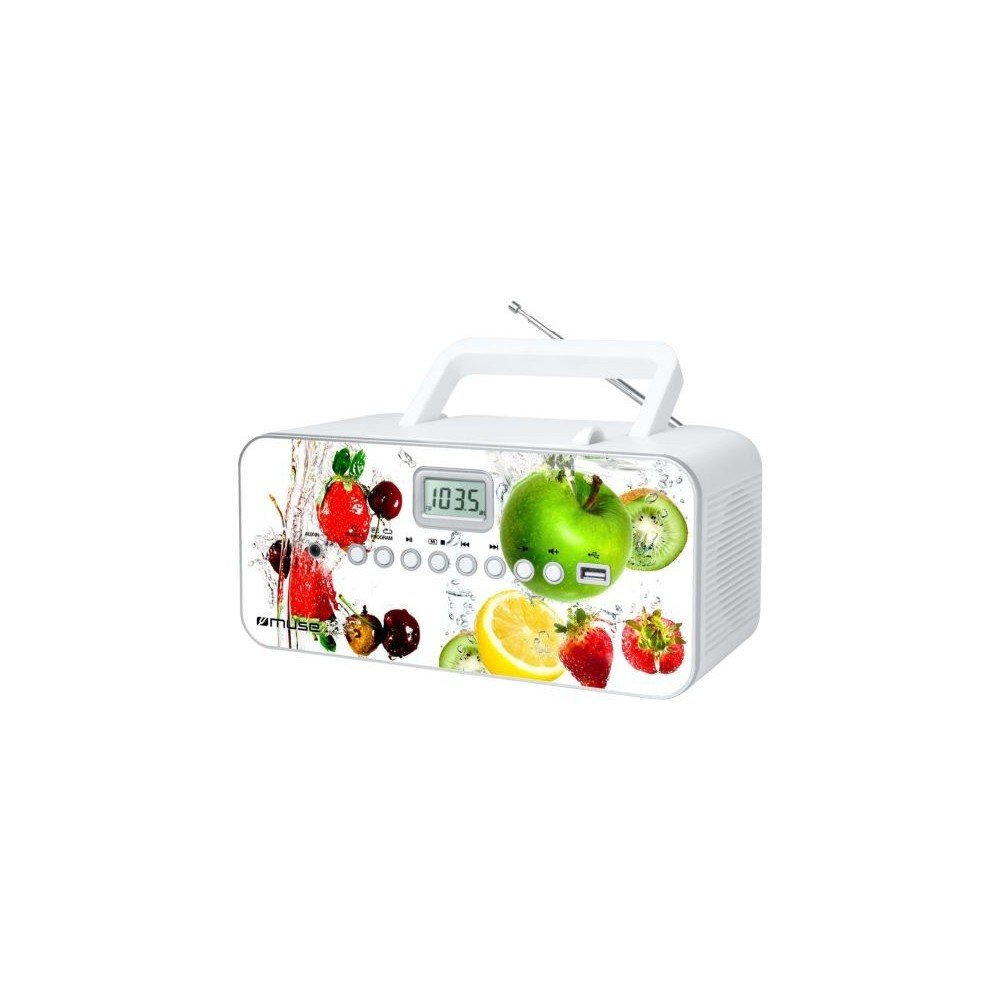
Voorkant view of the Muse M-28 VF portable CD/MP3 radio, showing the CD compartment, display, and control buttons.
Veiligheidsinformatie
- Stel het apparaat niet bloot aan regen of vocht.
- Blokkeer geen ventilatieopeningen.
- Zorg voor voldoende ventilatie rond het apparaat.
- Gebruik uitsluitend de door de fabrikant gespecificeerde toebehoren/accessoires.
- Koppel het apparaat los tijdens onweer of wanneer het langere tijd niet wordt gebruikt.
- Laat alle onderhoudswerkzaamheden over aan gekwalificeerd onderhoudspersoneel.
Instellen
1. Stroomaansluiting
- Locate the AC power cord.
- Insert the small end of the power cord into the AC IN jack on the back of the unit.
- Sluit het andere uiteinde van het netsnoer aan op een standaard stopcontact.
2. Antenne-afstelling
For optimal FM radio reception, fully extend the telescopic antenna. For MW (AM) reception, the unit has a built-in antenna; rotate the unit for best reception.
Gebruiksaanwijzing
1. Aan/uit
Druk op de STROOM knop om het apparaat aan of uit te zetten.
2. Modusselectie
Druk op de MODUS button repeatedly to switch between CD, USB, FM Radio, MW Radio, and AUX modes.
3. CD-weergave
- Open het klepje van het cd-vak.
- Place a CD (CD/CD-R/CD-RW/MP3 compatible) with the label side facing up.
- Sluit de deur van het cd-compartiment.
- Selecteer de CD-modus met behulp van de MODUS knop.
- Druk op de AFSPELEN/PAUZE knop om het afspelen te starten.
- Gebruik de OVERSLAAN toetsen (<< / >>) om door sporen te navigeren.
- Druk op de STOP knop om het afspelen te beëindigen.
- The unit features a full or partial repeat function. Refer to the display for repeat mode indicators.
4. USB-weergave
- Plaats een USB-stick in de USB-poort.
- Selecteer de USB-modus met behulp van de MODUS knop.
- Playback will start automatically or by pressing the AFSPELEN/PAUZE knop.
- Gebruik de OVERSLAAN toetsen (<< / >>) om door sporen te navigeren.
5. FM/MW Radio Operation
- Select FM or MW mode using the MODUS knop.
- Houd de AFSTEM +/- knoppen om automatisch naar het volgende beschikbare station te scannen.
- Druk op de AFSTEM +/- Druk kort op de knoppen om de frequentie nauwkeurig af te stellen.
- Om een station op te slaan: Stem af op het gewenste station en houd vervolgens de knop ingedrukt. PROGRAMMA knop. Gebruik maken van OVERSLAAN knoppen om een vooraf ingesteld nummer te selecteren en vervolgens drukken PROGRAMMA again to confirm. The unit supports 20 FM and 10 MW storable stations.
- To recall a stored station: Press the GEHEUGEN or VOORINSTELLING knop, gebruik dan OVERSLAAN knoppen om de gewenste voorinstelling te selecteren.
6. Hulpingang (AUX IN)
- Connect an external audio device (e.g., smartphone, MP3 player) to the AUX IN jack using a 3.5mm audio cable (not supplied).
- Selecteer de AUX-modus met behulp van de MODUS knop.
- Bedien de weergave vanaf het aangesloten externe apparaat.
7. Volumeregeling
Draai de VOLUME knop om het geluidsniveau aan te passen.
Onderhoud
1. Het apparaat reinigen
- Zorg ervoor dat het apparaat is uitgeschakeld en dat de stekker uit het stopcontact is gehaald voordat u het schoonmaakt.
- Veeg de buitenkant af met een zachte, droge doek.
- Voor hardnekkige vlekken, licht dampReinig de doek met water. Gebruik geen schuurmiddelen, was of oplosmiddelen.
- Clean the CD lens periodically with a specialized CD lens cleaner disc (not supplied).
2. Opslag
Wanneer u het apparaat gedurende langere tijd niet gebruikt, berg het dan op op een koele, droge plaats, uit de buurt van direct zonlicht en extreme temperaturen.
Probleemoplossing
| Probleem | Mogelijke oorzaak | Oplossing |
|---|---|---|
| Geen stroom | Netsnoer niet goed aangesloten. | Controleer of het netsnoer goed in het apparaat en het stopcontact is aangesloten. |
| Geen geluid | Het volume is te laag of gedempt. Verkeerde modus geselecteerd. | Increase the volume. Ensure the correct playback mode (CD, USB, Radio, AUX) is selected. |
| CD speelt niet af | CD inserted incorrectly. CD is dirty or scratched. Incorrect mode. | Insert CD with label side up. Clean or replace the CD. Select CD mode. |
| USB speelt niet | USB-stick niet correct geplaatst. Incompatibel. file formaat. | Ensure USB drive is fully inserted. Check if fileHet betreft bestanden in MP3-formaat. |
| Slechte radio-ontvangst | Antenna not extended/positioned correctly. Interference. | Fully extend and adjust the FM telescopic antenna. Rotate the unit for MW reception. Move away from other electronic devices. |
Specificaties
- Model: M-28 VF
- Merk: MUZE
- Compatibele schijftypen: Cd, cd-r, cd-rw, mp3
- Radiotuner: PLL FM/MW
- Vooraf ingestelde zenders: 20 FM, 10 MW
- Connectiviteit: USB Port (1), Auxiliary Input (3.5mm)
- Luidsprekertype: Stereo
- Energiebron: AC-kabel
- Uitgangsvermogen: 14 Watt
- Afmetingen (L x B x H): 17 x 26 x 13 cm (ongeveer 6.7 x 10.2 x 5.1 inch)
- Gewicht: 1.4 kilogram (ongeveer 3.1 lbs)
- Bluetooth-compatibel: Nee
Garantie-informatie
Dit product wordt geleverd met fabrieksgarantie. 1 jaar from the date of purchase. Please retain your proof of purchase for warranty claims. The warranty covers defects in materials and workmanship under normal use. It does not cover damage caused by misuse, accident, unauthorized modification, or external causes.
Klantenservice
For further assistance, technical support, or warranty inquiries, please refer to the contact information provided with your product packaging or visit the official MUSE webProbeer het apparaat niet zelf te repareren.