
1. Inleiding
This manual provides essential instructions for the safe and efficient operation of your ICOM BC-152 charger. Please read this manual thoroughly before using the charger to ensure proper setup, operation, and maintenance. Keep this manual for future reference.
2. Veiligheidsinformatie
Always observe the following safety precautions to prevent injury, damage to the charger, or damage to the device being charged.
- Use only with compatible ICOM battery packs. Using incompatible batteries may cause fire, explosion, or injury.
- Stel de oplader niet bloot aan regen, vocht of extreme temperaturen.
- Demonteer of wijzig de lader niet. Laat alle onderhoudswerkzaamheden uitvoeren door gekwalificeerd personeel.
- Zorg ervoor dat het stopcontact vol istage matches the charger's specifications.
- Houd de oplader uit de buurt van warmtebronnen en direct zonlicht.
- Haal de oplader uit het stopcontact wanneer u deze niet gebruikt of voordat u hem schoonmaakt.
3. Instellen
3.1 Uitpakken
Carefully remove the ICOM BC-152 charger from its packaging. Verify that all components are present:
- ICOM BC-152 Charger Unit
- AC Adapter (if included)
- Gebruiksaanwijzing (dit document)
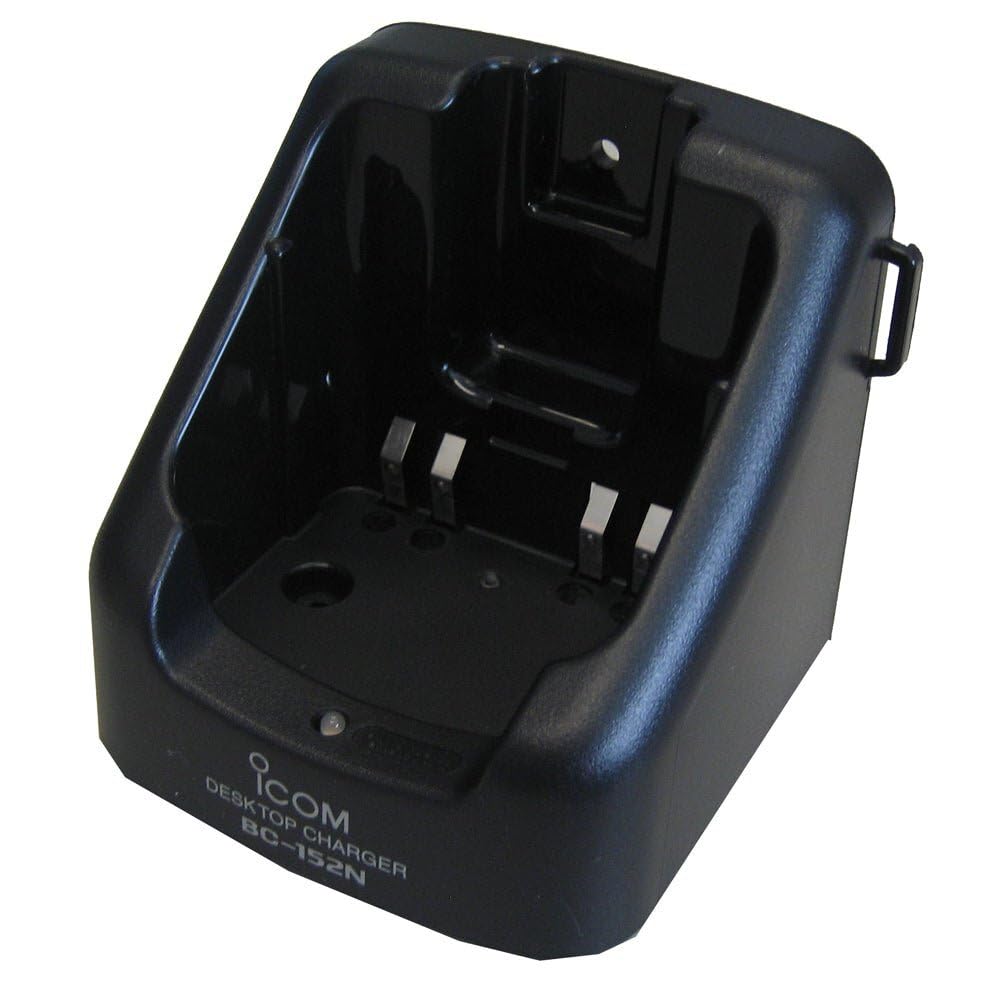
Figure 1: The ICOM BC-152 charger unit. This image shows the compact black charger with a single slot for a battery pack.
3.2 Stroom aansluiten
- Connect the AC adapter cable to the DC input jack on the rear of the BC-152 charger unit.
- Sluit de netadapter aan op een standaard stopcontact.
- De oplader is nu klaar voor gebruik.
4. Gebruiksaanwijzing
4.1 Charging a Battery Pack
Follow these steps to charge a compatible ICOM battery pack:
- Zorg ervoor dat de oplader is aangesloten op een stroombron zoals beschreven in paragraaf 3.2.
- Carefully insert the battery pack into the charging slot of the BC-152 charger. Ensure it is seated firmly.
- Observe the charging indicator light.
4.2 indicatielampjes
The BC-152 charger features an LED indicator to show the charging status:
- Rood (effen): De batterij wordt momenteel opgeladen.
- Groen (continu): Charging is complete. The battery pack is fully charged.
- Knipperend rood: Charging error or battery fault. Remove the battery and re-insert. If the error persists, consult the troubleshooting section.
- Geen licht: Charger is not connected to power, or no battery is inserted.
Charging time may vary depending on the battery's capacity and its current charge level. Typically, a fully depleted battery will take approximately 2-4 hours to charge.
5. Onderhoud
5.1 Reinigen
Om optimale prestaties en uiterlijk te behouden:
- Haal de oplader altijd uit het stopcontact voordat u gaat schoonmaken.
- Gebruik een zachte, droge doek om de buitenkant van de oplader af te vegen.
- Gebruik geen schurende reinigingsmiddelen, oplosmiddelen of agressieve chemicaliën.
- Ensure no moisture enters the charging slot or power input.
5.2 Opslag
When not in use for extended periods, store the charger in a cool, dry place, away from direct sunlight and extreme temperatures. Disconnect it from the power supply.
6. Probleemoplossing
If you encounter issues with your BC-152 charger, refer to the table below for common problems and solutions.
| Probleem | Mogelijke oorzaak | Oplossing |
|---|---|---|
| Het oplaadindicatielampje is uit. | No power supply or battery not inserted. | Check AC adapter connection. Ensure battery is correctly inserted. |
| Indicator light flashes red. | Battery fault or charging error. | Remove and re-insert the battery. Try a different compatible battery if available. |
| Batterij laadt niet op. | Faulty battery, charger, or power supply. | Verify power connection. Test with a known good battery. If problem persists, contact support. |
7. Specificaties
| Merk | ICOM |
| Model | BC-152 |
| Ingangsvolumetage | 12-16V DC (via AC adapter) |
| Uitgangsvolumetage | 8.4V gelijkstroom |
| Laadstroom | Ca. 450mA |
| Afmetingen (B×H×D) | Approx. 80 × 50 × 90 mm (3.1 × 2.0 × 3.5 inches) |
| Gewicht | 0.18 pond (ca. 82 g) |
| Kleur | Zwart |
Let op: Specificaties kunnen zonder voorafgaande kennisgeving worden gewijzigd ter verbetering.
8. Garantie-informatie
ICOM products are manufactured with high-quality components and are subject to rigorous quality control. This product is covered by a limited warranty against defects in materials and workmanship. The specific terms and duration of the warranty may vary by region. Please refer to the warranty card included with your purchase or visit the official ICOM webwebsite voor gedetailleerde garantie-informatie.
Deze garantie dekt geen schade die is veroorzaakt door verkeerd gebruik, een ongeval, ongeoorloofde wijziging of onjuiste installatie.
9. Klantenservice
If you have any questions, require technical assistance, or need to report a problem that cannot be resolved using the troubleshooting guide, please contact ICOM customer support.
ICOM America Inc.
Visit ICOM America's Contact Page
Please have your product model (BC-152) and serial number ready when contacting support.