
1. Inleiding
This manual provides detailed instructions for the setup, operation, and maintenance of your Vibe Axcess 5-in-1 Universal Remote. Please read this manual thoroughly before using the remote control to ensure proper functionality and to maximize your user experience. This remote is designed to control up to five different audio/video devices.
2. Product voorbijview
The Vibe Axcess 5-in-1 Universal Remote is designed to consolidate control of multiple home entertainment devices into a single unit. It features dedicated buttons for various functions and device types.
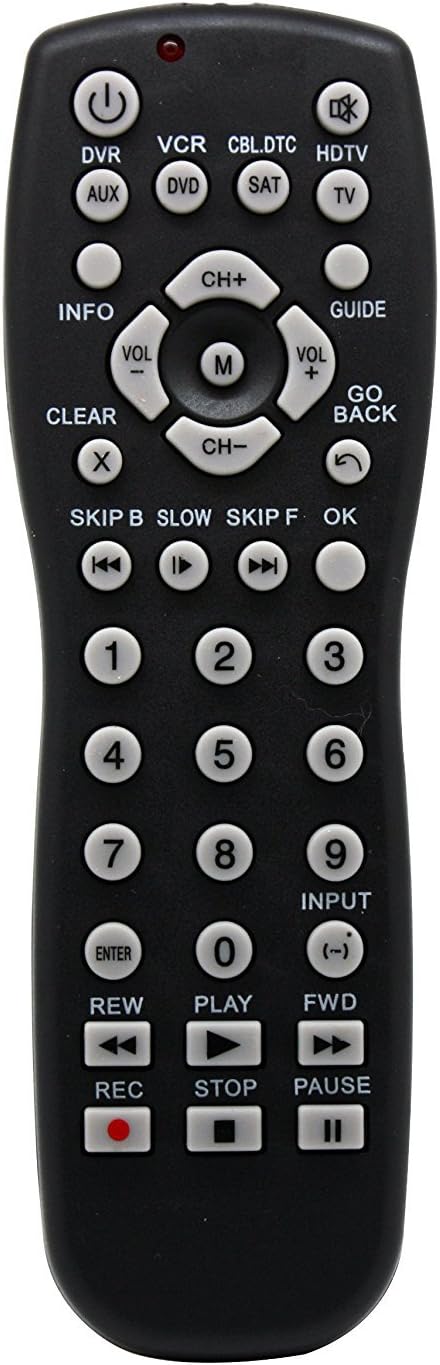
Figuur 1: Voorkant view of the Vibe Axcess 5-in-1 Universal Remote. This image displays the remote's layout, including device selection buttons (DVR, VCR, CBL.DTC, HDTV, AUX, DVD, SAT, TV), navigation pad, number keys, and media control buttons (REW, PLAY, FWD, REC, STOP, PAUSE).

Figuur 2: Packaging of the Vibe Axcess 5-in-1 Universal Remote. The packaging highlights the remote's 5-in-1 capability and compatibility with various device types such as DVD/VCR, HDTV, DVD, AUX, and CBL/SAT/CABLE.
3. Instellen
3.1 Batterij installatie
- Zoek het deksel van het batterijcompartiment aan de achterkant van de afstandsbediening.
- Schuif het deksel naar beneden of druk op de vergrendeling en til het op om te openen.
- Plaats twee (2) AAA-batterijen en zorg ervoor dat de positieve (+) en negatieve (-) polen overeenkomen met de schema's in het batterijcompartiment.
- Plaats het batterijklepje terug en schuif het terug totdat het goed vastklikt.
Opmerking: Always use fresh batteries and replace both batteries at the same time. Do not mix old and new batteries or different types of batteries.
3.2 De afstandsbediening programmeren
To control your devices, the universal remote must be programmed with the correct codes for each device. There are typically two methods for programming:
3.2.1 Directe code-invoer
This method involves entering a specific code from a code list (usually provided with the remote or available online) for your device's brand.
- Schakel het apparaat in dat u wilt bedienen (bijv. tv, dvd-speler).
- Press and hold the desired device button on the remote (e.g., TV, DVD) for approximately 3 seconds until the indicator light (usually red) illuminates and stays on.
- While the indicator light is on, enter the 3-digit or 4-digit code for your device's brand using the number keys.
- If the code is valid, the indicator light will turn off. If the light flashes and remains on, the code was invalid; re-enter the code.
- Test de afstandsbediening door op de knop te drukken. STROOM button. If the device turns off, the code is correct. If not, try the next code listed for your brand.
3.2.2 Auto code zoeken
If you cannot find a code or direct code entry fails, use the auto code search method.
- Schakel het apparaat in dat u wilt bedienen.
- Houd de gewenste knop op het apparaat ingedrukt (bijv. TV) for approximately 3 seconds until the indicator light illuminates and stays on.
- While holding the device button, press the STROOM button once. The indicator light will start flashing, indicating it is searching for a code.
- Point the remote at the device and wait for the device to turn off. This may take several minutes as the remote cycles through codes.
- Zodra het apparaat is uitgeschakeld, drukt u onmiddellijk op de knop. BINNENKOMEN Druk op de knop om de code op te slaan. Het indicatielampje gaat uit.
- Test the remote's functions. If some functions do not work, repeat the auto search process to find a more compatible code.
4. Gebruiksaanwijzing
Once programmed, operating your Vibe Axcess 5-in-1 Universal Remote is straightforward.
- Selecteer apparaat: Druk op de bijbehorende knop van het apparaat (bijv. TV, DVD, CBL.DTC) for the device you wish to control. The indicator light will briefly illuminate to confirm selection.
- Aan/uit: Druk op de STROOM knop om het geselecteerde apparaat in of uit te schakelen.
- Volumeregeling: Gebruik de VOL+ En VOL- knoppen om het volume aan te passen.
- Kanaalcontrole: Gebruik de CH+ En CH- knoppen om van kanaal te wisselen.
- Cijfertoetsen: Use the number keys (0-9) to directly enter channel numbers or other numerical inputs.
- Navigatie: Gebruik de richtingsknoppen (omhoog, omlaag, links, rechts) en OK button for menu navigation.
- Mediabediening: Gebruik TONEELSTUK, PAUZE, STOP, REW, Vooruit, En REC for controlling media playback on compatible devices.
5. Onderhoud
5.1 Reinigen
To clean your remote, gently wipe it with a soft, dry cloth. Do not use abrasive cleaners, solvents, or harsh chemicals, as these can damage the remote's finish or internal components.
5.2 Batterij vervangen
When the remote's performance degrades or the indicator light fails to illuminate, it is time to replace the batteries. Follow the battery installation steps in Section 3.1. Dispose of used batteries responsibly according to local regulations.
6. Probleemoplossing
- Afstandsbediening werkt niet:
- Controleer of de batterijen correct zijn geplaatst en niet leeg zijn. Vervang ze indien nodig.
- Ensure you have selected the correct device button (e.g., TV voor uw televisie).
- Verify that the remote is programmed with the correct code for your device. Re-program if unsure.
- Zorg ervoor dat er geen obstakels zijn tussen de afstandsbediening en de infraroodsensor van het apparaat.
- Sommige functies werken niet:
- Some universal remote codes may not support all original remote functions. Try another code for your device brand using the programming steps.
- Ensure the device you are trying to control supports the specific function (e.g., not all TVs have a dedicated 'INFO' button function).
- Indicatielampje brandt niet:
- Controleer en vervang de batterijen.
- If the issue persists after battery replacement, the remote may be faulty.
7. Specificaties
- Model: OT795-KO
- Merk: Stemming
- Productafmetingen: 10.7 x 4 x 0.8 inch
- Artikelgewicht: 4 ons
- Batterijen: 2 AAA-batterijen vereist (niet inbegrepen)
- Maximaal aantal ondersteunde apparaten: 5
- Connectiviteitstechnologie: Infrarood
- Speciale eigenschap: Universeel
8. Garantie en ondersteuning
For information regarding warranty coverage or technical support, please refer to the documentation included with your purchase or contact the retailer where the product was acquired. Specific warranty terms may vary.