
POLY M25
Gebruikershandleiding voor de Plantronics M25 Bluetooth-headset
Model: M25
Invoering
The Plantronics M25 Bluetooth headset is designed for convenient wireless communication and audio playback. It features an extended battery life with DeepSleep mode, ensuring readiness when needed. The headset provides whispered alerts for battery status and connection information, and allows for listening to music, internet radio, or navigation directions while managing calls.
Inhoud van het pakket
Controleer of alle artikelen in uw pakket aanwezig zijn:
- Plantronics M25 Bluetooth-headset
- AC Charger (100-240v)
- Clip-on Earloop
Instellen
1. De hoofdtelefoon opladen
Before first use, fully charge the headset. Connect the AC charger to the headset's charging port. The indicator light will change to show charging status and turn off or change color when fully charged. A full charge can provide up to 5 months of readiness in DeepSleep mode.
2. Koppelen met een apparaat
To pair your Plantronics M25 headset with a Bluetooth-enabled device (e.g., smartphone, tablet):
- Zorg ervoor dat de headset is opgeladen en uitgeschakeld.
- Press and hold the Call button on the headset until the indicator light flashes red and blue, indicating pairing mode.
- Schakel Bluetooth in op uw apparaat en zoek naar nieuwe apparaten.
- Select "Plantronics M25" from the list of available devices.
- Als u om een toegangscode wordt gevraagd, voer dan "0000" (vier nullen) in.
- Once paired, the headset's indicator light will stop flashing and a voice prompt will confirm the connection.
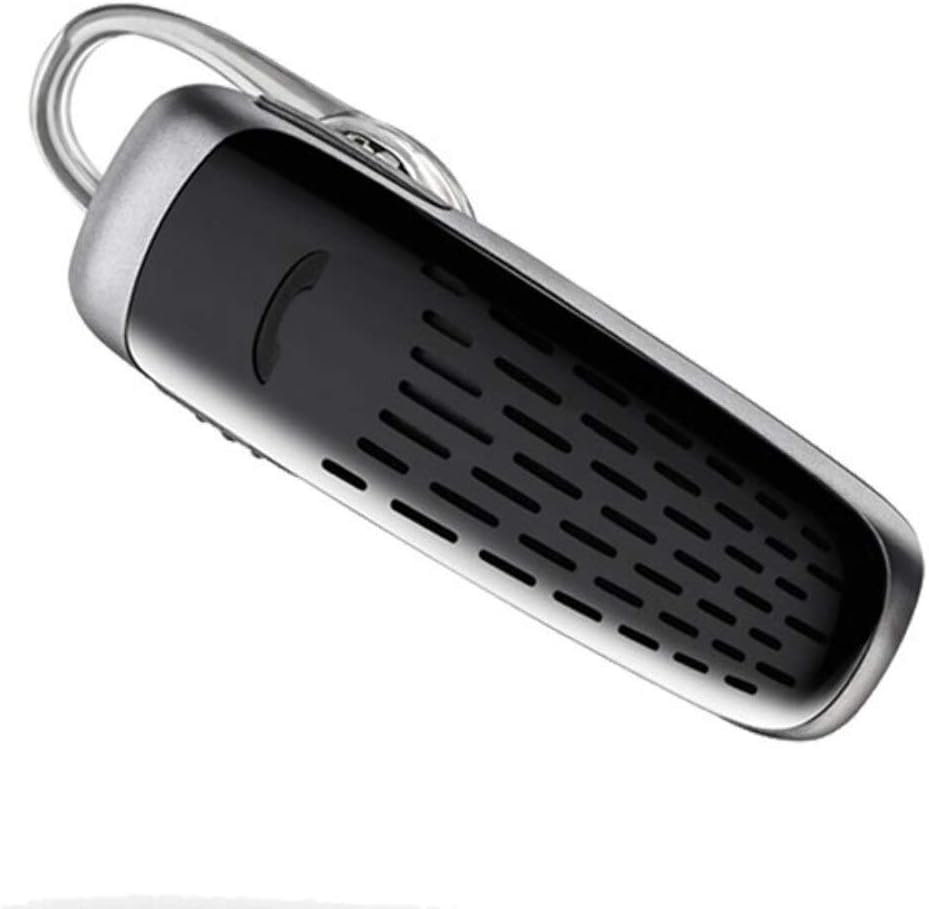
Image: The Plantronics M25 Bluetooth Headset, a compact black and silver device with an earloop, shown from an angled perspective. The call button is visible on the side.
Gebruiksaanwijzing
Aan/uit
- Inschakelen: Houd de aan/uit-knop ingedrukt totdat het indicatielampje blauw knippert.
- Uitschakelen: Press and hold the Power button until the indicator light flashes red.
Bellen en gebeld worden
- Beantwoord oproep: Druk op de belknop.
- Einde gesprek: Druk op de belknop.
- Oproep afwijzen: Houd de belknop 2 seconden ingedrukt.
- Laatste nummer opnieuw kiezen: Druk twee keer op de belknop.
Audio afspelen
The headset supports streaming audio from your device, including music, podcasts, and GPS directions.
- Afspelen/Pauzeren: Press the Call button during audio playback.
DeepSleep-modus
The headset enters DeepSleep power-saving mode if it is disconnected from your phone for over 90 minutes. To wake it up when it's back in range (within 33 feet), simply tap the Call button.
Onderhoud
- Schoonmaak: Gebruik een zachte, droge doek om de headset schoon te maken. Gebruik geen vloeibare reinigingsmiddelen of spuitbussen.
- Opslag: Bewaar de headset op een koele, droge plaats, uit de buurt van extreme temperaturen.
- batterij zorg: To preserve battery life, avoid fully discharging the battery frequently. Charge the headset regularly, even if not in use.
- Waterbestendigheid: Dit apparaat is Niet waterbestendigVermijd blootstelling aan water of overmatige vochtigheid.
Probleemoplossing
| Probleem | Oplossing |
|---|---|
| Headset gaat niet aan. | Ensure the headset is charged. Connect it to the AC charger and allow it to charge for at least 30 minutes before attempting to power on. |
| Het lukt me niet om de headset met mijn apparaat te koppelen. |
|
| No audio or low audio volume. |
|
| Headset frequently disconnects. |
|
Specificaties
| Functie | Detail |
|---|---|
| Modelnaam | Plantronics M25 |
| Connectiviteitstechnologie | Bluetooth |
| Draadloze communicatietechnologie | Bluetooth |
| Compatibele apparaten | Smartphones, laptops, desktops, tablets, slimme luidsprekers, televisies |
| Controletype | Oproepbeheer |
| Artikelgewicht | 0.3 ounces (ongeveer 8.5 gram) |
| Waterbestendigheidsniveau | Niet waterbestendig |
| Frequentiebereik | 20 Hz tot 20,000 Hz |
| Battery Life (DeepSleep) | Tot 150 dagen |
| Bluetooth-bereik | Tot 10 meter (33 voet) |
| Plaatsing van de oren | In het oor |
| Vormfactor | One Ear |
| Geluidsbeheersing | Actieve ruisonderdrukking |
| Productafmetingen | 1.85 x 0.59 x 0.35 inch |
| Kleur | Zwart |
| Fabrikant | Plantronics |
Garantie en ondersteuning
Garantie-informatie: Please note that this product is sold with No Warranty or Return as per the provided information. Users are advised to verify product condition upon receipt.
For further assistance or inquiries, please refer to the official POLY support channels or visit their website. Contact information may be available on the product packaging or the manufacturer's official webplaats.
Disclaimer: Productspecificaties en -kenmerken kunnen zonder voorafgaande kennisgeving worden gewijzigd. Raadpleeg altijd de meest recente informatie van de fabrikant.