
1. Inleiding
This manual provides essential information for the safe and efficient operation of your Technaxx Wireless CarPlay & Android Car Monitor TX-361. Please read this manual thoroughly before using the device and retain it for future reference. The TX-361 is designed to integrate modern smartphone connectivity, including Apple CarPlay and Android Auto, into your vehicle without requiring a complex car radio replacement. It also features an integrated DAB digital radio for enhanced audio experience.
2. Veiligheidsinformatie
- Gebruik het apparaat altijd verantwoord en in overeenstemming met de plaatselijke verkeersregels. Afleiding achter het stuur kan tot ongelukken leiden.
- Probeer het apparaat niet te demonteren of te wijzigen. Dit kan de garantie ongeldig maken en veiligheidsrisico's met zich meebrengen.
- Houd het apparaat uit de buurt van extreme temperaturen, direct zonlicht en vocht.
- Zorg ervoor dat het apparaat stevig is gemonteerd en uw zicht niet belemmert. view of interfereren met de voertuigbediening.
- Gebruik uitsluitend de meegeleverde stroomkabel en accessoires.
- If the device malfunctions, disconnect it from the power source and contact customer support.
3. Inhoud van het pakket
Controleer of alle hieronder vermelde artikelen in uw pakket zitten:
- DAB 7-inch CarPlay with Touch Screen TX-361
- Power Supply (USB-A to USB-C, 1.5m cable)
- AUX Cable (1m)
- DAB-antenne
- Holder (Mounting Bracket)
- Gebruiksaanwijzing
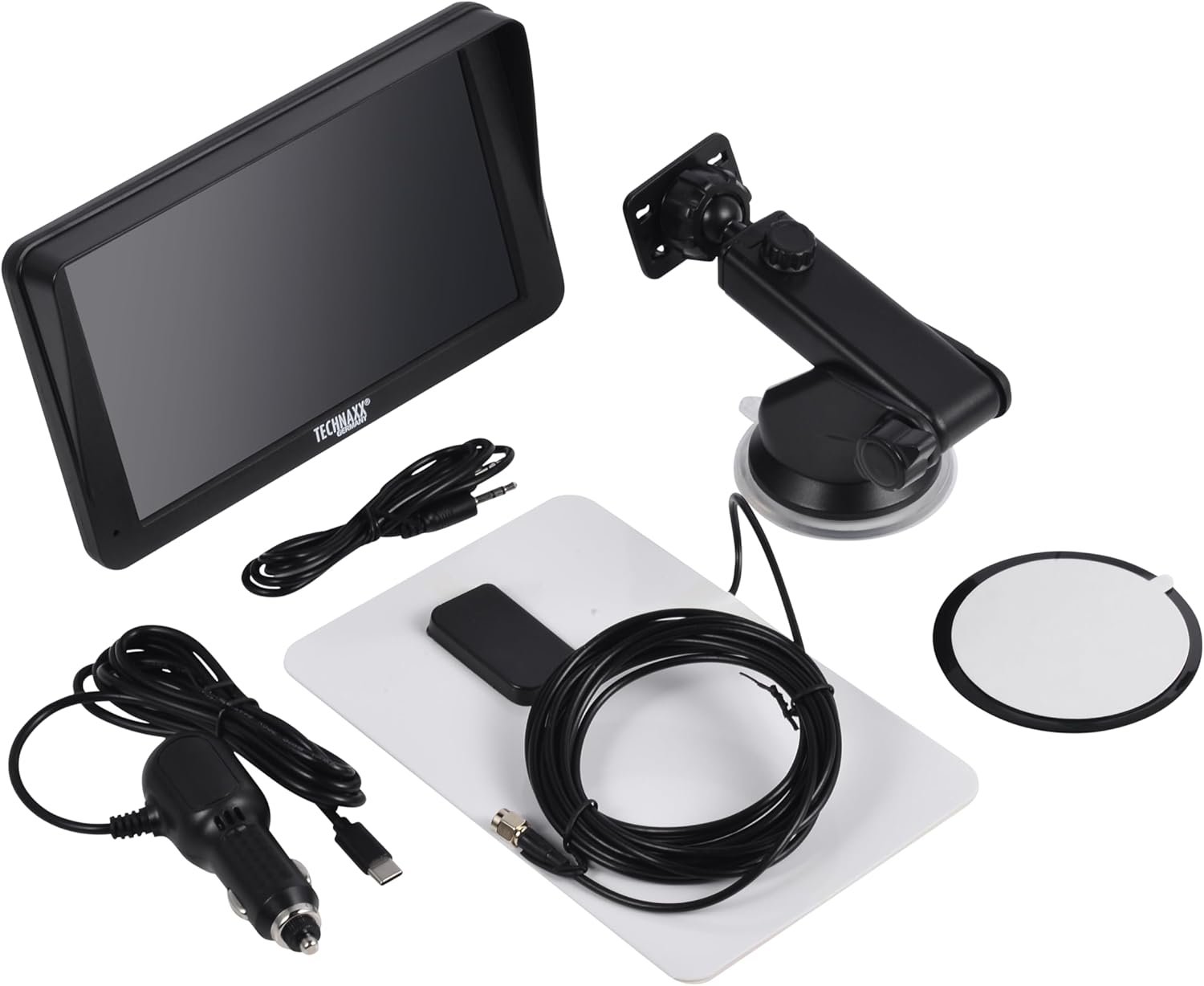
Image: All components included in the Technaxx TX-361 package, neatly laid out.
4. Product voorbijview
Familiarize yourself with the main components of your TX-361 monitor.
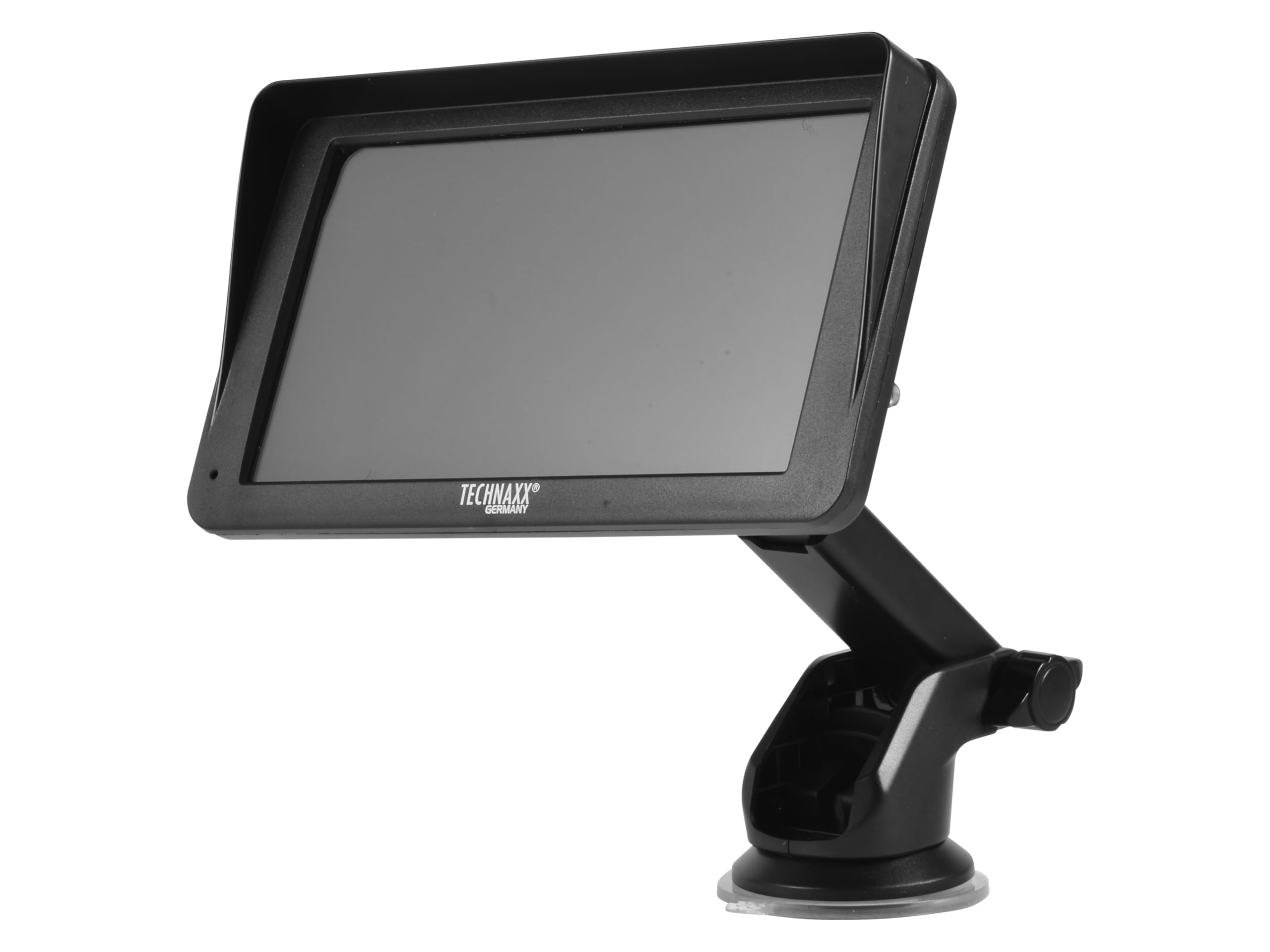
Afbeelding: Voorzijde view of the TX-361 monitor with its 7-inch display and 'TECHN AXX GERMANY' branding, attached to the adjustable mounting stand.

Afbeelding: Achterkant view of the TX-361 monitor, highlighting the ventilation grilles and the attachment point for the mounting bracket.

Afbeelding: Gedetailleerd view of the right side of the TX-361 monitor, showing the power button, reset button, USB-C power input, AUX output, and USB-A port.
4.1. Apparaatcomponenten
- 7-inch capacitief touchscreen: Hoofdscherm voor alle functies.
- Aan/uit-knop: Located on the top right side.
- Resetknop: Small pinhole button for system reset.
- USB-C-poort: Voor stroomtoevoer.
- AUX-uitgang: 3.5mm jack for wired audio transmission.
- USB-A-poort: For media playback or charging external devices.
- DAB-antenne-ingang: Connector for the external DAB antenna.
- Geïntegreerde luidspreker: Voor directe audioweergave.
5. Instellen
5.1. Het apparaat monteren
The TX-361 can be mounted on your vehicle's windscreen or dashboard using the provided holder.
- Attach the monitor to the mounting bracket.
- For Windscreen Mounting: Clean the desired area on the windscreen. Press the suction cup firmly against the glass and engage the lever to secure it.
- For Dashboard Mounting: Clean the desired area on the dashboard. If necessary, use the adhesive disc provided for a more secure attachment point for the suction cup. Press the suction cup firmly and engage the lever.
- Pas de hoek van de monitor aan voor een optimale weergave viewzonder uw rijgedrag te belemmeren view.

Image: The TX-361 monitor securely mounted on a car dashboard, showing its position relative to the driver's view.

Image: The TX-361 monitor mounted on a car windscreen, demonstrating an alternative placement option.
5.2. Stroomaansluiting
- Connect the USB-C end of the power cable to the USB-C port on the monitor.
- Plug the USB-A end of the power cable into the provided 12V/24V cigarette lighter adapter.
- Insert the cigarette lighter adapter into your vehicle's 12V/24V power socket. The device will power on automatically or can be turned on using the power button.
5.3. DAB Antenna Connection
For optimal DAB radio reception, connect the included DAB antenna:
- Connect the DAB antenna cable to the dedicated DAB antenna input on the monitor.
- Mount the DAB antenna on your windscreen or another suitable location, ensuring it has clear line of sight for best signal reception.
6. Gebruiksaanwijzing
6.1. In-/uitschakelen
- Inschakelen: The device typically powers on automatically when connected to the vehicle's power. If not, press and hold the power button on the top right side.
- Uitschakelen: Press and hold the power button until the device shuts down. A short press will turn the screen off/on.
6.2. Initial Setup and Smartphone Connection
The TX-361 supports wireless Apple CarPlay and Android Auto via Wi-Fi and Bluetooth 5.0.
- Zorg ervoor dat de wifi en bluetooth van uw smartphone zijn ingeschakeld.
- On the TX-361 monitor, navigate to the CarPlay or Android Auto section.
- The monitor will display a Bluetooth name. On your smartphone, search for and connect to this Bluetooth device.
- Once connected via Bluetooth, the device will prompt you to enable Wi-Fi for CarPlay/Android Auto functionality. Confirm the connection on your phone.
- After successful pairing, Apple CarPlay or Android Auto will launch automatically on the monitor.
6.3. Touchscreen-bediening
The 7-inch capacitive touchscreen allows for intuitive control:
- Kraan: Selecteer items of bevestig acties.
- Veeg: Navigeer door menu's of lijsten.
- Knijpen om te zoomen: (Where supported, e.g., in navigation apps) Adjust map zoom levels.
6.4. DAB Digital Radio
To use the integrated DAB digital radio:
- Ensure the DAB antenna is properly connected.
- From the main menu, select the 'DAB Radio' option.
- The device will automatically scan for available DAB stations.
- Selecteer het gewenste station uit de lijst.
6.5. FM-radio
For traditional FM radio reception:
- From the main menu, select the 'FM Radio' option.
- Gebruik de bedieningselementen op het scherm om naar zenders te zoeken of handmatig op een frequentie af te stemmen.
6.6. Audio-uitvoeropties
The TX-361 offers several ways to transmit audio to your vehicle's sound system:
- Geïntegreerde luidspreker: Audio will play directly from the monitor's built-in speaker.
- AUX-kabel: Connect the provided 3.5mm AUX cable from the monitor's AUX output to your car's AUX input. Select 'AUX' as the input source on your car radio.
- FM-transmissie: Select an unused FM frequency on the TX-361 and tune your car radio to the same frequency. Audio will be transmitted wirelessly to your car's speakers.
7. Onderhoud
- Schoonmaak: Gebruik een zachte, droge doek om het scherm en de buitenkant van het apparaat schoon te maken. Gebruik geen schurende reinigingsmiddelen of oplosmiddelen.
- Opslag: Als u het apparaat voor een langere periode opbergt, koppelt u het los van de stroomvoorziening en bewaart u het op een koele, droge plaats.
- Software-updates: Controleer regelmatig de specificaties van de fabrikant webwebsite voor beschikbare firmware-updates om optimale prestaties te garanderen.
8. Probleemoplossing
| Probleem | Mogelijke oplossing |
|---|---|
| Apparaat gaat niet aan. |
|
| Cannot connect to CarPlay/Android Auto. |
|
| Poor DAB/FM radio reception. |
|
| Geen audio-uitgang. |
|
9. Specificaties
| Functie | Specificatie |
|---|---|
| Modelnummer | 5361 |
| Weergave | 7-inch capacitief touchscreen |
| Connectiviteitstechnologie | Wi-Fi (Dual-band 2.4 / 5 GHz), Bluetooth 5.0 |
| Speciale kenmerken | Wireless CarPlay & Android Auto, DAB Digital Radio, FM Radio, Touchscreen Display |
| DAB-frequentiebereik | Band III: 174-240 MHz |
| Audio-uitgang | AUX, FM Transmission, Integrated Speaker |
| Stroomvoorziening | 12V/24V via Cigarette Lighter |
| Productafmetingen (D x B x H) | 18.8D x 10.8B x 3.5H centimeter |
| Artikelgewicht | 0.58 pond (ongeveer 263 gram) |
10. Garantie en ondersteuning
Technaxx products are covered by a manufacturer's warranty. For detailed warranty information, please refer to the warranty card included with your product or visit the official Technaxx website. For technical support, troubleshooting assistance, or service inquiries, please contact Technaxx customer support through their official channels.
Vaak kunt u aanvullende bronnen, veelgestelde vragen en contactgegevens vinden op de Technaxx official webplaats.