
Invoering
This manual provides essential instructions for the installation, operation, maintenance, and troubleshooting of the IBM 49P1599 FRU System Board. This system board is designed for personal computers, featuring a 400/533 Front Side Bus, integrated 10/100 Ethernet, and support for DDR2 memory.
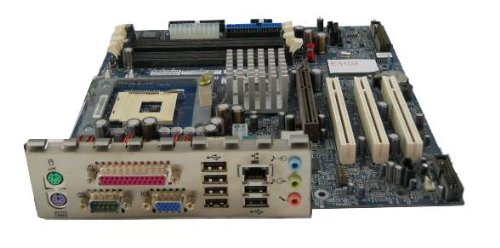
Image: The IBM 49P1599 FRU System Board. This image displays the main components and layout of the motherboard, including CPU socket, memory slots, and various connectors.
Instellen en installeren
Careful installation is crucial for the proper functioning of your system board. Always handle the board by its edges to avoid static discharge.
1. Installatie voorbereiden
- Ensure your computer case is compatible with the system board's form factor.
- Verzamel het benodigde gereedschap: een kruiskopschroevendraaier en een antistatische polsband.
- Unplug the power supply from the wall outlet before beginning.
2. Installing the System Board
- Installeer het I/O-shield in de opening aan de achterkant van uw computerkast.
- Carefully align the system board with the standoffs in the case.
- Secure the system board with screws, ensuring it is firmly seated.
3. Componenten installeren
Verwerker (CPU)
This system board is supplied without a processor. Refer to your CPU's manual for specific installation instructions. Ensure the CPU is correctly oriented in the socket before securing the retention lever.
Geheugen (RAM)
The board supports DDR2 RAM and has 2 memory slots.
- Open de clips aan beide uiteinden van de geheugensleuf.
- Lijn de geheugenmodule uit met de sleuf en zorg ervoor dat de inkeping op de module overeenkomt met de sleutel in de sleuf.
- Druk stevig op beide uiteinden van de module totdat de klemmen vastklikken.
Grafische kaart
The system board features an Integrated Graphics Card Interface and a PCI-Express x16 slot for dedicated graphics cards.
- Locate the PCI-Express x16 slot.
- Verwijder het bijbehorende afdekplaatje van het uitbreidingsslot uit uw computerkast.
- Insert the graphics card firmly into the slot until it clicks. Secure it with a screw to the case.
4. Kabels aansluiten
- Stroomconnectoren: Connect the main 24-pin ATX power connector and the 4-pin CPU power connector from your power supply to the system board.
- SATA-apparaten: Connect SATA 3 data cables from your storage devices (hard drives, SSDs) to the SATA ports on the system board.
- Connectoren op het voorpaneel: Connect the power button, reset button, HDD LED, power LED, and USB ports from your case to the corresponding headers on the system board. Refer to the board's silkscreen labels for correct orientation.
- Ethernet: The board has integrated 10/100 Ethernet. Connect your network cable to the RJ-45 port on the I/O panel.
Gebruiksaanwijzing
After completing the physical installation, you can proceed with the initial boot and operating system setup.
1. Eerste opstart
- Zorg ervoor dat alle componenten veilig zijn aangesloten.
- Sluit uw monitor, toetsenbord en muis aan.
- Plug in the power supply and turn on the system.
- Het systeem zou moeten opstarten en u zou beeld op uw monitor moeten zien.
2. BIOS/UEFI-instellingen
During the initial boot sequence, press the designated key (commonly DEL, F2, F10, or F12) to enter the BIOS/UEFI setup utility. Here you can configure boot order, system time, and other hardware settings. Save changes before exiting.
3. Installatie van het besturingssysteem
This system board is compatible with platforms such as Windows 10. Insert your operating system installation media (USB drive or DVD) and follow the on-screen prompts to install the operating system. Ensure all necessary drivers for the system board components are installed after the OS installation.
Onderhoud
Regular maintenance helps ensure the longevity and stable performance of your system board.
- Schoonmaak: Periodically clean dust from the system board and components using compressed air. Ensure the system is powered off and unplugged before cleaning.
- BIOS-updates: Check the official IBM support website for BIOS updates. BIOS updates can improve compatibility, stability, and performance. Follow the provided instructions carefully when updating the BIOS.
- Componentcontroles: Ensure all cables and components remain securely connected.
Probleemoplossing
Als u problemen ondervindt, raadpleeg dan de volgende veelvoorkomende stappen voor probleemoplossing:
Geen stroom
- Verify the power supply is connected to the wall outlet and turned on.
- Check that the 24-pin and 4-pin power connectors are securely attached to the system board.
- Ensure the front panel power button cable is correctly connected to the system board header.
Geen weergave
- Confirm the monitor is powered on and connected to the correct video output (either integrated or dedicated graphics card).
- Reseat the graphics card (if applicable) and memory modules.
- Test het indien mogelijk met een andere monitor of videokabel.
System Fails to Boot
- Check for any loose cables or components.
- Ensure the CPU is properly seated and its cooler is installed correctly.
- Try booting with only one memory module installed, rotating through the modules and slots to identify a faulty one.
- Reset the BIOS to default settings (refer to your system board's specific instructions for clearing CMOS).
Specificaties
Garantie en ondersteuning
For warranty information and technical support, please refer to the official IBM website or contact your point of purchase. Keep your proof of purchase for warranty claims. IBM provides resources and support for its products to ensure customer satisfaction.
Voor verdere hulp kunt u terecht op de IBM-ondersteuning webplaats.
Ask a question about this manual
Ask about setup, troubleshooting, compatibility, parts, safety, or missing instructions. Manuals+ will review the question and use this page’s manual context to help answer it.
Posting as .
| Functie | Specificatie |
|---|---|
| Modelnummer | 49P1599 FRU |
| Voorste zijbus (FSB) | 400/533 MHz |
| RAM-geheugentechnologie | DDR2 |
| Geheugenkloksnelheid | 2133 MHz |
| Beschikbare geheugenslots | 2 |
| Grafische kaartinterface | Integrated, PCI-Express x16 |
| Systeembusstandaard ondersteund | SATA-3 |
| Integrated Ethernet | 10/100 Mbps |
| Compatibele apparaten | Persoonlijke computer |
| Platformcompatibiliteit | Vensters 10 |
| Artikelgewicht | 8 pond |