
1. Inleiding
The Rane RS-1 is a dedicated external power supply designed to provide reliable 120VAC power to a range of compatible Rane audio products. This manual provides essential information for the safe and correct setup, operation, and maintenance of your RS-1 power supply.
Please read this manual thoroughly before using the product to ensure proper function and to prevent damage to the unit or connected equipment.
2. Veiligheidsinformatie
- Energiebron: Connect the RS-1 only to a 120VAC, 60Hz power outlet. Ensure the outlet is properly grounded.
- Ventilatie: Do not block any ventilation openings. Ensure adequate airflow around the power supply.
- Vocht: Do not expose the unit to rain, moisture, or excessive humidity. Keep liquids away from the power supply.
- Warmte: Plaats het apparaat niet in de buurt van warmtebronnen zoals radiatoren, verwarmingsroosters, fornuizen of andere warmteproducerende apparaten.
- kabels: Zorg ervoor dat er niet op het netsnoer kan worden gelopen en dat het niet kan worden afgekneld, vooral bij stekkers, stopcontacten en het punt waar het snoer uit het apparaat komt.
- Onderhoud: Probeer dit product niet zelf te onderhouden. Laat al het onderhoud over aan gekwalificeerd onderhoudspersoneel.
- Ontkoppeling: Unplug the power supply from the wall outlet during lightning storms or when unused for long periods.
3. Instellen
Follow these steps to correctly set up your Rane RS-1 Power Supply:
- Compatibel apparaat identificeren: Ensure your Rane audio product requires the RS-1 power supply and has the appropriate RJ-45 style power input port.
- Verbinding maken met apparaat: Carefully insert the RJ-45 style connector from the RS-1 power supply into the designated power input port on your Rane audio device. Ensure a secure connection.
- Aansluiten op stopcontact: Plug the two-prong AC power cord of the RS-1 into a standard 120VAC, 60Hz wall outlet.
- Inschakelen: Once connected, your Rane audio device should receive power. Refer to your Rane audio device's manual for specific power-on procedures.
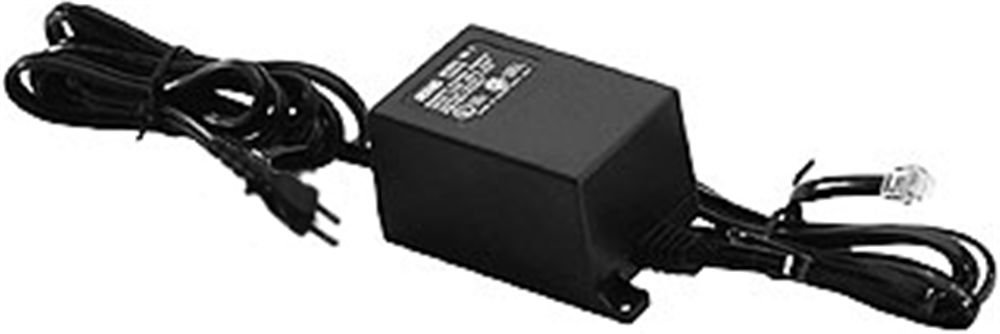
Image: Rane RS-1 Power Supply. This image displays the Rane RS-1 Power Supply, a black rectangular unit with an attached power cord featuring a two-prong North American plug on one end and an RJ-45 style connector on the other, designed to provide power to compatible Rane audio equipment.
4. Gebruiksaanwijzing
The Rane RS-1 is an external power supply that operates automatically once connected to a power source and a compatible Rane device. It does not have user-adjustable controls.
- Ensure all connections are firm before applying power.
- The power supply is designed for continuous operation within its specified voltage en wattagde limieten.
- Always disconnect the power supply from the wall outlet before disconnecting it from the Rane audio device, especially if the device does not have its own power switch.
5. Onderhoud
The Rane RS-1 Power Supply requires minimal maintenance. Follow these guidelines to ensure longevity:
- Schoonmaak: Disconnect the power supply from the wall outlet before cleaning. Use a soft, dry cloth to wipe the exterior. Do not use liquid cleaners or aerosol sprays.
- Inspectie: Periodically inspect the power cord and connectors for any signs of damage, fraying, or loose connections. If damage is observed, discontinue use and seek professional servicing.
- Opslag: Bewaar de voedingseenheid, wanneer deze gedurende langere perioden niet in gebruik is, op een koele, droge plaats, uit de buurt van direct zonlicht en extreme temperaturen.
6. Probleemoplossing
If you encounter issues with your Rane RS-1 Power Supply, refer to the following common troubleshooting steps:
| Probleem | Mogelijke oorzaak | Oplossing |
|---|---|---|
| No power to connected Rane device. |
|
|
| Stroomuitval. |
|
|
If these steps do not resolve the issue, contact Rane customer support or a qualified service technician.
7. Specificaties
| Model | RS1 |
| Merk | Rans |
| Ingangsvolumetage | 120 volt wisselstroom |
| Energiebron | AC |
| Wattage | 1000 watt |
| Type stekker | Type A - 2 pinnen (Noord-Amerikaans) |
| Artikelgewicht | 1.3 pond (0.59 kg) |
| Afmetingen | (Not specified in data) |
| UPC | 687499101045 |
| ASIN | B0002IU02S |
8. Compatible Rane Devices
The Rane RS-1 Power Supply is compatible with the following Rane audio products:
- AC 22B
- AC 23B
- AD 22d
- AP-13
- AVA 22d
- CP52
- CP64
- DA 216a
- DA26
- DC 24
- DMS-22
- GE 130
- GE 215
- GE 30
- HC 4
- HC 6
- MLM 42
- MLM 82a
- MM 8z
- MP 2
- MP 22z
- MP 24z
- MP 2016
- MS-1b
- PE-nummer 17
- Ps 1
- RA-30
- SM-26B
- SM 82
- SRM-66
- ZZO 35
- THX22
- THX44
- TTM 54i
- TTM 56
- VP 12
9. Garantie en ondersteuning
For information regarding warranty coverage, product registration, or technical support, please refer to the official Rane website or contact Rane customer service directly. Keep your purchase receipt as proof of purchase for warranty claims.
Rane Official Webwebsite: www.rane.com