
Master Lock 630D
Master Lock 630D Combinatiehangslot Gebruikershandleiding
Model: 630D | Brand: Master Lock
Invoering
This manual provides instructions for the Master Lock 630D Set Your Own Combination Padlock. Designed for durability and convenience, this padlock is ideal for securing backpacks, cabinets, and zippers. Its solid metal body and nickel-plated steel shackle offer resistance against cutting and sawing, while the 3-dial combination provides keyless security.

Image: The Master Lock 630D combination padlock, featuring a silver aluminum body and three numerical dials.
Producteigenschappen
- Compact ontwerp: Small lock, best used as a travel lock, backpack lock, or cabinet lock.
- Aanpasbare combinatie: Set your own three-digit combination for keyless convenience.
- Duurzame constructie: Constructed with an aluminum body and nickel-plated steel shackle.
- Afmetingen: 1-3/16 in. (30 mm) wide lock body; 3/16 in. (5 mm) diameter shackle with 1 in. (25 mm) length, 9/16 in. (14 mm) width.

Image: Close-up of the Master Lock 630D, highlighting its features: "Set Your Own 3-Digit Combination" and "Aluminum Body With Nickel-Plated Steel Shackle."
Instellen: uw combinatie instellen
The shackle is preset to open on 0-0-0. Follow these steps to set your personal combination:
- Set the dials to the current code (factory preset is 0-0-0).
- Trek de beugel omhoog om het slot te openen.
- Rotate the shackle 90 degrees (a quarter turn) in either direction.
- Druk de beugel stevig in het slotlichaam.
- While holding the shackle down, set your new desired 3-digit combination by turning the dials. Ensure the numbers align with the indicator line.
- Release the shackle and return it to its normal open position.
- Rotate the shackle back to the original 0-degree position.
- Push the shackle down to lock. Scramble the dials to secure the lock.
Important: Remember your new combination. There is no master key or override for this lock.
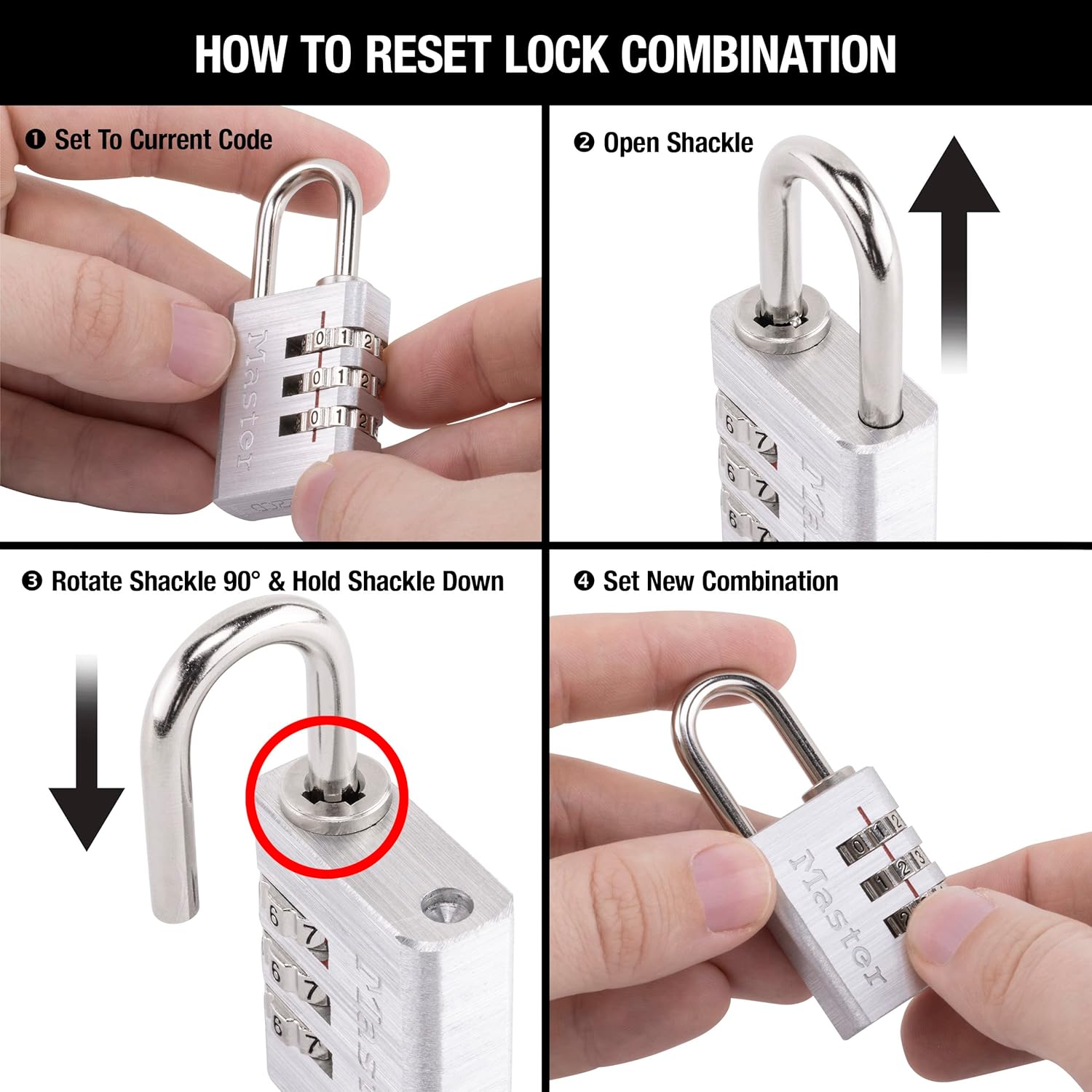
Image: A four-panel diagram illustrating the steps to reset the lock combination, showing the lock being opened, shackle rotated, pressed down, and new combination set.
Het hangslot bedienen
To open the padlock, align the three dials to your set combination. The shackle will release, allowing you to open the lock. To close, simply push the shackle back into the lock body and scramble the dials to secure it.

Image: A Master Lock 630D padlock securing the zippers of a black backpack, demonstrating its use for added security while traveling.
Onderhoud
The Master Lock 630D is designed for low maintenance. To ensure smooth operation and prolong the life of your padlock:
- Keep the dials clean and free from dirt or debris.
- Periodically apply a small amount of silicone lubricant to the shackle mechanism if it becomes stiff. Avoid oil-based lubricants as they can attract dirt.
- Bewaar het slot op een droge plaats wanneer het niet in gebruik is om corrosie te voorkomen.

Image: A Master Lock 630D padlock attached to the zipper of a blue backpack, illustrating its practical application for securing belongings.
Probleemoplossing
Lock Will Not Open with Correct Combination
If the lock does not open after entering the correct combination, try the following:
- Ensure each number on the dials is perfectly aligned with the indicator line. Sometimes a slight misalignment can prevent opening.
- Gently jiggle the shackle while entering the combination.
- Double-check that you are using the correct combination. If you recently reset it, ensure you are using the new code.
- If the lock has been exposed to extreme conditions (e.g., dirt, moisture), clean the dials and shackle area thoroughly and apply a lubricant.
De boei is stijf of moeilijk te bewegen.
- Apply a silicone-based lubricant to the shackle where it enters the lock body.
- Ensure the combination is correctly set to 0-0-0 (or your current combination) before attempting to open or reset.
Specificaties
| Functie | Detail |
|---|---|
| Merk | Hoofdslot |
| Modelnaam | Set Your Own Combination Lock |
| Modelnummer | 630D |
| Slottype | Combinatieslot |
| Lichaamsmateriaal | Aluminium |
| Beugelmateriaal | Nickel-plated Steel |
| Lock Body Width | 1-3/16 inch (30 mm) |
| Beugeldiameter | 3/16 inch (5 mm) |
| Lengte van de sluiting | 1 inch (25 mm) |
| Breedte van de beugel (speling) | 9/16 inch (14 mm) |
| Artikelgewicht | 2.4 ons |
| Productafmetingen (L x B x H) | 5.56 x 2.75 x 0.7 inch |
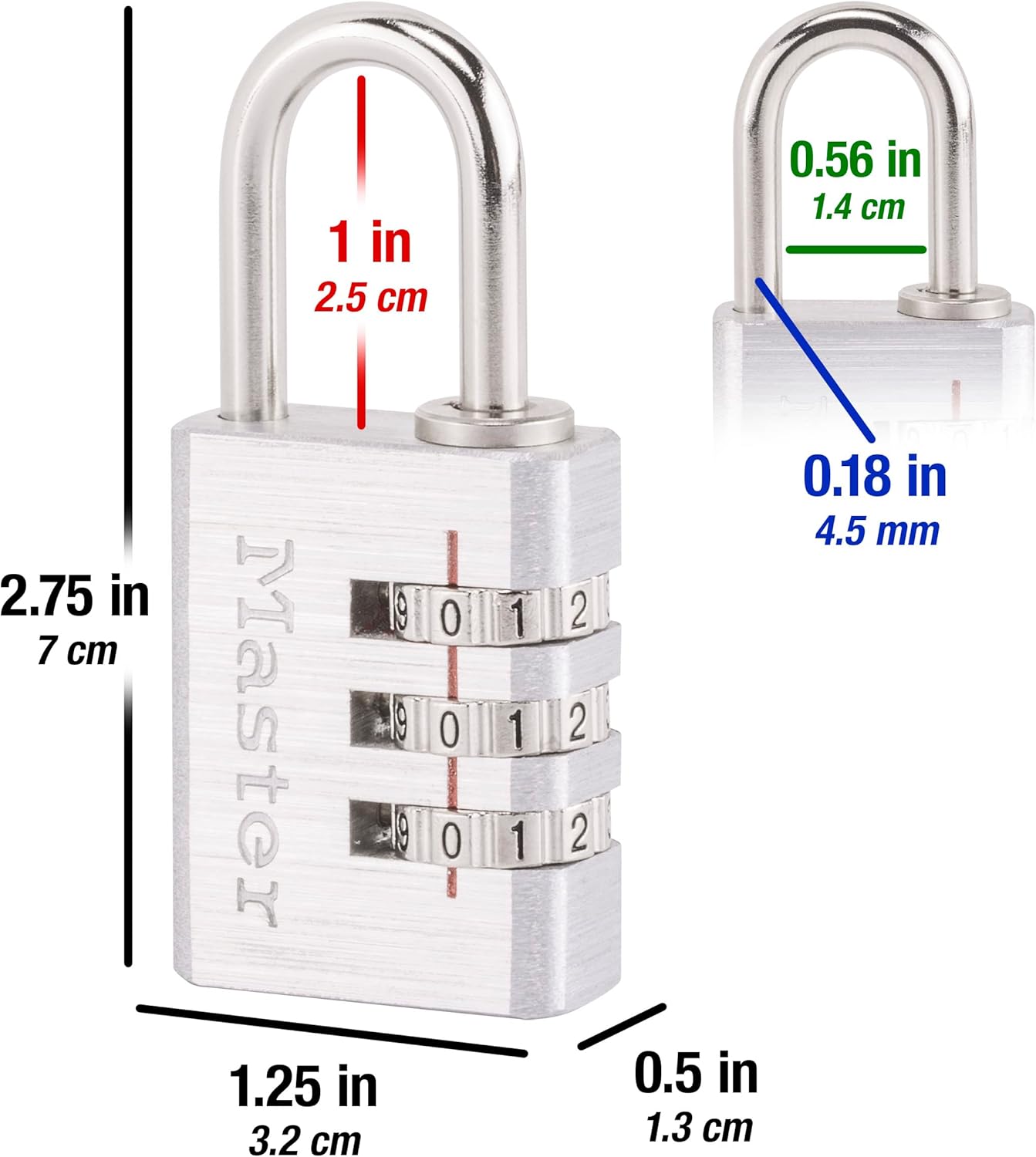
Image: A diagram showing the precise dimensions of the Master Lock 630D, including body width, shackle length, and shackle diameter.
Garantie-informatie
The Master Lock 630D Set Your Own Combination Aluminum Lock comes with a Beperkte levenslange garantie. This warranty provides peace of mind, covering defects in material and workmanship for the life of the product. For full details and to make a claim, please refer to the official Master Lock website of neem contact op met hun klantenservice.
Klantenservice
For further assistance, product inquiries, or troubleshooting not covered in this manual, please visit the official Master Lock website of neem contact op met hun klantenondersteuningsteam.
Webwebsite: www.masterlock.com
Contact information may also be found on the product packaging.